Archive for the ‘Software Development’ Category
Posted by jpluimers on 2013/02/05
 Clarification of the steps from via Support Beyond Compare to use Beyond Compare 3 or 2 from Visual Studio and with Team Foundation System.
First run this little batch file to show you the exact location of BComp.exe:
@echo off
  call :show "%ProgramFiles%\Beyond Compare 3\BComp.exe"
  call :show "%ProgramFiles(x86)%\Beyond Compare 3\BComp.exe"
  call :show "%ProgramFiles%\Beyond Compare 2\BComp.exe"
  call :show "%ProgramFiles(x86)%\Beyond Compare 2\BComp.exe"
  goto :eof
:show
  if not exist %1 goto :eof
  echo Beyond Compare is here:
  echo %~1
(I know that this will not find a Portable Beyond Compare installation).
 Note that
 BComp.exe (for GUI use) and BComp.com (for console use) are bootstrappers for BCompare.exe. Both will wait when ran from a GUI or console for the comparison to finish. Starting BCompare.exe will not wait. See BComp.exe vs BComp.com – Scooter Forums for more information on this.
Everywhere you see path to BComp.exe below, enter the path that the above batch file tells you.
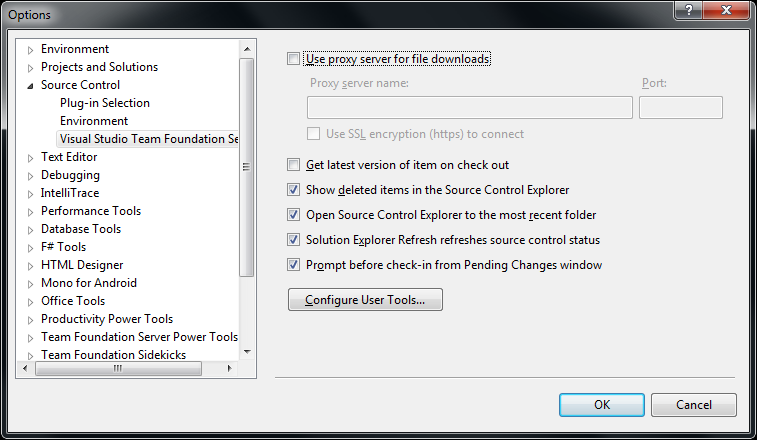
The first two pictures on the right show common steps for all three integrations. The images below are the specific ones for each integration. You can click on each image to view a larger version.
The steps work with the full version of Visual Studio and the Team Explorer edition of Visual Studio.
You can find different arguments for other tools on this excellent diff/merge configuration in Team Foundation – common Command and Argument values post by James Manning.
Adding diff/compare support to Visual Studio
 In Visual Studio Choose Options from the Tools menu.
- Expand Source Control in the treeview.
- Click Visual Studio Team Foundation Server in the treeview.
- Click the Configure User Tools button.
- Click the Add button.
- Enter “.*” in the Extension edit.
- Choose
Compare in the Operation combobox.
- Enter the
path to BComp.exe in the Command edit.
- In the Arguments edit, use:
%1 %2 /title1=%6 /title2=%7
- Then press OK, then OK, then OK
Adding 3-way Merge to Visual Studio
You need Beyond Compare version 3 Professional for this.
(note: only the steps marked with * are different from above)
 In Visual Studio Choose Options from the Tools menu.
- Expand Source Control in the treeview.
- Click Visual Studio Team Foundation Server in the treeview.
- Click the Configure User Tools button.
- Click the Add button.
- Enter “.*” in the Extension edit.
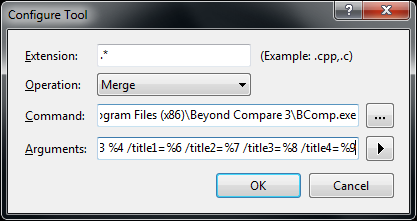
- * Choose
Merge in the Operation combobox.
- Enter the
path to BComp.exe in the Command edit.
- * In the Arguments edit, use:
%1 %2 %3 %4 /title1=%6 /title2=%7 /title3=%8 /title4=%9
- Then press OK, then OK, then OK
Adding 2-way Merge to Visual Studio
This is for Beyond Compare version 2, and Beyond Compare version 3 Standard.
(note: only the step marked with * is different from above)
 In Visual Studio Choose Options from the Tools menu.
- Expand Source Control in the treeview.
- Click Visual Studio Team Foundation Server in the treeview.
- Click the Configure User Tools button.
- Click the Add button.
- Enter “.*” in the Extension edit.
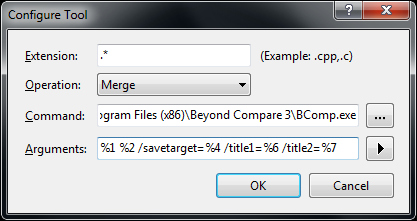
- Choose
Merge in the Operation combobox.
- Enter the
path to BComp.exe in the Command edit.
- * In the Arguments edit, use:
%1 %2 /savetarget=%4 /title1=%6 /title2=%7
- Then press OK, then OK, then OK
To summarize, the differences
Functionality
|
entry in
Operation combobox
|
content of
Arguments edit
|
Beyond Compare
version/edition |
| diff/merge |
Compare |
%1 %2 /title1=%6 /title2=%7 |
any version/edition |
| 3-ware compare |
Merge |
%1 %2 %3 %4 /title1=%6 /title2=%7 /title3=%8 /title4=%9 |
3/Professional |
| 2-way compare |
Merge |
%1 %2 /savetarget=%4 /title1=%6 /title2=%7 |
2 or 3/Standard |
Hope this helps a few people.
–jeroen
via:
Posted in .NET, Beyond Compare, Development, Power User, Software Development, Visual Studio 11, Visual Studio 2002, Visual Studio 2003, Visual Studio 2005, Visual Studio 2008, Visual Studio 2010, Visual Studio and tools | Leave a Comment »
Posted by jpluimers on 2013/02/04
Whether you are an engineer or a manager, the article behind the conclusion below is a very interesting one to read: The care and feeding of software engineers (or, why engineers are grumpy) at NCZOnline.
We software engineers are an interesting bunch. There’s a definite personality that comes along with us, and we really do want to make the best thing possible. If you stop treating us like short-order cooks and start treating us like part of the creative process, you are likely to get much farther, faster than you would otherwise. […] We’re all just people who want to feel like a part of the solution rather than a worker bee.
–jeroen
via The care and feeding of software engineers (or, why engineers are grumpy) | NCZOnline.
Posted in About, Development, Opinions, Personal, Software Development | Leave a Comment »
Posted by jpluimers on 2013/01/30
Just in case you wonder about Property using Generics in Delphi, they are not possible.
Thanks David for mentioning it, Hallvard for mentioning it even earlier and Rudy for confirming it.
These are supported with Generics in Delphi:
All of the supported aspects are linked to articles from excellent authors. There is far more on the internet about Delphi and Generics, but those are a good start.
Thanks Malcolm, Phil, Barry, Hallvard, Jolyon and many others for posting all those articles!
Note that this is not possible in C# either, Julian Bucknall organized a chat and explains why, but there is a workaround which I might try to port to Delphi in the future.
–jeroen
via: Property using Generics in Delphi – Stack Overflow.
Posted in .NET, .NET 2.0, .NET 3.0, .NET 3.5, .NET 4.0, .NET 4.5, C#, C# 2.0, C# 3.0, C# 4.0, C# 5.0, Delphi, Delphi 2009, Delphi 2010, Delphi XE, Delphi XE2, Delphi XE3, Development, Software Development | 3 Comments »
Posted by jpluimers on 2013/01/29
If Gloegg@Bonn has posted a few nice Delphi entries over the last couple of years, so he should be added to DelphiFeeds.
His last one was a very funny post on the Delphi implementation of Sleep sort.
It uses Generics, so you need at least Delphi 2009 or better.
–jeroen
via:
Posted in Delphi, Delphi 2009, Delphi 2010, Delphi XE, Delphi XE2, Delphi XE3, Development, Software Development | 4 Comments »
Posted by jpluimers on 2013/01/29
A while ago, I had to adapt a DOS app that used one specific version of Excel to do some batch processing so it would support multiple versions of Excel on multiple versions of Windows.
One of the big drawbacks of DOS applications is that the command lines you can use are even shorter than Windows applications, which depending you how you call an application are:
This is how the DOS app written in Clipper (those were the days, it was even linked with Blinker :) started Excel:
c:\progra~1\micros~2\office11\excel.exe parameters
01234567890123456789012345678901234567890
          1         2         3         4
The above depends on 8.3 short file names that in turn depend on the order in which similar named files and directories have been created.
The trick around this, and around different locations/versions of an application, is to use START to find the right version of Excel.
The reason it works is because in addition to PATH, it checks the App Paths portions in the registry in this order to find an executable: Read the rest of this entry »
Posted in Batch-Files, Development, Encoding, Power User, Scripting, Software Development, Unicode, Windows, Windows 7, Windows 8, Windows Server 2000, Windows Server 2003, Windows Server 2003 R2, Windows Server 2008, Windows Server 2008 R2, Windows Vista, Windows XP | Leave a Comment »
Posted by jpluimers on 2013/01/28
A quick and easy way of getting the CurrentCulture and CurrentUICulture is to use the get-host cmdlet from PowerShell.
This is what PowerShell 2.0 shows on my system:
C:\Users\jeroenp>powershell get-host

Name             : ConsoleHost
Version          : 2.0
InstanceId       : 1ce173fb-70a7-403b-a2bd-3800fe740f7c
UI               : System.Management.Automation.Internal.Host.InternalHostUserInterface
CurrentCulture   : en-IE
CurrentUICulture : en-US
PrivateData      : Microsoft.PowerShell.ConsoleHost+ConsoleColorProxy
IsRunspacePushed : False
Runspace         : System.Management.Automation.Runspaces.LocalRunspace
The SeaTools from Seagate can’t cope with that because they don’t manage the Resource Fallback Process properly.
My machine is on en-IE, as it is English, and USA as location.
The main advantage for me is to use the that it is a good mix between English and Dutch settings:
- English language (so you get proper error messages that you can find back using Google)
- USA as location (to force more search engines to use .com domains)
- EUR money settings (most software in Western Europe expects EUR, but displays USD when using en-US)
- decimal dot (far easier import/export with non-Dutch stuff)
- DD/MM/YYYY date format (I tried ISO 8601 YYYYMMDD, but that breaks too much software)
- 24 hour clock format (just as it should be)
- comma list separator (too much software is not configurable to use a certain separator for CSV, especially Excel depends on the system settings for list separator and decimal)
- metric system (just as it should be)
–jeroen
via: Get-Host.
Posted in .NET, CSV, Development, Excel, ISO 8601, Office, Power User, PowerShell, Scripting, Software Development | Leave a Comment »
Posted by jpluimers on 2013/01/26
Back in the days I started programming, Micro Cornucopia was a wonderful magazine, so I’m glad that BitSavers scanned a few more issues and put them online today, a week after some great PDF scans: Turbo Assembler/Debugger (1993/1994), Borland C++/Object Windows Library (1993):
They covered a lot of languages (x86 and 68k assembly, C, C++, Turbo Pascal and many more), and very interesting hardware designs.
–jeroen
via: Index of /pdf/microCornucopia.
Posted in Assembly Language, BitSavers.org, C, C++, Delphi, Development, History, Pascal, Software Development, Turbo Assembler, Turbo Pascal, x86 | Tagged: computer, software, technology, wonderful magazine | 2 Comments »
Posted by jpluimers on 2013/01/24
Very distracting: 404.
Thanks Julian (I just found out you also own a Dutch domain jmbk.nl/) for pointing to it (boy, some unproductive days ahead) and the cheat (in your browser, Open the JavaScript console, then paste and run the cheat code).
Thanks Romain for developing it.
When you read through his java script code files, remember that these french-english translations:
- etat == state
- tombe == fall
- paraOpen == opened parachute
- mort == dead
- flocon == flake
- taille == size
- vitesse == speed
- écrase == crash
- marche == walk
- neige == snow
--jeroen
via: Développeur Web sur Lille (59), Romain Brasier.
Posted in Development, JavaScript/ECMAScript, Power User, Scripting, Software Development, Web Development | Tagged: cheat code, french english translations, java script code, julian, software, technology, unproductive days | Leave a Comment »
Posted by jpluimers on 2013/01/24
During code reviews, I often see people do things like this:
if (!Directory.Exists(directoryPath))
    Directory.CreateDirectory(directoryPath);
or this:
DirectoryInfo directoryInfo = new DirectoryInfo(directoryPath);
if (!directoryInfo.Exists)
    directoryInfo.Create();
You don’t need the if statements here. Read the rest of this entry »
Posted in .NET, .NET 1.x, .NET 2.0, .NET 3.0, .NET 3.5, .NET 4.0, .NET 4.5, C#, C# 1.0, C# 2.0, C# 3.0, C# 4.0, C# 5.0, Development, Software Development | 1 Comment »


 Clarification of the steps from via Support Beyond Compare to use Beyond Compare 3 or 2 from Visual Studio and with Team Foundation System.



 The Wiert Corner - irregular stream of stuff