The Wiert Corner – irregular stream of stuff

Jeroen W. Pluimers on .NET, C#, Delphi, databases, and personal interests

  • My badges

  • Twitter Updates

  • My Flickr Stream

  • Pages

  • All categories

  • Enter your email address to subscribe to this blog and receive notifications of new posts by email.

    Join 1,854 other subscribers

Archive for the ‘Software Development’ Category

Days since last time zone issue

Posted by jpluimers on 2022/02/24

If you do business with for instance Jordan for he first time, then is likely -1 because tomorrow their clock moves forward one hour.

The 2022 daylight saving time changes (summer time / winter time) are at time.is/DST_2022 [Wayback/Archive.is]

[Archive.is] Dr. Jessie Christianstein 👩🏻‍🔬🧟‍♀️ on Twitter: “… “

–jeroen

Read the rest of this entry »

Posted in Algorithms, Development, Software Development | Leave a Comment »

Viewing the last lines of the postfix log with journalctl (with help from Unix & Linux Stack Exchange)

Posted by jpluimers on 2022/02/24

Two command-lines I use to view my Postfix logs:

  1. journalctl --unit postfix --since "2 days ago"
  2. journalctl --unit postfix --pager-end

Note that neither of these work well with the --follow (or equivalent -f) option, as this will effectively disable the pager (which by default is less).

The second is via [Wayback] systemd – How to see the latest x lines from systemctl service log – Unix & Linux Stack Exchange (which got the--pagerend bit wrong, as it misses a dash and should be --pager-end, but still thanks [Wayback] Daniel Kmak):

Just:

journalctl -u SERVICE_NAME -e

Parameter -e stands for:

-e –pagerend

That’s the one ! Other answers will go through the whole log to get to its end, which can be veeeeery long for large syslogs.

The last bit (by [Wayback] Léo Germond, thanks!) is why I like it most.

Similarly, specifying --since in the first example will not go through the whole log.

Some background information:

Read the rest of this entry »

Posted in *nix, *nix-tools, bash, Development, journalctl and journald, Linux, postfix, Power User, Scripting, Software Development, systemd | Leave a Comment »

Egardia/Woonveilig: some notes about logging on a local gateway to see more detailed information on the security system

Posted by jpluimers on 2022/02/23

A follow-up on Source: Some links with notes on WoonVeilig/Egardia security system communications, protocols and support by 3rd party home automation apps:

Notes on the Woonveilig/Egardia GATE-03 model alarm hub (where 192.168.x.y is the IPv4 address that hub):

  1. It still uses the plain-text insecure http to communicate, so it is wise to try and put it in a separate LAN apart from other systems.
  2. Logon is done using HTTP Basic access authentication.
  3. Woonveilig/Egardia by now prefers the XMPP prototol over the CID protocol (the CID protocol is still used by jeroenterheerdt/python-egardia.
    • You can find the configuration at http://192.168.x.y/setting/xmpp.htm.
    • XMPP protocol uses
      • xmpp01.egardia.com as primary and xmpp01.alt.egardia.com as secondary server on port 443.
      • arg-####-auth  where ###### are the last 6 *lowercase* hexadecimal digits of the MAC address of the GATE-03.
      • a long password you can find in the plain-text of the http://192.168.x.y/action/xmppGet http GET request fired by http://192.168.x.y/setting/xmpp.htm.
  4. CID protocol address is ip://######@ics.alt.egardia.com:52010/CID where ###### are the last 6 *uppercase* hexadecimal digits of the MAC address of the GATE-03.
  5. User PIN-codes are not visible at the Woonveilig/Egardia alarm site, but they are at http://192.168.x.y/setting/userCode.htm together with their user names.
  6. Special PIN codes for Installer/Duress/Guard/Master/Temporary are at http://192.168.x.y/setting/codeSetting.htm and obtained via http://192.168.x.y/action/areaListGet and http://192.168.x.y/action/codeSettingGet
  7. On the CID protocol:

I got all of the above via: [Wayback/Archive.is] GATE-03 system does not report to Egardiaserver · Issue #26 · jeroenterheerdt/python-egardia (which by coincidence used the same firmware I had: HSGW 0.0.2.18.1 HPGW-L2-XA35H).

Which brings me to some Google search with some remarkable results:

So I did a quick look at LUPUS XT* based products:

Then at the Woonveilig/Egardia and Climax shops:

Conclusions:

  • Egardia/Woonveilig sensors look remarkably similar to the LUPUS ones
  • LUPUS is a re-brand of Climax with slightly different firmware

Side note on open ports

  • Open ports on the [Wayback] GATE-03 alarm device:
    PORT    STATE    SERVICE      VERSION
    9/tcp   filtered discard
    25/tcp  filtered smtp
    80/tcp  open     http
    445/tcp filtered microsoft-ds
  • Open ports on the [Wayback] CAM-06 outdoor camera:
    PORT      STATE    SERVICE      VERSION
    9/tcp     filtered discard
    21/tcp    open     ftp          oftpd
    25/tcp    filtered smtp
    80/tcp    open     tcpwrapped
    445/tcp   filtered microsoft-ds
    554/tcp   open     rtsp
    711/tcp   open     cisco-tdp?
    1935/tcp  open     rtmp?
    6000/tcp  open     X11?
    49152/tcp open     upnp         Portable SDK for UPnP devices 1.6.17 (Linux 3.4.35; UPnP 1.0)
    

jeroen


Posted in Communications Development, Development, Python, Scripting, Software Development | Leave a Comment »

Having wrong address field order is an almost Dark Pattern to me: #mijnOLVG again.

Posted by jpluimers on 2022/02/23

Yesterday I wrote about I consider stealing the user’s time because of a bad UX design among the Dark Patterns.

It was about a site blocking the paste of an e-mail field.

I forgot about an almost Dark Pattern on the same site that might be not obvious for English and French readers, but (though there is little documentation on this) there are a lot of countries having the house number put after the street name.

When filling out forms, it makes a lot of sense to put the house number and street name fields in the order of use for the majority of people living that country.

Not doing so rates a form almost as Dark Pattern, for instance the Dutch “MijnOLVG” site, as this is their account sign-up form:

Read the rest of this entry »

Posted in Dark Pattern, Development, Power User, Software Development, User Experience (ux), Web Development | Leave a Comment »

I consider stealing the user’s time because of a bad UX design among the Dark Patterns

Posted by jpluimers on 2022/02/22

I an with [Wayback] Craig Buckler to consider Dark Patterns being wider than the strict sense.

For me anything that costs a user extra time or makes accessibility harder is a Dark Pattern.

So I agree with the issues he explains at [Wayback] The Web’s Most Annoying Dark Patterns – SitePoint

Does the web delight or displease you? Craig lists his least favourite UI and marketing dark patterns. Have you developed on the dark side?

Paste is enabled, but does not function

Paste is enabled, but does not function

A while ago, I got into one myself. Let me explain.

Having had RSI, I’m dependent on keeping my hands and arms in good shape. This means minimising the use of pointing devices and also trying to minimise typing.

In addition, I have heavily segmented my use of email addresses (among others for cutting down SPAM). Basically any point of contact gets a new email address.

This means I realy on tooling like password managers and email address generators. It means copying and pasting information.

So I bumped into a web-site that disallowed pasting the (unique and long!) email address into the email verification field.

[Archive.is] Jeroen Wiert Pluimers on Twitter: “The @olvg #mijnOLVG site is now on my Dark Patterns list as they make #accessibility harder by blocking pasting into the email address verification field. Blocking the paste-blocker. CC some people advocating mijnolvg.nl @MauricevdBosch @ronklitsie63 @kyntha”

Despite the popup menu, paste didn’t work. Chrome autofill did, but didn’t have the information for this particular (new and unique) email address yet, so could not be used yet.

Disabling the paste block

It is relatively easy to disable a paste block. In this case, I was using chrome, but this can be done with any browser. Some browsers even have optional extensions that can do this for you.

In the case of Chrome, when right clicking, there is an “Inspect” option
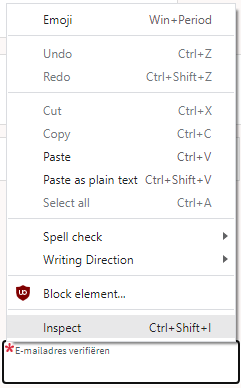
Inspect is enabled and actually works.

Inspect is enabled and actually works.

It inspects the current element, which on this site looks like this:

The element does not contain event handlers. But the code hooks them behind our backs.

The element does not contain event handlers. But the code hooks them behind our backs.

On the “Event Listeners” tab on the right, you can see there are two JavaScript methods hooked to the paste handler:

The paste handlers. The first is OK, the second blocks paste.

The paste handlers. The first is OK, the second blocks paste.

The first one is OK, though I did not really look into what the proxy does.

Second paste event handler: remove this one.

First paste event handler: keep this one.

First paste event handler: keep this one.

The second is not OK, as it effectively prevents the event from being handled any further at all by calling preventDefault

Second paste event handler: remove this one.

Second paste event handler: remove this one.

By clicking on the second Remove button above, the paste blocker is gone and you can paste again.

–jeroen

Read the rest of this entry »

Posted in Chrome, Chrome, Dark Pattern, Development, Google, JavaScript/ECMAScript, Power User, Scripting, Software Development, User Experience (ux), Web Browsers | Leave a Comment »

I always forget how simple it is to show the definition of bash function or alias (via: Stack Overflow)

Posted by jpluimers on 2022/02/17

I always facepalm myself after looking up this: [Wayback] Can bash show a function’s definition? – Stack Overflow (thanks [Wayback] Benjamin Bannier!):

Use type. If foobar is e.g. defined in your ~/.profile:

$ type foobar
foobar is a function
foobar {
    echo "I'm foobar"
}

type will also expand aliases, which is a nice bonus :) – [Wayback] Esdras Lopez

–jeroen

Posted in *nix, *nix-tools, bash, bash, Development, Power User, Scripting, Software Development | Leave a Comment »

File, extensions and directories to ignore in version control

Posted by jpluimers on 2022/02/17

I will try to keep this table up-to-date.

Note that in some tooling, names are case sensitive.

Name Category Tool Comment
Debug Directory
lib Directory
*.identcache Extension Delphi
*.local Extension Delphi
*bin Extension
*obj Extension
RECYCLER Directory Windows
Bin Directory
*.user Extension Visual Studio/Delphi
*.suo Extension Visual Studio
*.dcu Extension Delphi
__history Directory Delphi
ModelSupport_* File Delphi
*.rsm Extension Delphi
thumbs.db File Windows stored in each directory that contains thumbnails on Windows systems
thumbcache_256.db File Windows stored in each directory that contains thumbnails on Windows systems
*.bak Extension
*.~* Extension pattern Delphi
__recovery Directory Delphi
*.tvsconfig Extension Delphi
*.o Extension
*.lo Extension
*.la Extension
*.al Extension
.libs
*.so Extension
*.so.[0-9]* Extension pattern
*.a Extension
*.pyc Extension Python
*.pyo Extension Python
*.rej Extension Mercurial [WayBack] Rejected patches
*~
#*#
.#* Extension pattern
.*.swp Extension
.DS_Store File MacOS stores custom attributes of its containing folder
desktop.ini File Windows determines how a directory is displayed by Windows, such as the icon used by that directory
*.chw Extension HTML Help Compiled HTML Help general index

Based on at least these earlier blog posts, and a lot of fiddling around:


Hopefully, some day, I will find time to compare these against gitignore templates, for instance via:

and against [WayBack] svn – How do I configure the TortoiseSVN ‘Global ignore pattern’ properly? – Stack Overflow.

–jeroen

Posted in Development, Software Development, Source Code Management | 1 Comment »

Windows Defender: adding and removing exclusions from PowerShell (via Stack Overflow)

Posted by jpluimers on 2022/02/16

I use this small script to install or update [Wayback] Chocolatey package NirLauncher (which is the [Wayback] Nirsoft Launcher that has all the [Wayback] Nirsoft freeware tools in it).

powershell -Command Add-MpPreference -ExclusionPath "%TEMP%\chocolatey\NuGetScratch"
choco update --yes NirLauncher 
powershell -Command Remove-MpPreference -ExclusionPath "%TEMP%\chocolatey\NuGetScratch"

It works around the issue that many times NirLauncher is marked by anti-virus tools or/and listed on VirusTotal, which means you get an error like this:

NirLauncher not installed. An error occurred during installation:
 Operation did not complete successfully because the file contains a virus or potentially unwanted software.

followed by

Chocolatey upgraded 0/1 packages. 1 packages failed.
 See the log for details (C:\ProgramData\chocolatey\logs\chocolatey.log).

I wrote about this error before Need to research: Nirlauncher v1.23.42 to 1.23.43 upgrade through Chocolatey fails with “Operation did not complete successfully because the file contains a virus or potentially unwanted software.”, and this post is explaining how I got to the above workaround.

Context: I was running Windows Defender (now officially called Microsoft Defender, but most people still use the old name), which is a good baseline anti-virus tool that is included with Windows.

Finding out the location of the offending file

The offending location is not actually in the C:\ProgramData\chocolatey\logs\chocolatey.log file.

I did a small search to see if one could list Windows Defender messages, and there was [Wayback] Use PowerShell to See What Windows Defender Detected | Scripting Blog explaining the Get-MpThreatDetection available since around Windows 8.x.

This little command got what I wanted:

C:\temp>PowerShell Get-MpThreatDetection ^| Format-List ^| Out-String -Width 4096 | findstr /I "nir"
Resources                      : {file:_C:\Users\jeroenp\AppData\Local\Temp\chocolatey\NuGetScratch\a78a5776-0fdd-48c0-8313-9b0107f54cba\hy3odwgw.1dc\tools\nirsoft_package_1.23.44.zip}

A few tricks I used here:

Searching for [Wayback] “chocolatey\NuGetScratch” – Google Search, I found out %Temp%\chocolatey\NuGetScratch is the default value for [Wayback] chocolatey cacheLocation – Google Search. I run default settings, so that is good enough for me.

Adding / removing a recursive folder exclusion to Windows defender

I found [Wayback] Windows Defender – Add exclusion folder programmatically – Stack Overflow through [Wayback] “Windows Defender” exclusion from commandline – Google Search explaining these (thanks [Wayback] gavenkoa!):

Run in elevated shell (search cmd in Start menu and hit Ctrl+Shift+Enter).

powershell -Command Add-MpPreference -ExclusionPath "C:\tmp"
powershell -Command Add-MpPreference -ExclusionProcess "java.exe"
powershell -Command Add-MpPreference -ExclusionExtension ".java"

powershell -Command Remove-MpPreference -ExclusionExtension ".java"

This was a short step to these documentation pages (note to self: figure out the origin of the Mp prefix)

Windows Defender still marks individual tools

Of course Windows Defender still marks individual tools as “unsafe” (for instance C:\tools\NirLauncher\NirSoft\mailpv.exe). To alleviate that, you have to permanently add this directory to the exclusion list: C:\tools\NirLauncher.

–jeroen

Posted in CommandLine, Development, NirSoft, Power User, PowerShell, Software Development, Windows | Leave a Comment »

Some links on sending SMS and the protocols/types involved

Posted by jpluimers on 2022/02/16

So I can find them back later:

  • SMS: Short Message Service. Messages limited to 140 octet (160 7-bit characers, 140 8-bit characters or 70 16-bit characters) sent mainly over the GSM or UMTS mobile networks.
  • Concatenated SMS or Multipart SMS. Does work on most devices and most operators. Way to send messages longer than 140 octets. Each part is billed separately.
  • MSISDN a number uniquely identifying a subscription in a GSM or a UMTS mobile network. Always starts with country code. Never includes a prefix (like 00 or +).
  • SMPP: Short Message Peer-to-Peer.
  • HLR: Home Location Register.

An interesting party with some public SMS APIs is MessageBird. You can compare their old and new ones:

Read the rest of this entry »

Posted in Development, Encoding, Software Development | Leave a Comment »

.NET: XML escaping a string

Posted by jpluimers on 2022/02/15

[Wayback] WILT: XML encode a string in .net « Benoit MARTIN’s Weblog:

Always wondered why I couldn’t find a method that would XML encode a string, effectively escaping the 5 illegal characters for XML. There is such a method but its location in the API is not intuitive at all. It’s in the System.Security namespace: [Wayback] SecurityElement.Escape(String) Method (System.Security) | Microsoft Docs

public static string? Escape (string? str);

Its usage is:

   tagText = System.Security.SecurityElement.Escape(tagText);

This will escape the 5 characters <, >, &, " and '

–jeroen

Posted in .NET, Development, Encoding, Software Development, XML, XML escapes, XML/XSD | Leave a Comment »