


Enjoy Day of the Programmer and [WayBack] Good Questions — Geek&Poke
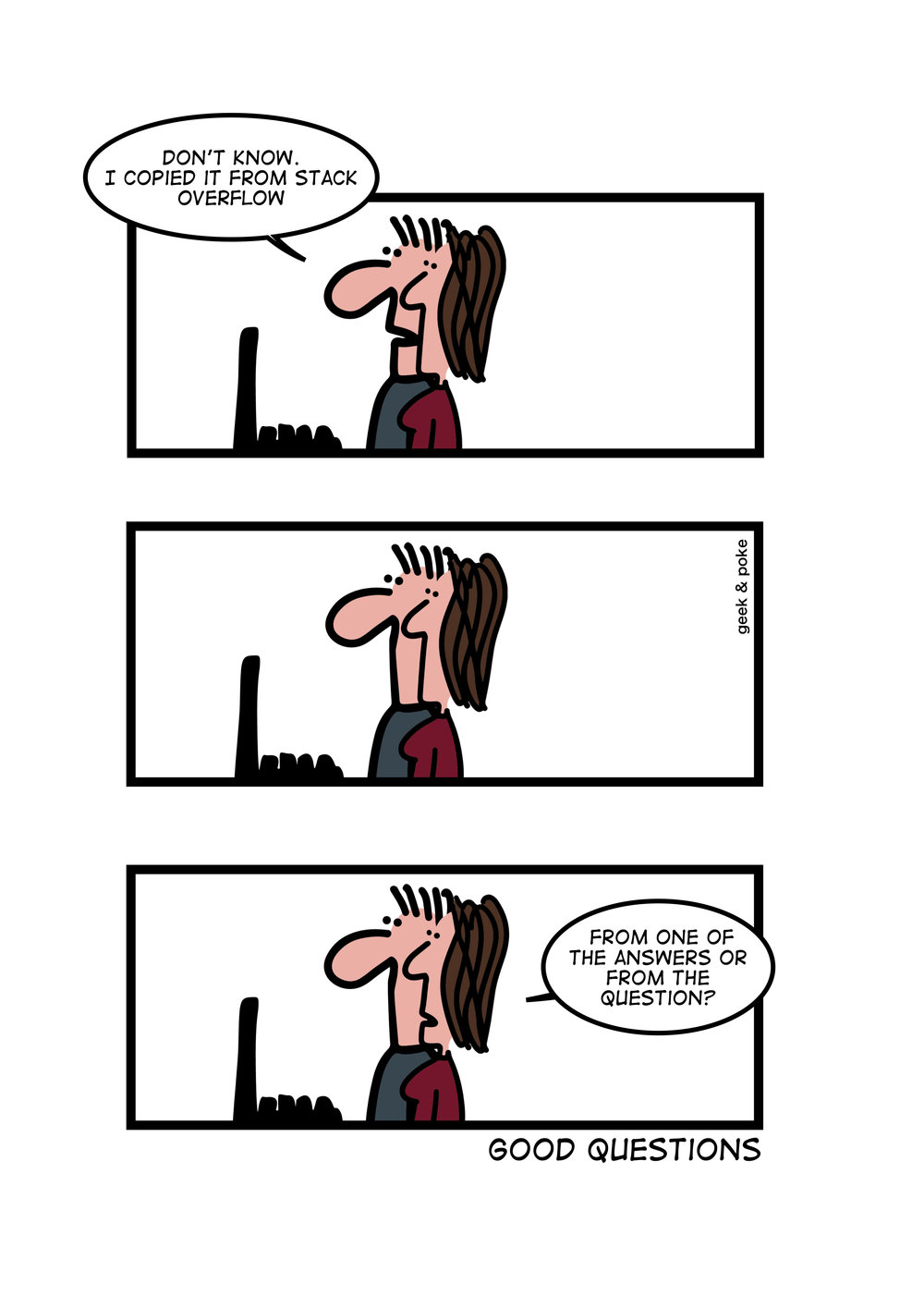
–jeroen
Related: Happy Day of the Programmer! 2018
via [WayBack] Steema Software on Twitter: “Happy #ProgrammersDay ! Feliç #DiaDelProgramador ! ¡Feliz #DíaDelProgramador !… ” .
Posted by jpluimers on 2022/09/13
Enjoy Day of the Programmer and [WayBack] Good Questions — Geek&Poke
–jeroen
Related: Happy Day of the Programmer! 2018
via [WayBack] Steema Software on Twitter: “Happy #ProgrammersDay ! Feliç #DiaDelProgramador ! ¡Feliz #DíaDelProgramador !… ” .

Posted in Development, Software Development | Leave a Comment »
Posted by jpluimers on 2022/09/08
I’ve mentioned this in the past, but not sure I did that on my blog yet, so here it goes:
Avoid writing the deep security layers of your software yourself, as it is hard, even for seasoned security software developers.
Push as much as you can to well tested external libraries.
See for instance [Wayback/Archive.is] GHSL-2021-1012: Poor random number generation in keypair – CVE-2021-41117 | GitHub Security Lab
Three went wrong, leading to easy to guess RSA security keys:
- The library has an insecure random number fallback path. Ideally the library would require a strong CSPRNG instead of attempting to use a LCG and
Math.random.- The library does not correctly use a strong random number generator when run in NodeJS, even though a strong CSPRNG is available.
- The fallback path has an issue in the implementation where a majority of the seed data is going to effectively be zero.
The most important thing that went wrong was seeding the random number generator, cascading
Via:
–jeroen

Posted in Development, Encryption, Hashing, Power User, Security, Software Development | Leave a Comment »
Posted by jpluimers on 2022/09/06
For my link archive, the [Wayback] Better, Stronger, Safer jQuerify Bookmarklet | Learning jQuery
Via: [Wayback/Archive.is] Include jQuery in the JavaScript Console – Stack Overflow (thanks [Wayback/Archive.is] brichins!)
When you do not have jQuery installed, then the Chrome console will give you the error [Wayback/Archive.is] javascript – TypeError: $(...).children is not a function – Stack Overflow which has code to load jQuery in this gist: [Wayback/Archive.is] use jQuery in Chrome javascript console.
If this bookmarklet ever starts to fail, then I need to check out these links:
The content of the JQueryfi bookmarklet is in the below gist:
| javascript:(function(){var%20el=document.createElement(%22div%22),b=document.getElementsByTagName(%22body%22)[0],otherlib=!1,msg=%22%22;el.style.position=%22fixed%22,el.style.height=%2232px%22,el.style.width=%22220px%22,el.style.marginLeft=%22-110px%22,el.style.top=%220%22,el.style.left=%2250%25%22,el.style.padding=%225px%2010px%22,el.style.zIndex=1001,el.style.fontSize=%2212px%22,el.style.color=%22#222%22,el.style.backgroundColor=%22#f99%22;function%20showMsg(){var%20txt=document.createTextNode(msg);el.appendChild(txt),b.appendChild(el),window.setTimeout(function(){txt=null,typeof%20jQuery==%22undefined%22?b.removeChild(el):(jQuery(el).fadeOut(%22slow%22,function(){jQuery(this).remove()}),otherlib&&(window.$jq=jQuery.noConflict()))},2500)}if(typeof%20jQuery!=%22undefined%22)return%20msg=%22This%20page%20already%20using%20jQuery%20v%22+jQuery.fn.jquery,showMsg();typeof%20$==%22function%22&&(otherlib=!0);function%20getScript(url,success){var%20script=document.createElement(%22script%22);script.src=url;var%20head=document.getElementsByTagName(%22head%22)[0],done=!1;script.onload=script.onreadystatechange=function(){!done&&(!this.readyState||this.readyState==%22loaded%22||this.readyState==%22complete%22)&&(done=!0,success(),script.onload=script.onreadystatechange=null,head.removeChild(script))},head.appendChild(script)}getScript(%22http://code.jquery.com/jquery.min.js%22,function(){return%20typeof%20jQuery==%22undefined%22?msg=%22Sorry,%20but%20jQuery%20was%20not%20able%20to%20load%22:(msg=%22This%20page%20is%20now%20jQuerified%20with%20v%22+jQuery.fn.jquery,otherlib&&(msg+=%22%20and%20noConflict().%20Use%20$jq(),%20not%20$().%22)),showMsg()})})(); |
| javascript:(function(){var el=document.createElement("div"),b=document.getElementsByTagName("body")[0],otherlib=!1,msg="";el.style.position="fixed",el.style.height="32px",el.style.width="220px",el.style.marginLeft="-110px",el.style.top="0",el.style.left="50%",el.style.padding="5px 10px",el.style.zIndex=1001,el.style.fontSize="12px",el.style.color="#222",el.style.backgroundColor="#f99";function showMsg(){var txt=document.createTextNode(msg);el.appendChild(txt),b.appendChild(el),window.setTimeout(function(){txt=null,typeof jQuery=="undefined"?b.removeChild(el):(jQuery(el).fadeOut("slow",function(){jQuery(this).remove()}),otherlib&&(window.$jq=jQuery.noConflict()))},2500)}if(typeof jQuery!="undefined")return msg="This page already using jQuery v"+jQuery.fn.jquery,showMsg();typeof $=="function"&&(otherlib=!0);function getScript(url,success){var script=document.createElement("script");script.src=url;var head=document.getElementsByTagName("head")[0],done=!1;script.onload=script.onreadystatechange=function(){!done&&(!this.readyState||this.readyState=="loaded"||this.readyState=="complete")&&(done=!0,success(),script.onload=script.onreadystatechange=null,head.removeChild(script))},head.appendChild(script)}getScript("http://code.jquery.com/jquery.min.js",function(){return typeof jQuery=="undefined"?msg="Sorry, but jQuery was not able to load":(msg="This page is now jQuerified with v"+jQuery.fn.jquery,otherlib&&(msg+=" and noConflict(). Use $jq(), not $().")),showMsg()})})(); |
–jeroen
Posted in Bookmarklet, Development, JavaScript/ECMAScript, jQuery, Power User, Scripting, Software Development, Web Browsers, Web Development | Leave a Comment »
Posted by jpluimers on 2022/09/01
Geocities is long dead, but luckily a lot has been archived: [Wayback] Archive.is: History of ASCII Art with a very comprehensive history ranging from ancient old hand painted art to contemporary computer made illustrations.
Via: [Wayback/Archive.is] ASCII art: The roots of ASCII art
--jeroen
Posted in ASCII, ASCII art / AsciiArt, Development, Encoding, Fun, History, Power User, Retrocomputing, Software Development | Leave a Comment »
Posted by jpluimers on 2022/08/31
Especially on Archive, but also on Android and other mobile operating systems, mobile apps can have their in-app browsers to circumvent the OS provided wrapper around the system browser.
On iOS, the Safari is the only system browser engine whereas on Android you can have other engines too, so less Android applications have in-app browsers.
Most of those in-app browsers are in social media applications that go to great length to keep their users inside a walled garden.
The site [Wayback/Archive] inAppBrowser.com helps checking how severely information is leaked through the in-app browser as those potentially have a lot of control. TikTok is worst capturing all input including credentials like user names and passwords.

Posted in Chrome, Conference Topics, Conferences, Development, Event, Firefox, iOS Development, JavaScript/ECMAScript, Mobile Development, Power User, Privacy, Safari, Scripting, Security, Software Development, Web Browsers, Web Development | Leave a Comment »
Posted by jpluimers on 2022/08/30
For my link archive: [Wayback/Archive] Making SMB Accessible with NTLMquic – TrustedSec
Via [Wayback/Archive] Florian Hansemann on Twitter: “”Making SMB Accessible with NTLMquic” #pentest #redteam #infosec”
Related: Read the rest of this entry »
Posted in Development, Power User, Red team, Security, Software Development, Windows, Windows Development | Leave a Comment »
Posted by jpluimers on 2022/08/25
No, Carbon is not the same thing as the same named MacOS Carbon API it .
Someone had to make it: [Wayback/Archive] Jeroen Wiert Pluimers on Twitter: “@d_feldman That has a net zero Carbon footprint, right? (OK, I’ll show myself out)”.
Luckily Googlers themselves are joking about it as well:
Posted in C, C++, Carbon, Development, Software Development | Leave a Comment »
Posted by jpluimers on 2022/08/23
For my link archive: [Wayback/Archive.is] Facebook banned me for life because I created the tool Unfollow Everything.
Via:
Related:

Posted in Development, Facebook, Instagram, SocialMedia, Software Development, Web Development | Leave a Comment »
Posted by jpluimers on 2022/08/18
If you like working with STM32 and want to try out a new simulator for it (by [Wayback/Archive] Wokwi (@WokwiMakes)), then sign up at
[Wayback/Archive] https://docs.google.com/forms/d/e/1FAIpQLSfpuGcUI1YdsX6o5lBhit14GPBEh6L7MVTSSDEk_HJFvBgjUQ/viewform
Via [Wayback/Archive] Wokwi on Twitter: “Want to try out the new STM32 simulator? Sign-up for early access: link.wokwi.com/stm32-simulator 🤓” and [Wayback/Archive] tnt (@tnt).
–jeroen
Posted in ARM, ARM Cortex-M, Assembly Language, Development, Go (golang), Hardware Development, Software Development, STM32 | Leave a Comment »
Posted by jpluimers on 2022/08/16
A while back Kristian Köhntopp (isotopp) wrote a blog post after quite a Twitter argument where he poses against using git empty commits. I’m with Kris: don’t use them for anything, especially not for kicking off your CI/CD.
Basically his blog post is all about avoiding to think you have a golden hammer, and avoid falling for the Law of the instrument – Wikipedia.
Originally, Abraham Maslow said in 1966:
“I suppose it is tempting, if the only tool you have is a hammer, to treat everything as if it were a nail.”
For me this has all to do with preventing technical debt: find the right tool to kick your CI/CD pipeline after part of that chain somehow malfunctioned is way better than polluting the commit history with empty commits.
His blog post: [Wayback/Archive.is] Empty commits and other wrong tools for the job | Die wunderbare Welt von Isotopp
The most important bit in it:
And since we are talking about CI/CD pipelines: Don’t YAML them. Don’t JSON them. Don’t XML them.
…
Programming in any of these three is wrong use of tooling, and you should not do it.
- YAML, JSON and XML are for declarative things.
- Python, Go and Rust are for procedural things.
- Bash is for interactive use only.
Use the proper tooling for the job. Be an engineer.
This very much reminds me of an Entwickler Konferenz keynote a long time ago, where Neal Ford made the point that most software engineers act very much unlike what is expected from traditional engineering way of operating where the engineer is both responsible and liable for his actions.
The start of the Twitter thread: [Archive.is] Kristian Köhntopp on Twitter: “A lot of people right now that git is an API and triggering CI/CD pipelines with empty commits replaces the equivalent of a Kubernetes controller for their fragile pile of bash in git triggers. This is broken and begets more brokenness. Evidence:… “
The tweet that started the subtweet: [Archive.is] Florian Haas on Twitter: “(For anyone wondering, what’s nice about this one is it works in any CI. So you don’t have to remember how to manually kick off a GitLab CI pipeline or GitHub Action or Zuul job, you just push an empty commit and off you go.)”
Other relevant tweets:
This solution still has one drawback. Gitlab requires a project specific token. If every developer uses the same token, its validity is bound to the project and not the individual contributor. While Gitlab allows users to create personal access tokens, you cannot require such a token to trigger a pipeline.
Yes, you want to avoid shell too (anything like for instance sh, ash, dash, bash or zsh), but you have to know it (and understand why to avoid it) as often it is the only interactive way to access systems from the console.
And of course Kris also wrote a big document on that too, which is available as full PDF (Wayback), full HTML (Wayback) and chaptered HTML Die UNIX Shell /bin/sh.
But more importantly, Kris wrote [Wayback/Archive.is] Using Python to bash | Die wunderbare Welt von Isotopp which is about using Python to do things you might be tempted to do in the shell. It quotes
Shell is a thing you want to understand and then not use, because you learned to understand it.
which is from the German post in thread [Wayback/Archive.is] Bashprogrammierung, wo gehts am besten los which quotes Kris’ 1998 message:
From kris Tue Sep 1 11:26:12 1998
From: kris
Newsgroups: de.comp.os.unix.misc
Subject: Re: Shell-Frage, find, xargs, kopieren von vielen Dateien
References: <6seh24$q9a$2...@nz12.rz.uni-karlsruhe.de>
From: kr...@koehntopp.de (Kristian Koehntopp)
Alignment: chaotic/neutral
X-Copyright: (C) Copyright 1987-1998 Kristian Koehntopp -- All rights
reserved.
MIME-Version: 1.0
Content-Type: text/plain; charset=iso-8859-1
Content-Transfer-Encoding: 8bit

Marc.Hab...@gmx.de (Marc Haber) writes:
>mir ist das ganze Zeug mit der Shell, find, xargs und Konsorten noch
>reichlich verschlüsselt.

http://www.koehntopp.de/kris/artikel/unix/shellprogrammierung/

>xargs hin oder sollte ich besser ein Perlskript schreiben?

Verwende Perl. Shell will man koennen, dann aber nicht verwenden.

Kristian
–jeroen
Posted in *nix, *nix-tools, ash/dash, ash/dash development, bash, bash, Conference Topics, Conferences, Continuous Integration, Development, DVCS - Distributed Version Control, Event, git, Power User, Scripting, sh, Sh Shell, Software Development, Source Code Management, Technical Debt | Leave a Comment »
 The Wiert Corner - irregular stream of stuff