Archive for the ‘JavaScript/ECMAScript’ Category
Posted by jpluimers on 2023/05/04
As a continuation of the various bookmarklet posts, here is one with information on bookmarklets that operate on the current page, for instance when you already got text selected.
All via [Wayback/Archive] bookmarklet that works on link of current selection – Google Search
–jeroen
Posted in Bookmarklet, Development, JavaScript/ECMAScript, Power User, Scripting, Software Development, Web Browsers, Web Development | Leave a Comment »
Posted by jpluimers on 2023/05/03
Oh well: [Archive] Kris on Twitter: “L> add AI there and you’ve got a paper R> I just had a look, and that thing is pretty much completely offline. the JS contains the entire dictionary C> well would you look at that, might want to use the actual dictionary then “
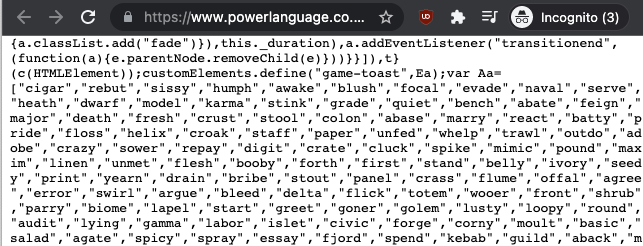
Actually, it was dead easy to copy the sources to a gist and host the gist:
And of course someone distilled the wordle word solutions list into some statistics:
More was done at [Wayback/Archive] Reverse Engineering Wordle | Robert Reichel.
Which got updated to the statistics of the union of solution and accepted words list
Another tool that helps solving is [Wayback/Archive] willthames/wordle-guesses which I found via [Archive] Will Thames on Twitter: “I spent some of my New Year’s Day writing a program to generate the best first two guesses for Wordle. Time well spent, I think: …”.
Jilles then posted a video on how to view the source [Archive] Jilles🏳️🌈 on Twitter: “How to cheat on #wordle …”.
To make Wordle even harder, there is Absurdle, an adversorial version of Wordle that decides the word upon your input until it runs out of decisions:
A Dutch and German version were added as Woordle and Wordle (which missed being called WorDeL and Wortle):
Shortly followed by another German version (always the Austrians setting themselves apart), and a French one (which messed Le Word as perfect name):
There is also a four-letter word edition, actually two of them:
There is a Prime version too:
Felienne posted a cool analysis bot that watches Wordle tweets and uses them to estimate the correct Wordle solution:
Oh, there is a single Letterle, which on average takes you some 13 tries when disregarding letter frequencies (which likely should not matter):
When you think Absurdle was going far, look at what happened Wordlinator:
Two search tools that are very useful:
If you are desperate, these solvers can help; the second one is more flexible, the first one faster, and the last one is pure cheating:
- [Wayback/Archive] Ruining the fun: a Wordle auto-solver – by Tom
- [Wayback/Archive] Wordle Helper – Suggestion and Solver Tool – Gamer Journalist
- [Wayback/Archive] Wordle Answers (February 2022) – Today’s Solution
I tried referencing all posts in the somewhat broken thread at:
Some links that did not make it into that thread (yet):
Having good start words and an on-line dictionary help:
And there is always a really fast way: [Wayback/Archive] Wordle Solver | Not Fun at Parties (explained in [Wayback/Archive] Ruining the fun: a Wordle auto-solver – by Tom)
–jeroen
Read the rest of this entry »
Posted in Development, JavaScript/ECMAScript, LifeHacker, Natural Languages, Power User, Scripting, Software Development | Leave a Comment »
Posted by jpluimers on 2023/04/27
I want to check out how to do POST requests using bookmarklets in order to save URLs to the Wayback machine.
The reason is that every few months or so, saving a page the normal way through a something like https://web.archive.org/save/URL fails for one reason or the other, but going to https://web.archive.org/save, then entering URL, and pressing “SAVE PAGE” button works fine:
The the failing way above is using a GET request, the succeeding workaround will open https://web.archive.org/save/URL using the below POST request (where I omitted some HTTP cookies and HTTP header fields for brevity).
- POST request using
PowerShell:
$session = New-Object Microsoft.PowerShell.Commands.WebRequestSession
$session.UserAgent = "Mozilla/5.0 (Windows NT 10.0; Win64; x64) AppleWebKit/537.36 (KHTML, like Gecko) Chrome/96.0.4664.110 Safari/537.36"
Invoke-WebRequest -UseBasicParsing -Uri "https://web.archive.org/save/URL" `
-Method "POST" `
-WebSession $session `
-Headers @{
"method"="POST"
  "origin"="https://web.archive.org"
  "referer"="https://web.archive.org/save"
} `
-ContentType "application/x-www-form-urlencoded" `
-Body "url=URL&capture_outlinks=on&capture_all=on&capture_screenshot=on"
- POST request using cURL on
bash:
curl 'https://web.archive.org/save/URL' \
  -H 'origin: https://web.archive.org' \
  -H 'content-type: application/x-www-form-urlencoded' \
  -H 'referer: https://web.archive.org/save' \
  --data-raw 'url=URL&capture_outlinks=on&capture_all=on&capture_screenshot=on' \
  --compressed
- POST request using the fetch API in JavaScript:
fetch("https://web.archive.org/save/URL", {
  "headers": {
    "content-type": "application/x-www-form-urlencoded",
  },
  "referrer": "https://web.archive.org/save",
  "body": "url=URL&capture_outlinks=on&capture_all=on&capture_screenshot=on",
  "method": "POST",
  "mode": "cors"
});
BTW: Yes, I know that URL is not a valid URL, so it will return a page with “http://url/ URL syntax is not valid.“.
All links below via [Wayback/Archive] bookmarklet post request – Google Search:
I tried to put createFormSubmittingBookmarklets/createFormSubmitBookmarklets.js in a bookmarklet using both userjs.up.seesaa.net/js/bookmarklet.html and skalman.github.io/UglifyJS-online. That failed: somehow this code does not want to run as bookmarklet.
Running it from the console is fine though, and gave me this basic bookmarklet template:
javascript:function sf(ur,ty,fd){function me(tg,pr){var el=document.createElement(tg);for(const[nm,vl]of Object.entries(pr)){el.setAttribute(nm,vl);}return el}const fm=me("form",{action:ur,method:ty,style:"display:hidden;"});for(const[nm,vl]of Object.entries(fd)){fm.appendChild(me("input",{name:nm, value:vl}))}document.body.appendChild(fm);fm.submit()}sf("https://web.archive.org/save","post",{"url":"URL","capture_outlinks":"on","capture_all":"on","capture_screenshot":"on","wm-save-mywebarchive":"on","email_result":"on","":"SAVE PAGE"});
There bold URL there is the URL to be saved. I need to test this, then rework it to become parameterised.
–jeroen
Posted in Bookmarklet, Development, JavaScript/ECMAScript, Power User, Scripting, Software Development, Web Browsers, Web Development | Leave a Comment »
Posted by jpluimers on 2023/03/16
PolyShell is a script that’s simultaneously valid in Bash, Windows Batch, and PowerShell (i.e. a polyglot).
[Wayback/Archive] llamasoft/polyshell: A Bash/Batch/PowerShell polyglot!
Need to check this out, as often I have scripts that have to go from one language to the other or vice versa.
Maybe it enables one language to bootstrap functionality in the other?
The quest
The above polyglot started with a quest to see if I can could include some PowerShell statements in a batch file with two goals:
- if the batch file started from the PowerShell command prompt, then execute the PowerShell code
- if the batch file started from the
cmd.exe command prompt, then have it start PowerShell with the same command-line arguments
The reasoning is simple:
- PowerShell scripts will start from the PATH only when PowerShell is already running
- Batch files start from the path when either
cmd.exe or PowerShell are running
Lots of users still live in the cmd.exe world, but PowerShell scripts are way more powerful, and since PowerShell is integrated in Windows since version 7, so having a batch file bootstrap PowerShell still makes sense.
Since my guess was about quoting parameters the right way, my initial search for the link below was [Wayback/Archive] powershell execute statement from batch file quoting – Google Search.
I have dug not yet into this, so there are still…
Many links to read
These should give me a good idea how to implement a polyglot batch file/PowerShell script.
–jeroen
Posted in *nix, *nix-tools, bash, bash, Batch-Files, Development, JavaScript/ECMAScript, Perl, Polyglot, Power User, PowerShell, Scripting, Software Development | Leave a Comment »
Posted by jpluimers on 2023/03/15
Yup, web browser bookmarklets, though hardly published about any more, I still like them (and wrote about them before). With a little bit, usually unreadable, JavaScript, they can add magical functionality to your browser.
So here are some links on Twitter related bookmarklets:
- [Wayback/Archive] Send to Twitter Bookmarklet (uses document.title and URL as content) with this URI:
javascript:location.href='http://twitter.com/share?url='+encodeURIComponent(window.location.href)+'&text='+encodeURIComponent(document.title)
which I reworked into:
javascript:window.open('http://twitter.com/share?url='+encodeURIComponent(window.location.href)+'&text='+encodeURIComponent(document.title))
- These are all from the same author:
All code from the above links seemed to give corrupted tweets, which I thought was because of quote beautification, but was just me doing the whitespace removal wrong.
This is the right one:
javascript:(function(){n=getSelection().anchorNode;if(!n){t=document.title;}else{t=n.nodeType===3?n.data:n.innerText;}t='“'+t.trim()+'”\n\n';window.open(`https://twitter.com/intent/tweet?text=${encodeURIComponent(t)}${document.location.href}`)})();
which I reworked using «» quotes into:
javascript:(function(){n=getSelection().anchorNode;if(!n){t=document.title;}else{t=n.nodeType===3?n.data:n.innerText;}t='«'+t.trim()+'»\n\n';window.open(`https://twitter.com/intent/tweet?url=${document.location.href}&text=${encodeURIComponent(t)}`)})();
All via [Wayback/Archive] twitter bookmarklet – Google Search.
–jeroen
Posted in Bookmarklet, Development, JavaScript/ECMAScript, Power User, Scripting, Software Development, Web Browsers, Web Development | Leave a Comment »
Posted by jpluimers on 2023/01/19
After publishing Free Linux cloud shell for Gmail users – shell in the browser that works in all locations I’ve been so far, the Google Cloud Shell got extended quite a bit.
There is now [Wayback/Archive] Safe Mode (which skips initialisation scripts):
If there’s a problem in your .bashrc or .tmux.conf files, Cloud Shell immediately close after connection. To resolve this, open Cloud Shell in safe mode by appending cloudshellsafemode=true to the URL. This restarts your Cloud Shell instance and logs you in as root, allowing you to fix any issues in the files.
To permanently delete all files in your home directory and restore your Cloud Shell home directory to a clean state, you can reset your Cloud Shell VM.
And there is support for way more [Wayback/Archive] tools and languages:
Read the rest of this entry »
Posted in .NET, C#, Cloud, Development, Go (golang), Google, GoogleCloudShell, Infrastructure, Java, Java Platform, JavaScript/ECMAScript, Node.js, Perl, PHP, Power User, Python, Ruby, Scripting, Software Development | Leave a Comment »
Posted by jpluimers on 2023/01/03
QR codes often are the quickest way to copy/paste some data to a smartphone.
So, via [Wayback/Archive] generate qr code site:github.io – Google Search, I found these two (the first is based on the JavaScript source in second, but has QR codes with larger blocks and is therefore easier to scan):
- [Wayback/Archive] QR Code Generator
- [Wayback/Archive] QR Code Generator
–jeroen
Posted in Development, HTML, JavaScript/ECMAScript, Scripting, Software Development, Web Development | Leave a Comment »
Posted by jpluimers on 2022/11/29
For my link archive: [Wayback/Archive] google chrome devtools – Use JavaScript to set value of textbox when .value and events don’t seem to work – Stack Overflow
TL;DR
Sometimes fields are blocked from pasting values.
Normally a trick like this works in the chrome development panel console:
document.getElementById('nonPasteElementID').value = 'myValueFromTheClipboard'
With some web development environments this does not work.
For react, after finding the react render name for the input (in the case of the answer, it was “reactNameForInputElement“) this is a solution:
To make it work you will need this:
const input = document.getElementById('nonPasteElementID');
const event = new Event('reactNameForInputElement', { bubbles: true });
input.value = '1';
input.dispatchEvent(event);
–jeroen
Posted in Chrome, Chrome, Development, Google, JavaScript/ECMAScript, Power User, Scripting, Software Development, Web Browsers, Web Development | Leave a Comment »
Posted by jpluimers on 2022/10/27
I knew there was JSFiddle for live playing around with JavaScript and more in your browser, so I wondered if there was a similar site for databases and SQL queries.
There are, so here are a few database fiddle sites: SQL playgrounds where you can live play with SQL queries (sometimes even without an underlying example database).
All via [Wayback/Archive.is] database fiddle – Google Search:
Read the rest of this entry »
Posted in Conference Topics, Conferences, Database Development, DB2, Development, Event, Firebird, JavaScript/ECMAScript, JSFiddle, MariaDB, MySQL, OracleDB, PL/SQL, PostgreSQL, Scripting, Software Development, SQL, SQL Server, SQLite, T-SQL | Leave a Comment »


 The Wiert Corner - irregular stream of stuff