Archive for the ‘GitHub’ Category
Posted by jpluimers on 2017/05/02
To get to the compare view, append /compare to your repository’s path.
This brings you the basic comparison interface which is very flexible: just enter a branch, tag or history marker in the dropdowns for base and compare.
Examples from the user docs:
–jeroen
Source: Comparing commits across time – User Documentation
Posted in Development, DVCS - Distributed Version Control, git, GitHub, Software Development, Source Code Management | Leave a Comment »
Posted by jpluimers on 2017/04/26
Printing Markdown with GitPrint
Simply view any Markdown file on GitHub, then in your URL bar replace the github.com part of the URL with gitprint.com — your markdown file will be rendered to a beautiful, printable PDF.
Try an example https://gitprint.com/jquery/jquery/blob/master/README.md
Every once in a while I feel like I’ve been living under a stone for years. Today is such a day as gitprint has been around since 2014 and I only noticed it until now.
It’s cool as it prints any github page (including Markdown, RestructuredText, etc) as a PDF file.
Notes:
Read the rest of this entry »
Posted in Bookmarklet, Development, DVCS - Distributed Version Control, git, GitHub, jQuery, Software Development, Source Code Management, Web Browsers | Leave a Comment »
Posted by jpluimers on 2017/04/18
Basically below gist tells it all.
Many repositories on GitHub do not have whitespace between the # and headings. This is against the specs, so GitHub fixed their rendering engine. Which means now many files do not render nicely any more.
So if you have headings like this:
##text
Fix them to be like:
## text
If your GitHub repository has less than 50 starts, you did not get an automatic pull request to fix it from https://github.com/bryant1410/readmesfix so you can either:
–jeroen
Posted in Development, DVCS - Distributed Version Control, git, GitHub, Software Development, Source Code Management | Leave a Comment »
Posted by jpluimers on 2017/03/07
Found out recently that next to rawgit.com there is also raw.githack.com which contrary to the name also supports bitbucket files:
–jeroen
Posted in BitBucket, Development, DVCS - Distributed Version Control, git, githack.com, GitHub, Mercurial/Hg, rawgit, Source Code Management | Leave a Comment »
Posted by jpluimers on 2016/09/14

Adobe marketing scam
I don’t want Acrobat/Adobe Reader on my Mac. Period.
But Preview will show some PDF files as “For the best experience, open this PDF portfolio in Acrobat 9 or Adobe Reader 9, or later.” or “For the best experience, open this PDF portfolio in Acrobat X or Adobe Reader X, or later.”
This is some Adobe marketing scam where they generate a PDF file actually as a portfolio of PDF files having the first PDF being “marketing” message.
So I needed the pdf-tools on my Mac for which many sites suggest to use brew install pdf-tools. That worked not so well:
$ brew install pdf-tools
Error: No available formula with the name "pdf-tools"
==> Searching for similarly named formulae...
This similarly named formula was found:
mupdf-tools
To install it, run:
  brew install mupdf-tools
==> Searching taps...
This formula was found in a tap:
homebrew/emacs/pdf-tools
To install it, run:
  brew install homebrew/emacs/pdf-tools
Searching for “Error: No available formula with the name” “pdf-tools” didn’t return useful results but looking for brew “pdf-tools” gone revealed pdf-tools: move to homebrew/emacs · wingyplus/homebrew@6e73af9 indicating the command should indeed be brew install homebrew/emacs/pdf-tools however that also ended up failing, in fact with multiple errors:
==> make server/epdfinfo
Error: No available formula with the name "homebrew/dupes/tcl-tk"
Please tap it and then try again: brew tap homebrew/dupes
==> Searching for similarly named formulae...
Error: No similarly named formulae found.
==> Searching taps...
Error: No formulae found in taps.
After doing abrew tap homebrew/dupes it finally worked.
Read the rest of this entry »
Posted in Apple, Development, DVCS - Distributed Version Control, git, GitHub, Home brew / homebrew, Power User, Source Code Management | Leave a Comment »
Posted by jpluimers on 2016/07/08
I’m not yet sure what the exact cause is, but at irregular intervals when clicking on Google Plus links, they show as “403. That’s an error.”.
They appear both when I have multiple WAN connections or a single WAN connection, which leads me to suspect that G+ doesn’t cope well when
- you have a lot (dozens) of Google related pages open (Drive, Mail, Search, Documents, etc) as Google Plus is embedded in each of them
- you rapidly browse through your G+ backlog (the G+ counter is > 50 since you follow a lot of people/communities and you quickly do catch-up on them)
In a future post, I will explain how I created the workaround, but here it is:
Work around G+ “403. That’s an error.” errors
Basically it translates links
The latter was the original link I clicked in the first place. The former what G+ comes up with.
After a while, G+ comes back to its senses and allows the latter links again, so the page allows you to parse the former then put them in a list like this:

One decoded URL per list-item.
–jeroen _ _ _ _
Posted in Development, G+: GooglePlus, gist, GitHub, Google, Power User, rawgit, SocialMedia, Source Code Management | Leave a Comment »
Posted by jpluimers on 2016/06/28
At first you’d think that gists can only hold text files. That’s not true, and I hinted to this last week in Hosting an HTML gist containing JavaScript.
As gists are git repositories, you can put any file in it through git, even binary files, though the gist UI nor a lot of the tools – including gist(1) – support uploading binary files in a gist.
This post – though old, so the screenshots are not current any more, but the commands still are current – explains how to clone the gist and add binaries (in this case images): How To Upload Image / Binary File to Gist | Hanxue and IT
This is for instance how I created a gist containing openssl Darwin binaries to help solve https://github.com/drwetter/testssl.sh/issues/362.
–jeroen
Posted in Development, DVCS - Distributed Version Control, gist, git, GitHub, Source Code Management | Leave a Comment »
Posted by jpluimers on 2016/06/22
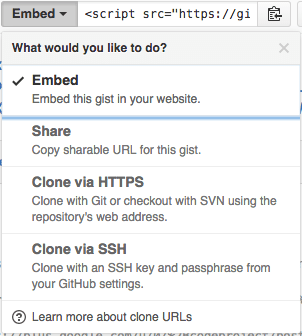
The “embed” dropdown allows to get URLs for sharing and git cloning.
Recently I did my very first JavaScript in HTML development. Since it was a one page experiment, I didn’t want to put it in an official repository of it’s own.
I will explain about the content in a future post, but first about getting it on-line as a HTML file that can run JavaScript.
This is the hosted page: Work around G+ “403. That’s an error.” errors.
Gists are the base
Gists are pretty amazing. They have history, syntax highlighting (which you can embed on your own page, see Using Github as a Syntax Highlighter for Your Blog or Website), can show an overview of files or even raw content. This holds for public and secret gists.
The history of all the files comes from a repository: in fact all gists are in fact git repositories of which you can get the URL (be it https or ssh) is under the “Embed” dropdown: see the screenshot on the right.
So the gist itself is available under these URLs:
- gist
- syntax highlight script
- git https
- git ssh
The individual files can either be viewed as syntax highlighted (when they’re small enough, not binary and github knows how to highlight them), or as raw files:
Read the rest of this entry »
Posted in Development, DVCS - Distributed Version Control, gist, git, GitHub, rawgit, Source Code Management | 2 Comments »


 The Wiert Corner - irregular stream of stuff