The Wiert Corner – irregular stream of stuff

Jeroen W. Pluimers on .NET, C#, Delphi, databases, and personal interests

  • My badges

  • Twitter Updates

  • My Flickr Stream

  • Pages

  • All categories

  • Enter your email address to subscribe to this blog and receive notifications of new posts by email.

    Join 1,854 other subscribers

Archive for the ‘Source Code Management’ Category

the curse of tooling replacing double quotation marks with left double quotation marks and right double quotation marks – via StackOverflow

Posted by jpluimers on 2016/07/21

Most developers I speak to have trapped into a case of copy/pasting some source code containing quotation marks from documentation or post immediately failing on curly quotes like left double quotation marks () and right double quotation marks () that should have been regular double quotation marks (").

I’ve tried to search for a way to automate the replacement process to “ASCII quotation marks”, but not found an on-line engine yet. The best I could find was this post: java – Replacing unicode punctuation with ASCII approximations – Stack Overflow.

Note it’s not only the auto-correct of office applications. For instance “blog engines” like WordPress do that too, unless you add a code or pre around them:

  • code: "blog engines"
  • pre:
    "blog engines"

Very irritating, but apparently nowadays beauty trumps accuracy.

–jeroen

via: xampp – Apache Prefixing Path to Virtual Hosts Path – Stack Overflow.

Posted in Development, Software Development, Source Code Management | Leave a Comment »

Git Cheat Sheet

Posted by jpluimers on 2016/07/14

I had seen the bitmap Git Cheat Sheet referenced numerous times, so I went searching for the source and found it under Creative Commons 3.0 license at http://byte.kde.org/~zrusin/git/ which has the Vector Image Source by Zack Rusin.

[ICO] Name Last modified Size Description

[DIR] Parent Directory
[IMG] git-cheat-sheet-large.png 29-Aug-2007 14:52 1.2M
[IMG] git-cheat-sheet-medium.png 29-Aug-2007 14:52 336K
[IMG] git-cheat-sheet.svg 29-Aug-2007 14:52 162K
[IMG] git-cheet-sheet-small.png 10-Sep-2007 09:05 87K
[TXT] license.html 29-Aug-2007 08:41 24K

And yes, they are all in the Wayback Machine: http://web.archive.org/web/*/http://byte.kde.org/~zrusin/git/

–jeroen

via: Zack Rusin: Git cheat sheet.

Git Cheat Sheet Git Cheat Sheet

Posted in Development, DVCS - Distributed Version Control, git, Software Development, Source Code Management | Leave a Comment »

Work around G+ “403. That’s an error.” errors

Posted by jpluimers on 2016/07/08

I’m not yet sure what the exact cause is, but at irregular intervals when clicking on Google Plus links, they show as “403. That’s an error.”.

They appear both when I have multiple WAN connections or a single WAN connection, which leads me to suspect that G+ doesn’t cope well when

  • you have a lot (dozens) of Google related pages open (Drive, Mail, Search, Documents, etc) as Google Plus is embedded in each of them
  • you rapidly browse through your G+ backlog (the G+ counter is > 50 since you follow a lot of people/communities and you quickly do catch-up on them)

In a future post, I will explain how I created the workaround, but here it is:

Work around G+ “403. That’s an error.” errors

Basically it translates links

The latter was the original link I clicked in the first place. The former what G+ comes up with.

After a while, G+ comes back to its senses and allows the latter links again, so the page allows you to parse the former then put them in a list like this:

One decoded URL per list-item.

One decoded URL per list-item.

–jeroen _ _ _ _

Posted in Development, G+: GooglePlus, gist, GitHub, Google, Power User, rawgit, SocialMedia, Source Code Management | Leave a Comment »

GitHub has majour service outages…

Posted by jpluimers on 2016/07/06

Boom!

In a split second GitHub went to


from

from 

Posted in Development, DVCS - Distributed Version Control, git, GitHub, Software Development, Source Code Management | Leave a Comment »

case insensitive files systems and git – Lesson Learned – I Can’t Get My Git Repo Clean! | DrupalEasy

Posted by jpluimers on 2016/07/06

via: Lesson Learned – I Can’t Get My Git Repo Clean! | DrupalEasy

One file kept getting added to the git modified list: service/src/main/MySOAPdefinition.pas.

It was part of a repository that had been migrated from SVN (more on that in a future blog post) and along the way been renamed in directory service/src/main from MySOAPdefinition.pas to MySoapDefinition.pas. SVN (and TortoiseSVN) don’t object to this. But git does.

You’d see this on the command-line:

>git status
On branch develop
Your branch is up-to-date with 'origin/develop'.
Changes not staged for commit:
  (use "git add ..." to update what will be committed)
  (use "git checkout -- ..." to discard changes in working directory)

        modified:   service/src/main/MySOAPdefinition.pas

no changes added to commit (use "git add" and/or "git commit -a")

>git add service\src\main\MySoapDefinition.pas

>git status
On branch develop
Your branch is up-to-date with 'origin/develop'.
Changes not staged for commit:
  (use "git add ..." to update what will be committed)
  (use "git checkout -- ..." to discard changes in working directory)

        modified:   service/src/main/MySOAPdefinition.pas

no changes added to commit (use "git add" and/or "git commit -a")

Basically the add would do nothing.

On Windows, this is how to get around this:

Read the rest of this entry »

Posted in Delphi, Delphi XE8, Development, git, Mac OS X / OS X / MacOS, OS X 10.9 Mavericks, Power User, Software Development, Source Code Management, SourceTree, Windows, Windows 7 | 1 Comment »

git svn broken on Mac OS X under SourceTree but not from the terminal: how to fix it.

Posted by jpluimers on 2016/07/05

Not on the terminal, but only in SourceTree I got this error (full text below):

Can't locate SVN/Core.pm in @INC

Well, the Xcode binaries were here:

 $ xcode-select -p
/Applications/Xcode.app/Contents/Developer

On Mavericks, perl is this version:

$ perl --version | grep -w for
This is perl 5, version 16, subversion 2 (v5.16.2) built for darwin-thread-multi-2level
(with 3 registered patches, see perl -V for more detail)

and git is this:

$ git --version
git version 1.9.5 (Apple Git-50.3)

Steps for fixing are at these blog entries:

All these solutions point you to change the system Perl installation, but since on my system it failed only on SourceTree, but from the terminal, I wanted to fix SourceTree.

Read the rest of this entry »

Posted in Apple, Development, DVCS - Distributed Version Control, git, Mac OS X / OS X / MacOS, OS X 10.9 Mavericks, Power User, Source Code Management, Subversion/SVN | 4 Comments »

Storing binaries in your gists

Posted by jpluimers on 2016/06/28

At first you’d think that gists can only hold text files. That’s not true, and I hinted to this last week in Hosting an HTML gist containing JavaScript.

As gists are git repositories, you can put any file in it through git, even binary files, though the gist UI nor a lot of the tools – including gist(1) – support uploading binary files in a gist.

This post – though old, so the screenshots are not current any more, but the commands still are current – explains how to clone the gist and add binaries (in this case images): How To Upload Image / Binary File to Gist | Hanxue and IT

This is for instance how I created a gist containing openssl Darwin binaries to help solve https://github.com/drwetter/testssl.sh/issues/362.

–jeroen

Posted in Development, DVCS - Distributed Version Control, gist, git, GitHub, Source Code Management | Leave a Comment »

Some notes on tfpt.exe from Microsoft Visual Studio Team Foundation Server (2010/2013/2015) Power Tools extension

Posted by jpluimers on 2016/06/23

Some links.

First tfpt:

Old name: Microsoft Team Foundation Server 2010 Power Tools.

Then witAdmin:

With API:


–jeroen

via: Microsoft Visual Studio Team Foundation Server 2013 Power Tools extension.

Links to past posts about tfpt:

Posted in .NET, Development, Power User, PowerToys, Software Development, Source Code Management, TFS (Team Foundation System), Visual Studio and tools, Windows | Leave a Comment »

Hosting an HTML gist containing JavaScript

Posted by jpluimers on 2016/06/22

The

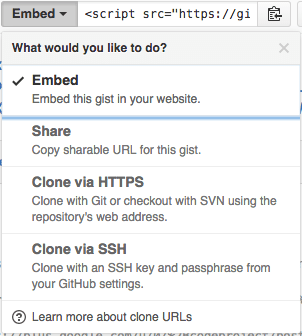
The “embed” dropdown allows to get URLs for sharing and git cloning.

Recently I did my very first JavaScript in HTML development. Since it was a one page experiment, I didn’t want to put it in an official repository of it’s own.

I will explain about the content in a future post, but first about getting it on-line as a HTML file that can run JavaScript.

This is the hosted page: Work around G+ “403. That’s an error.” errors.

Gists are the base

Gists are pretty amazing. They have history, syntax highlighting (which you can embed on your own page, see Using Github as a Syntax Highlighter for Your Blog or Website), can show an overview of files or even raw content. This holds for public and secret gists.

The history of all the files comes from a repository: in fact all gists are in fact git repositories of which you can get the URL (be it https or ssh) is under the “Embed” dropdown: see the screenshot on the right.

So the gist itself is available under these URLs:

The individual files can either be viewed as syntax highlighted (when they’re small enough, not binary and github knows how to highlight them), or as raw files:

Read the rest of this entry »

Posted in Development, DVCS - Distributed Version Control, gist, git, GitHub, rawgit, Source Code Management | 2 Comments »

When a fresh install of Bonobo Git Server on Windows 7 IIS 7 gives you a “HTTP Error 404.0 – Not Found”

Posted by jpluimers on 2016/06/16

HTTP Error 404.0 - Not Found

HTTP Error 404.0 – Not Found

Had this on a fresh Bonobo Git Server on a relatively fresh Windows 7 installation:

HTTP Error 404.0 – Not Found

At first I thought it was missing ASP because of the “StaticFile” in the error information, so I enabled it:

ASP is not enabled by default

ASP is not enabled by default

Enable ASP

Enable ASP

That didn’t help, so I searched for “MapRequestHandler” “HTTP Error 404.0 – Not Found” and found:

  1. HTTP Error 404.0 – Not Found (MapRequestHandler / StaticFile) when deploying WCF Web API on IIS 7.x | Alexander Zeitler
  2. aspnet_regiis.exe -i is still a solution : Fixing HTTP Error 404.0 – Not Found (MapRequestHandler / StaticFile) when deploying an application in IIS 7.x | Michael Hidalgo

Though ASP.NET was clearly enabled according to the Windows features, this was apparently for an old ASP.NET version so I manually re-registered ASP.NET (but now for Version 4: I had 4.6.1 installed):

C:\Windows\System32>%windir%\Microsoft.NET\Framework\v4.0.30319\aspnet_regiis.exe -ir
Microsoft (R) ASP.NET RegIIS version 4.0.30319.0
Administration utility to install and uninstall ASP.NET on the local machine.
Copyright (C) Microsoft Corporation. All rights reserved.
Start installing ASP.NET (4.0.30319.0) without changing existing web applications to use this version of ASP.Net.
.....
Finished installing ASP.NET (4.0.30319.0) without changing existing web applications to use this version of ASP.Net.

Windows 7 is .NET 2.0 all over the place…

Then it still didn’t work, but the second tip above also mentioned the application pool. And since Bonobo insists installing in wwwwroot, it’s using the default application which on Windows 7 – surprise! – is ASP.NET 2.0:

Default Windows 7 application pool for wwwroot uses ASP.NET 2.0

Default Windows 7 application pool for wwwroot uses ASP.NET 2.0

ASP.NET 4.0 needs to be the default.

ASP.NET 4.0 needs to be the default.

Changing that to ASP.NET 4.0 made it all work.

Read the prerequisites

Too bad that ASP.NET registration part is only prominently visible in the readme.md on github, but not in the installation instructions of the web-site with a tiny link (overwhelmed by the screenshots) to prerequisites.

Same for the default credentials:

  • username admin
  • password admin

–jeroen


Posted in .NET, ASP.NET, Development, DVCS - Distributed Version Control, git, Software Development, Source Code Management | Leave a Comment »