


Why the Heck is Git so Hard? | Probably Done Before is wonderful, especially as it points to workspace • Git Cheatsheet • NDP Software.
And I really like this hacker news comment on it: Read the rest of this entry »
Posted by jpluimers on 2014/02/04
Why the Heck is Git so Hard? | Probably Done Before is wonderful, especially as it points to workspace • Git Cheatsheet • NDP Software.
And I really like this hacker news comment on it: Read the rest of this entry »

Posted in Development, DVCS - Distributed Version Control, git, Source Code Management | 2 Comments »
Posted by jpluimers on 2013/12/29
I had this occur a few times over the last couple of weeks.
The solution is to delete the index.lock file, but I’m not sure if more steps are needed to verify repository content.
Anyone?
–jeroen
via: git index.lock File exists when I try to commit, but cannot delete the file – Stack Overflow.
Posted in Development, DVCS - Distributed Version Control, git, Software Development, Source Code Management | Leave a Comment »
Posted by jpluimers on 2013/12/29
Thanks Uncle Bob Martin for posting this.
I’ve been trying (with increasing success: it takes time to get this all right) to practice XP (through various name changes) as much and wide as possible since almost 14 years, and only the last few years it is starting to be common practice for many more people.
take a moment to reflect back on 1999. A time when Kent Beck wrote a ground-breaking book. A book that changed everything. Look back and remember: Extreme Programming; and recognize it as the core of what we, today, simply think of as:
Good Software Practice.
–jeroen
via: Extreme Programming, a Reflection | 8th Light.
Posted in .NET, Agile, Continuous Integration, Delphi, Design Patterns, Development, Software Development, Source Code Management, Technical Debt, Testing, Unit Testing | Leave a Comment »
Posted by jpluimers on 2013/12/24
I’ve been wanting this a very long time, so I’m going to install it Right Now ™ (:
Right before X-Mas, Scooter Software did the ANN: Beyond Compare 4.0 beta available on Windows, Linux, and OS X:
Posted: Dec 23, 2013 4:17 PM
Beyond Compare 4.0 beta is now available for testing on Windows, Linux, and OS X.
http://www.scootersoftware.com/beta
This version adds a number of new features: Read the rest of this entry »

Posted in *nix, Apple, Beyond Compare, Delphi, Development, Linux, Mac, Mac OS X / OS X / MacOS, Mac OS X 10.7 Lion, MacBook, MacBook Retina, MacBook-Air, MacBook-Pro, OS X 10.8 Mountain Lion, Power User, Software Development, Source Code Management, SuSE Linux, Windows | Leave a Comment »
Posted by jpluimers on 2013/11/28
There are a few more messages in the “Missed Schedule” backlog, and I really hope that WordPress is going to address this really annoying bug soon as I have to recheck my blog multiple times a day now.
Back on topic:
I’m taking Delphi and Bitbucket here as an example, but this holds for many more development tools and version control tools.
Ultimately, you want changes to be as simple as this one: only the relevant changed lines show up as an actual change.
But often changes include convoluted non-relevant information.
A few things development tools should not do: Read the rest of this entry »
Posted in .NET, C#, Delphi, Development, DVCS - Distributed Version Control, Software Development, Source Code Management, Visual Studio and tools | 2 Comments »
Posted by jpluimers on 2013/10/01
I love DVCS for one single reason: merges are so much easier than with traditional version control systems, and you can use it in a disconnected way for almost 100% of the time. Coming from a traditional world, interoperability is key. So here are some links that greatly helped my getting started with DVCS (a really long while ago; this post has been way overdue).
Usually, the D in DVCS is regarded as distributed. But it can have multiple meanings (even at the same time), depending on how you use it.
Because it leads to experimenting, which makes you a better programmer: Version Control Makes You A Better Programmer | Cocoa Is My Girlfriend.
Because you will never lose your repository: Embarcadero Discussion Forums: XanaNews users ….
Because… Intro to Distributed Version Control (Illustrated) | BetterExplained.
Because of the demise of traditional version control systems: SVN projects on SourceForge, CodePlex and other sites are massively migrated to DVCS.
Note that for by hosting on USA based or USA related providers, NSA can probably do whatever they please.
There are various lists of hosting sites, for instance:
I have experience with the sites I mention below. When time permits, I’m going to try some non-USA hosted providers as well.
can host both GIT and HG for you. (it is from Atlassian; both public and private projects; free for private projects up to 5 users).
Notes:
Tip for a first commit: make sure you have a good README file in your rout (you can use various extensions), as it will get a prominent place at your bitbucket repository page.
can host GIT for you. It can also hosts GISTs (small code snippets). Note it is USA based too.
can host both TFVC and GIT for you (it is from Microsoft; payed if you have over 5 developers). Note it is USA based as well.
can host TFVC, GIT and Mercurial for you (also from Microsoft, but free, though supports only public projects) . Note it is USA based.
can put migrate from SVN to TFVC in TFS. I have not used this myself, but did use:
an SVN front-end to TFVC. CodePlex uses this a lot, and I used it client-side to pull a TFS 2005 repository to a user that could only do SVN. I could never get this to work on TFS 2005 server side, then never bothered as I switched to GIT/Mercurial soon after.
There are three tools that can help you integrate SVN and Mercurial:
Getting Started with Git in Visual Studio and Team Foundation Service – Visual Studio ALM + Team Foundation Server Blog – Site Home – MSDN Blogs. GIT TF: Announcing Git Integration with TFS – Brian Harry’s blog – Site Home – MSDN Blogs. GIT TFS: similar to GIT-TF, but works cross platform. git-tfs; How do I use git-tfs and idiomatic git branching against a TFS repository? – Stack Overflow.
GIT and Mercurial are so so similar that there is both a Hg-Git Mercurial Plugin (free command-line tool) and Kiln Harmony (payed hosting service, but free for teams up to 2 developers).
Normally you work on a local for of a more global repository. Locally you branch/tag on work (then merge back into a more mainstream branch) and finally push your work (or create a pull request) to integrated it in other repositories. But if you are going to do major work that you are not sure you are willing to push back, then you are going to fork locally as well: Forking a Repository – Bitbucket – Atlassian Documentation.
Note that pull requests between BitBucket/GitHub/GoogleCode are not possible (hopefully yet). Actually it takes a bit of effort to push to multiple servers so I’ll ever that to another blog post.
Currently, the best practice is to use either of these two workflow models:
Both are a set of scripts (Python for HG Flow, Shell for Git flow) assisting in managing your workflow.
The concept behind HG Flow is based on Git Flow, which has been made after the article A successful Git branching model » nvie.com (see also the list below).
For an example, examine the commit flow of the HG Flow project itself.
There are various pages with nice graphs and diagrams on what kind of workflows you can use, for instance:
The best is to do all your work in feature branches, as that makes working with pull requests a lot easier.
Even in a shared repository model, forks and pull requests have benefit as they allow for discussion / mentoring / code review.
One of the drawbacks of files-based repository databases is that if they get damaged, you are hosed as downloading a fresh repository can take a long time. HG, GIT and SVN store their database in local directories named .hg, .git and .svn. You should be extra careful with them. So first and for all: make backups! Then: make sure you disable virus scanners for your .hg, .git and .svn directories.

SourceTree GUI on a Mac
For GUI tools, I’ve switched from TortoiseGit and TortoiseHG to SourceTree: see image on the right. It is the most powerful standalone VCS GUI I know about, and is available both on Windows (written in .NET using WPF controls; supporting HG and Git) and Mac OS X (supporting HG and Git, and importing from SVN). Actually, the Mac version was there first; the Windows version got released in March 2013 (:
For both SourceTree for Windows and Mac OS X, you can choose to use System (pre-existing) command-line versions of HG and Git, or embedded versions of HG and Git. Their clear aim here is that you should seldom be bothered with using the command-line tools, and that indeed works for most of the time.
Another very strong feature is that SourceTree supports both HG Flow and Git Flow out of the box: no need to use the flow command-line tools here. There is a good Git Flow guide here: Smart branching with SourceTree and Git-flow | SourceTree Blog.
Finally, SourceTree has some extra built-in support for the repository hosters Bitbucket and GitHub making it easier to interact with those.
All Tortoise* downloads, except TortoiseGit (go figure!) can install command-line versions of the tools. TortoiseGIT requires the commandline tools for msysgit to function at all.

Tortoise HG Werkbench
In my experience (before discovering SourceTree), I needed to go to the command-line a lot, especially for TortoiseGit and TortoiseSVN. TortoiseHG has a way better GUI: they include HG Workbench – see image on the right – , which none of the other Tortoise implementations have leaving a clear gap for SourceTree (next to the virtually non-existence of good other GUI based VCS tools on Mac OS X).
If you want to do command-line only, here are some sources:
The best is to use ASCII filenames and comments. Be very careful when using non-ASCII filenames, especially across operating systems. The main reason is that the Windows Console does not use the UTF-8 codepage. Some links (mainly about HG, but all version control systems have issues here):
Be careful with file content. For instance, TortoiseHG does not like UTF-16 files with BOM: it thinks they are binary: Converted `GroupProj.xsd` from UTF-16 to UTF-8 as TortoiseHg does not like UTF-16 files (it thinks they are binary).
Since the local operations are on your file system, they are not atomic. Which means that when a command is interrupted, your local state can be corrupted. This can hold for any version control (SVN, GIT, HG, TFS, etc). This leads to answers and comments like with these questions:
One of the really powerful features of SVN is that you can get status info in XML format for easier parsing. Without it, you get questions like these:
For GIT and HG you need this a lot less, but when you need it, they don’t have it.
SVN 1.5 added a great feature (improved with 1.6) called relative URLs (they start with ^, .., / or //) which made a lot of commands easier. Since HG and GIT contain the complete repository history, virtually any path can be relative.
Ignore lists are path patterns to ignore in your version control system. There is a whole bunch of pattern examples for various languages at Github. Setting up Ignore lists under GIT and Mercurial is easy: add a .gitignore or .hgignore file in the root of your repository. They are version controlled, so apply to all clients. HG ignore allows to kinds of patterns: glob and regex. For SVN it is a lot harder, so here are some links that can serve as a good starting point:
For all version control systems: Don’t use a client-side global ignore list; they only apply at that particular client. Even if you have ignore lists, thinks can seem to be strange. A few examples:
This is a bit tricky as the standard rename/move in Windows explorer does not notify the version control system about the operation. So you have to perform the rename or move in your version control tool or on the commandline.

Version control Icon overlays in the Windows Explorer
Version control Icon overlays in the Windows Explorer can have a big system impact. TortoiseHG does handle this in a very smart way, that’s why TortoiseHG does not have Icon Overlay include, exclude paths. TortoiseSVN and TortoiseGIT however do, as they share large parts of the code (hence the dialogs look very similar), and this is how you configure them:
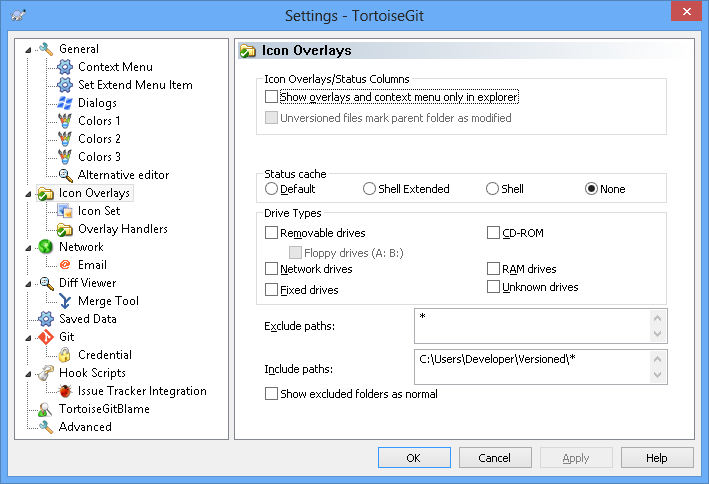
20130820-TortoiseGit-overlay-icons-setti ngs (click to enlarge)

20130820-TortoiseSVN-overlay-icons-setti ngs (click to enlarge)
For all three, there can be various reasons for overlay icons not to show up, varying from wrong configuration to crossing the Windows limit of 15 overlay icons (which is the reason that all three use the same overlay icon set).
I love Beyond Compare very much as a diff/merge tool as it supports to many file and archive formats.
Their support list lists a large number of other tools they integrate with, including many version control systems.
Integration screenshots (click on each to get a larger version):
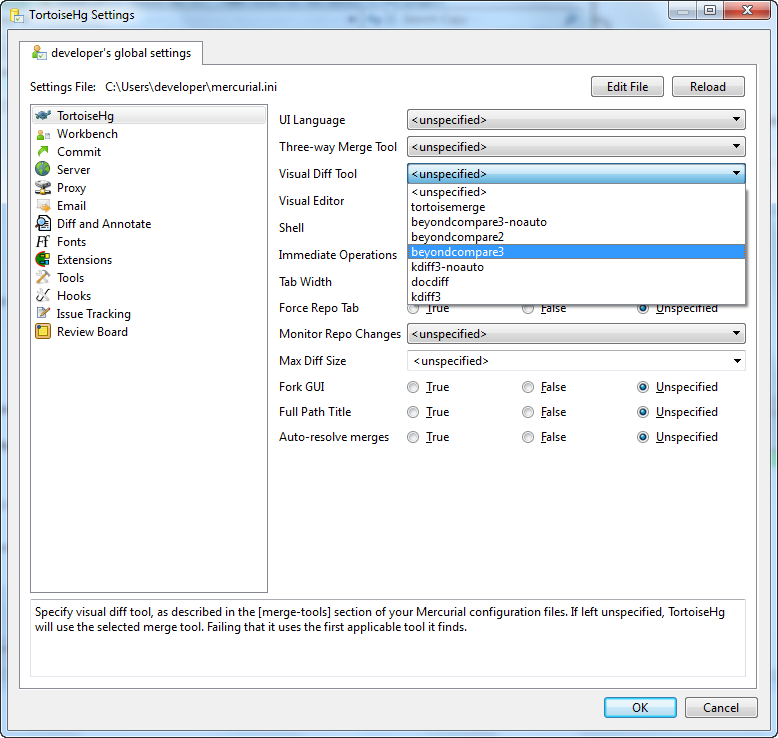
Select “beyondcompare3” from the dropdowns in both “Three-way Merge Tool” and “Visual Diff Tool”
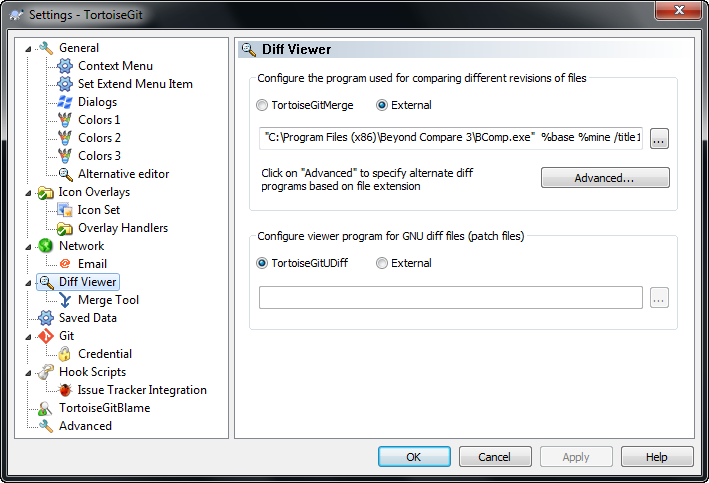
Switch the radiobutton to “External” then fill in the path and parameters.
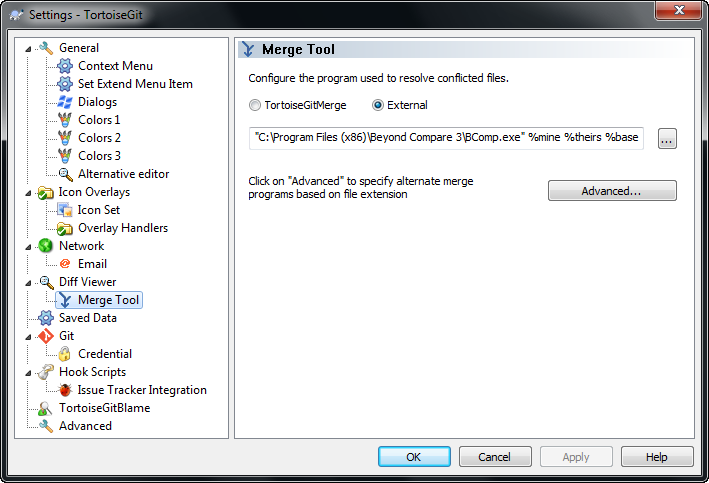
Switch the radiobutton to “External” then fill in the path and parameters.

Switch the radiobutton to “External” then fill in the path and parameters.
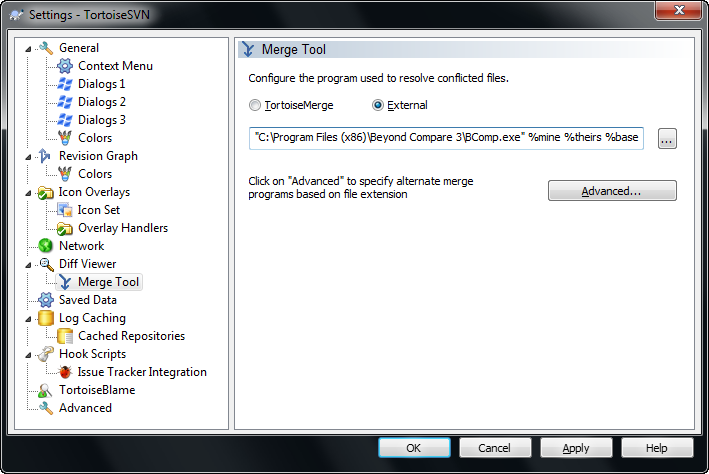
Switch the radiobutton to “External” then fill in the path and parameters.
Line ending conversion
Be careful that you do not accidentally change CRLF line endings into LF ones: Delphi still does not like those. See You Clumsy GIT – DelphiFeeds.com.
Both Mercurial/HG and GIT support multiple upstreams.
I need to put some more research in this though.
Next to Mercurial: The Definitive Guide, there is quite bit of other stuff around version control and open source software at Red Bean, for instance these three books are great:
You use forks when you do not have write access to a public repository. Pull requests than allows you to offer your changes back to the original repository. But what if the original repository changes? You want to sync your fork, right? On BitBucket with HG, this is easy: they offer a sync button. On GitHub with GIT it is a bit more work: you have to sync through your local clone through what is usually called the `upstream` (the original repository), then push the changes back to your fork. GitHub explains this using the command-line tools at Syncing a fork · GitHub Help, and manojlds for TortoiseGit at github – Can I update a forked project, on git, to the original/master copy? – Stack Overflow.
Real-World use of Mercurial with a Team Foundation Server? – Stack Overflow. This explains how to use HG, and how to push/pull from the TFVC. The comments and answers also talk about SVN, and other version control systems.
–jeroen

Posted in .NET, CodePlex, Delphi, Development, DVCS - Distributed Version Control, Encoding, git, Mercurial/Hg, Software Development, Source Code Management, Subversion/SVN, TFS (Team Foundation System), Unicode, Visual Studio 11, Visual Studio 2005, Visual Studio 2008, Visual Studio 2010, Visual Studio and tools | 3 Comments »
Posted by jpluimers on 2013/09/26
Converting SVN repositories to HG isn’t always as straight forward as you want to.
GExperts and GExperts-Formatter succeeded a while ago, but DSharp (a very nice library by Stefan Glienke) failed at first.
It so happens that in the mean time, I switched VM’s to Delphi XE5 with a fresh list of VCS installs:
That was the cause: this new setup caused a new SVN db format for local synced file based SVN repositories that HG cannot not cope with.
It worked fine when I went back to a VM that had this config:
So I won’t forget to keep an eye on progress, I filed this Bug 4043 – HG 2.7.x cannot convert a local file based SVN repository with db format 6 (works fine with db format 4):
HG 2.6.x and 2.7.x cannot convert SVN repositories with db format 6 that SVN 1.8.x defaults to.
(SVN db format list: see http://svn.apache.org/repos/asf/subversion/trunk/subversion/libsvn_fs_fs/structure)
This works fine when performing svnadmin/svnsync on SVN 1.7.5 (they will get a db format 4), but fails when performing svnadmin/svnsync on SVN 1.8.x (they will get a db format 6)
I’ve tried the matrix of SVN versions 1.7.5, 1.8.1 and 1.8.2 versus HG 2.6.2, 2.7 and 2.7. HG consistently fails with db format 6.
The error message you get is this:
file:///C:/Users/developer/Versioned/DSharp.svn does not look like a Subversion repositoryfrom the command here:
C:\Users\developer\Versioned>hg convert --verbose file:///C:/Users/developer/Versioned/DSharp.svn DSharp

file:///C:/Users/developer/Versioned/DSharp.svn does not look like a CVS checkout

file:///C:/Users/developer/Versioned/DSharp.svn does not look like a Git repository

file:///C:/Users/developer/Versioned/DSharp.svn does not look like a Subversion repository

file:///C:/Users/developer/Versioned/DSharp.svn is not a local Mercurial repository

file:///C:/Users/developer/Versioned/DSharp.svn does not look like a darcs repository

file:///C:/Users/developer/Versioned/DSharp.svn does not look like a monotone repository

file:///C:/Users/developer/Versioned/DSharp.svn does not look like a GNU Arch repository

file:///C:/Users/developer/Versioned/DSharp.svn does not look like a Bazaar repository

file:///C:/Users/developer/Versioned/DSharp.svn does not look like a P4 repository

abort: file:///C:/Users/developer/Versioned/DSharp.svn: missing or unsupported repository
Two of my tries that shows success/failure and got me in the right direction:
Success:
This file contains hidden or bidirectional Unicode text that may be interpreted or compiled differently than what appears below. To review, open the file in an editor that reveals hidden Unicode characters.
Learn more about bidirectional Unicode characters
C:\Users\Developer\Versioned>svnadmin create DSharp.svn C:\Users\Developer\Versioned>echo exit 0 1>DSharp.svn\hooks\pre-revprop-change.bat C:\Users\Developer\Versioned>svnsync init file:///C:/Users/Developer/Versioned/DSharp.svn http://delphisorcery.googlecode.com/svn Copied properties for revision 0. C:\Users\Developer\Versioned>svnsync sync file:///C:/Users/Developer/Versioned/DSharp.svn http://delphisorcery.googlecode.com/svn Committed revision 1. Copied properties for revision 1. Transmitting file data ………. … Committed revision 630. Copied properties for revision 630. C:\Users\Developer\Versioned>hg clone https://bitbucket.org/jeroenp/dsharp DSharp.hg no changes found updating to branch default 0 files updated, 0 files merged, 0 files removed, 0 files unresolved C:\Users\Developer\Versioned>hg convert file:///C:/Users/Developer/Versioned/DSharp.svn DSharp.hg scanning source… sorting… converting… 628 Initial directory structure. 627 First version … 1 – refactoring for yield support (renamed DSharp.Collections.Yield.pas to DSharp.Collections.Iterators.pas) 0 – added XE4 packages C:\Users\Developer\Versioned>svn –version svn, version 1.7.5 (r1336830) compiled May 11 2012, 02:21:17 Copyright (C) 2012 The Apache Software Foundation. This software consists of contributions made by many people; see the NOTICE file for more information. Subversion is open source software, see http://subversion.apache.org/ The following repository access (RA) modules are available: * ra_neon : Module for accessing a repository via WebDAV protocol using Neon. – handles 'http' scheme – handles 'https' scheme * ra_svn : Module for accessing a repository using the svn network protocol. – with Cyrus SASL authentication – handles 'svn' scheme * ra_local : Module for accessing a repository on local disk. – handles 'file' scheme * ra_serf : Module for accessing a repository via WebDAV protocol using serf. – handles 'http' scheme – handles 'https' scheme C:\Users\Developer\Versioned>hg –version Mercurial Distributed SCM (version 2.6.2) (see http://mercurial.selenic.com for more information) Copyright (C) 2005-2012 Matt Mackall and others This is free software; see the source for copying conditions. There is NO warranty; not even for MERCHANTABILITY or FITNESS FOR A PARTICULAR PURPOSE. C:\Users\Developer\Versioned>type DSharp.svn\format 5 C:\Users\Developer\Versioned>type DSharp.svn\db\format 4 layout sharded 1000 C:\Users\Developer\Versioned>type DSharp.svn\db\fs-type fsfs C:\Users\Developer\Versioned>type DSharp.svn\db\min-unpacked-rev 0 C:\Users\Developer\Versioned>dir DSharp.svn DSharp.svn\db Volume in drive C has no label. Volume Serial Number is 4665-BAA1 Directory of C:\Users\Developer\Versioned\DSharp.svn 09/26/2013 08:47 AM <DIR> . 09/26/2013 08:47 AM <DIR> .. 09/26/2013 08:47 AM <DIR> conf 09/26/2013 08:55 AM <DIR> db 09/26/2013 08:47 AM 2 format 09/26/2013 08:47 AM <DIR> hooks 09/26/2013 08:47 AM <DIR> locks 09/26/2013 08:47 AM 234 README.txt 2 File(s) 236 bytes Directory of C:\Users\Developer\Versioned\DSharp.svn\db 09/26/2013 08:55 AM <DIR> . 09/26/2013 08:55 AM <DIR> .. 09/26/2013 08:55 AM 4 current 09/26/2013 08:47 AM 22 format 09/26/2013 08:47 AM 5 fs-type 09/26/2013 08:47 AM 1,997 fsfs.conf 09/26/2013 08:47 AM 2 min-unpacked-rev 09/26/2013 08:55 AM 235,520 rep-cache.db 09/26/2013 08:47 AM <DIR> revprops 09/26/2013 08:47 AM <DIR> revs 09/26/2013 08:55 AM <DIR> transactions 09/26/2013 08:55 AM 3 txn-current 09/26/2013 08:47 AM 0 txn-current-lock 09/26/2013 08:55 AM <DIR> txn-protorevs 09/26/2013 08:47 AM 37 uuid 09/26/2013 08:47 AM 0 write-lock 10 File(s) 237,590 bytes 6 Dir(s) 2,377,388,032 bytes free C:\Users\Developer\Versioned> Failure:
This file contains hidden or bidirectional Unicode text that may be interpreted or compiled differently than what appears below. To review, open the file in an editor that reveals hidden Unicode characters.
Learn more about bidirectional Unicode characters
C:\Users\developer\Versioned>svnadmin create DSharp.svn C:\Users\developer\Versioned>echo exit 0 1>DSharp.svn\hooks\pre-revprop-change.bat C:\Users\developer\Versioned>svnsync init file:///C:/Users/developer/Versioned/DSharp.svn http://delphisorcery.googlecode.com/svn Copied properties for revision 0. C:\Users\developer\Versioned>svnsync sync file:///C:/Users/developer/Versioned/DSharp.svn http://delphisorcery.googlecode.com/svn Committed revision 1. Copied properties for revision 1. Transmitting file data ………. … Committed revision 630. Copied properties for revision 630. C:\Users\developer\Versioned>hg clone https://bitbucket.org/jeroenp/dsharp DSharp.hg no changes found updating to branch default 0 files updated, 0 files merged, 0 files removed, 0 files unresolved C:\Users\developer\Versioned>hg convert –verbose file:///C:/Users/developer/Versioned/DSharp.svn DSharp file:///C:/Users/developer/Versioned/DSharp.svn does not look like a CVS checkout file:///C:/Users/developer/Versioned/DSharp.svn does not look like a Git repository file:///C:/Users/developer/Versioned/DSharp.svn does not look like a Subversion repository file:///C:/Users/developer/Versioned/DSharp.svn is not a local Mercurial repository file:///C:/Users/developer/Versioned/DSharp.svn does not look like a darcs repository file:///C:/Users/developer/Versioned/DSharp.svn does not look like a monotone repository file:///C:/Users/developer/Versioned/DSharp.svn does not look like a GNU Arch repository file:///C:/Users/developer/Versioned/DSharp.svn does not look like a Bazaar repository file:///C:/Users/developer/Versioned/DSharp.svn does not look like a P4 repository abort: file:///C:/Users/developer/Versioned/DSharp.svn: missing or unsupported repository C:\Users\developer\Versioned>svn –version svn, version 1.8.1 (r1503906) compiled Jul 22 2013, 19:58:17 on x86-microsoft-windows Copyright (C) 2013 The Apache Software Foundation. This software consists of contributions made by many people; see the NOTICE file for more information. Subversion is open source software, see http://subversion.apache.org/ The following repository access (RA) modules are available: * ra_svn : Module for accessing a repository using the svn network protocol. – with Cyrus SASL authentication – handles 'svn' scheme * ra_local : Module for accessing a repository on local disk. – handles 'file' scheme * ra_serf : Module for accessing a repository via WebDAV protocol using serf. – handles 'http' scheme – handles 'https' scheme C:\Users\developer\Versioned>hg –version Mercurial Distributed SCM (version 2.7) (see http://mercurial.selenic.com for more information) Copyright (C) 2005-2013 Matt Mackall and others This is free software; see the source for copying conditions. There is NO warranty; not even for MERCHANTABILITY or FITNESS FOR A PARTICULAR PURPOSE. C:\Users\developer\Versioned>type DSharp.svn\format 5 C:\Users\developer\Versioned>type DSharp.svn\db\format 6 layout sharded 1000 C:\Users\developer\Versioned>type DSharp.svn\db\fs-type fsfs C:\Users\developer\Versioned>type DSharp.svn\db\min-unpacked-rev 0 C:\Users\developer\Versioned>dir DSharp.svn DSharp.svn\db Volume in drive C has no label. Volume Serial Number is A855-3C2D Directory of C:\Users\developer\Versioned\DSharp.svn 09/25/2013 09:52 PM <DIR> . 09/25/2013 09:52 PM <DIR> .. 09/25/2013 07:38 PM <DIR> conf 09/25/2013 07:44 PM <DIR> db 09/25/2013 07:38 PM 2 format 09/25/2013 07:38 PM <DIR> hooks 09/25/2013 07:38 PM <DIR> locks 09/25/2013 07:38 PM 251 README.txt 2 File(s) 253 bytes Directory of C:\Users\developer\Versioned\DSharp.svn\db 09/25/2013 07:44 PM <DIR> . 09/25/2013 07:44 PM <DIR> .. 09/25/2013 07:44 PM 4 current 09/25/2013 07:38 PM 22 format 09/25/2013 07:38 PM 5 fs-type 09/25/2013 07:38 PM 6,963 fsfs.conf 09/25/2013 07:38 PM 2 min-unpacked-rev 09/25/2013 07:44 PM 232,448 rep-cache.db 09/25/2013 07:38 PM <DIR> revprops 09/25/2013 07:38 PM <DIR> revs 09/25/2013 07:44 PM <DIR> transactions 09/25/2013 07:44 PM 3 txn-current 09/25/2013 07:38 PM 0 txn-current-lock 09/25/2013 07:44 PM <DIR> txn-protorevs 09/25/2013 07:38 PM 37 uuid 09/25/2013 07:38 PM 0 write-lock 10 File(s) 239,484 bytes .
–jeroen
Posted in Delphi, Development, DVCS - Distributed Version Control, Mercurial/Hg, Software Development, Source Code Management, Subversion/SVN | Tagged: command line tools, software, technology | 1 Comment »
Posted by jpluimers on 2013/09/26
I totally forgot to blog about the Annotate feature that has been introduced in Visual Studio 2010 (lots of Tortoise SVN and GIT users will know it as blame).
It is a view of a historic (can be the current) version of a source file, adding before each line a note containing the revision number and author of that line.
Great to find out when a particular change was introduced and by who.
Here is the MSDN documentation about annotate: View File Changes Using Annotate.
The not so good feature that you can only use this feature from the Source Control Explorer window, not from any other part of Visual Studio (unlike History, Compare, etc).
If you have an older version of Visual Studio, then use this:
Annotate (also known as blame) is now a power toy – Buck Hodges – Site Home – MSDN Blogs.
–jeroen
via: visual studio – TFS annotate/blame summary report for a project – Stack Overflow.
Posted in .NET, Development, Software Development, Source Code Management, TFS (Team Foundation System), Visual Studio 11, Visual Studio 2010, Visual Studio and tools | Leave a Comment »
Posted by jpluimers on 2013/08/27
The Dutch stop of the RAD Studio In Action LIVE! tour is on September 7th.
The venue location is via Holiday Inn Leiden Hotels: Haagse Schouwweg 10, 2332 KG Leiden, The Netherlands.
It is close to the advertised “Amsterdam Netherlands” (about half an hour drive), close to the A44 highway and close enough to public transport. And it is indeed on Saturday September 7, 2013
Posted in Android, Android Devices, CodePlex, Conferences, Delphi, Delphi XE4, Delphi XE5, Development, DVCS - Distributed Version Control, Event, FreePascal, git, iOS Development, Lazarus, Mercurial/Hg, Mobile Development, Power User, Software Development, Source Code Management, SourceForge, Subversion/SVN, TFS (Team Foundation System) | Leave a Comment »
Posted by jpluimers on 2013/07/25
Over the last month or so, two incompatibilities between SVN and CodePlex have risen. I’m not sure which side caused it (see below for the error messages), who will fix it and when. Some details I bumped into.
CodePlex knows about both issue. I’m not sure the SVN team does yet about the second issue.
If you are using CodePlex with SVN/SubVersion, then you shoud stick to SVN versions lower than 1.8, or you will run into the error messages below.
So:
You can find older 1.7.x versions of SVN here:
Posted in CodePlex, Development, Source Code Management, Subversion/SVN, TFS (Team Foundation System) | Tagged: software, technology | 17 Comments »
 The Wiert Corner - irregular stream of stuff