The Wiert Corner – irregular stream of stuff

Jeroen W. Pluimers on .NET, C#, Delphi, databases, and personal interests

  • My badges

  • Twitter Updates

  • My Flickr Stream

  • Pages

  • All categories

  • Enter your email address to subscribe to this blog and receive notifications of new posts by email.

    Join 1,861 other subscribers

Archive for the ‘Conference Topics’ Category

In life, including working life “slow is smooth, and smooth is fast.”

Posted by jpluimers on 2022/01/26

I’ve been agile all my (not just programming) life, and only figured out this century that there is a vocabulary for that, containing the words agile, extreme programming, feature-driven and many more.

Now with the passing of the years, I also realise I have been trying to do “slow and smooth” all my life, and that with age (and less adrenaline) this becomes easier and easier.

I think “slow and smooth” goes well with “agile”, specially when you keep the focus on “doing things right” (and trying to do them right the first time, and keeping it right in incremental steps).

It often reminds me of the Dutch phrase “heeft u haast, gaat dan zitten” which often is attributed to be part of the many Chinese proverbs. It roughly translates to “when in a hurry, take a seat”, and suggests to take a step back and think when under pressure. Maybe this English version of a Chinese proverb comes close: “When you are in a hurry, the horse holds back”.

For is it is intriguing that mainly Chinese, but in a broader sense Asian, proverbs play such an important role, whereas Western proverbs get less and less important. Informal knowledge seems to diminish in Western culture, which I think is a pity.

Maybe all these vocabulary things that started  to make sense way after my puberty also have to do with being diagnosed autistic at 50. That too started a lot of puzzle-pieces to suddenly make sense.

Below the links that inspired me to make this blog post in the first place:

–jeroen

Read the rest of this entry »

Posted in Agile, Conference Topics, Conferences, Development, Event, LifeHacker, Power User, Software Development | Leave a Comment »

When MySQL characterset ‘utf’ does not allow you to enter some Unicode code points

Posted by jpluimers on 2022/01/06

Contrary to what many believe is that MySQL utf8 is not always full blown UTF-8 support, but actually utf8mb3, which has been deprecated for a while now.

Only utf8mb4 will give you full blown UTF-8 support.

This when someone reminded me of this in a Delphi application:

When I insert :joy: emoji into mysql varchar filed I got an error :
#22007 Incorrect string value: '\xF0\x9F\x98\x82' for column 'remarks' at row 1

database charset is utf8

Note that the :joy: emoji is 😂 and has Unicode code point U+1F602 which is outside the basic multilingual plane.

See:

–jeroen

Posted in Conference Topics, Conferences, Database Development, Delphi, Development, Encoding, Event, MySQL, Software Development, UTF-8, UTF8 | Leave a Comment »

media.ccc.de – No, we won’t have a video call for that! (Communications in distributed teams by Florian Haas)

Posted by jpluimers on 2021/12/29

Not just for during the Covid times: the helpful examples and thorough explanation by Florian makes this a must-watch video for anyone wanting to participate in distributed teams.

[Wayback] media.ccc.de – No, we won’t have a video call for that!

The above link has downloads for both Video (mp4 and WebM formats) and audio (mp3 and opus formats). I found the video easier to digest.

If you want to watch it on-line, there is the YouTube video (below the signature) which has closed captions as well.

Kristian Köhntopp made a [Wayback/Archive.is] short intro and abstract on Twitter:

https://xahteiwi.eu/resources/presentations/no-we-wont-have-a-video-call-for-that/

Exactly one year ago, the office building I was working from every work day caught fire, and was closed for a month for renovation.

On the day of the planned reopening, my employer declared Covid emergency and asked everybody to work from home.

So that is how we work since then, and we will continue to do so until at least October.

Not too much has changed, though. When the new https://oosterdokseiland.nl/en/ opens, there will be probably a lot of pain between the people who go to the office to work and those who don’t.

The talk above by @xahteiwi explains in a nice way how to work properly remote first:

  • Writing over speaking.
  • Asynchronous over synchronous.
  • Structured communication over free form.

Some things require a free form video chat, but even then, set an agenda and write minutes.

Florian also explains when to use what, and what situations would require a synchronous wide-band channel, but most of them are exceptional, and most of the time you could execute better using structured, written, async mode comms.

Having said that, if you want his talk as a briefing, here is a Youtube: https://www.youtube.com/watch?v=NVnci3tyDa4

First watch the video, then read the full speaker notes at [Wayback] No, We Won’t Have a Video Call for That! – xahteiwi.eu “My talk from FrOSCon 2020, Cloud Edition.”

More on-line:

–jeroen

Read the rest of this entry »

Posted in Agile, Conference Topics, Conferences, Development, Event, LifeHacker, Power User, Software Development | 1 Comment »

Delphi: workaround doing math with generic types preventing “E2015 Operator not applicable to this operand type” with TValue (as there is no way to constraint the generic type to be floating point or ordinal)

Posted by jpluimers on 2021/12/14

A while ago on Facebook (it’s a private group, so you cannot see the posts unless you both have a Facebook account and are member of the group), [Archive.is] Niels Tjørnhøj-Thomsen (coming from a C++ templates background) asked why the below method would throw a E2015 Operator not applicable to this operand type in the complex expression:

function TAxis<t>.Calc(const AScalar: T): single;
begin
  Result := fStart + ( ( ( AScalar - fMin ) / fRange ) * fExtent );
end;

The type itself was very simple:

TAxis<T> = record
  fMin, fMax, fRange: T;
  fStart, fEnd, fExtent: single;
  function Calc( const AScalar: T ): single;
end;

He used these small example specialisations that put me on the wrong foot, as the order was TDateTime followed by single:

var
  rXAxis: TAxis<TDateTime>;
  rYAxis: TAxis<single>;

So at first I thought this might be caused by TDateTime to be defined in the System unit as a typed type:

type
  TDateTime = type Double;

It wasn’t.

Splitting the code in 4 lines with assignments of single expression operations would make the error appear in all expressions.

Casting parts of the expression to simple would not help either.

A small test program [Archive.is] might put you, like me, on the wrong foot because the specialisation is in the same source file as the generic type:

program DelphiMathAndGenerics;

type
  TAxis<T> = record
    fMin, fMax, fRange: T;
    fStart, fEnd, fExtent: single;
    function CalcCasted( const AScalar: T ): single;
    function CalcPlain( const AScalar: T ): single;
  end;

function TAxis<T>.CalcCasted(const AScalar: T): single;
var
  Offset: single;
  NormalisedOffset: single;
  ScaledOffset: single;
begin
  // First 2 lines give the same error: E2089 Invalid typecast
  Offset := single(AScalar) - fMin;
  NormalisedOffset := Offset / single(fRange);
  ScaledOffset := NormalisedOffset * fExtent;
  Result := fStart + ScaledOffset;
end;

function TAxis<T>.CalcPlain(const AScalar: T): single;
var
  Offset: T;
  NormalisedOffset: T;
  ScaledOffset: T;
begin
  // All 4 lines give the same error: E2015 Operator not applicable to this operand type
  Offset := AScalar - fMin;
  NormalisedOffset := Offset / fRange;
  ScaledOffset := NormalisedOffset * fExtent;
  Result := fStart + ScaledOffset;
end;

var
  rXAxis: TAxis<TDateTime>;
  rYAxis: TAxis<single>;

begin
end.

Splitting this in two files [Archive.is], a AxisUnit unit having only the TAxis<T> type, and a main program (even without having the specialisations) shows that even the unit itself would not compile.

This shows a major difference between Delphi (and similar C#) generics and C++ templates:

  • generics are compiled and fully verified at the generic stage
  • templates are pre-processed, then finally verified at specialisation stage

A solution would be that Delphi could constraint the generic type T into something like float or ordinal so the compiler would know that more operators are allowed in the code. But alas, Delphi – like C# – has a very limited number of constraints (C# only would allow a constraint for enumerations in version 7.3): Delphi Constraints in Generics – RAD Studio XE documentation wiki.

This StackOverflow question is very similar, and has the same answer (generics in Delphi work differently than templates in C++): [Source] templates – Arithmetic operations with generic types in Delphi – Stack Overflow

I’m new in Delphi. For a project required by my company, I need to translate some code from our existing C++ classes to Delphi. Some of these classes are templates, such …

Workaround: use the TValue.From<T>() function

There is a workaround though, but it is slow, as you need to convert from the generic T type to the actual (in this case floating point) type you can apply the operators on.

This is possible with the (Delphi 2010 introduced) TValue.From<T>() method which returns a TValue record. That TValue record has instance methods like AsExtended to extract or convert the embedded value as a specific type.

Initially, [Wayback] Delphi 2010 Rtti.TValue documentation had the From method signature wrong, maybe because of many wiki and blog HTML editors kill angle bracket pairs < and > in code blocks:

function From(const Value: T): TValue; static;

Since the [Wayback] Delphi XE System.Rtti.TValue documentation, the From method signature is fixed (see the bold parts):

class function From<T>(const Value: T): TValue; static;

With the [Wayback] Delphi XE2 Rtti.TValue documentation, the unit got renamed from Rtti into System.Rtti and has not changed further.

When using TValue.From<T>(), the AxisUnit becomes this:

unit AxisUnit;

interface

type
  TAxis<T> = record
    fMin, fMax, fRange: T;
    fStart, fEnd, fExtent: single;
    function Calc( const AScalar: T ): single;
  strict private
    function AsSingle(const Value: T): single;
  end;

implementation

uses
  System.Rtti;

function TAxis<T>.AsSingle(const Value: T): single;
begin
  Result := TValue.From<T>(Value).AsExtended
end;

function TAxis<T>.Calc(const AScalar: T): single;
var
  Offset: single;
  NormalisedOffset: single;
  ScaledOffset: single;
begin
  Offset := AsSingle(AScalar) - AsSingle(fMin);
  NormalisedOffset := Offset / AsSingle(fRange);
  ScaledOffset := NormalisedOffset * fExtent;
  Result := fStart + ScaledOffset;
end;

end.

–jeroen

Read the rest of this entry »

Posted in .NET, C#, Conference Topics, Conferences, Delphi, Development, Event, Software Development | Leave a Comment »

The IDEA project – an ongoing series of nonverbal algorithm assembly instructions

Posted by jpluimers on 2021/12/10

I wonder how many new algorithms were added, as the first 6 were really impressive: [WayBackIDEA on Twitter: “Excited to announce the IDEA project – an ongoing series of nonverbal algorithm assembly instructions: https://t.co/zOAyfOAv3l… https://t.co/epQfBBdzdF”

While originally scheduling this, these were added:

Read the rest of this entry »

Posted in Algorithms, Conference Topics, Conferences, Development, Event, IKEA hacks, LifeHacker, Power User, Software Development | Leave a Comment »

On TStrings (and TStringList) sorting: what the default Sort behaviour is and how to change sorting order

Posted by jpluimers on 2021/12/07

Because I need this eventually, here the full quote of my answer in [Wayback] sorting – How can I get TStringList to sort differently in Delphi – Stack Overflow (The default Sort behaviour is to accommodate i18n sorting in natural order):

Read the rest of this entry »

Posted in Conference Topics, Conferences, Delphi, Development, Event, Software Development, Undocumented Delphi | Leave a Comment »

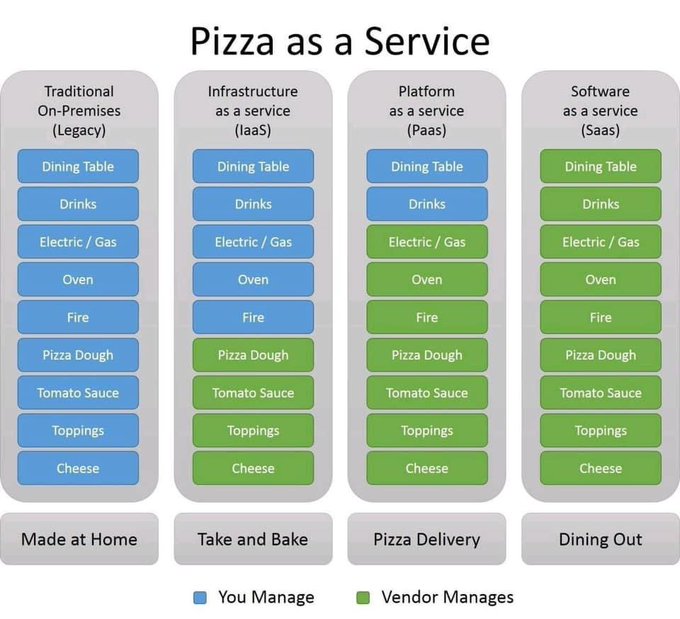
Katie Anderson on Twitter: “Saw this on Facebook and it’s my new favorite PaaS (Pizza as a Service) breakdown”

Posted by jpluimers on 2021/11/30

Legacy/IaaS/PaaS/SaaS explained by “Pizza as a service”: from home made, take and bake, pizza delivery to full dining out.

[Archive.is] Katie Anderson on Twitter: “Saw this on Facebook and it’s my new favorite PaaS (Pizza as a Service) breakdown https://t.co/INKKG9UOAK” / Twitter

–jeroen

Read the rest of this entry »

Posted in Cloud, Conference Topics, Conferences, Development, Event, Infrastructure, Software Development, Systems Architecture | Leave a Comment »

DUnit with FastMM: Detecting memory leaks in individual tests.

Posted by jpluimers on 2021/08/05

Steps:

  1. Add the conditional define FASTMM to your project
  2. Ensure you have $(BDS)\source\DUnit\src  in your search path in your project (as otherwise Delphi will pick the pre-built TestFramework.dcu file which was compiled without the FASTMM conditional define)
  3. Inside a test method, or the SetUp method of a class, set FailsOnMemoryLeak to True
  4. If the SetUp method of the class allocates memory, ensure the TearDown de-allocates it. Otherwise you will have leaks:
    • DUnit will check memory differences from the start of the SetUp until the end of the TearDown
    • DUnit will not take into account what is freed in the destructor or by automatic finalization after the destructor!
  5. Re-build your application (otherwise the DUnit TestFramework unit will not take into account the FASTMM conditional define)

Depending in your test framework, FailsOnMemoryLeak might be by default be False or True:

  • TestInsight by default has FailsIfMemoryLeaked set to True for the root test suite (which is then applied to FailsOnMemoryLeak of any test method).
    procedure RunRegisteredTests(const baseUrl: string);
    var
      suite: ITestSuite;
      result: TTestResult;
      listener: ITestListener;
    begin
      suite := RegisteredTests;
      if not Assigned(suite) then Exit;
      result := TTestResult.Create;
      result.FailsIfNoChecksExecuted := True;
      result.FailsIfMemoryLeaked := True;
      listener := TTestInsightListener.Create(baseUrl, suite.CountEnabledTestCases);
      result.AddListener(listener);
      try
        suite.Run(result);
      finally
        result.Free;
      end;
    end;
  • Console DUnit runners (Text, or XML) by default have FailsIfMemoryLeaked set to False.
  • GUI DUnit runner has FailsIfMemoryLeaked depending on the options:

DUnit source differences

Note that recent Delphi versions (I think XE and up) ship with almost the same sources as https://sourceforge.net/code-snapshots/svn/d/du/dunit/svn/dunit-svn-r44-trunk.zip, with these Embarcadero changes:

  • all SVN timestamps are based on time zone -0400 instead of +0000:
    • $Date: 2008-04-24 07:59:47 -0400 (Thu, 24 Apr 2008) $
    • $Date: 2008-04-24 11:59:47 +0000 (Thu, 24 Apr 2008) $
  • Embarcadero removed:
    • all comment lines having TODO in them
    • all files of types .dof, .cfg, and.wmz
    • the files NGUITestRunner.nfm and NGUITestRunner.pas
    • the file /etc/usermap
    • the directory trees /private and /projects
  • Embarcadero changed
    • file /src/versioninfo.res from 9.3.0 to 9.2.1 (which is odd, as all files are from 9.3.0)
    • unit TextTestRunner to support:
      • CLR (used last in Delphi 2007)
      • FailureCount
      • ErrorCount
      • IndentLevel
      • PrefixChars
      • conditional defines ADDITIONAL_INFO, BASIC_INFO
      • output of UnitName
    • unit TestExtensions to support:
      • CLR (used last in Delphi 2007)
      • conditional defines ANDROID_FIXME and LINUX
      • compiler directive LEGACYIFEND
    • GUITestRunner.dfm to have ResultsView: TListView property Height value 45 instead of 39
    • the below methods to use ReturnAddress in stead of CallerAddr:
      • TGUITestCase.FindControl
      • TGUITestCase.Click
      • TGUITestCase.EnterKeyInto
      • TGUITestCase.EnterTextInto
      • TGUITestCase.Show
      • TGUITestCase.CheckTabTo overloads
      • TGUITestCase.CheckFocused overloads
      • TGUITestCase.CheckEnabled overloads
      • TGUITestCase.SetFocus overloads
      • TGUITestCase.CheckVisible overloads
    • method TGUITestRunner.RunTest
      • from
        class procedure TGUITestRunner.RunTest(test: ITest);
        begin
          with TGUITestRunner.Create(nil) do
          begin
           try
            suite := test;
            ShowModal;
           finally
            Free;
           end;
          end;
        end;
      • to
        class procedure TGUITestRunner.RunTest(test: ITest);
        var
          GUI :TGUITestRunner;
        begin
          Application.CreateForm(TGUITestRunner, GUI);
          with GUI do
          begin
           try
            suite := test;
            ShowModal;
           finally
            Free;
           end;
          end;
        end;
    • unit GUITestRunner:
      • from
        procedure RunTest(test: ITest);
        begin
          with TGUITestRunner.Create(nil) do
          begin
            try
              Suite := test;
              ShowModal;
            finally
              Free;
            end;
          end;
        end;
      • to
        procedure RunTest(test: ITest);
        var
          GUI :TGUITestRunner;
        begin
          Application.CreateForm(TGUITestRunner, GUI);
          with GUI do
          begin
            try
              Suite := test;
              if Suite <> nil then
                ShowModal;
            finally
              Free;
            end;
          end;
        end;
      • method TGUITestRunner.SetUp not to set SubItems[0] := ''; when there is no test suite.
      • method TGUITestRunner.FormCreate to use FormatSettings.TimeSeparator instead of TimeSeparator.
  • unit TestFramework to support:
    • HPPEMIT
    • LEGACYIFEND
    • CLR and _USE_SYSDEBUG_
    • AUTOREFCOUNT
    • NEXTGEN
    • ANDROID
    • the RunCountAttribute and RunCount support
    • a CheckEquals overload for uint64
    • a CheckNotEquals overload for TCharArray
    • CheckCircularRef
    • CompareFloatRelative
    • NotSameErrorMessage with WideString arguments instead of string
    • a TestDataDir function
    • ReturnAddress for older compilers
  • a new unit DUnitTestRunner
  • a new Makefile file
  • a new UnitTests.log file

–jeroen

Posted in Conference Topics, Conferences, Delphi, Development, DUnit, Event, FastMM, Software Development, TestInsight | 1 Comment »

“Unexpected Memory Leak” after “MyTestApplication.exe: Memory Leak Detected”

Posted by jpluimers on 2021/07/28

Sometimes after a regular FastMM memory leak test report you get a dialog like this:

---------------------------
Unexpected Memory Leak
---------------------------
An unexpected memory leak has occurred. The unexpected small block leaks are:

61 - 68 bytes: Unknown x 1
---------------------------
OK   
---------------------------

The normal FastMM memory leak reporting dialog looks like this:

---------------------------
MyTestApplication.exe: Memory Leak Detected
---------------------------
...
Note: Memory leak detail is logged to a text file in the same folder as this application. To disable this memory leak check, undefine "EnableMemoryLeakReporting".
---------------------------
OK   
---------------------------

Searching for “Unexpected Memory Leak” in RTL or FastMM code did not reveal results, but that might be me not doing a proper search.

One big problem is that the regular memory leak dialog is being suppressed by setting SuppressMessageBoxes to True (see for instance my blog post Application shutdown: wait for all threads to terminate or not? or [WayBack] delphi – Generating a FASTMM report WITHOUT the shutdown dialog – Stack Overflow).

However the “Unexpected Memory Leak” message box is always shown.

Research

Location of the error message caption

  • GETMEM.INC has an identifier LeakMessageTitle:
    LeakMessageTitle: _PAnsiChr = 'Unexpected Memory Leak';
  • Unlike FastMM4.pas, GETMEM.INC does not take into account SuppressMessageBoxes.
  • Like FastMM4.pas, GETMEM.INC does take into account ReportMemoryLeaksOnShutdown.

More on GETMEM.INC: [WayBack] delphi – Reporting memory leaks on shutdown with a console application – Stack Overflow

Versioned FastMM4.pas.

Complicating the hunt

Not all allocations go via the memory manager. A complicating factor is that:

  • ALL TMonitor.Create allocations go through SysAllocMem:
class function TMonitor.Create: PMonitor;
begin
  if CacheLineSize = 0 then
    AtomicExchange(CacheLineSize, GetCacheLineSize);
  if (CPUCount > 1) and (FDefaultSpinCount = 0) then
    AtomicExchange(FDefaultSpinCount, 1000);
  if CacheLineSize > SizeOf(Result^) then
    Result := SysAllocMem(CacheLineSize)
  else
    Result := SysAllocMem(SizeOf(Result^));
  Result.FSpinCount := FDefaultSpinCount;
end;
  • ALL TMonitor.Destroy deallocations go through SysFreeMem:
procedure TMonitor.Destroy;
begin
  if (MonitorSupport <> nil) and (FLockEvent <> nil) then
    MonitorSupport.FreeSyncObject(FLockEvent);
  SysFreeMem(@Self);
end;

Debugging this is easiest to set a breakpoint in the FastMM4.pas finalization section enabling a breakpoint group that has breakpoints on these methods inside GETMEM.INC:

  • function SysGetMem(Size: NativeInt): Pointer;
  • function SysFreeMem(P: Pointer): Integer;
  • function SysReallocMem(P: Pointer; Size: NativeInt): Pointer;
  • function SysAllocMem(Size: NativeInt): Pointer;

For inspecting for instance an asm construct like TSmallPoolBlockPoolHeader[edx], use a conversion PSmallBlockPoolHeader(Pointer(EDX))^,r

Poor mans shotgun approach

This will hide all the SysAllocMem related leaks:

unit FastMM4WrapperUnit;

interface

{$ifdef UseFastMM4}
uses
  FastMM4,
  FastMM4Messages;
{$endif UseFastMM4}

implementation

initialization
//
finalization
// Disable GETMEM.INC reports that neglect SuppressMessageBoxes and NoErrMsg; this will effectively hide the leak as GETMEM.INC also does not write the leaks to a log file
{$ifdef UseFastMM4}
  if SuppressMessageBoxes then
  begin
    {$WARN SYMBOL_PLATFORM OFF} NoErrMsg := True {$WARN SYMBOL_PLATFORM ON}; // no ShowMessage from the RTL (except for memory leaks)
    ReportMemoryLeaksOnShutdown := False; // No ShowMessage from the RTL in the GETMEM.INC teardown
  end;
{$endif UseFastMM4}
end.

IsConsole: needs linker option

Note that I tried embedding this in the then portion, but enabling IsConsole fails:

    IsConsole := True; // can only force run-time error messages to be written to the console if the "Project/Options/Linking/Generate console application" is set.

The reason is that this does not allocate a console handle, so you really need to ensure the linker has allocated a console for you by enabling Project/Options/Linking/Generate console application (or option DCC_ConsoleTarget in the .dproj file)

For more details, see my post console – When is System.IsConsole true in Delphi? – Stack Overflow.

–jeroen

Posted in Conference Topics, Conferences, Delphi, Development, Event, FastMM, Software Development | Leave a Comment »

console – When is System.IsConsole true in Delphi? – Stack Overflow

Posted by jpluimers on 2021/07/22

Some highlights from [WayBack] console – When is System.IsConsole true in Delphi? – Stack Overflow:

  • Project/Options/Linking/Generate console application and {$APPTYPE CONSOLE} are two separate things. – [WayBack] Andreas Rejbrand.
  • The -cc commandline parameter for dcc32.exe (which could be in your ProjectX.cfg file!) is equivalent to “Generate console application):

    Found it: the executable has been created using dcc32.exe and the dpr / cfg file, the cfg contains a line

    -cc

    which creates a console application. – [WayBack] mjn

  • Note that in Delphi XE2, OSX applications can not use this variable as it is always true. See QC Entry 98956 and Why Does My OSX FireMonkey App Think It Is a Console App ? – [WayBack] mjn

A few notes I have found out myself

The linker option Project/Options/Linking/Generate console application” is the same as “DCC_ConsoleTarget” in the .dproj file:

    <PropertyGroup Condition="'$(Base_Win32)'!=''">
        <DCC_ConsoleTarget>true</DCC_ConsoleTarget>
    </PropertyGroup>

Even setting IsConsole to True does not allocate a new console, so the STD_OUTPUT_HANDLE handle does not work!

The below method in the System unit, then does not show output:

procedure WriteErrorMessage;
{$IFDEF MSWINDOWS}
var
  Dummy: Cardinal;
begin
  if IsConsole then
  begin
    with TTextRec(Output) do
    begin
      if (Mode = fmOutput) and (BufPos > 0) then
        TTextIOFunc(InOutFunc)(TTextRec(Output));  // flush out text buffer
    end;
    // Leave #0 off end of runErrMsg
    WriteFile(GetStdHandle(STD_OUTPUT_HANDLE), @runErrMsg, Sizeof(runErrMsg) - 1, Dummy, nil);
    WriteFile(GetStdHandle(STD_OUTPUT_HANDLE), @sLineBreak[1], 2, Dummy, nil);
  end
  else if not NoErrMsg then
    MessageBoxA(0, runErrMsg, errCaption, 0);
end;

For console output, you have to enable the linker option DCC_ConsoleTarget allocates a console (if not yet allocated), enables the “STD_OUTPUT_HANDLE” handle, and sets IsConsole to True.

–jeroen

Posted in Conference Topics, Conferences, Delphi, Development, Event, Software Development | Leave a Comment »