The default folder-merge behavior in Mac OS X is to erase the existing folder, deleting all its files rather than offering to merge them intelligently. Windows and Linux file managers have offered folder-merging for decades, but Macs still don’t.
The Terminal on Mac OS X / OS X / MacOS is very much like a Linux terminal, but there are also a lot of differences especially with keyboard, tab and process handling.
[WayBack] GitHub – dschmenk/apple2pi: Apple II client/server for Raspberry Pi: hybrid computer of a Raspberry Pi inside an Apple II (either ][, or ][+, or //e) so the Apple II can be a front-end to the Raspberry Pi which then can run an Apple IIGS emulator, talk to the Apple II storage hardware and much more.
[WayBack] How to Run Native tvOS Browser on Your Apple TV: If you want to run native tvOS browser on Apple TV, there is a hack developed by a Dutch developer. This hack uses Apple’s private API based on UIWebView class.
Limiting to only Apple TV 4, another solution is also possible:
However the last solution is not a real web browser, so it does not allow a layout I’m using for the calendar, or actually two calendars:
weekly calendar on the left so my brother sees his detailed activities for the upcoming days
monthly calendar on the top right for an overview of the past and upcoming weeks
three weather frames on the bottom right with two weather radars from different sources and a weather overview for the upcoming days
The reason I need this is because my brother is mentally retarded having problems with abstract concepts like relative time and scheduling. Like me he is also easily distracted and not good at repeating tasks. So looking at a schedule at least once a day is tough for him.
He is very good at concrete topics, especially ones he can put to practice right away like “will it rain on my way to work”. That makes him look at this web page in the first place.
Currently this calendar is shown on a monitor by a Raspberry Pi attached to it.
Why the effort? I needed an as recent as possible youtube-dl working on as many sites as possible because of some work preparation.
The first link is very important because brew versions and alternatives have stopped working some 6 years ago, even though they turn up high on Google searches for brew install specific version. Hence the quote from the first link:
Installing software packages on Mac is very easy with homebrew. You typically get the latest version, however often in production you do not have the latest version of a software package. Another use case is when you upgrade to the latest and you find out there is bug which blocks you doing something. In this case you would like to downgrade to the previous version until the bug is fixed.In both cases you need to install a specific version of a software package with homebrew on your Mac, which tends to be not that trivial. There is a lot of discussion about this on stackoverflow but some of them are outdated based on brew versions which is not available anymore.
The main reason: “to change the name, double-click, then type a new name”
I needed this to specify A0 size, in inches, which was hard to find exact dimensions with more than 1 decimal digit, but luckily- unlike ISO 216 – Wikipedia:
[WayBack] The A4 paper size | dimensions, usage & alternatives: DIN A4 measures 210 × 297 millimeters or 8.27 × 11.69 inches. In PostScript, its dimensions are rounded off to 595 × 842 points. Folded twice, an A4 sheet fits in a C6 size envelope (114 × 162 mm).
[WayBack] The A6 paper size | dimensions, usage & alternatives: DIN A6 measures 105 × 148 millimeters or 4.13 × 5.83 inches. In PostScript, its dimensions are rounded off to 298 × 420 points. The matching envelope format is C6 (114 × 162 mm).
If you want to create a document that has a unique size, such as an envelope or card, first see if the paper size appears in the Paper Size pop-up menu. If not, you can create your own custom paper size. Custom paper sizes aren’t available for some printers or for all apps.
Note: The following options might not be available for your printer or app. If these instructions differ from what you see onscreen, refer to the documentation that came with the app you’re using.
Choose File > Print. If you see a Show Details button, click it to show all available options.
Click the Paper Size pop-up menu, then choose Manage Custom Sizes.
Click the Add button to add a new paper size, then specify the paper size you want.
To create a new paper size based on an existing size, select a paper size in the list, then click Duplicate.
To print to a custom paper size, choose it from the Paper Size pop-up menu in the Print dialog (choose File > Print). To set a document size to a custom paper size, choose it from the Paper Size pop-up menu in the Page Setup dialog (choose File > Page Setup).
Tip: If a document is printing with incorrect margins or clipped text, try this: click the Non-Printable Area pop-up menu, choose User Defined, then enter zero for the nonprintable margins. In some cases this allows the document margins to print as expected.
You could go the homebrew way, but that means your system will have two Python installations usually causing a nightmare of path dependency orders. In addition, homebrew puts you on the wrong foot, so:
DO NOT DO THIS!
# brew install pip
Error: No available formula with the name "pip"
Homebrew provides pip via: `brew install python`. However you will then
have two Pythons installed on your Mac, so alternatively you can install
pip via the instructions at:
  https://pip.readthedocs.io/en/stable/installing/



 to add a new paper size, then specify the paper size you want.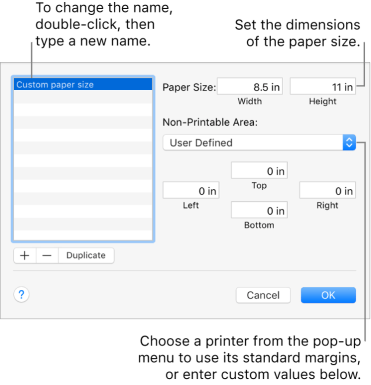


 The Wiert Corner - irregular stream of stuff