


After [WayBack] 20 years of Google: [WayBack] 20 things you didn’t know you could do with Search: Read the rest of this entry »
Archive for the ‘GoogleSearch’ Category
20 things you didn’t know you could do with Search
Posted by jpluimers on 2018/09/20

Posted in Google, GoogleSearch, Power User | Leave a Comment »
When Google Search returns one link twice in the results, thinking it was published on two different dates.
Posted by jpluimers on 2018/09/13
I laughed when https://www.google.com/#q=visual%20studio%20code%20indent%20settings%20per%20file%20type got me the first link twice (see below screenshot).
But I was glad that that link to [WayBack] visual studio code – How to set per-filetype tab size? – Stack Overflow.
This one:
- pointed me at [WayBack] Editor Config for VS Code – Visual Studio Marketplace “Extension for Visual Studio Code – DEPRECATED – See Read Me for more information”
- which got me to [WayBack] GitHub – editorconfig/editorconfig-vscode: EditorConfig extension for Visual Studio Code
- that allows to specify [WayBack] EditorConfig types of configuration files:
EditorConfig is a file format and collection of text editor plugins for maintaining consistent coding styles between different editors and IDEs.
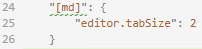
In addition, it taught me how to configure the settings.json with md specific settings, which – despite the IDE indicating the JSON is invalid – just works: markdown indentation is now 2 character positions.
    "[md]": {
      "editor.tabSize": 2
    }

The search result:
Share this:

Posted in .NET, Chrome, Development, Google, GoogleSearch, Power User, Software Development, Visual Studio and tools, vscode Visual Studio Code | Leave a Comment »
Google URLs with funny results
Posted by jpluimers on 2018/02/22
https://www.google.com/search?q=blink+html
https://www.google.com/search?q=askew
https://www.google.com/search?q=recursion
Share this:

Posted in Fun, Google, GoogleSearch, Power User | Leave a Comment »
seo – How to request Google to re-crawl my website? – Stack Overflow
Posted by jpluimers on 2017/12/25
[WayBack] seo – How to request Google to re-crawl my website? – Stack Overflow
TL;DR:
- For a single page recrawl use http://www.google.com/addurl/ which forces you to login, then brings you to https://www.google.com/webmasters/tools/submit-url where you have to prove you’re not a robot.
- For a recrawl of a (selection) of the site at https://www.google.com/webmasters/tools/home by adding a sitemap list via https://www.google.com/webmasters/tools/sitemap-list or “fetch as Google” at https://www.google.com/webmasters/tools/googlebot-fetch
Some links that help you create a sitemap.xml file:
- [WayBack] sitemaps.org – Protocol
- [WayBack] Generate google sitemap in command line – BASH | www.nowakowskig.com
- [WayBack] how to create an XML sitemap using wget and shell script – lost saloon
- [WayBack] Shell Script To Generate Mediawiki Wiki Software Google Sitemap
–jeroen
Share this:
Posted in Google, GoogleSearch, Power User | Leave a Comment »
Droste effect… best torrent sites – Google Search
Posted by jpluimers on 2017/07/11
Likely the Droste effect won’t last long: best torrent sites – Google Search and https://www.google.com/#q=best%20torrent%20sites both give this list at the top and a recursive link about stories with the search links at the bottom.
- https://www.google.com/search?q=1337x
- https://www.google.com/search?q=Rarbg
- https://www.google.com/search?q=The+Pirate+Bay
- https://www.google.com/search?q=Torrent+Project
- https://www.google.com/search?q=ExtraTorrent
- https://www.google.com/search?q=YourBittorrent
- https://www.google.com/search?q=Demonoid
- https://www.google.com/search?q=EZTV
- https://www.google.com/search?q=Seedpeer
- https://www.google.com/search?q=Torrentz
- https://www.google.com/search?q=KickassTorrents
- https://www.google.com/search?q=ArenaBG
via many, including:
- [WayBack] This probably won’t last very long but.. LOL – Roderick Gadellaa – Google+
- [WayBack] Google search now casually highlights ‘best torrent sites’ – The Verge
–jeroen
Share this:

Posted in Fun, Google, GoogleSearch, Power User | Leave a Comment »
How To Work with Google Reference List: all Google URLs you will ever need in one handy place – via Denis Labelle
Posted by jpluimers on 2015/11/30
All Google URLs you will ever need in one handy place: How To Work with Google Reference List I. by Dennis Labelle.
–jeroen
Share this:
Posted in G+: GooglePlus, GMail, Google, Google Analytics, Google Apps, GoogleAuthenticator, GoogleBookmarks, GoogleCalendar, GoogleContacts, GoogleDocs, GoogleDrive, GoogleFlights, GoogleGroups, GoogleHangouts, GoogleMaps, GoogleReader, GoogleSearch, GoogleTranslate, GoogleVoice, Hangouts, Power User, SocialMedia | Leave a Comment »
Google thinks google.com is in German. How can I prevent that? +GoogleTranslate
Posted by jpluimers on 2015/08/22
This was a search for ISDN S0 bus: https://www.google.com/search?q=ISDN+S0+bus
Google thinks it is in German, but it is in English: even the html tag indicates it is in English:
<!doctype html><html itemscope="" itemtype="http://schema.org/SearchResultsPage" lang="en"><head><meta content="/images/google_favicon_128.png" itemprop="image"><meta content="origin" id="mref" name="referrer">
I cannot change the page so nothing I can use from the suggestions in html – Why does Chrome incorrectly determine page is in a different language and offer to translate? – Stack Overflow.
Anybody knows what can I do to prevent this wrong guess?
Can anyone from +GoogleTranslate please step in?
Share this:
Posted in Chrome, Google, GoogleSearch, GoogleTranslate, Power User | Leave a Comment »
The difference between https://google.com and https://encrypted.google.com? – Information Security Stack Exchange
Posted by jpluimers on 2015/06/22
There are differences between the encrypted Google search at https://encrypted.google.com and the ordinary HTTPS Google search at https://google.com:
Originally, the regular Google.com and http://www.Google.com usage was without HTTPS, and encrypted.Google.com was using HTTPS.
Even after HTTPS support was added to all Google subdomains there is still a difference in the referer handling: encrypted.Google.com is much safer.
–jeroen
Share this:
Posted in Google, GoogleSearch, Power User | Leave a Comment »
(NL) Wat is een goede mobiliteitskaart als alternatief voor de NS business card van NS Zakelijk? @ns_online @xxlmo @radiuz_nl wie biedt?
Posted by jpluimers on 2015/01/31
Ik word gek van NS Zakelijk en hun NS business card.
Ik ben ZZP-er, heb geen personeel, dus wil geen ingewikkelde constructies. NS business card is het niet (zie onder: misschien kunnen ze er nog wat van leren).
Echter, er is nu een oerwoud aan alternatieven: @xxlmo (want @xximo is al iets anders), @radiuz_nl, @MKBMoov (is dit niet XXImo?), @Reisbalans, en nog meer (sommigen hebben geen publiek twitter: #fail)
Vandaar mijn vraag:
Wie helpt mij aan een kaart die makkelijk en robuust is in gebruik, en mijn administratieve processen makkelijker maakt.
Wat ik zoek is een zakelijke mobiliteitskaart (en ervaringen daarmee!) waarmee ik:
- kan reizen met het openbaar vervoer
- kan parkeren
- eventueel een auto kan huren/delen
- eventueel korting krijg buiten de spits
- maandelijks een factuur met specificatie krijg, liefst op papier of met specificatie per email (maar dan wel in 1 email)
- ik telefonisch of per email een probleem met een OV chipkaart boeking kan rechtzetten **
- niet hoef in te loggen om specificaties te zien
- elk jaar een nieuwe kaart (die slijten nogal snel als je ze elke dag een keer of 10 moet gebruiken, zie foto onderdaan)
Laat ik het eenvoudig stellen:
Ik ben er niet voor om het administratieve proces van mijn leveranciers te vereenvoudigen, ze zijn er om mijn administratieve processen te vereenvoudigen.
Terug naar NS Zakelijk en hun NS business card.
In hun termen “minder tijd kwijt aan administratie“, maar dat geldt kennelijk voor de NS en niet voor mij:
- Ze blijven SPAM sturen naar het emailadres waar ze ook hun facturen heen sturen, dus sneeuwen hun facturen onder tussen de SPAM.
- Als ik probeer aan te loggen met de gegevens van dat adres zie ik geen factuur specificaties.
- Maar NS Zakelijk stuurt wel een factuur van EUR 77 over een maand waarop ik niet gereisd heb (ik was op vakantie in het buitenland en de business card had ik bij me). Uiteraard zit daar geen specificatie bij: stel je voor dat ze hun beloftes zouden nakomen (hun eerste belofte: “Alles op 1 gespecificeerde factuur”).
Ik ga het niet meer uitzoeken: geen specificaties, dus geen betaling.
** Problemen met de OV chipkaart paaltjes en poortjes, daar kun je boeken over vol schrijven; Inmiddels is corrigeren van fouten enorm beperkt: je zou haast lachen als het niet zo triest was, want het gaat haast nooit om “vergeten” maar meer dat het niet werkt, of je in de spits-meute niet hoort/ziet of het goed gegaan is:
“Het is mogelijk om dit binnen 3 maanden en vanaf dag 9 na reisdatum maximaal 3 keer per kalenderjaar te corrigeren via Mijn NS Zakelijk.”
Mijn gevoel is echter dat NS Zakelijk met name bezig geweest is hun eigen administratieve processen te vereenvoudigen, waarbij die van mij alleen maar lastiger geworden zijn.
En nee, NS, kom niet bij mij aan met “voor ons moet u het zus en zo doen”, want ik heb tientallen leveranciers en ik ga niet voor elke leverancier onthouden hoe het precies moet. Dan wordt het namelijk moeilijker in plaats van makkelijker. Post is makkelijk: want voor elke leverancier hetzelfde proces. Daar wil ik heen.
Iets meer achtergrond waarom ik ooit NS business card gekozen heb
Share this:
Posted in Google, GoogleSearch, LifeHacker, Power User | 1 Comment »
Google NCR: access the Google homepage with “no country redirect”, then reset the language (via: Stack Overflow)
Posted by jpluimers on 2014/06/30
Though the question is still marked as “not a real question” (even after the edit by Michael Mrozek), the answers by User Mr. Smith – Stack Overflow and User FrustratedWithFormsDesigner – Stack Overflow are very valuable, as they describe NCR (no, not the National Cash Register company, but No Country Redirect).
The NCR url will force google.com to stay at the .com domain, not redirect the local country domain:
After that, none of the other Google URLs will auto-redirect to the country site any more: good thing!
Later I found a few other nice pages explaining NCR too (:
- Stop Google.com Redirecting to Local Country or Language Version of Google.
- Google.com automatically takes me to another Google site – Web Search Help.
- What Is Google NCR? | eHow.
- redirect – How does google deal with www.google.com/ncr? – Stack Overflow.
- Tech Dreams: Force Google.com not to redirect to Google.co.in or to Any Localized Google Site.
Another thing is that (if you did not yet know about NCR), you accidentally can end up with the wrong Google.com language. Resetting that is easy too as it answered at How can I force my browser to search Google in English? – Super User.
- Goto http://www.google.com/preferences#languages
- Reset the Google text language
- Reset the Google search results language
–jeroen
via: How to access the main Google homepage (no country redirect) – Stack Overflow.
Share this:
Posted in Google, GoogleSearch, Power User | 2 Comments »
 The Wiert Corner - irregular stream of stuff