The Wiert Corner – irregular stream of stuff

Jeroen W. Pluimers on .NET, C#, Delphi, databases, and personal interests

  • My badges

  • Twitter Updates

  • My Flickr Stream

  • Pages

  • All categories

  • Enter your email address to subscribe to this blog and receive notifications of new posts by email.

    Join 1,862 other subscribers

Archive for the ‘GoogleSearch’ Category

Yuko Nakamura – Google+ – How do you search movies? Trick: “Movie poster images by color” #googlesearch #movie #trick

Posted by jpluimers on 2013/08/31

I was aware of Finally, proof that all movie trailers use the same color palette.

Now I know that movie posters differ there palettes according to the genre of movie.

Thanks Lars Fosdal – Google+. for re-sharing this: How do you search (Google) movies?  

It got me doing some searching myself, and the colour distribution has been researched before too:

Back to the shared post, as it adds genre to the colours:

Trick: “Movie posters” by color on Google Images

  1. Type “movie posters”
  2. Click images  > Search tools > Color

[Movies by Colors]

Posted in Google, GoogleSearch, Power User | Tagged: , , | Leave a Comment »

All About SEO on WordPress.com — Blog — WordPress.com

Posted by jpluimers on 2013/03/22

WordPress just posted a nice article on SEO for people that still don’t get that SEO is basically following common sense.

The most important bullets from the article:

SEO DOs and DON’Ts

Do:

  • Regularly publish original content.
  • Use a few precise categories and tags.
  • Write for human ears.
  • Build your traffic in smart, organic ways.
  • Choose simple, meaningful post slugs.
  • Create a descriptive tagline.
  • Include keywords selectively.

Don’t:

  • Start duplicate sites.
  • “Stuff” your site with irrelevant, broad categories, tags, or buzzwords.
  • Write with search engines in mind.
  • Purchase or exchange meaningless “backlinks.”
  • Buy into SEO fads.
  • Worry too much about SEO at the expense of writing good content!

Two things I didn’t know about: WordPress generates two sitemaps for each site: both a regular XML sitemap, as well as an XML based news-sitemap.

–jeroen

via: All About SEO on WordPress.com — Blog — WordPress.com.

Posted in Google, GoogleSearch, Power User, SocialMedia, WordPress | Leave a Comment »

If your system is configured as Metric, then any app not honouring that have a UX #Fail

Posted by jpluimers on 2013/01/19

I love Google:

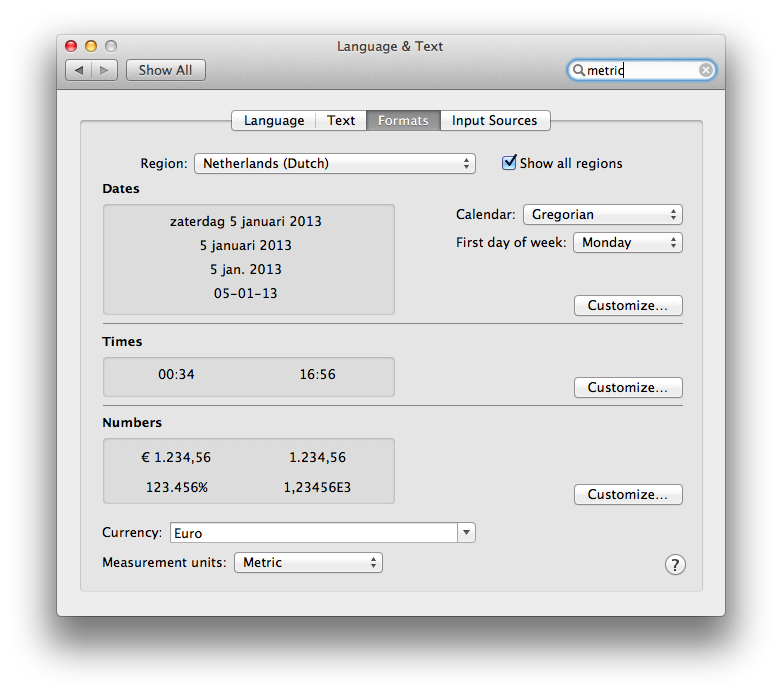
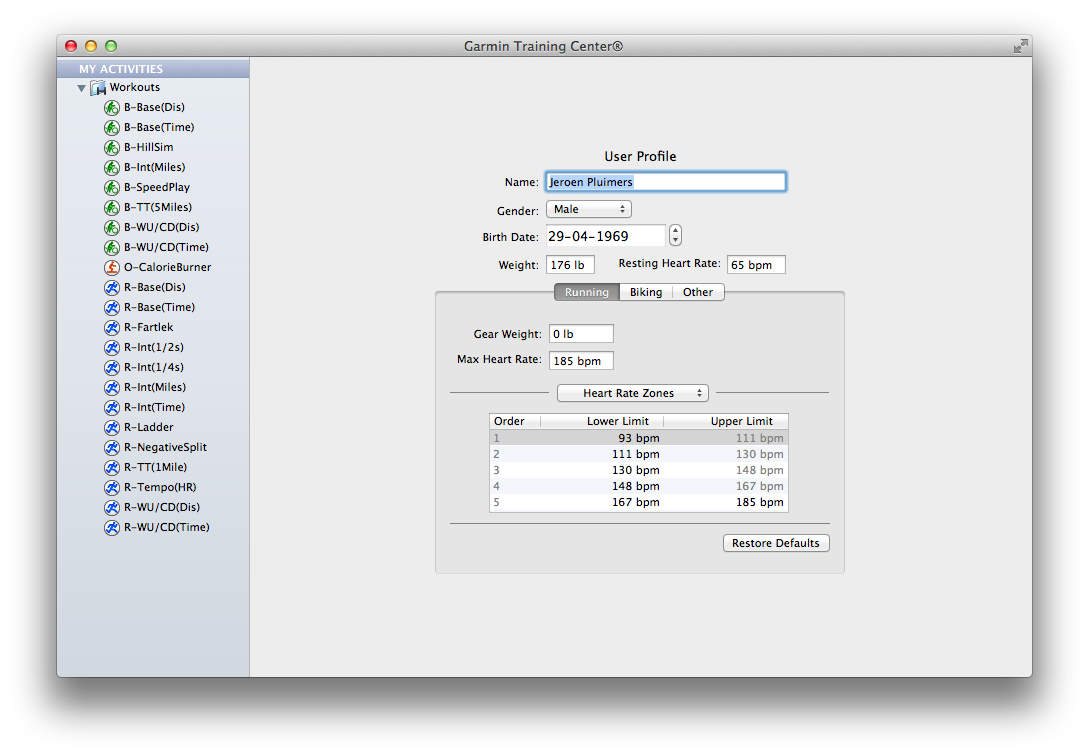
Especially since there is still software like Garmin Training Center for Mac on Mac OS X with – in the System Preferences – the Measurement Units set as Metric, insists on entering weight as lb, and workout distance in miles.

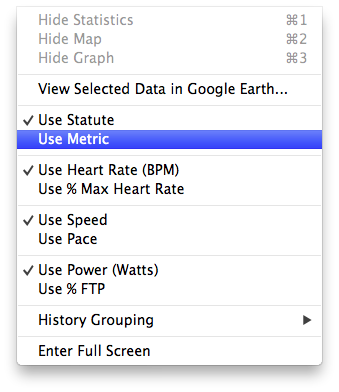
The reason is that Garmin Training Center on Mac OS X has its own “Measurement Units” settings. Where Mac OS lets the system wide setting be either “Metric”  or ” US”, Garmin choose between “Metric” and “Statute” (the latter is default, not the OS X setting).

The problem is twofold:

Garmin has head offices and most of their customers outside the USA, so why insist on US units being default, and why not link the setting to the Mac OS X Preference?

UX #fail.

Oh BTW: if you connect your Garmin device, and GTC still indicates “no fitness device was found”, then use a different USB Cable and don’t connect it through a hub: the device is very picky on talking over USB (charging over USB works with virtually any USB cable).

Garmin Training Center on Mac OS X insists in imperial units, even though the system is configured as metric.

Garmin Training Center on Mac OS X insists in imperial units, even though the system is configured as metric.

Garmin Training Center on Mac OS X has its own

Garmin Training Center on Mac OS X has its own “Measurement Units” settings. Where Mac OS lets the system wide setting be either “Metric” or ” US”, Garmin choose between “Metric” and “Statute” (the latter is default, not the OS X setting).

Even after setting the Garmin Training Center to

Even after setting the Garmin Training Center to “Metric”, it still lists “Miles” in your workouts.

–jeroen

Posted in Google, GoogleSearch, Opinions, Power User, User Experience (ux) | Tagged: , , , , , , , , , , , , | Leave a Comment »

Link dump: URLs I used to setup Google 2-step verification on my account, devices and software I use

Posted by jpluimers on 2012/10/22

It was a lot of pain, and somehow my Android 4 device now doesn’t sync contacts any more.

–jeroen

Posted in Android Devices, Chrome, GMail, Google, Google Apps, GoogleCalendar, GoogleMaps, GoogleSearch, HTC, HTC Sensation, Power User | 1 Comment »

Finally Google allows searching for “C#” via: Search quality highlights: 50 changes for March – Inside Search

Posted by jpluimers on 2012/04/05

Finally, Google allows searching for C# and returns meaningful results (previously they returned the same results as searching for C).

They improved a bunch of other special characters as well.
–jeroen

via:

Search quality highlights: 50 changes for March – Inside Search.

Posted in .NET, C#, Development, Google, GoogleSearch, Power User, Software Development | Leave a Comment »

Funny how Google Search tries to interpret version numbers as dates and totally misses the actual date (via: directx runtime – Google Search)

Posted by jpluimers on 2012/02/20

Funny how Google Search tries to interpret number sequences as dates:

Download: DirectX Redist (June 2010) – Microsoft Download Center …

www.microsoft.com/download/en/details.aspx?id=8109

29 Sep 1974 – The DirectX redist installation includes all the latest and previous released DirectX runtime. This includes D3DX, XInput, and Managed DirectX …

I almost skipped that search result, as the date was from 1974, but since back then DirectX didn’t even exist, I became curious.

This is the original text from the page that Google tried to interpret: Read the rest of this entry »

Posted in Google, GoogleSearch, Power User | Leave a Comment »

Chrome Google search URLs changed into a webhp redirect; no rootkit; Avast! and eggheadcafe seem involved; reproducible on one machine. What happened?

Posted by jpluimers on 2012/02/16

Somewhere the last couple of days, Google or Google Chrome has changed the default search URL.

I thought I had a webhp rootkit issue, possibly related to Avast, but it wasn’t (I posted at the Avast forums, and later replied the issue had solved itself, but I still wonder about the real cause).

What happened was that some page I had open in Google Chrome (all other web browsers were fine) forced the redirect.

I can only reproduce this on one system (that has both Avast! Antivirus installed, and Chrome open with the page http://www.eggheadcafe.com/searchform.aspx?search=Cross+Join+Excel) but not on other machines.

So far, it took me about a day of work (quarantining the machine, investigating if it was a virus, rootkit or otherwise, trying to verify this is a one off), and I still feel I don’t have the complete answer yet.

I still wonder if others have seen similar issues.

This is how it redirected

The defaults have a truckload of junk around them, but come down to the URLs below (lmgtfy is the search phrase)

It used to be of this form (which now again works, after I closed all Google Chrome pages)

The redirect made it into a longer webhp form:

The fun thing is, that if you enter the form

then you will end at the Google Search home page with the search phrase pre-filled in.
Now that is a pretty nifty “let me Google that for you” :)

–jeroen

via: Google.

Posted in Google, GoogleSearch, Power User | Leave a Comment »