Archive for the ‘Google’ Category
Posted by jpluimers on 2020/09/14
Interesting, not just from a GDPR perspective:
EditThisCookie is a cookie manager. You can add, delete, edit, search, protect and block cookies!
[WayBack] EditThisCookie – Chrome Web Store
Via [WayBack] Error 400 on Google sites (YouTube, Maps, Search etc) · Issue #537 · deanoemcke/thegreatsuspender · GitHub
–jeroen
Posted in Chrome, Chrome, Google, LifeHacker, Power User, Web Browsers | Leave a Comment »
Posted by jpluimers on 2020/08/17
Blocking persons (for instance for sending you materials that in G+ would be a T.O.S. violation) is only possible by blocking them, not by reporting them.
Most hangouts users however do have a G+ account, so you can request a block there.
Relevant links:
–jeroen
Posted in G+: GooglePlus, Google, GoogleHangouts, Power User, SocialMedia | Leave a Comment »
Posted by jpluimers on 2020/07/27
 Somehow Firefox is available on ARM by default, but the crash recovery isn’t that awesome.
On my list of things to try is Chrome or Chromium. These links should help me find out if this is possible at all:
On Firefox crash recovery:
–jeroen
Posted in *nix, Chrome, Google, Linux, openSuSE, Power User, SuSE Linux, Tumbleweed | Leave a Comment »
Posted by jpluimers on 2020/07/20
So I wondered why on some tabs, the bookmark bar would never disappear:
Chrome’s default new tab page (NTP) always shows a bookmark bar, even if you turn it off for other pages. You can however install browser extensions which replace the NTP, and the replacements do not automatically get the bookmarks bar (but can with some extra programming).
So for instance Google’s Earth View extension does not show bookmarks, whereas Pinterest’s now does.
Thanks deltab for answering this at [WayBack] google chrome – How to hide the bookmark bar? – Super User
–jeroen
Posted in Chrome, Google, Power User | Leave a Comment »
Posted by jpluimers on 2020/07/10
Hopefully by now the extensions below still work, as Google removed the “View Image” button in Google Image Search a few years back.
When not: these might help finding an updated method (:
Via:
–jeroen
Posted in Google, GoogleImageSearch, GoogleSearch, Power User | Leave a Comment »
Posted by jpluimers on 2020/06/25
From a while back, but still relevant as the speed of the GMail web-UI still has not improved.
[WayBack/Archive.is] Peeking under the hood of redesigned Gmail – Boris – Medium
Via:
–jeroen
Read the rest of this entry »
Posted in CSS, Development, GMail, Google, HTML, JavaScript/ECMAScript, Power User, Scripting, Software Development, Web Development | Leave a Comment »
Posted by jpluimers on 2020/06/25
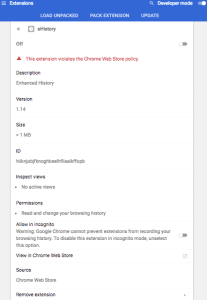 [WayBack] browser – Clearing old browsing data in Chrome instead of newer data – Super User had a few possibilities, but eHistory disappeared from the Chrome store (apparently due to some unknown violation), so the way that works best now is to hack the History database which is a SQLite file as mentioned in
[WayBack] How can I delete all web history that matches a specific query in Google Chrome – Super User: For literal values of “query”…You can even query your Chrome history using SQL. (Firefox too: see below. Of course, the appropriate file path will have to be changed).
If you really want you can hack the history frame chrome://history-frame/: [WayBack] How can I delete all web history that matches a specific query in Google Chrome – Super User
–jeroen
Posted in Chrome, Database Development, Development, Google, Power User, Software Development, SQL | Leave a Comment »


 The Wiert Corner - irregular stream of stuff