Archive for the ‘Google’ Category
Posted by jpluimers on 2020/06/01
Cool: [WayBack] GitHub – kzahel/web-server-chrome: An HTTP Web Server for Chrome (chrome.sockets API)
This allows you to develop HTTP applications that live in Chrome:
[Archive.is1/Archive.is2] Web Server for Chrome – Chrome Web Store: A Web Server for Chrome, serves web pages from a local folder over the network, using HTTP. Runs offline.
Of course you could to python -m SimpleHTTPServer 8888 or python -m http.server 8888, but this runs within chrome and can be used from inside JavaScript projects.
Features
- serve local files
- configure listening port
- configure listening interface (e.g. localhost or all interfaces)
- custom http handlers possible
- websocket support available
- works nice with chrome.runtime.onSuspend
- options for autostart, start in background, etc etc.
- handles range requests, HEAD, etc
- options for CORS
- optional PUT, DELETE request (for upload files)
- sets MIME types
- can render directory listing
- See relevant options: https://github.com/kzahel/web-server-chrome/blob/master/polymer-ui/options.js
Via [WayBack] This is super useful: A# web #server that runs in #Chrome! Makes it super easy to do local web dev without the hassle of setting up a complex back end s… – Jason Mayes – Google+
–jeroen
Posted in Chrome, Development, Google, JavaScript/ECMAScript, Power User, Scripting, Software Development, Web Development | Leave a Comment »
Posted by jpluimers on 2020/05/25
Interesting: Secure Shell – Chrome Web Store. But does not work behind an SSH blocking firewall, seem more on that below.
Terminal emulator and SSH client.
Secure Shell is an xterm-compatible terminal emulator and stand-alone ssh client for Chrome. It uses Native-Client to connect directly to ssh servers without the need for external proxies.
Secure Shell is a Beta release and has known bugs.
Please read the FAQ, available here: http://goo.gl/3i5AJ.
You can also exchange feedback in the chromium-hterm mailing list, available here: http://goo.gl/RYHiK.
Edit 20240818: the above Googl links will die; the redirects back at the time of writing in 2014 where to:
- [Wayback/Archive] [chromiumos/platform/assets.git] / chromeapps / nassh / doc / faq.txt which first moved to [Wayback/Archive] hterm and Secure Shell – nassh/doc/FAQ.md and later moved to [Wayback/Archive] hterm and Secure Shell – nassh/docs/FAQ.md.
- [Wayback/Archive] chromium-hterm – Google Groups which now has moved to [Wayback/Archive] chromium-hterm – Google Groups.
It is based on [WayBack] GitHub – chromium/hterm: MOVED: Please use the new libapps repo on chromium.googlesource.com insteadf.
With relays, you can tunnel over SSH. Two relays are on github:
Resources:
--jeroen
via: Secure Shell – Chrome Web Store.
Posted in Chrome, Google, Power User | Leave a Comment »
Posted by jpluimers on 2020/05/20
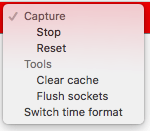 Cool feature I discovered from [WayBack] How to read network requests in Chrome for new tab or popup window:
chrome://net-internals/#events
It will immediately show all events from all tabs including networking events.
The red bar at the top has a drop down on the right where you can stop them and perform a few other actions.
During or after capture, you can select relevant requests from the list (through checkboxes) so the right of the pane gets their info (which is a lot: not just the request/response content including all headers and cookies, but also any delegates from extensions and their results).
Read the rest of this entry »
Posted in Bookmarklet, Chrome, Google, Power User, Web Browsers | Leave a Comment »
Posted by jpluimers on 2020/05/18
This is still so cool: [WayBack] Free Linux cloud shell for Gmail users … – Adrian Marius Popa – Google+:
Free Linux cloud shell for Gmail users
https://news.ycombinator.com/item?id=16247577
comments are more interesting
“If you want a free Linux box with a Public IP and SSH, I’d recommend spinning up an f1-micro VM. It’s part of the permanent free tier”
https://news.ycombinator.com/item?id=16248668
Even cooler is that you can use it both from a web browser and from your own console, more on that below.
Cloud Shell from the web
The above links:
Read the rest of this entry »
Posted in Google, GoogleCloudShell, Power User | Leave a Comment »
Posted by jpluimers on 2020/05/08
Boy, I totally missed that the Google Photos search has become this smart: [WayBack] 8 Brilliant Search Tools Hidden Within Google Photos:
Google Photos’ search tools have powerful algorithms that are on par with that of Google’s search engine.
Things I tried so far at photos.google.com and they all work, most way better than I anticipated:
- Person names
- Object names (like Fiat, BMW, Mercedes, Mitsubishi, Ford; Fiat got me way more car types than the other brands)
- Area names (cities, places, countries, etc)
- Time
- Screenshot, screenshots, png, jpg
- Tall, wide, but these worked better: portrait, landscape
- WMC
–jeroen
Posted in Google, Google Photos, Power User | Leave a Comment »
Posted by jpluimers on 2020/04/17
Reminder to self:
Some 5 years after the .zip top-level domain got live, I wonder if there are any domains in it.
Currently, it screws up non-quoted searches in browsers like Chrome, so I wonder if this still holds: .ZIP URLs (or, Why You Should Block Domains on a TLD That Doesn’t Have Any) | Blue Coat
When writing this, there was one domain (nic.zip) and two registrars.
–jeroen
Posted in Chrome, Google, Power User | Leave a Comment »
Posted by jpluimers on 2020/03/30
It seems Google Voice has gotten more restrictions over time that I was not aware of: [Archive.is] No forwarding phone number – Google Product Forums:
Bluescat said:
There is no bug involved here. And no, you haven’t stumbled on a way to game the system.
Two things have changed.
- With the introduction of Google Hangouts’ ability to place and receive calls via a Google Voice telephone number, the requirement to maintain a 10-digit forwarding phone number was removed. So yes, you can remove all forwarding phone numbers from your account if you wish. However, keep in mind that you have now made it more difficult to access your account from a telephone, to manage your voicemail greetings, listen to messages, set Do Not Disturb mode, etc. Without a forwarding phone number, you have no way to do that over the phone.
- In response to fraud and abuse of the service, Google now requires that users have a valid, working (paid-service) telephone number, which hasn’t been previously used to claim another Google Voice number, to be eligible to be issued a new Google Voice number. This is designed to deter people from collecting multiple Google Voice phone numbers to use for spam, robocalling, stalking, etc. Once that number has been used to claim a Google Voice number, it can’t be used to claim another Google Voice number. However, there’s no requirement that it be left on the account. Removing the forwarding phone from one Google Voice account will not enable that forwarding number to be used to claim a Google Voice number for another account.
So, all you did was use up your husband’s entitlement to a Google Voice number.
Finally, a disclaimer: Google Voice cannot be used for emergency 911 calling. Not having some alternative telephone service available for that purpose is a very bad idea.
–jeroen
Posted in Google, GoogleVoice, Power User | Leave a Comment »
Posted by jpluimers on 2020/03/24
If you want to process the JSON form the Google Take Out, then below are some resources that will help you get started developing
Started developing you say?
Yes, of course the JSON does not match APIs any more, and of course Google has not provided and starting point or guidance.
A perfect execution of Sunset.
So you are on your own with:
All via [WayBack] Continuing the takeout data migration process with a first look at the data that is in the archive. – Edward Morbius – Google+
In the mean time, some people started hosting their HTML take out, for instance:
Here you have to note that the take out does not include media, and many hyperlinks still point to within Google Plus itself, for instance for circles and avatars.
Example:
–jeroen
Posted in Development, G+: GooglePlus, Google, Power User, SocialMedia, Software Development | Leave a Comment »
Posted by jpluimers on 2020/01/17
A blog entry since it was hard to find about [WayBack] “Isolated segment – all turns from it are closed” – Google Search as the source reveals not much: no explanation at [WayBack] wme-history/index.html at master · wazers/wme-history · GitHub (A repository containing the pretty-printed index and JavaScript files of the WME to investigate version differences – wazers/wme-history).
Same for [WayBack] “Added big junction” waze – Google Search and [WayBack] wme-history/index.html at master · wazers/wme-history · GitHub
Note that updates you make to the map can take a while to update to the actual live map (even after approval).
You can check at [WayBack] Waze Status for the latest updates.
I added a piece of road in between Thunstetten and Herzogenbugsee, but could not save it:
Read the rest of this entry »
Posted in LifeHacker, Power User, Waze | Leave a Comment »
Posted by jpluimers on 2019/12/30
Boy, I totally missed this was possible: [WayBack] How to text from your computer with Android Messages – The Verge
Texting from the web gives you a lot more flexibility in how and where you can continue conversations. Here’s how to set it up and get started.
…
- Make sure you’ve got the latest version of Android Messages installed on your phone.
- Go to messages.android.com on the computer or other device you want to text from. You’ll see a big QR code on the right side of this page.
- Open up Android Messages on your smartphone. Tap the icon with three vertical dots at the top and to the far right. You should see a “Messages for web” option inside this menu. If you don’t, just give it some time. Google is rolling out the feature gradually to everyone over the next week.
- Tap “Scan QR code” and point your phone’s camera at the QR code on your other device. In less than a second, your phone will vibrate and the two will be linked up. You should notice your conversations show up in the left column of the browser window. Google says that “conversation threads, contacts, and other settings will be encrypted and cached on your browser.”
Note: this doesn’t mean your actual text conversations are encrypted. They’re not.
–jeroen
Posted in Android Devices, Chrome, Google, LifeHacker, Power User | Leave a Comment »


 The Wiert Corner - irregular stream of stuff