The Wiert Corner – irregular stream of stuff

Jeroen W. Pluimers on .NET, C#, Delphi, databases, and personal interests

  • My badges

  • Twitter Updates

  • My Flickr Stream

  • Pages

  • All categories

  • Enter your email address to subscribe to this blog and receive notifications of new posts by email.

    Join 1,861 other subscribers

Archive for the ‘Google’ Category

Finally Google allows searching for “C#” via: Search quality highlights: 50 changes for March – Inside Search

Posted by jpluimers on 2012/04/05

Finally, Google allows searching for C# and returns meaningful results (previously they returned the same results as searching for C).

They improved a bunch of other special characters as well.
–jeroen

via:

Search quality highlights: 50 changes for March – Inside Search.

Posted in .NET, C#, Development, Google, GoogleSearch, Power User, Software Development | Leave a Comment »

Many people missed the 8-bit street view at Google Maps Quest on April 1st #1april #april1st

Posted by jpluimers on 2012/04/01

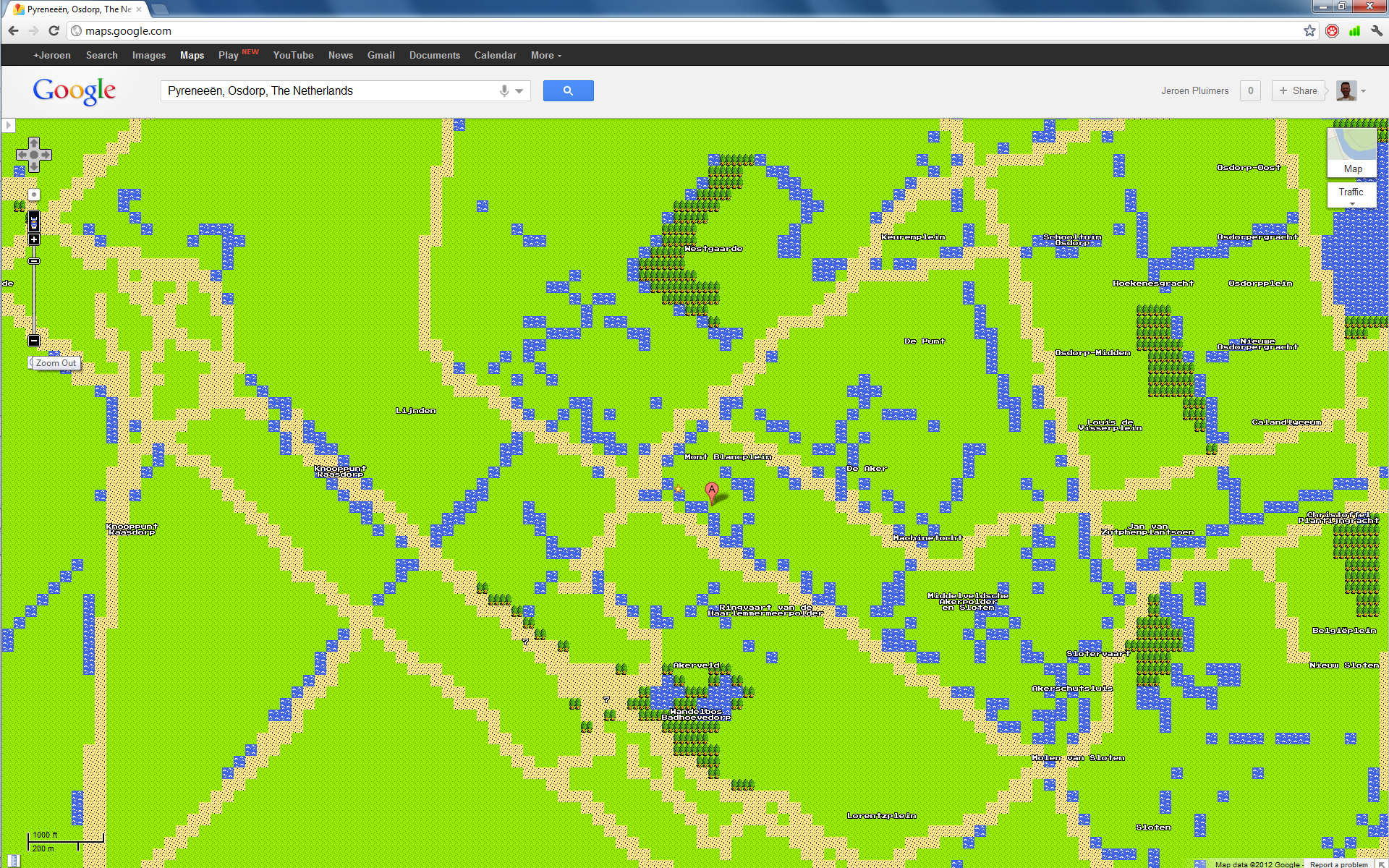
Many people mentioned the April 1st prank by Google: 8-bit maps, and a NES Google Maps cartridge (quote at 0:55: blow on the cartridge to fix bugs ROFL!)

Today Google Maps has a quest mode, rendering the maps in Nintendo NES “quality”.

Few people really used it, and missed the glorious 8-bit streetview, and the really nice landmarks that you see when you zoom in to a scale of 500 meter or better.

You can even link to the 8-bit maps and to the 8-bit street view!.

Click on the images for larger versions (:

--jeroen


Posted in About, Apri1st, Fun, Google, GoogleMaps, Personal, Power User, Prank | Tagged: , , , , , | Leave a Comment »

Refined: Alternate (offline) Google Chrome installer (Windows) – Google Help « The Wiert Corner – irregular stream of Wiert stuff

Posted by jpluimers on 2012/03/30

Just updated my earlier post on Google Chrome offline installers with this info:

Google Chrome has two offline installers: one single user install, and one for all users on the same Windows machine.

It ends up at one of these download pages, each with a download link for the current version (which changes for every new version):

–jeroen

via: Alternate (offline) Google Chrome installer (Windows) – Google Help « The Wiert Corner – irregular stream of Wiert stuff.

Posted in Chrome, Google, Power User | Leave a Comment »

intelligent answer to “whats my ip” on Google Search

Posted by jpluimers on 2012/03/23

It looks like Google decreased traffic to many “Whats My IP” sites by automatically answering the whats my ip – Google Search query.

I’m not sure when they introduced this, but it is good and bad at the same time.

–jeroen

Via: whats my ip – Google Search.

Posted in Google, LifeHacker, Opinions, Power User | 2 Comments »

Funny how Google Search tries to interpret version numbers as dates and totally misses the actual date (via: directx runtime – Google Search)

Posted by jpluimers on 2012/02/20

Funny how Google Search tries to interpret number sequences as dates:

Download: DirectX Redist (June 2010) – Microsoft Download Center …

www.microsoft.com/download/en/details.aspx?id=8109

29 Sep 1974 – The DirectX redist installation includes all the latest and previous released DirectX runtime. This includes D3DX, XInput, and Managed DirectX …

I almost skipped that search result, as the date was from 1974, but since back then DirectX didn’t even exist, I became curious.

This is the original text from the page that Google tried to interpret: Read the rest of this entry »

Posted in Google, GoogleSearch, Power User | Leave a Comment »

Chrome Google search URLs changed into a webhp redirect; no rootkit; Avast! and eggheadcafe seem involved; reproducible on one machine. What happened?

Posted by jpluimers on 2012/02/16

Somewhere the last couple of days, Google or Google Chrome has changed the default search URL.

I thought I had a webhp rootkit issue, possibly related to Avast, but it wasn’t (I posted at the Avast forums, and later replied the issue had solved itself, but I still wonder about the real cause).

What happened was that some page I had open in Google Chrome (all other web browsers were fine) forced the redirect.

I can only reproduce this on one system (that has both Avast! Antivirus installed, and Chrome open with the page http://www.eggheadcafe.com/searchform.aspx?search=Cross+Join+Excel) but not on other machines.

So far, it took me about a day of work (quarantining the machine, investigating if it was a virus, rootkit or otherwise, trying to verify this is a one off), and I still feel I don’t have the complete answer yet.

I still wonder if others have seen similar issues.

This is how it redirected

The defaults have a truckload of junk around them, but come down to the URLs below (lmgtfy is the search phrase)

It used to be of this form (which now again works, after I closed all Google Chrome pages)

The redirect made it into a longer webhp form:

The fun thing is, that if you enter the form

then you will end at the Google Search home page with the search phrase pre-filled in.
Now that is a pretty nifty “let me Google that for you” :)

–jeroen

via: Google.

Posted in Google, GoogleSearch, Power User | Leave a Comment »

Google Calendar: Quick Add to specific calendar? – Calendar Help – @google

Posted by jpluimers on 2011/12/27

It would be so cool if Google re-added this feature:

  1. Deselect all calendars but one
  2. Quick Add an event
  3. The event gets added to this one selected calendar

Now all events always get added to your default calendar. I remember this worked somewhere in 2010. But now it fails when adding about 200 events by hand on a secondary calendar :(

See this discussion thread:

tiburon200; 3/21/09

When using quick add, is it possible to place the new event on a specific calendar (ie, home, work) or is that only an option through the regular “Create Event” method?

Thanks for any insight… seems like it should be pretty easy, but I can’t find the right syntax.

rmorales2005; 8/17/11

This used to be possible by just hiding all other calendars, but this got broken some time ago…

–jeroen

via Quick Add to specific calendar? – Calendar Help.

Posted in Google, GoogleCalendar, Opinions, Power User | Leave a Comment »

About Gmail’s new look: a few comments

Posted by jpluimers on 2011/11/07

Not sure I really like the “all new” black and white look where all of the screen looks the same, so no emphasis on the things that really matter.

Over time, you won’t be able so switch back, so you have to adapt to the new look & feel, and try the options to make it work for you the best.

So far, I switched to the “Compacrt” view, and chose the “Blue” theme to make emphasis on the mail list/content.

–jeroen

About Gmail’s new look.

Posted in GMail, Google, LifeHacker, Power User | Leave a Comment »

How to disable Chrome PDF Viewer in Google Chrome and reenable the Acrobat Reader plugin

Posted by jpluimers on 2011/02/07

Google Chrome integrated a PDF viewer that is far less functional than Adobe Reader.

In fact: if you had Adobe Reader as PDF viewer, Google Chrome will just use their own.

One of the things I use a lot is the multi-page view (2 page next to each other; fits nicely on a 1920×1200 screen).

It is actually pretty easy to switch back: Read the rest of this entry »

Posted in Google, Power User, Windows, Windows 7, Windows Vista, Windows XP | Leave a Comment »

SQL Server: Google search tip for MSDN

Posted by jpluimers on 2010/09/07

When searching on MSDN for SQL Server syntax related things, you often get results matching other languages or frameworks.

For instance, searching for INSERT site:msdn.microsoft.com gets other results having to do with the .NET Framework. Those usually are not relevant to SQL Server.

Google search can be tweaked to limit your search results: there is a nice Google search help page on this.
The above search phrase already includes a the site: prefix to limit the results to the msdn.microsoft.com domain.

There are a few tricks to limit the search phrase even further:

  1. Add “SQL Server” to your search phrase:
    “SQL Server” INSERT site:msdn.microsoft.com
    Microsoft always had the “SQL Server” in their Books Online topics.
    This way, you will find SQL Server 2000 and SQL Server Compact Edition information now as well as more current SQL Server versions.
  2. Add “Transact-SQL” to your search phrase:
    “Transact-SQL” INSERT site:msdn.microsoft.com
    Microsoft started to suffix SQL Server T-SQL keywords with “(Transact-SQL)” for the Books Online in November 2008 (covering SQL Server 2005) to make finding results easier.
    This way you will favour topics for SQL Server 2005 and up.

Luckily the MSDN site has done a lot of SEO, so even if you don’t add these two to your search phrase, SQL Server relevant results end up pretty high in the result list.
They strive to get the SQL Server 2008 R2 Books Online topics as high in the ranking as possible.

If you want to search for specific versions of SQL Server, then it is easiest to use this Microsoft SQL Server Library page to begin your search.

Conclusion:

Depending on what kind of search results you are interested in, you might want to extend your search phrase a bit.

–jeroen

Posted in Database Development, Development, Google, Power User, SQL Server | Leave a Comment »