The Wiert Corner – irregular stream of stuff

Jeroen W. Pluimers on .NET, C#, Delphi, databases, and personal interests

  • My badges

  • Twitter Updates

  • My Flickr Stream

  • Pages

  • All categories

  • Enter your email address to subscribe to this blog and receive notifications of new posts by email.

    Join 1,862 other subscribers

Archive for the ‘Google’ Category

Google Cloud Shell: connecting to cloud storage buckets

Posted by jpluimers on 2021/09/28

One of the drawbacks of Google Cloud Shell is that it will delete the home directory after 120 days of not using it: [WayBack] Deletion notice for my Google Cloud Shell home directory – Stack Overflow

This is documented [WayBack] here:

If you do not access Cloud Shell for 120 days, we will delete your home disk. You will receive an email notification before we do so and simply starting a session will prevent its removal.

This only applies to the home directory of your Cloud Shell instance (you may want to store it on Cloud Storage anyway if you want to keep it). Any other Google services you use will be unaffected.

I hardly use the cloud shell, as it is a last resort to shell out from overly protected networks. Fewer and fewer environments restrict so much, so I’ve bumped into the home directory deletion a few times now.

I might use it more in the future, as I recently discovered there is a URL trick so you can start a cloud shell with parameters like an initial git repository: [WayBack] Open in Cloud Shell  |  Google Cloud

The Open in Cloud Shell feature allows you to publish a link that opens the Cloud Console and either automatically clones a Git repository into Cloud Shell or starts Cloud Shell with a custom image. It also allows for instructions to be printed to the terminal to help users interact with the content.

The Open in Cloud Shell feature helps developers experiment with code samples and APIs without having to worry about downloading Cloud SDK, installing required dependencies, or searching for relevant source files. This page explains how to add this feature to your Git repository.

Currently, only GitHub and Bitbucket repositories are whitelisted. If you would like to add a different repository, send feedback with the repository type you’d like to use with Open in Cloud Shell.

Setting up the home directory with my scripts can be a curse, so I have contemplated on these kinds of solutions:

  • store scripts in Google Drive, and mount part of Google Drive into the Cloud Shell
  • store scripts in Google Cloud Storage
  • script the setup of the home directory via a bash script in a gist

Some links that will hopefully help me with that:

  • [WayBack] Use the Google Cloud Shell to Upload files to Google Drive : DataHoarder
  • [WayBack] Open Your Repository In Google Cloud Shell – Daisuke Maki – Medium
  • [WayBack] gsutil – Google cloud storage – Download file from web – Stack Overflow

    mount the bucket in your Cloud Shell using gcsfuse:

    Create a directory in your Cloud Shell user home

     mkdir ~/mybucket
    

    Now mount your bucket in that directory using gcsfuse:

     gcsfuse bucket_name ~/mybucket
    

    Change the current directory to mount point directory:

     cd mybucket
    

    (if you want to have some fun run “df -h .” to see how much space you got in that mount point)

    seems to work for all file sizes:

     curl http://speedtest.tele2.net/10GB.zip | gsutil cp - gs://YOUR_BUCKET_NAME/10GB.zip
    

    Basically curl “streams” the data directly to the bucket.

  • [WayBack] Limitations and restrictions  |  Cloud Shell  |  Google Cloud

    Usage limits

    Cloud Shell inactivity: If you do not access Cloud Shell for 120 days, your home disk will be deleted. You will receive an email notification before its deletion and simply starting a session will prevent its removal. Please consider a different solution on Google Cloud storage for sensitive data you wish to store long term.

    Non-interactive usage: Cloud Shell is intended for interactive use only. Non-interactive sessions will be ended automatically after a warning. Note that Cloud Shell sessions are capped at 12 hours, after which sessions are automatically terminated. You can use a new session immediately after.

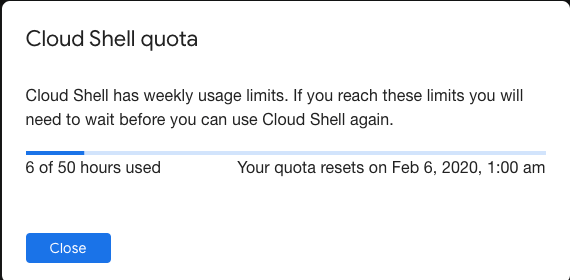
    Weekly usage: Cloud Shell also has weekly usage limits. If you reach your usage limit, you’ll need to wait until the specified time (listed under Usage Quota, found under the three dots menu icon) before you can use Cloud Shell again.

    Restoring a session after a service limit violation: If your session is terminated or cannot be established because you exceeded a service limit, Cloud Shell will display an error with a link to a form that allows you to appeal the limit violation. Click the feedback link and submit the form with more information about the tasks you were performing before your session was terminated.

–jeroen

Posted in bash, Development, Google, GoogleCloudShell, GoogleDrive, Internet, Power User, Scripting, Software Development, SpeedTest | Leave a Comment »

calendar google sub-calendar – Google Search

Posted by jpluimers on 2021/09/17

For a web-dashboard showing both agenda and month-calendar, I wanted to show the daily activities only on the agenda, and all other events on both the agenda and mont-calendar.

For that I needed a sub-Google-calendar for the daily activities next to the main Google-calendar, so I searched for [WayBack] calendar google sub-calendar – Google Search

Google sub calendars
Once the calendar is created, you’ll see it on your browser and in the app.
  • On your computer, open Google Calendar.
  • On the left side, above “My calendars,” click Add other calendars New calendar.
  • Add a name and description for your calendar.
  • Click Create calendar.
Create a new calendar – Calendar Help – Google Support


This wasn’t fully accurate:

  • the add option intuitively is a plus sign (+):

  • In addition it is not above “my calendars”, but next to “other calendars”:

Alternative

Read the rest of this entry »

Posted in Google, GoogleCalendar, Power User | Leave a Comment »

How to prepare your IdentityServer for Chrome’s SameSite cookie changes – and how to deal with Safari, nevertheless – Thinktecture

Posted by jpluimers on 2021/09/15

For my link archive:

Via:

–jeroen

Posted in .NET, .NET Core, ASP.NET, C#, Chrome, Chrome, Development, Firefox, Google, Power User, Safari, Software Development, Web Browsers | Leave a Comment »

Run chrome in fullscreen mode on Windows – Stack Overflow

Posted by jpluimers on 2021/09/14

Since Chrome changes over time, the batch file below from [WayBack] Run chrome in fullscreen mode on Windows – Stack Overflow also changes:

@echo off
echo Countdown to application launch...
timeout /t 10
"C:\Program Files (x86)\chrome-win32\chrome.exe" --chrome --kiosk http://localhost/xxxx --incognito --disable-pinch --no-user-gesture-required --overscroll-history-navigation=0
exit

On most of my systems. Chrome is at C:\Program Files (x86)\Google\Chrome\Application\chrome.exe, so I need to change the path anyway.

–jeroen

Posted in Batch-Files, Chrome, Development, Google, Power User, Scripting, Software Development, Windows | Leave a Comment »

css color picker – Google Search

Posted by jpluimers on 2021/08/12

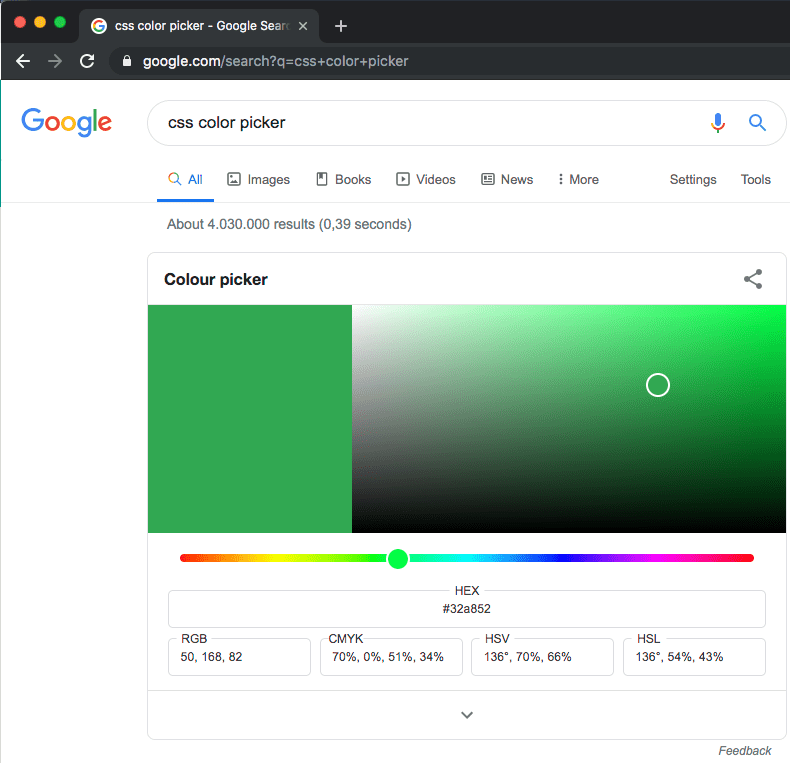
Probably old, but there is an embedded [WayBack] css color picker – Google Search that on each refresh switches colours:

–jeroen

Posted in Color (software development), CSS, Development, Google, GoogleSearch, HTML, Power User, Software Development, Web Development | Leave a Comment »

Create & use pivot tables – Computer – Docs Editors Help

Posted by jpluimers on 2021/08/02

This was way easier than I thought it would be; it’s just that the meny items are different from Excel: [WayBack] Create & use pivot tables – Computer – Docs Editors Help.

The page has much more, but these are the initial steps:

Add or edit pivot tables

  1. On your computer, open a spreadsheet in Google Sheets.
  2. Select the cells with source data you want to use. Important: Each column needs a header.
  3. In the menu at the top, click Data and then Pivot table. Click the pivot table sheet, if it’s not already open.
  4. In the side panel, next to “Rows” or “Columns,” click Add, then choose a value.
    • Note: Sometimes, you’ll see recommended pivot tables based on the data you choose. To add a pivot table, under “Suggested,” choose a pivot table.
  5. In the side panel, next to “Values,” click Add, then choose the value you want to see over your rows or columns.
  6. You can change how your data is listed, sorted, summarized, or filtered. Next to what you want to change, click the Down Arrow Down Arrow.

–jeroen

Read the rest of this entry »

Posted in Google, GoogleDocs, GoogleSheets, Power User | Leave a Comment »

Hangouts is being replaced by Google Chat: how long will Hangouts last?

Posted by jpluimers on 2021/06/25

Hangouts is being replaced by Google Chat

Hangouts is being replaced by Google Chat

Oh boy, this is probably a prelude to Google Hangouts, as it originates from Google+, following the Google+ feat: death for personal users.

[Wayback] Learn about the switch from classic Hangouts to Google Chat – Computer – Hangouts Help started with

Google Chat launched to Google Workspace accounts in 2017 and is now available for free on personal accounts. When you switch from classic Hangouts to Google Chat on your personal account, you

but then came this in the list of limitations:

  • Video call ringing isn’t available on Google Chat. If you use classic Hangouts for direct video calls that ring, don’t switch to Google Chat. To start a video call in Google Chat, you can drop a Google Meet chip into the conversation and dial in.

Now looking for an integrated chat and video call option that my mentally retarded brother understands, as the non-straightforward integration of Google Chat and Google Meet features won’t cut it for his mental abilities.

Via: [Archive.is] Jeroen Wiert Pluimers on Twitter: “Oh dang: how long will Google Hangouts last? It is the easiest (and currently only well known) way for my mentally retarded brother to have video calls with his caretakers and us.”

–jeroen

PS: Blocks also do not transfer to Google Chats. At myaccount.google.com/blocklist you can find who you blocked.

Posted in Google, GoogleHangouts, Power User | Leave a Comment »

Awesome Cookie Manager: popup URI

Posted by jpluimers on 2021/06/14

I blogged about [WayBack] Awesome Cookie Manager before. The Awesome Cookie Manager lets the user manage cookies in Google Chrome. It is great.

It is even greater that the pop-up dialog has a URI:

chrome-extension://hcpidejphgpcgfnpiehkcckkkemgneif/popup.html

Get it at [Archive.is] Awesome Cookie Manager – Chrome Web Store:

Displays a list of all Google Chrome cookies. Allows searching, viewing, editing, saving, restoring, and deleting cookies.

It helped me solve the below cases, where I had too many cookies, to the Web Archive bailed out; Awesome Cookie Manager helped me to clear the right cookies:

Edit 20231230: Awesome Cookie Manager source repository at [Wayback/Archive] Phatsuo/awesome-cookie-manager: Awesome Cookie Manager.

--jeroen

Posted in Chrome, Google, Power User | Leave a Comment »

MacOS: killing Chrome from the terminal

Posted by jpluimers on 2021/06/14

Every now and then, Chrome hangs to badly on MacOS that the whole Mac GUI becomes unresponsive so even the “Force Quit” dialog does not appear.

Sometimes you are lucky enough that you have a (remote) terminal shell open.

Then you can do either of these:

  • Less hard kill:
    • killall 'Google Chrome'
    • killall Google\ Chrome
  • Hard kill:
    • killall -9 'Google Chrome'
    • killall -9 Google\ Chrome

The less hard kill sometimes brings up an unresponsive task and still allows you to save any changed.

Via:

–jeroen

Posted in Apple, Chrome, Google, Mac OS X / OS X / MacOS, Power User | Leave a Comment »

Chrome supported extension IDs

Posted by jpluimers on 2021/05/11

I wonder how you can programmatically open a Hangouts link from Chrome?

These dit not help:

So did some more digging.

TL;DR: did not find a solution; so any help is appreciated.

I found the IDs of then in [WayBack] extensions/common/constants.cc – chromium/src.git – Git at Google

namespace extension_misc {
const char kPdfExtensionId[] = "mhjfbmdgcfjbbpaeojofohoefgiehjai";
const char kQuickOfficeComponentExtensionId[] =
    "bpmcpldpdmajfigpchkicefoigmkfalc";
const char kQuickOfficeInternalExtensionId[] =
    "ehibbfinohgbchlgdbfpikodjaojhccn";
const char kQuickOfficeExtensionId[] = "gbkeegbaiigmenfmjfclcdgdpimamgkj";
const char kMimeHandlerPrivateTestExtensionId[] =
    "oickdpebdnfbgkcaoklfcdhjniefkcji";
const char kProdHangoutsExtensionId[] = "nckgahadagoaajjgafhacjanaoiihapd";
const char* const kHangoutsExtensionIds[6] = {
    kProdHangoutsExtensionId,
    "ljclpkphhpbpinifbeabbhlfddcpfdde",  // Debug.
    "ppleadejekpmccmnpjdimmlfljlkdfej",  // Alpha.
    "eggnbpckecmjlblplehfpjjdhhidfdoj",  // Beta.
    "jfjjdfefebklmdbmenmlehlopoocnoeh",  // Packaged App Debug.
    "knipolnnllmklapflnccelgolnpehhpl"   // Packaged App Prod.
    // Keep in sync with _api_features.json and _manifest_features.json.
};
// Error returned when scripting of a page is denied due to enterprise policy.
const char kPolicyBlockedScripting[] =
    "This page cannot be scripted due to an ExtensionsSettings policy.";
}  // namespace extension_misc

The odd thing is that the source does not match the Chrome web store designation:

Hangouts ExtensionId Source name Web store name
nckgahadagoaajjgafhacjanaoiihapd kProdHangoutsExtensionId Google Hangouts
ljclpkphhpbpinifbeabbhlfddcpfdde Debug Google Hangouts (Extension, Beta); GOOGLE CONFIDENTIAL – FOR INTERNAL USE ONLY
ppleadejekpmccmnpjdimmlfljlkdfej Alpha Google Hangouts (Extension, Debug)
eggnbpckecmjlblplehfpjjdhhidfdoj Beta Google Hangouts (Extension, Alpha)
jfjjdfefebklmdbmenmlehlopoocnoeh Packaged App Debug 404 error
knipolnnllmklapflnccelgolnpehhpl Packaged App Prod Google Hangouts; Hangouts Chrome App is deprecated. Please switch to the Hangouts Chrome Extension.

You can not start the extensions in a tab; they need to start their view through the extension.

So these links do not work:

  • chrome-extension://nckgahadagoaajjgafhacjanaoiihapd/mainapp.html?uv_main_window
  • chrome-extension://ljclpkphhpbpinifbeabbhlfddcpfdde/mainapp.html?uv_main_window
  • chrome-extension://ppleadejekpmccmnpjdimmlfljlkdfej/mainapp.html?uv_main_window
  • chrome-extension://eggnbpckecmjlblplehfpjjdhhidfdoj/mainapp.html?uv_main_window
  • chrome-extension://jfjjdfefebklmdbmenmlehlopoocnoeh/mainapp.html?uv_main_window
  • chrome-extension://knipolnnllmklapflnccelgolnpehhpl/mainapp.html?uv_main_window

–jeroen

Read the rest of this entry »

Posted in Chrome, Development, Google, GoogleHangouts, Power User, Software Development, Web Development | Leave a Comment »