The Wiert Corner – irregular stream of stuff

Jeroen W. Pluimers on .NET, C#, Delphi, databases, and personal interests

  • My badges

  • Twitter Updates

  • My Flickr Stream

  • Pages

  • All categories

  • Enter your email address to subscribe to this blog and receive notifications of new posts by email.

    Join 1,854 other subscribers

Archive for the ‘Google’ Category

Automatically reload page in Chrome without plugin – Super User

Posted by jpluimers on 2022/07/14

Below is a cool solution to refresh a page using a bookmarklet is to embed it into an iframe, then automatically reload it every interval.

It for instance works for the [Wayback/Archive.is] Woonveilig and often in Fritz!Box environments.

[Wayback] Jon described the below method as a solution for his own question, 6 years after asking it in [Wayback/Archive.is] Automatically reload page in Chrome without plugin – Super User.

So I made this a bookmark:


javascript:document.getElementsByTagName("body")[0].innerHTML = "<iframe id=\"testFrame\" src=\""+window.location.toString()+"\" style=\"position: absolute; top:0; left:0; right:0; bottom:0; width:100%; height:100%;\"><\/iframe>";reloadTimer = setInterval(function(){ document.getElementById("testFrame").src=document.getElementById("testFrame").src },5*60*1000)

(it is in a gist as the WordPress editors keep killing the embedded html code, despite it being escaped within <code> tags.

–jeroen

Posted in Bookmarklet, Chrome, Chrome, Development, Firefox, Google, HTML, JavaScript/ECMAScript, Power User, Scripting, Software Development, Web Browsers, Web Development | Leave a Comment »

Google Duo as a simple alternative for the deprecated Google Hangouts video calls?

Posted by jpluimers on 2022/04/18

Now that Google Hangouts on a PC keeps nagging that it will be replaced with Google Chat, and the main use case for my mentally retarded brother is video calls from behind his PC, I am going to investigate if Google Duo is any better (he loses mobile phones, which means no WhatsApp; Google Meet is to difficult for his mental abilities).

Some links to get me started:

Related:

–jeroen

Read the rest of this entry »

Posted in Google, GoogleDuo, GoogleHangouts, Power User | Leave a Comment »

Cleaning up Google Drive (for instance when a rogue supplier decides to fill your Windows Documents folder) and preventing TomTom HOME to use too much information

Posted by jpluimers on 2022/04/12

The below links helped me clean the Google Drive of a friend that grew way too large because TomTom HOME decided to put 100 gigabyte of data in the Documents folder instead of the local AppData folder (yup, this is a follow-up of Windows applications: storing your data in the correct place (Roaming, Local, LocalLow, not Documents)).

The trick with extensions to exclude is you have to add exclusions before syncing. Which is a kind of catch-22 or chicken and egg problem.

In case of the friend I helped we made a backup of the TomTom HOME data, then applied the exclusions and restored the data.

For TomTom HOME in order not to fill your Google Drive, but still allow backing up your Documents folder, these are extensions you might want to exclude (roughly in descending order of space) where you have to mind not storing any of these extensions in other subfolders of your Documents folder.:

  • .zip
  • .cab
  • .toc
  • .tmp
  • .meta
  • .sat
  • .tlv
  • .ttd
  • .dat
  • .vif
  • .chk
  • .bin
  • .rex
  • .lde
  • .gpr
  • .dbl
  • .so
  • .ov2

The problem with this? Google Backup and Sync does not allow that many exclusion extensions.

–jeroen

Posted in Google, GoogleBackupAndSync, GoogleDrive, Power User, Windows, Windows 10 | Leave a Comment »

Speed up Upload and Download Speeds in Google Backup and Sync (formerly Google Drive)

Posted by jpluimers on 2022/03/31

[Wayback] Speed up Upload and Download Speeds in Google Drive is still relevant, despite the name change of Google Drive to Google Backup and Sync.

In my experience (fiber 100 mebibit symmetric with less than 5 milliseconds latency to the Amsterdam Internet Exchange) the only option that really matters is to set the Proxy Settings from “auto-detect” to “direct connection”. This saves as much as 25% on latency, which plays a big role when syncing many small files.

These are the steps in pictures:

Read the rest of this entry »

Posted in Google, GoogleBackupAndSync, GoogleDrive, Power User | Leave a Comment »

How to access Archive.org’s Google+ communities archive? : googleplus

Posted by jpluimers on 2022/03/15

On my research list: [Wayback/Archive.is] How to access Archive.org’s Google+ communities archive? : googleplus, as there are so many interesting programming related posts there.

The main takeaway is that in order to access an archived Google+ post, you need to know or be able to reconstruct the canonical URL with language specifier to the Google+ post, see the comment in the first related link below.

It looks that for my archived profile links Wayback – Google+: Jeroen Wiert Pluimers (UUID) / Wayback – Google+: Jeroen Wiert Pluimers (user name) only some 30 links were archived directly through the WayBack save-as feature based on my UUID and some 250 based on my username profile:

. Hopefully more

Some related links:

  1. [Wayback/Archive.is] dredmorbius comments on How to access Archive.org’s Google+ communities archive?

    dredmorbius Author of the article you’ve linked.

    Unfortunately, no, there’s not a really good way of finding content on the Internet Archive’s WBM, unless you already know the URL(s) you’re looking for.

    Keep in mind that:

    • Not everything got captured. I’ve been having a discussion with another G+ user over this, and spot-checking multiple URLs finds no archive of many.

    • There are several variants of G+ post URLs. You want the one with the 20-digit numeric UUID, and NOT the “vanity url” +FirstnameLastname format.

    • Also strip out any instances of /u/[0-9]+/ within the URL. E.g., if you see “https://plus.google.com/u/0/<UUID>”, change that to “https://plus.google.com/<UUID>” (where UUID is the numeric user string).

    • User profile homepages are frequently archived, but the visible posts cannot themselves be opened. This is … unfortunate.

    • Similarly: only the first page of an infinite scroll of User, Brand, Collection, Community, etc., pages is captured. Unless there are multiple captures over time, you’re not going to get a full user history there.

    Generally, your best bet is to have some link to G+ content that you can convert to the appropriate format as Internet Archive might have saved, and check to see if it’s stored. Again, this is tedious, though at least in many cases, useful.

    There’s a list of some of the more notable G+ users and Communities at PlexodusWiki which may also be helpful in tracking down specific references.

    Also: it turns out that slight variations in URL format can mean you do or don’t find a page.

    I just ran into this trying to track down a post and discovered that the URL arguments — here a language specifier — are critical in returning the intended post.

    Discussion: https://mastodon.cloud/@dredmorbius/103592826938741244

    The fully qualified G+ URL is found: https://web.archive.org/web/20190325032955/https://plus.google.com/104092656004159577193/posts/4REjF1smHpE?hl=en

    But stripping off ?hl=en, even when wildcarded, is not:

    https://web.archive.org/web/2019*/https://plus.google.com/104092656004159577193/posts/4REjF1smHpE

    Unfortunately, the IA’s WBM requires JS to return content, which means that simple means of testing with common shell tools in scripts (allowing a large number of candidate URIs to be checked quickly) isn’t possible.

  2. [Wayback] Doc Edward Morbius ❌​: “@woozle@toot.cat You might also try appending “?h…” – mastodon.cloud
  3. [Wayback] G+ Notable Communities Database – PlexodusWiki
  4. [Wayback] Google+ tracker – #googleminus – Donate at https://archive.org/donate/ for hosting the archives Dashboard
  5. [Wayback/Archive.is] Saving of public Google+ content at the Internet Archive’s Wayback Machine by the Archive Team has begun : plexodus
  6. GitHub – ArchiveTeam/googleplus-grab: Archiving Google+.
  7. [Wayback/Archive.is] Plexodus: The Google+ Exodus subreddit : plexodus
  8. [Wayback/Archive.is] Internet Data Is Rotting | Hacker News

–jeroen

Posted in G+: GooglePlus, Google, Power User, SocialMedia | Leave a Comment »

Need to keep an eye on Clockwise until it supports either personal (non G-Suite) Google accounts or Office-365

Posted by jpluimers on 2022/03/07

Too bad that when trying this out in 2021, you got the message

Please sign in with your work Google account.Clockwise does not currently support signing in with a personal Google account.

G-Suite only

G-Suite only

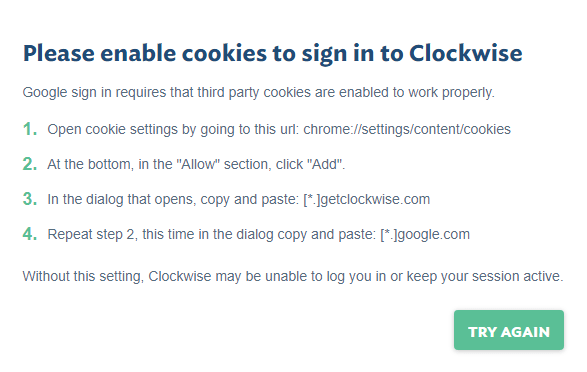
Note that if you have a G-Suite account, it needs these cookies to be accepted to signup via [Archive.is] https://www.getclockwise.com/signup:

Please enable cookies to sign in to Clockwise

Google sign in requires that third party cookies are enabled to work properly.
  1. Open cookie settings by going to this url: chrome://settings/content/cookies
  2. At the bottom, in the “Allow” section, click “Add”.
  3. In the dialog that opens, copy and paste: [*.]getclockwise.com
  4. Repeat step 2, this time in the dialog copy and paste: [*.]google.com
Without this setting, Clockwise may be unable to log you in or keep your session active.
The domains on which cookies are required.

The domains on which cookies are required.

More info:

Via:

–jeroen

Read the rest of this entry »

Posted in Google, GoogleCalendar, Power User | Leave a Comment »

I consider stealing the user’s time because of a bad UX design among the Dark Patterns

Posted by jpluimers on 2022/02/22

I an with [Wayback] Craig Buckler to consider Dark Patterns being wider than the strict sense.

For me anything that costs a user extra time or makes accessibility harder is a Dark Pattern.

So I agree with the issues he explains at [Wayback] The Web’s Most Annoying Dark Patterns – SitePoint

Does the web delight or displease you? Craig lists his least favourite UI and marketing dark patterns. Have you developed on the dark side?

Paste is enabled, but does not function

Paste is enabled, but does not function

A while ago, I got into one myself. Let me explain.

Having had RSI, I’m dependent on keeping my hands and arms in good shape. This means minimising the use of pointing devices and also trying to minimise typing.

In addition, I have heavily segmented my use of email addresses (among others for cutting down SPAM). Basically any point of contact gets a new email address.

This means I realy on tooling like password managers and email address generators. It means copying and pasting information.

So I bumped into a web-site that disallowed pasting the (unique and long!) email address into the email verification field.

[Archive.is] Jeroen Wiert Pluimers on Twitter: “The @olvg #mijnOLVG site is now on my Dark Patterns list as they make #accessibility harder by blocking pasting into the email address verification field. Blocking the paste-blocker. CC some people advocating mijnolvg.nl @MauricevdBosch @ronklitsie63 @kyntha”

Despite the popup menu, paste didn’t work. Chrome autofill did, but didn’t have the information for this particular (new and unique) email address yet, so could not be used yet.

Disabling the paste block

It is relatively easy to disable a paste block. In this case, I was using chrome, but this can be done with any browser. Some browsers even have optional extensions that can do this for you.

In the case of Chrome, when right clicking, there is an “Inspect” option
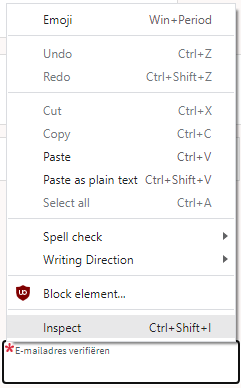
Inspect is enabled and actually works.

Inspect is enabled and actually works.

It inspects the current element, which on this site looks like this:

The element does not contain event handlers. But the code hooks them behind our backs.

The element does not contain event handlers. But the code hooks them behind our backs.

On the “Event Listeners” tab on the right, you can see there are two JavaScript methods hooked to the paste handler:

The paste handlers. The first is OK, the second blocks paste.

The paste handlers. The first is OK, the second blocks paste.

The first one is OK, though I did not really look into what the proxy does.

Second paste event handler: remove this one.

First paste event handler: keep this one.

First paste event handler: keep this one.

The second is not OK, as it effectively prevents the event from being handled any further at all by calling preventDefault

Second paste event handler: remove this one.

Second paste event handler: remove this one.

By clicking on the second Remove button above, the paste blocker is gone and you can paste again.

–jeroen

Read the rest of this entry »

Posted in Chrome, Chrome, Dark Pattern, Development, Google, JavaScript/ECMAScript, Power User, Scripting, Software Development, User Experience (ux), Web Browsers | Leave a Comment »

Workaround to add a Shared With Me folder to your Google Drive (Google made this a lot harder in 2020)

Posted by jpluimers on 2022/02/21

It took a few tries to Google how to sync folders that were shared after roughly fall 2020 (folders shared with me before that were totally fine), but [Wayback] drive google shared with me – Google Search got me the below answer.

From [Wayback/Archive.is] Google completely ruined shared folders in Drive (Update: Workaround, Google shares longterm plan):

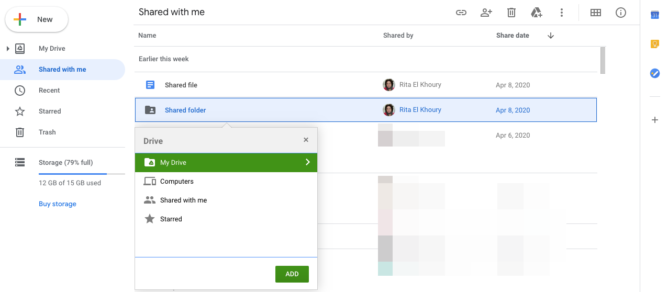
you can still move shared files and folders to your Drive, even on the web (no need for the Android app), but the option is hidden behind a keyboard shortcut. Go to your Shared with me section, highlight the shared files or folders you want to move, and type Shift+Z on your keyboard. You’ll see the old move menu and can choose where to put those folders. On your PC, they’ll sync and behave like they used to, no shortcut mess. More info can be found here, and you can always type ? in Drive to bring up the list of keyboard shortcuts if you forget this one.

Finally, Remy revealed that the Drive team will “keep this behavior [Shift+Z] around for folders until we have a solid solution to sync shared folders.” I think that helps appease our collective fears about the change.

From the page linked at [Wayback] Find files & folders with Google Drive shortcuts – Computer – Google Drive Help:

Shortcuts can sync across your devices, including computers and smartphones. But when you use Backup and Sync to connect with a computer, there are some differences. The shortcuts you made to individual files will sync up with the file as normal. But the shortcuts you made to shared folders will just link to the folder on the Google Drive website.

Try these alternatives:

  • Instead of a shortcut, add the folder to an additional location. On the Google Drive website, select the folder and press Shift + Z. 
  • Add shortcuts to individual files within the shared folder (and not to the shared folder itself).
  • If you’re a Google Workspace user, learn more about Drive File Stream.

–jeroen

Posted in Google, GoogleDrive, Power User | Leave a Comment »

Some links on Chrome not prompting to save passwords (when Firefox and Safari do)

Posted by jpluimers on 2022/01/20

For quite some time now, Chrome (think years) refuses to prompt for saving passwords whereas Firefox and Safari do prompt and save them, even for site types that it used to save passwords for in the past.

It has been annoying enough for too long now that I tried to do better than the Google searches I used back when I saw this happen first.

Below are some links based on new searches (starting with [Wayback] adding a password in chrome settings – Google Search); hopefully I can try them after I made a list of sites that Chrome does not show the password save prompt for.

Solutions I tried that failed (but maybe useful for others):

Solutions still to try:

Read the rest of this entry »

Posted in Chrome, Chrome, Communications Development, Development, Encryption, ESXi6, ESXi6.5, ESXi6.7, Firefox, Fritz!, Fritz!Box, Fritz!WLAN, Google, https, HTTPS/TLS security, Internet, Internet protocol suite, Let's Encrypt (letsencrypt/certbot), Power User, routers, Safari, Security, TCP, TLS, Virtualization, VMware, VMware ESXi, Web Browsers, Web Development | Leave a Comment »

How to Delete Specific Chrome Autofill Suggestions

Posted by jpluimers on 2022/01/14

If use the Chrome web browser, it’s fairly likely you will find Chrome autofill suggestions recommending things for various forms and text entry points. Sometimes those autofill suggestions c…

[Wayback] How to Delete Specific Chrome Autofill Suggestions

Most important are the steps:

  1. Open the related website which has a form entry where autofill suggestions appear
  2. Start typing so that the suggestion shows up as an option in Chrome
  3. Using the keyboard arrows, navigate down the suggestion list to the item(s) you want to remove from the Chrome autofill suggestions
  4. With the suggestion highlighted, use the appropriate keystroke sequence to delete the Chrome suggestion:
    • Mac: Shift + FN + Delete
    • Windows: Shift + Delete
    • Chromebook / Chrome OS: Alt + Shift + Delete
  5. Repeat with other suggestions to delete if desired

Via: [WayBack] edit google chrome autocomplete list – Google Search

–jeroen

Posted in Chrome, Chrome, Google, Power User, Web Browsers | Leave a Comment »