The Wiert Corner – irregular stream of stuff

Jeroen W. Pluimers on .NET, C#, Delphi, databases, and personal interests

  • My badges

  • Twitter Updates

  • My Flickr Stream

  • Pages

  • All categories

  • Enter your email address to subscribe to this blog and receive notifications of new posts by email.

    Join 1,854 other subscribers

Archive for the ‘Google’ Category

Google Cloud Shell: tools, languages and “safe mode”

Posted by jpluimers on 2023/01/19

After publishing Free Linux cloud shell for Gmail users – shell in the browser that works in all locations I’ve been so far, the Google Cloud Shell got extended quite a bit.

There is now [Wayback/Archive] Safe Mode (which skips initialisation scripts):

If there’s a problem in your .bashrc or .tmux.conf files, Cloud Shell immediately close after connection. To resolve this, open Cloud Shell in safe mode by appending cloudshellsafemode=true to the URL. This restarts your Cloud Shell instance and logs you in as root, allowing you to fix any issues in the files.

To permanently delete all files in your home directory and restore your Cloud Shell home directory to a clean state, you can reset your Cloud Shell VM.

And there is support for way more [Wayback/Archive] tools and languages:

Read the rest of this entry »

Posted in .NET, C#, Cloud, Development, Go (golang), Google, GoogleCloudShell, Infrastructure, Java, Java Platform, JavaScript/ECMAScript, Node.js, Perl, PHP, Power User, Python, Ruby, Scripting, Software Development | Leave a Comment »

Finding your Google Pay payments and receipts (they do not send proper invoices)

Posted by jpluimers on 2022/12/26

For my link archive: [WayBack/Archive.is] Your Google Store charges and receipts – Google Store Help

Charges:

  1. Visit pay.google.com/.
  2. Sign in to your Google account.
  3. On the left, click Subscriptions and services.
  4. Click View purchases.

Receipts and order numbers

  1. Visit pay.google.com/ and sign in with your Google account.
  2. On the left, click Subscriptions and services.
  3. Click View purchases.
  4. Select an order to see your receipt.
    • If you need your order number, you can find it on the receipt page.

VAT invoice

If you live in the European Union, Switzerland, or Norway, learn how to request a VAT invoice:

You can request each month’s invoice in the first few days of the following month. It might take up to 24 hours to process your request.

The address shown on your VAT invoice is your legal address at the time the purchase was made. You can’t change the address that appears on a VAT invoice after the purchase is made.

  1. Sign in to Settings.
  2. Check that you’ve entered your tax ID number. If you haven’t, enter it now.
    • In some countries, you can’t get a VAT invoice if you didn’t enter your tax ID number before you made the purchase.
  3. Click Activity.
  4. Click on the transaction you want an invoice for.
  5. At the bottom of the transaction details, click Download VAT invoice. You may be asked to enter some information, like your full address or a tax ID.
  6. Click Save. You’ll see a link where you can download your invoice.


–jeroen

Posted in Google, GooglePay, Power User | Leave a Comment »

google chrome devtools – Use JavaScript to set value of textbox when .value and events don’t seem to work – Stack Overflow

Posted by jpluimers on 2022/11/29

For my link archive: [Wayback/Archive] google chrome devtools – Use JavaScript to set value of textbox when .value and events don’t seem to work – Stack Overflow

TL;DR

Sometimes fields are blocked from pasting values.

Normally a trick like this works in the chrome development panel console:

document.getElementById('nonPasteElementID').value = 'myValueFromTheClipboard'

With some web development environments this does not work.

For react, after finding the react render name for the input (in the case of the answer, it was “reactNameForInputElement“) this is a solution:

To make it work you will need this:

const input = document.getElementById('nonPasteElementID');
const event = new Event('reactNameForInputElement', { bubbles: true });
input.value = '1';
input.dispatchEvent(event);

–jeroen

Posted in Chrome, Chrome, Development, Google, JavaScript/ECMAScript, Power User, Scripting, Software Development, Web Browsers, Web Development | Leave a Comment »

Some links on Chromecast and stuttering

Posted by jpluimers on 2022/10/18

For my link archive (all my Chromecast devices are wired via LAN to low-latency fiber backed ISPs):

For v1 Chromecast devices, it seems Google does not care any more and will always stream at 1060p50 or 1060p60 without giving the opportunity to tune down the quality from the Android Chromecast app (my app always shows “Quality:Unavailable”, see the picture below the signature).

For v2 and up, there sometimes are firmware issues that take long times to get resolved.

–jeroen

Read the rest of this entry »

Posted in Chromecast, Google, Power User | Leave a Comment »

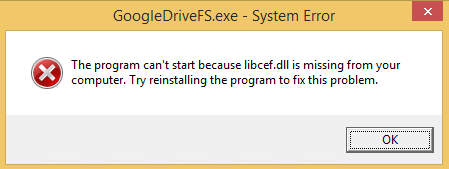
GoogleDriveFS.exe – System Error; The program can’t start because libcef.dll is missing from your computer. (it wasn’t missing)

Posted by jpluimers on 2022/10/17

GoogleDriveFS - cannot find libcef.dll

GoogleDriveFS – cannot find libcef.dll

Don’t you love errors after things try to audo-update themselves without testing preerquisites:

---------------------------
GoogleDriveFS.exe - System Error
---------------------------
The program can't start because libcef.dll is missing from your computer. Try reinstalling the program to fix this problem. 
---------------------------
OK   
---------------------------

The message was from the csrss.exe Client/Server Runtime Subsystem – Wikipedia process:

Read the rest of this entry »

Posted in Google, GoogleDrive, Power User, Windows, Windows 8 | Leave a Comment »

On the research list: ahochsteger/gmail2gdrive: Gmail2GDrive is a Google Apps Script which automatically stores and sorts Gmail attachments into Google Drive folders.

Posted by jpluimers on 2022/10/13

On the research list: [Wayback/Archive.is] ahochsteger/gmail2gdrive: Gmail2GDrive is a Google Apps Script which automatically stores and sorts Gmail attachments into Google Drive folders.

The script is in JavaScript and runs on Archive.is Apps Script – Google Apps Script.

Because of [Wayback/Archive.is] gmail – Way to automatically download or print attachments or URLs from emails with specific labels – Web Applications Stack Exchange.

–jeroen

Posted in Development, GMail, Google, JavaScript/ECMAScript, Power User, Scripting, Software Development | Leave a Comment »

Converting an html dl (delimited list) on a page to a table from the Chrome console

Posted by jpluimers on 2022/09/14

A while ago, I wanted to convert the dl delimited list html element on a web page into a regular table so I could more easily reorder the data into cells.

So I ran the below bit of code in the Chrome Console after first putting the mentioned table with id here_table in the place where I wanted the table to be included:


<table id="here_table"></table>

view raw

_table.html

hosted with ❤ by GitHub


var arr = $("#delimitedList").children().map(function () {
return $(this).html();
}).get();
for (var i = 0; i < arr.length; i += 2) {
$('#here_table').append('<tr><td>' + arr[i] + '</td><td>' + arr[i + 1] + '</td></tr>');
}

For this script to work, you need jQuery, so yesterday I wrote Better, Stronger, Safer jQuerify Bookmarklet | Learning jQuery.

The code is based on [Wayback/Archive.is] Rebuild each definition list () as a table using JQuery – Stack Overflow (thanks [Wayback/Archive.is] easy!) with an important adoption instead of calling text() to get the textual dt and dd information, it uses html() so the original innerHTML is being preserved.

Some similar JavaScript pieces of code are at [Wayback/Archive.is] Turning HTML into a nested JavaScript array with jQuery – Stack Overflow.

Related:

–jeroen

Posted in Bookmarklet, Chrome, Development, Google, JavaScript/ECMAScript, jQuery, Pingback, Power User, Scripting, Software Development, Stackoverflow, Web Browsers, Web Development | Leave a Comment »

On my list of things to try: chrome flag: global-media-controls (older article, it’s live in stable now)

Posted by jpluimers on 2022/09/12

[WayBack] Roderick Gadellaa on Twitter: “My new favorite chrome flag: global-media-controls (older article, it’s live in stable now)… “

[WayBack ]Chrome is testing new media playback controls that can even work with background tabs

To enable to controls, head to chrome://flags/#global-media-controlsAfter a browser restart, you’ll see a play button in your toolbar next to the extensions whenever you have media playing in Chrome. Clicking it will show the title of what’s playing, where it’s playing from, and provide play/pause and skip buttons.

–jeroen

Posted in Chrome, Google, Power User | Leave a Comment »

How To Fix “Google Photos Not Uploading” On Android & iPhone

Posted by jpluimers on 2022/08/22

For my link archive, as sometimes uploading does not proceed, and I want to figure out the cause: [Wayback/Archive.is] How To Fix “Google Photos Not Uploading” On Android & iPhone

Before you start: Check your Back up Status

  1. Diagnose your Internet Connection
  2. Ensure you’re using the right backup settings
  3. Enable Backup Device Folders
  4. Disable Battery Optimization for Google Photos
  5. Enable Background Data Usage
  6. Keep Google Photos updated
  7. Reset/Reinstall the Google Photos app

I had to revert to 7. as 5. was already set, and 4. was not available in the settings.

That solved my issues.

–jeroen

Posted in Android Devices, Google, Google Photos, OnePlus Six, Power User | Leave a Comment »

WhatsApp Desktop for Mac or PC cannot only chat but also voice and video call

Posted by jpluimers on 2022/07/28

Easiest way to video call from your PC via WhatsApp is to use [Wayback/Archive] WhatsApp: Download – Mac or Windows PC.

This should be an alternative for Hangouts Video Calling as Hangouts is yet another product killed by Google as mentioned in many places for instance:

Read the rest of this entry »

Posted in About, Conference Topics, Conferences, Event, Google, GoogleHangouts, LifeHacker, Personal, Power User, SocialMedia, WhatsApp | Leave a Comment »