Archive for the ‘Mainboards’ Category
Posted by jpluimers on 2025/09/16
 Not all virtualised hardware (older hardware usually has died by now) conforms to the Windows 11 minimum specifications.
So here are some links that should be of help to still get Windows 11 running on those:
If you insist on running older hardware that has a TPM header on the mainboard:
Read the rest of this entry »
Posted in CommandLine, Development, MSI, Power User, PowerShell, PowerShell, Scripting, Software Development, Windows, Windows 11, Z77A-G43 | Leave a Comment »
Posted by jpluimers on 2025/06/23
If I ever want to build a PC again, this site helps me assemble the parts and check their compatibility: [Wayback/Archive] Pick parts. Build your PC. Compare and share. – PCPartPicker
Of course it is not a 100% coverage or guarantee, but it will you a lot of hints when on-line configuring a system.
This is the system a friend was configuring and I was quite positively surprised:
Read the rest of this entry »
Posted in CPU, Hardware, HDD, M.2/NGFF, Mainboards, Memory, PC PSU, PCIe/PCI-e/PCI Express, Power User, PSU, SAS/SATA, SCSI, SSD, Uncategorized | Leave a Comment »
Posted by jpluimers on 2023/02/06
An X10 machine here hardly needs reboots, but at one point it did, and got a dreaded message “PEI--Could Not Find Recovery Image...“, so I started Googling.
- [Wayback/Archive] “pei” “could not find recovery image” – Google Search returned only one Russian thread: [Wayback/Archive] Восстановление BIOS на Supermicro X10SRi.
- Hard to read, I dug further with [Wayback/Archive] “PEI–Could Not Find Recovery Image…” – Google Search and [Wayback/Archive] “pei could not find recovery image” – Google Search, which both went for inexact matches: bummer.
The good news is that few people bump into this problem. The bad news is that the ones that do, usually do not find a way to solve it. For example:
What helped in retrospect, was using IPMI (which still worked), re-flash the most recent BIOS, then powered down the machine and rebooted: it worked.
Not sure if I will be so lucky next time, but via [Wayback/Archive] supermicro “could not find recovery image” – Google Search , I found the the idea from [Wayback/Archive] X9SRL-F POSTs only via BIOS recovery process | ServeTheHome Forums that might help: solder a new BIOS Flash ship. Definitely not for the fainthearted: [Wayback/Archive] Bios Recovery via Chip Reprogramming Supermicro X10SLM+-LN4F | ServeTheHome Forums.
I got at the BIOS programming via IPMI idea via the second set of searches above, which got me at [Wayback/Archive] Supermicro BIOS recovery – SUPER.ROM – Server Fault (thanks anonymous [Wayback/Archive] user303507):
Get mainboards with a “-F” in the product name. Then you have IPMI and can even flash a faulty BIOS. It requires a key from Supermicro to activate this feature which is not for free
…
The 2nd flash area can also be fully impacted by a faulty flash process, therefore the trick with Ctrl+HOME does not work.
This worked because all my SuperMicro mainboards are of the “-F” type and I had the key.
If you don’t have the key it can be generated, for instance with the bash script I published in Supermicro Bios Update – YouTube.
You can find back most letters and numbers SuperMicro uses at [Wayback/Archive1/Archive2] Motherboards (Intel UP) | Product Naming Conventions | Super Micro Computer, Inc. which has a few tables like this:
Read the rest of this entry »
Posted in Hardware, Mainboards, Power User, SAS/SATA, SuperMicro, X10SRH-CF | Leave a Comment »
Posted by jpluimers on 2022/09/05
The board supports mSATA which is an older standard so it is harder to get media for it. I keep mixing up mSATA and M.2 all the time, so:
The Gigabyte GA-Z77-DS3H manuals (see below) note “The mSATA connector conforms to SATA 3Gb/s standard and can connect to a single solid-state drive.”
Read the rest of this entry »
Posted in GA-Z77-DS3H, gigabyte, Hardware, Mainboards, Power User | Leave a Comment »
Posted by jpluimers on 2022/05/16
IntelBurnTest is a wrapper around the [Wayback] Intel Linpack benchmark ([Wayback] Windows download) and still a great way to test CPUs.
From [Wayback/Archive.is] reddit – About Intel Burn Test… : overclocking:
“Pinhedd: “Both IBT and Prime95 are similar in that they stress floating point arithmetic and memory subsystems. They are different in that IBT uses Linpack (solving linear equations) while Prime95 calculates Mersene Primes.
IBT is generally regarded as being far more aggressive in the short term, which makes it great for testing ultimate stability. IBT will easily drive load temps up to 20 degrees higher than Prime95, this is well known and is a defining feature of the program.
Unfortunately, the Linpack benchmark was designed for supercomputers (hence the floating point part, for modeling continuous phenomenon) so it really pushes desktops to the limit, far beyond what any application will do. This means that IBT may fail on commercial CPUs that are running at stock settings simply because Intel doesn’t test them to that extent.
Too bad it is not open source and steadily at version 2.54, but then again, there is so little to maintain when the underlying tests basically do not change.
Read the rest of this entry »
Posted in CPU, Hardware, Intel CPUs, Mainboards, MSI, Power User, Z77A-G43 | Leave a Comment »
Posted by jpluimers on 2022/03/24
For my link archive: [Wayback] MSI Z77A-G43 support and downloads
Note that Windows 10 does not seem to need additional drivers, even Wake-on-LAN works with the stock Windows 10 drivers (but does require two BIOS settings and three Windows driver settings, see [Wayback] Wake-on-LAN (WoL) | MSI HQ User-to-User FAQ.
Max processor information based on the below links.
- Max processor that supports VT-d (for virtualisation), but no manual overclocking: i7 3770.
- Max processor that supports manual overclocking, but not VT-d: i7 3770K
From:
Via: [Wayback] MSI Z77A-G43 – Kenmerken – Tweakers
–jeroen
Posted in Hardware, Mainboards, MSI, Power User, Z77A-G43 | Leave a Comment »
Posted by jpluimers on 2022/03/23
[Wayback] msi hq user-to-user faq: wake on lan (wol) by Author Ruudt Swaanen on 3 May, 2017, paraphrased by me:
- In the BIOS:
- Under “Settings -> Advanced -> Power Management Setup”, disable the option “EuP 2013” (my mainboard) or “ERP Ready”.
Disabling this function will keep the LAN port enabled when the system is put to Sleep (S3) or in Shutdown (S5) mode.
Enabling this function will use less power (see [Wayback] What is EuP 2013? | Overclock.net)
- Under “Settings -> Wake Up Event Setup”, enable the option “Resume By PCI or PCI-E Device” (my mainboard) or “Resume by LAN”.
- In the Windows 10 Control Panel, (
control.exe) with an Administrator elevation token):
- In the “Power Options” Control Panel applet (
powercfg.cpl), under “Choose what the power buttons do”, disable the option “Turn on fast startup (recommended)”.
On many MSI based machines, the option “Turn on fast startup (recommended)” interferes with Wake-on-LAN.
- In the “Device Manager” (
devmgmt.msc), under your network adapter change these options (the naming slightly differs per vendor/model; below is for generic Realtek PCIe GBE):
- On the “Power Management” tab, enable these options:
- “Allow this device to wake the computer”
- “Only allow a magic packet to wake the computer”
- On the “Advanced” tab, enable these options:
- “Wake on Magic Packet”
- “Wake on pattern match”
- On the “Advanced” tab, set this value:
- “WOL & Shutdown Link Speed” is “10 Mbps First”
Now test in these global Power States:
- S5 “soft off” (the state where there is a power cord connected, but none of the fans spin)
- S4 “hibernating” (if you have turned that on in the power options)
- S3 “sleeping”
This worked well for S3 and S5 (but not S4) on my MSI Z77A-G43 based Windows 10 PC and only required stock network driver for the “Realtek PCIe GBE Family Controller” shown in the Device Manager (devmgmt.msc) and you can find on [Wayback] Microsoft Update Catalog: Realtek PCIe GBE Family Controller Driver.
For more Wake on LAN blog posts, including how to initiate a Wake-on-LAN request, see the category Wake-on-LAN (WoL).
–jeroen
Posted in Hardware, Mainboards, MSI, Power User | Leave a Comment »
Posted by jpluimers on 2022/03/07
It looks like some X9 and X10 Supermicro boards already support PCIe bifurcation (splitting of PCIe slots into multiple channels), which might be worth a try to upgrade some of my older rigs to use NVMe instead of SATA storage as it will allow me to use adapters that support multiple NVMe devices into a single PCIe slot.
The X9 motherboards uses an LGA 2011-R socket, and the X10 motherboards an LGA 2011-R3 sockets.
Both use chipsets not being that different: the X9 uses the C600 series (which are similar to the X79 consumer series), and the X10 uses the C610 series (which are similar to the X99 consumer series).
This is what I found out about the bifurcation support for my boards:
References:
–jeroen
Posted in Hardware, Mainboards, Power User, SuperMicro, X10SRH-CF, X9SRi-3F, X9SRi-F | Leave a Comment »
Posted by jpluimers on 2021/08/13
TL;DR
- ensure the IPMI network cable is connected before connecting the power cable
- ensure the IPMI LAN is using the dedicated interface
- ensure the IPMI LAN interface is connected to a “non green” port of your network switch
- ensure the DHCP server has been cold rebooted
- ensure the IPMI VLAN configuration matches your network
- ensure the IPMI firewall configuration matches the network you try to reach IPMI from
- ensure the motherboard does not have a short-circuit anywhere
Otherwise SuperMicro devices might not get a DHCP address on the IPMI (BMC) interface, despite the tooling like [WayBack] ipmicfg indicating getting DHCP was succesful.
This especially holds for X9 boards, likely for newer boards as well.
Personally I never had the 4. and up above, but I bumped into 1. and 2. with SuperMicro boards and 3. with other devices.
Based on
Read the rest of this entry »
Posted in Hardware, Mainboards, Power User, SuperMicro, X9SRi-3F, X9SRi-F | Leave a Comment »
Posted by jpluimers on 2021/05/24
I had something odd on one SuperMicro systeem:
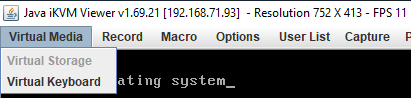
The “Virtual Storage” menu item under “Virtual Media” was marked grey (gray?) as being unavailable.
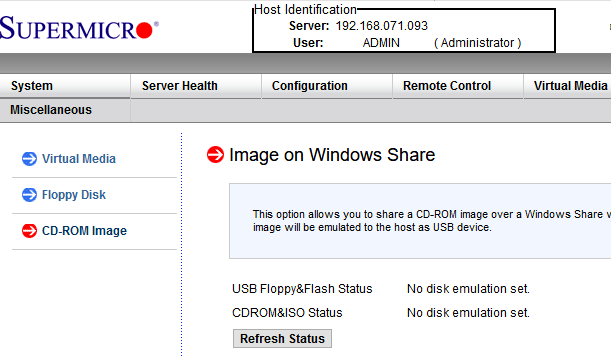
Despite that, no disk image was shown mounted according to the web interface at menu path “Virtual Media” -> “CD-ROM Image“:
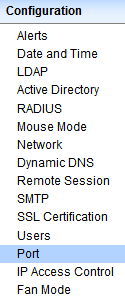
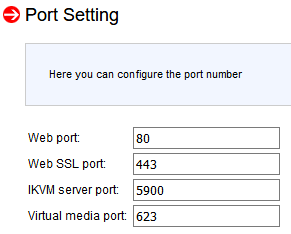
Port settings were good though as seen in menu path “Configuration” -> “Port“:
Even nmap did not show significant differences between the various systems (partial dump here; full dump below)
Discovered open port 443/tcp on 192.168.71.96
Discovered open port 5900/tcp on 192.168.71.96
Discovered open port 80/tcp on 192.168.71.96
Discovered open port 22/tcp on 192.168.71.96
Discovered open port 5985/tcp on 192.168.71.96
Discovered open port 623/tcp on 192.168.71.96
I use alias alias nmap-fingerprint_host_all-ports-even-if-ping-fails='sudo nmap -O -v -A -p- -Pn' here as it usually gives best results for port scans on a single machine.
“Secret” setting
The secret is in a different menu entry under menu path “Maintenance” -> “IKVM reset“:
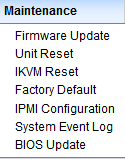
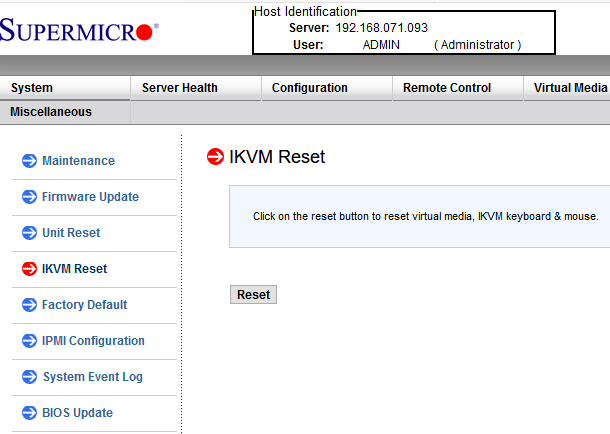
After pressing the Reset button, then restarting the iKVM client, “Virtual Media” -> “Virtual Storage” is nog grey any more, and just works:
Read the rest of this entry »
Posted in Hardware, IPMI, Mainboards, Power User, SuperMicro, X9SRi-F | Leave a Comment »


 The Wiert Corner - irregular stream of stuff