Archive for the ‘Fritz!Box’ Category
Posted by jpluimers on 2018/09/24
You can capture network packets on a Fritz!Box for any interface by:
- appending `/html/capture.html` to the IP address of your Fritz!Box
- providing your credentials
- for ISDN traces optionally entering any
dtrace parameters in the edit box
- pressing the Start button for the port you want to capture
- pressing the Stop button when you are finished capturing
Example URL: 192.168.178.1/html/capture.html
Note it’s ISDN [WayBack] Dtrace – Fritz!Box, not nx kernel [WayBack] DTrace – Wikipedia
I’ve seen this on these devices:
- Fritz!Box 7360 running FRITZ!OS 06.30
- Fritz!Box 7490 running FRITZ!OS: 06.83
Note there are tons of tools allowing to capture from various scripting languages:
–jeroen
Read the rest of this entry »
Posted in Fritz!, Fritz!Box, Internet, Power User | Leave a Comment »
Posted by jpluimers on 2018/07/23
I need to dig a bit deeper into these links to see how easy it is to record calls made on a Fritz!Box then playing back the captured calls.
Note that in various countries you have to indicate to the calling parties that their calls can be recorded.
Read the rest of this entry »
Posted in Fritz!, Fritz!Box, fritzcap, Internet, Power User | Leave a Comment »
Posted by jpluimers on 2017/06/06
The WAN sides of my Mikrotik CCR1009 are partly behind Fritz!Box routers that do NAT and contain a truckload of port-forwards.
A while ago, I wanted the CCR1009 to do PPTP as Fritz!Box 7360 and 7490: static routes over VPN don’t work (so I could only VPN to the WAN side of the CCR1009). However, it would not pass through the Fritz!Box from the outside.
It appears you need to forward both:
Maybe one day I will ditch the Fritz!Box 7490 and directly hookup the Mikrotik to the NTU: xs4all ftth en Mikrotik router – Google Groups.
But preferably I should follow Don’t use PPTP, and don’t use IPSEC-PSK either (via: CloudCracker blog)
–jeroen
via: VPNs einrichten mit PPTP – administrator.de: Achtung mit PPTP VPN Servern hinter NAT Firewalls !

Forward both PPTP TCP port 1723 and the GRE protocol
Posted in Fritz!, Fritz!Box, Fritz!WLAN, Internet, IPSec, MikroTik, Network-and-equipment, Power User, PPTP, routers, VPN | Leave a Comment »
Posted by jpluimers on 2017/06/05
Interesting:
As I always try to maximize the usage of new hardware I started to explore what is possible with this combination. In this post I will explain how you get access to your FRITZ!Box using ssh.
Source: FRITZ!Box tuning part 1: Enable remote access over ssh [WayBack]
–jeroen
Posted in Fritz!, Fritz!Box, Internet, Power User | Leave a Comment »
Posted by jpluimers on 2017/03/30
I tried to power both Raspberry B+ and Raspberry 2 B devices via the USB ports of both a Fritz!Box 7490 and Fritz!Box 7360.
At first this works, but the Raspberry B+ devices over time would become unstable: not being able to ping and/or boot.
So below are some links on power requirements and powering Raspberry Pi A, B, A+, B+, 2B and zero.
Fazit/TL;DR: use an external power supply when available.
Read the rest of this entry »
Posted in *nix, Development, Fritz!, Fritz!Box, Hardware Development, Internet, Linux, openSuSE, Power User, Raspberry Pi, SuSE Linux | Leave a Comment »
Posted by jpluimers on 2017/01/23
This was a tad difficult to find as I searched for “Convert Fritz!Box to Switch” instead of “Convert Fritz!Box to Access Point”.
Since I had an old Fritz!Box 7360 lying around (from my ADSL era) and wanted to extend the cabled LAN for my brothers Fritz!Box 7490 with some low-bandwidth devices (max 100 megabit/second) I searched for Switch. My bad.
Oh I had to factory reset it as well as I forgot the management credentials. The AVM help on this is cumbersome: Loading the FRITZ!Box factory settings | FRITZ!Box 7360 | AVM International but the xs4all help includes a web-reset procedure as part of Internet: Reset procedures van mijn FRITZ!Box 7360 which translates to:
- Switch off the Fritz!Box (as this procedure needs to be done within 10 minutes of switching it on)
- Connect LAN2 to your computer
- Switch on the Fritz!Box
- Wait for a DHCP IP or (if you know the IP addresses) configure IP manually
- Go to the web-interface URL
- Indicate you forgot your password:

Forgot your password?
- Indicate you want a factory reset:

Restore Factory Settings
Anyway: with the above steps it becomes a Managed Switch (and if you don’t disable WiFi: Access Point too) that uses the primary internet connection as DHCP server (so it gets an IP address itself as well which means you can manage it).
Read the rest of this entry »
Posted in ADSL, Fritz!, Fritz!Box, Internet, Power User | Leave a Comment »
Posted by jpluimers on 2016/11/29
Just in case you got scared by the TR-064 hack and likely causality to the German Telekom ISP outage yesterday as some modems expose TR-064 via the TR-069 WAN access, here is how to disable TR-069 in your Fritz!Box: [WayBack] TR-069 auf Fritzbox ausschalten und Ergebnis prüfen — Hartmut Goebel · CISSP, CSSLP · Berater für Information-Security-Management
Note that for Fritz!Box the TR-069 implementation is not as bad as some Speedport devices used by Telekom, but you might want to consider turning TR-069 off:
If you trust yourself to keep the Fritz!Box firmware *and* settings up-to-date better than your ISP does, below are the translated steps.
Steps to disable TR-069 on a Fritz!Box router
- Activate
telnetd on your Fritz!Box via a connected phone by dialing #96*7*
- Connect to your Fritz!Box over telnet at using
telnet fritz.box or instead of fritz.box., use the IP-address of your Fritz!Box device
- the password is the same as the password in the Fritz!Box web interface
- Disable TR-069 by typing this command:
ctlmgr_ctl w tr069 settings/enabled 0
- Verify the TR-069 is off by looking at configuration file with this command:
cat /var/flash/tr069.cfg
- Check that at the start there is a line with
enabled = no
- Disable
telnetd on your Fritz!Box via a connected by by dialing #96*8*
Note that even without a phone you can enable/disable
telnetd as described by [
WayBack]
FRITZ!Box VoIP password extraction
–jeroen
References:
Posted in Fritz!, Fritz!Box, Network-and-equipment, Power User | 2 Comments »
Posted by jpluimers on 2016/11/18
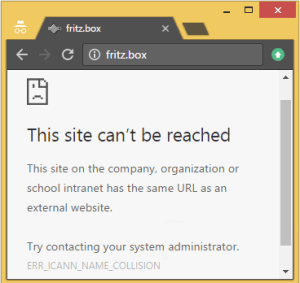 [WayBack] Schlechte Nachrichten für Fritz!box User: http://nic.box/ Euer http://fritz.box ist nicht mehr das, was es sein sollte. EDIT: Muahahaha … – Kristian Köhntopp – Google+
Now there is http://nic.box/ for the new [WayBack] box top level domain and AVM does not yet have the pre-registered fritz.box there effectuated (because .box is not in final registration state yet).
Kristian:
Schlechte Nachrichten für Fritz!box User: http://nic.box/ Euer http://fritz.box ist nicht mehr das, was es sein sollte.
EDIT: Muahahaha
kris@h1755802:~> host fritz.box

fritz.box has address 127.0.53.53

fritz.box mail is handled by 10 your-dns-needs-immediate-attention.box.
The joke is in the cryptic “your-dns-needs-immediate-attention” and usage of 127.0.53.53. to indicate a gTLD name collision.
Chrome knows about ICANN though and explains it in a slightly more readable form when browsing to http://fritz.box (:
Read the rest of this entry »
Posted in Chrome, Fritz!, Fritz!Box, Internet, Power User, Web Browsers | Leave a Comment »
Posted by jpluimers on 2016/09/29
I needed to script a few things on my Fritz!Box. Here are the cURL links that I used to research some Fritz!Box scripting.
My first try was wget, but that didn’t do everything I need, so cURL came to the rescue.
In the end, I didn’t need cookies (a post request with an MD5 based handshake sufficed to get a session SID which is not stored in a Cookie), but that surely will come in useful another time.
Curl man page entries:
The script is and docs are here: jpluimers/bash-fritzclient.
–jeroen
Posted in *nix, bash, cURL, Development, Fritz!, Fritz!Box, Network-and-equipment, Power User, Scripting, Software Development, wget | Leave a Comment »
Posted by jpluimers on 2016/08/01
With en empty Group Name you get this:

No Group Name means no connection
The bad thing is: the Fritz!Box will not tell you this in any of the logs.
So don’t forget to set the Group Name to be the same as the Account Name in the ….:

Always enter the Group Name in the Authentication Settings
Then you can successfully connect:

VPN connection succeeded!
–jeroen
Read the rest of this entry »
Posted in Fritz!, Fritz!Box, Internet, Power User | Leave a Comment »


 The Wiert Corner - irregular stream of stuff