Archive for the ‘Network-and-equipment’ Category
Posted by jpluimers on 2020/08/04
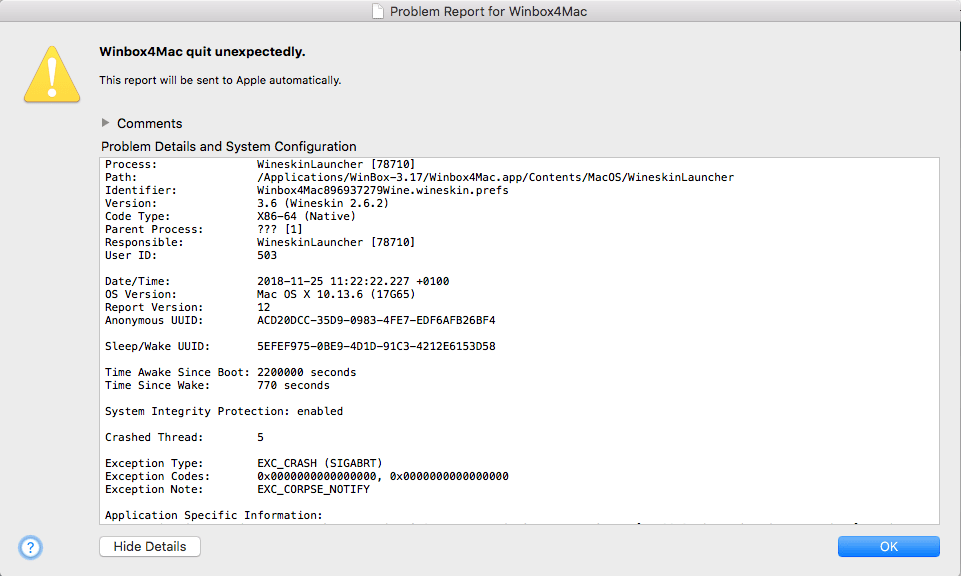
On my investigation list as WinBox 3.17 only crashes some of the times.
It might have to do with changes in High Sierra:
The real problem: if this happens, WinBox will not start until I have rebooted.
--jeroen
Read the rest of this entry »
Posted in Development, Ethernet, Hardware, MikroTik, Network-and-equipment, Power User, routers, Software Development, WinBox | Leave a Comment »
Posted by jpluimers on 2020/07/16
Thomas Rini (of U-Boot and Yocto fame) mentioned these solutions for remote power control of IoT devices and remote updating SD cards in this slide State of the U-Boot – Thomas Rini, Konsulko Group:
- FlashAir WiFi enabled SD cards
Two power solutions I like myself are:
The combination of these allows for really flexible production and testing environments.
Slides at [WayBack] ELC2017 – State of the U-Boot.pdf
–jeroen
Read the rest of this entry »
Posted in Arduino, Development, ESP8266, ESP8266X, Hardware Development, Hardware Interfacing, IoT Internet of Things, Network-and-equipment, Odroid, Power User, Raspberry Pi | Leave a Comment »
Posted by jpluimers on 2020/07/06
[WayBack] RB450G and “..could not get answer from dns server” – MikroTik: I do not see a default route. It would be the route with “dst-address=0.0.0.0/0“.
–jeroen
Posted in Internet, MikroTik, Power User, routers | Leave a Comment »
Posted by jpluimers on 2020/04/03
I totally forgot it was possible to usie an old Fritz!Box to act as a DECT repeater:
Um die Abdeckung von DECT für mobile Festnetztelefone zu verbessern, lässt sich eine ältere Fritzbox verwenden.
Source: [WayBack] Ältere Fritzbox als DECT-Repeater verwenden – PC-WELT
Via: [WayBack] Bludau Media – Google+
–jeroen
Posted in Fritz!, Fritz!Box, Internet, Power User | Leave a Comment »
Posted by jpluimers on 2020/02/24
Reminder to self: [WayBack] Tomato by shibby – upgrade procedure and cfg backup | LinksysInfo.org:
I keep a text file with the changes I’ve made after a fresh install and I keep the file updated as I make changes.
Re-configuring the router after that takes a bit of time, but it is not that bad. Toastman’s method (here) noted above as well as the methods described here and here can also be used, but I haven’t tried them.
which references:
- [WayBack] Using QOS – Tutorial and discussion | Page 3 | LinksysInfo.org
You need to save a file somewhere on or off the router, with the following command from the command line.
nvram export –set >config.txt
This outputs the complete setup in useable text form, each line beginning with “nvram set”. This means it’s ready to input to the router without having to add the “nvram set” to every line. You could do this by ssh or telnet.
NOTE – you can only restore the whole config file to the original router. To configure a different router you need to cherry pick the important lines (see below)
e.g.
nvram set clkfreq=480,240,120
nvram set wl0_country=AU
nvram set wan_domain=freewifi
nvram commit
- [WayBack] Tomato RAF Releases | Page 18 | LinksysInfo.org
save off the results of nvram export –quote, ie:
Code:
nvram export –quote > nvram_clean
after erasing, then subsequent changes are easy to find later with:
Code:
nvram export –quote | grep -Fvf nvram_clean
While not quite as readable or cut and paste friedly as –set, –quote is script friendly with the advantage that all entries are always a single line.
- [WayBack] I’ve created a command-line NVRAM cfg file parser | LinksysInfo.org
Decodes Tomato cfg files into JSON so they can be changed and compared against other backups. Encodes JSON-formatted Tomato cfg key/value pairs into the Tomato cfg format.
–jeroen
Posted in Internet, Power User, routers, TomatoUSB | Leave a Comment »
Posted by jpluimers on 2020/01/17
A long time ago I wrote in Mac/PC: sending Wake-on-LAN (WOL) packets « The Wiert Corner – irregular stream of stuff “I’ve succesfully woken up these machines: HP XW6600 running ESXi 5.1 ThinkPad W701U running Windows 7”.
The XW6600 have now been demoted to Windows 10 machines that I only need every now and then, so most of the time they are shutdown.
However, with the installation of Windows 10 however, they stopped reacting to WOL (Wake on LAN).
Per web-search results, I’ve tried all the permutations of the below settings to no avail.
Luckily, my trusty APC PDU AP7921 (and little sister AP7920) helped out: when setting the “Reboot Duration” to 30 seconds or more (so the power fully drains), it can be rebooted.
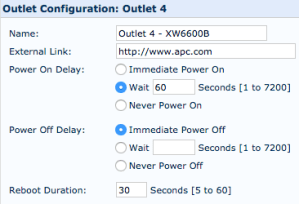
Note that since I bought these a long time ago, they have been replaced by these:
- AP7920 Rack PDU, Switched, 1U, 12A/208V, 10A/230V, (8)C13
- AP7921 Rack PDU, Switched, 1U, 16A, 208/230V, (8)C13
Firmwares:
Power usage:
- an XW66000 with 32 gigabytes of RAM and one hard disk takes between 0.6-1.2 Ampère of current, which at 230 Volt is 140-275 Watt.
- over one day that is between 3.4 and 6.6 kWh
Settings tried
Read the rest of this entry »
Posted in Ethernet, Hardware, HP XW6600, Network-and-equipment, Power User, Wake-on-LAN (WoL), Windows, Windows 10 | Leave a Comment »
Posted by jpluimers on 2020/01/15
 Two decades before the personal computer, a shy engineer unveiled the tools that would drive the tech revolution
Don’t read this as a historic piece, but as the potential we are still going to experience what was not just sketched by a true visionary in 1968, but also demonstrated back then: [Archive.is] How Douglas Engelbart Invented the Future | Innovation | Smithsonian.
I am including one of the pictures below by Christie Hemm Klok that shows how far Engelbart was ahead of his time: not his initial invention of an input device (the mouse) “chord” kind.
After that, read about his 1968 presentation: The Mother of All Demos – Wikipedia
Finally, watch the video below, well worth watching the more than one and a half hours.
–jeroen
Via:
Read the rest of this entry »
Posted in Development, Future, Hardware, History, Network-and-equipment, Power User, Software Development | Leave a Comment »




 The Wiert Corner - irregular stream of stuff