


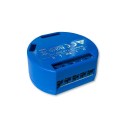
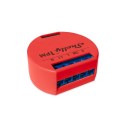
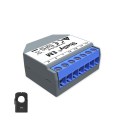
IoT power switching equipment at [WayBack] Shelly Shop Europe:





Via: [WayBack] Tweakers Gift Guide 2019 – Smarthome – Koophulp – Tweakers
–jeroen
Posted by jpluimers on 2021/09/01
IoT power switching equipment at [WayBack] Shelly Shop Europe:
Via: [WayBack] Tweakers Gift Guide 2019 – Smarthome – Koophulp – Tweakers
–jeroen

Posted in Development, Hardware Development, IoT Internet of Things, Network-and-equipment, Power User | Leave a Comment »
Posted by jpluimers on 2021/08/31
[WayBack] Nick_Craver on Twitter: Plus Another mini-project: let’s see if we can’t figure out what’s wrong with this little guy. Symptoms: constant LCD on (briefly) and restart loop immediately when plugged in.
–jeroen

Posted in Development, Displays, Hardware, Hardware Development, LifeHacker, Power User | Leave a Comment »
Posted by jpluimers on 2021/08/27
Sometimes, the Windows device manager shows any of the below errots for an USB 3.x device that is physically connected to the ESXi host and passes through a VM (via a virtual USB controller and virtual USB device).
This solution usually works: use a USB 2.0 cable instead of a USB 3.x cable.
If it doesn’t work, then the solutions are the same as when this happens in a pure physical solution:
In my case, I needed a USB connection, because it is the only way to reset a Fujitsu ScanSnap scanner to correct WiFi settings after it gets confused (which happens a few times per year).
The difference for devices with a known driver:

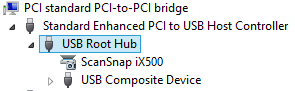
The difference for devices with an unknown driver:
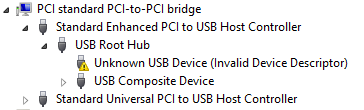
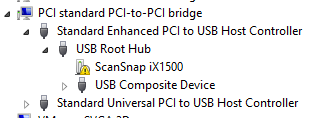
This happened with me on both a ScanSnap iX500 and iX1500, and this did not help (as I was on a more recent Windows version): [WayBack] When setting up your scanner 502: My computer does not recognize ScanSnap iX500 with a USB 3.0 port. – Fujitsu Global.
More on USB passthrough:
A tutorial explaining how to add USB devices connected to a ESXi host to a virtual machine residing on the host itself. A feature called USB passthrough.
You can add one or more USB passthrough devices from an ESXi host to a virtual machine if the physical devices are connected to the host on which the virtual machine runs.
More on USB virtualisation:
–jeroen

Posted in ESXi5.5, ESXi6, ESXi6.5, Fujitsu ScanSnap, Hardware, ix500, Power User, Scanners, Virtualization, VMware, VMware ESXi | Leave a Comment »
Posted by jpluimers on 2021/08/27
You know the old helpdesk joke about “turning it off and on”, right?
GE did that on steroids for their C light bulbs.
It is an off, on, off, on, off, on sequence that depends on the firmware version which nobody knows.
Both procedures:
Do not mix up the off and on times, or you have to restart again.
So step 2 becomes this:
The recommend counting using Mississippi seconds (am I the only one having to check the spelling of that 3 times?).
No counting mechanism beats using a watch or clock.
They even made a video about it lasting 3+ minutes.
The video has a great comment thread.
Via: [WayBack] Alexander BITCOIN ADS ZIJN NEP Klöpping on Twitter: “Als ik ooit zomergast ben laat ik dit fragment integraal zien https://t.co/iHuclGuddu”
–jeroen
Posted in Hardware, LifeHacker, Power User | Leave a Comment »
Posted by jpluimers on 2021/08/25
Oh nice: [Wayback/Archive.is] Samsung can remotely disable their TVs worldwide using TV Block.
This means:
Disconnected, any apps needing internet connection won’t run.
Those apps usually work more reliable on an Apple TV or similar device that plays over HDMI anyway.
In addition, it will also prevent Samsung to show adds on your TV.
So disconnecting it is a win-win-win situation.
Note: you could already block apps and adds, see:
Maybe those blocks also block blocking.
–jeroen
Posted in 4K Monitor, Displays, Hardware, Home Audio/Video, MU6100, Power User, Samsung TV | Leave a Comment »
Posted by jpluimers on 2021/08/24
By default, the [WayBack] MikroTik RB960PGS hEX PoE comes with a 24V power supply.
Most PoE capable devices cannot be powered by 24V but need 48V. I wrote about this before in the midst of the long post Linus Torvalds – Google+: Working gadgets: Ubiquiti UniFi collection (and a whole bunch of Unifi/Ubiquiti/Ubtn links)
- Mikrotik needs to make up their mind, as they ship a 24V power supply which cannot power any 802.3af/802.3at devices. The 48POW power supply enables 802.3af for the RB960PGS hEX PoE: [WayBack] hEX PoE (RB960PGS) – Need 48V Power Supply – MikroTik
So now I re-mention it in a much smaller post so it easier to find back, and a few links to Power over Ethernet – Wikipedia, where especially these bits are relevant:
- 24VDC 0.5A 100 Mbit/s or 1 Gbit/s
- 24VDC 1.0A 100 Mbit/s or 1 Gbit/s
- 48VDC 1.0A 100 Mbit/s or 1 Gbit/s
- 56VDC 1.0A and 2.0A 1 Gbit/s (used for 45W+ load point to point microwave and millimeter band radios
The 24V is what MikroTik sticks to with their default power supply.

Posted in Internet, MikroTik, Network-and-equipment, Power User, routers, Unifi-Ubiquiti | Leave a Comment »
Posted by jpluimers on 2021/08/18
LOL: [WayBack] atx psu 24pin 24p power supply jumper jack adapter connector for btc – Google Search
Via [WayBack] Brad Smith a Twitter: “LOL I just wanted to buy the cheapest ATX socket on ebay to to make a little power jumper connector, and the cheapest one already has the wire stuck onto it. “…for BTC” 🤣… “
–jeroen
Posted in Development, Fun, Hardware, Hardware Development, Power User | Leave a Comment »
Posted by jpluimers on 2021/08/17
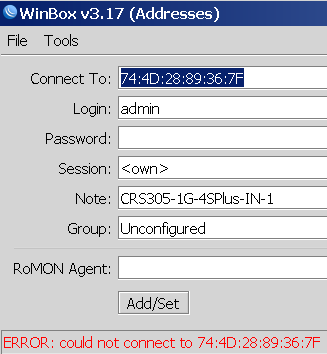
Not sure why, but Winbox 3.17 could not connect to out of the box blank MikroTik equipment at all.
Winbox 3.19 complains every now and than, but usually connects fine.
This was while configuring a bunch of [WayBack] MikroTik Routers and Wireless – Products: CRS305-1G-4S+IN.

Posted in Development, Internet, MikroTik, Power User, RouterOS, routers, Scripting, Software Development | Leave a Comment »
Posted by jpluimers on 2021/08/17
More sites seem to have a tendency of stealing keyboard shortcuts and violating the WCGA (Web Content Accessibility Guidelines), especially the (lowest!) conformance level A in [Wayback] WCAG version 2.1, section Success Criterion 2.1.4 Character Key Shortcuts
If a keyboard shortcut is implemented in content using only letter (including upper- and lower-case letters), punctuation, number, or symbol characters, then at least one of the following is true:
- 1. Turn off
- A mechanism is available to turn the shortcut off;
- 2. Remap
- A mechanism is available to remap the shortcut to use one or more non-printable keyboard characters (e.g. Ctrl, Alt, etc);
- 3. Active only on focus
- The keyboard shortcut for a user interface component is only active when that component has focus.
Mind you, I’m a keyboard person, there is even a: Keyboards and Keyboard Shortcuts category, but they always need to be configurable, anything else is a sin.
And GitHub did it again: [Archive.is] GitHub on Twitter: “🤫 New shortcut: Press . on any GitHub repo.… “.
So I’m totally with these:
Now they have started to steal the dot (.) keyboard to (in-place, with a fully new URL and no indication how to easily go back) start Visual Studio Code in the current repository.
Going back, though not documented, actually takes between one and three “back” movements in your web-browser history: utterly ridiculous for a key one can accidentally hit.
This behaviour violates all three above sub-criterions:
This is a very bad way to cope with accessibility, especially as conformance level A is yet again violated.
[Wayback] WCAG 2.1: section 5.2.1 Conformance Level:
One of the following levels of conformance is met in full.
- For Level A conformance (the minimum level of conformance), the Web page satisfies all the Level A Success Criteria, or a conforming alternate version is provided.
- For Level AA conformance, the Web page satisfies all the Level A and Level AA Success Criteria, or a Level AA conforming alternate version is provided.
- For Level AAA conformance, the Web page satisfies all the Level A, Level AA and Level AAA Success Criteria, or a Level AAA conforming alternate version is provided.
To me another cardinal sin is that they stole Ctrl-F / Command-F (depending if you use non-MacOS or MacOS) from the web browser. So now it does not find it in the full page, but only in the currently selected file. (You guessed it, I’m with [Archive.is] KewlCat on Twitter: “I hate it when they intercept “/” and even [Ctrl]-F… “ too)
More of those conformance violation sins are at [Wayback] Keyboard shortcuts – GitHub Docs.
It isn’t hard to prevent this kind of thinking: it’s a mind set as described by [Archive.is] Patrick Joannisse on Twitter: “I don’t know if you are expecting a real answer but here goes: it starts with the mindset. In my training they had us wear goggles to block our vision and made us use a screen reader for a while. We met people with disabilities and they would show us how they work.… “
github1s ft. netcon, @xcv58… “
–jeroen
Posted in accessibility (a11y), Development, GitHub, Keyboards and Keyboard Shortcuts, Power User, Software Development, Source Code Management | Leave a Comment »
Posted by jpluimers on 2021/08/16
If you own a Mikrotik CCR device based on NAND memory, then be prepared that it will die.
I had this on a (now discontinued [WayBack] MikroTik Routers and Wireless – Products: CCR1009-8G-1S-1S+PC, superseded by the less functional [WayBack] MikroTik Routers and Wireless – Products: CCR1009-7G-1C-1S+PC, which is also NAND based).
Many more people had this or very similar problems:
It also happens due to bad capacitors on the (also discontinued) [WayBack] MikroTik Routers and Wireless – Products: RB1200:
There have been quite a few NAND related changes to the firmware over the years that have to do with handling corruption:
If you are really lucky (I was not), then it is a bad power supply: [WayBack] bootloop on CCR1036-12g-4s (almost 5 years old) [SOLVED] – MikroTik.
Sometimes you can partially recover using the Console port or NetInstall, but eventually you will trip another part of the faulty NAND storage and it will die again, until it has spent all its lives.
Unlike a cat, those are usually far less than 9 lives.
If you do need to recover, the links might help you:
–jeroen
Posted in Internet, MikroTik, Power User, routers | Leave a Comment »
 The Wiert Corner - irregular stream of stuff