Archive for the ‘Hardware’ Category
Posted by jpluimers on 2020/01/17
A long time ago I wrote in Mac/PC: sending Wake-on-LAN (WOL) packets « The Wiert Corner – irregular stream of stuff “I’ve succesfully woken up these machines: HP XW6600 running ESXi 5.1 ThinkPad W701U running Windows 7”.
The XW6600 have now been demoted to Windows 10 machines that I only need every now and then, so most of the time they are shutdown.
However, with the installation of Windows 10 however, they stopped reacting to WOL (Wake on LAN).
Per web-search results, I’ve tried all the permutations of the below settings to no avail.
Luckily, my trusty APC PDU AP7921 (and little sister AP7920) helped out: when setting the “Reboot Duration” to 30 seconds or more (so the power fully drains), it can be rebooted.
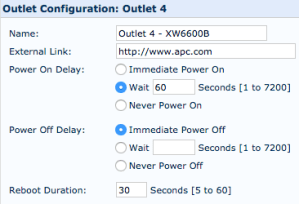
Note that since I bought these a long time ago, they have been replaced by these:
- AP7920 Rack PDU, Switched, 1U, 12A/208V, 10A/230V, (8)C13
- AP7921 Rack PDU, Switched, 1U, 16A, 208/230V, (8)C13
Firmwares:
Power usage:
- an XW66000 with 32 gigabytes of RAM and one hard disk takes between 0.6-1.2 Ampère of current, which at 230 Volt is 140-275 Watt.
- over one day that is between 3.4 and 6.6 kWh
Settings tried
Read the rest of this entry »
Posted in Ethernet, Hardware, HP XW6600, Network-and-equipment, Power User, Wake-on-LAN (WoL), Windows, Windows 10 | Leave a Comment »
Posted by jpluimers on 2020/01/15
 Two decades before the personal computer, a shy engineer unveiled the tools that would drive the tech revolution
Don’t read this as a historic piece, but as the potential we are still going to experience what was not just sketched by a true visionary in 1968, but also demonstrated back then: [Archive.is] How Douglas Engelbart Invented the Future | Innovation | Smithsonian.
I am including one of the pictures below by Christie Hemm Klok that shows how far Engelbart was ahead of his time: not his initial invention of an input device (the mouse) “chord” kind.
After that, read about his 1968 presentation: The Mother of All Demos – Wikipedia
Finally, watch the video below, well worth watching the more than one and a half hours.
–jeroen
Via:
Read the rest of this entry »
Posted in Development, Future, Hardware, History, Network-and-equipment, Power User, Software Development | Leave a Comment »
Posted by jpluimers on 2020/01/13
The manual for the CSL Bearware 302658 clock that uses the DCF77 signal is at [WayBack] Bearware_Manual-302658-20161220FZ004.pdf.
I like the relatively large 3.3 inch display and the blue background.
You can get the clock here:
More on the signal, transmitter and encoding: DCF77 – Wikipedia.
–jeroen
Read the rest of this entry »
Posted in DCF77, DCF77, Development, Encoding, Hardware, LifeHacker, Power User, Software Development | Leave a Comment »
Posted by jpluimers on 2020/01/10
Luckily I was watching over the shoulder of a friend when his hung as it was a while ago I had encountered issues like that.
Sometimes the system would get in trouble without warning: the machine would just hang. No Windows Event log or other place where we could trace back the origin.
I suspected failing hardware because it was similar to other machines I had seen: memory, loose connectors or power issues came to mind first.
 After about a week of trial and error I decided to check SMART status. HDTune did not warn of anything special. SmartCtl however did:
This drive may hang after 5184 hours of power-on time:
http://www.tomshardware.com/news/Crucial-m4-Firmware-BSOD,14544.html
See the following web pages for firmware updates:
http://www.crucial.com/support/firmware.aspx
http://www.micron.com/products/solid-state-storage/client-ssd#software
The relevant links (I prefer the WayBack links as at times the site is very slow) are below.
After upgrading the firmware, the problems were gone.
| version |
compatible products |
download |
| 070H |
Crucial m4 2.5-inch (7mm & 9.5mm) SSD |
Windows® 7 Updater Application
[WayBack] download firmware
[WayBack] instruction guide |
Windows® 8 Updater Application
[WayBack] download firmware
[WayBack] instruction guide |
Manual Boot File for Windows and Mac®
[WayBack] download firmware
[WayBack] instruction guide |
| Release Date: 04/02/2013
Firmware 070H is recommended for anyone currently running 040H or previous firmware releases. It includes incremental improvements and refinements over these versions which may improve the overall user experience.
Like recent firmware versions, version 070H has improvements over versions 000F which are specific for Windows 8 and new UltraBook systems, although systems running Windows 7 and other operating systems may also see improvements. Any m4 firmware
version will function normally in Windows 8, even without these performance improvements.
The following is a summary of changes between 040H and 070H, which are independent of operating system:
- Resolved a power-up timing issue that could result in a drive hang, resulting in an inability to communicate with the host computer. The hang condition would typically occur during power-up or resume from Sleep or Hibernate. Most often, a new
power cycle will clear the condition and allow normal operations to continue. The failure mode has only been observed in factory test. The failure mode is believed to have been contained to the factory. This fix is being implemented for all new
builds, for all form factors, as a precautionary measure. The fix may be implemented in the field, as desired, to prevent occurrence of this boot-time failure. To date, no known field returns have been shown to be related to this issue. A failure
of this type would typically be recoverable by a system reset.
Additional details can be found in the firmware guide |
–jeroen
Read the rest of this entry »
Posted in Hardware, Power User | Leave a Comment »
Posted by jpluimers on 2019/12/20
Cool: Magic SysRq key – Wikipedia
The magic SysRq key is a key combination understood by the Linux kernel, which allows the user to perform various low-level commands regardless of the system’s state. It is often used to recover from freezes, or to reboot a computer without corrupting the filesystem.[1] Its effect is similar to the computer’s hardware reset button (or power switch) but with many more options and much more control.
Sometimes reading fluffy fluff posts teaches you new things, so be sure to read this one:
[WayBack] I just got trolled by my cat, hard. Last night i left my linux laptop open and running while watching TV in the other room. I came back to find Marley … – Stephen Shirley – Google+
…
I started looking through the kernel logs from last night, to see if there was any indication of the issue starting. And then i saw it. One innocent line that said:
Dec 18 21:26:52 x240 kernel: [373001.156356] sysrq: SysRq : Emergency Remount R/O
The fluffy dumbass had somehow hit the Sysrq [0] key combo to mount all filesystems read-only. This is an old, low-level when-all-else-fails facility for dealing with an linux unresponsive system, and fluff-for-brains Marley had somehow hit alt+fn+s+u.
Sigh.
[0] https://en.wikipedia.org/wiki/Magic_SysRq_key
Via: [Archive.is] I just got trolled by my cat, hard. Last night i left my linux laptop open and running while watching TV in the other room. I came back to find Marley … – Kristian Köhntopp – Google+
–jeroen
Posted in *nix, *nix-tools, Keyboards and Keyboard Shortcuts, Linux, Power User | Leave a Comment »
Posted by jpluimers on 2019/12/11
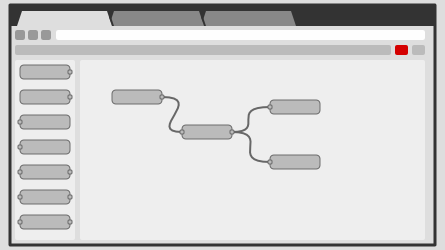
Node-RED is a programming tool for wiring together hardware devices, APIs and online services in new and interesting ways.It provides a browser-based editor that makes it easy to wire together flows using the wide range of nodes in the palette that can be deployed to its runtime in a single-click.
Seems one of the ways to automate our home: [WayBack] Node-RED, as it supports many input and output methods with all kinds of nodes between them:
| input |
output |
| inject |
debug |
| catch |
|
| status |
|
| link |
link |
| mqtt |
mqtt |
| http |
http response |
| websocket |
websocket |
| tcp |
tcp |
| udp |
udp |
| serial |
serial |
It is based on node.js, seems to need PM2 for running as a service, so I need to first figure out how well it runs on OpenSuSE (with more details than this gist).
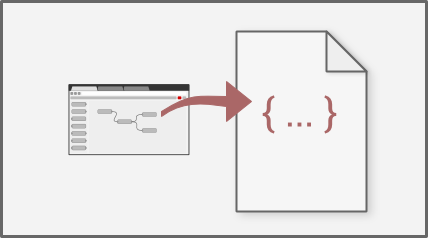
After that I need to figure out how to version your configurations using git and document as it looks like the configurations sources are stored in JSON format [WayBack].
For resources:
- StackOverflow node-red tag
- Github node-red repositories
- nodered documentation to:
- get started (including Installation, Running, Adding non-stock Nodes, Upgrading, Creating your first and second flow, running on Docker / Windows)
- running on a device (Raspberry Pi, BeagleBone Black, Android) which needs extra device specific modules to hardware inputs/outputs
- communicating with a device (Arduino)
- running in the cloud (IBM Bluemix, SenseTecnic FRED, Amazon Web Services, Microsoft Azure)
- user guide (including Configuration, Security, Logging, Command-line Admin, Writing Functions, Embedding into an existing app)
- cookbook (with many flows covering Basics, HTTP and MQTT)
- creating nodes (with a wall of information: Creating your first node, JavaScript File, HTML File, Storing Context, Node properties, Node credentials, Node appearance, Node status, Configuration nodes, Help style guide, Packaging, Internationalisation)
- flows (hundreds of them)
Code is published as JSON, but I wish more examples also showed the visual representation.
Via: [WayBack] Now I can go to bed :-) Added node-red [1] to my setup and thanks to node-red-contrib-ui [2] (replaced by node-red-dashboard [3]) I can now generate ni… – Jan Wildeboer – Google+ who also provided the large screenshot below.
–jeroen
Read the rest of this entry »
Posted in Development, Hardware Development, IoT Internet of Things, Network-and-equipment, Power User, Raspberry Pi | Leave a Comment »
Posted by jpluimers on 2019/12/09
I had a problem similar to [Archive.is] MX613ST Color space conversion issue (detects YUV instead of RGB) – Google Product Forums.
In my case I had a Chromecast 1st generation connected to a [WayBack] Harman Kardon BDS 580, which was hooked up to a [WayBack] Samsung MU6100 TV.
Everything, especially the white and grey areas, had a greenish tint over it, and I think there was also a purple mismatch.
I think it has to do with YUV versus RGB, similar to [WayBack] Force RGB Color Space over HDMI? – Apple Community.
Though I did not notice that with an Apple TV 4th generation (which you can switch between YCbCr/RGB-High/RGB-Low) hooked up to the same BDS 580.
The solution: plug the Chromecast in the TV, then the ARC (Audio Return Channel) will automatically route the audio to the BDS 580.
–jeroen
Posted in 4K Monitor, BDS580, Displays, Hardware, Harman Kardon, Home Audio/Video, LifeHacker, Media, MU6100, Power User, Samsung TV, Video | Leave a Comment »
Posted by jpluimers on 2019/11/25
Nice landing page to check various aspects of IP addresses: [WayBack] ipvoid.com:
We offer a vast range of IP address tools to discover details about IP addresses. IP smtp blacklist check, whois lookup, dns lookup, ping, and more!
I irregularly use them to check out blacklist issues (yes, sometimes 8.8.8.8, 8.8.4.4 and even 9.9.9.9 appear on blacklists).
–jeroen
Posted in Internet, Network-and-equipment, Power User | Leave a Comment »


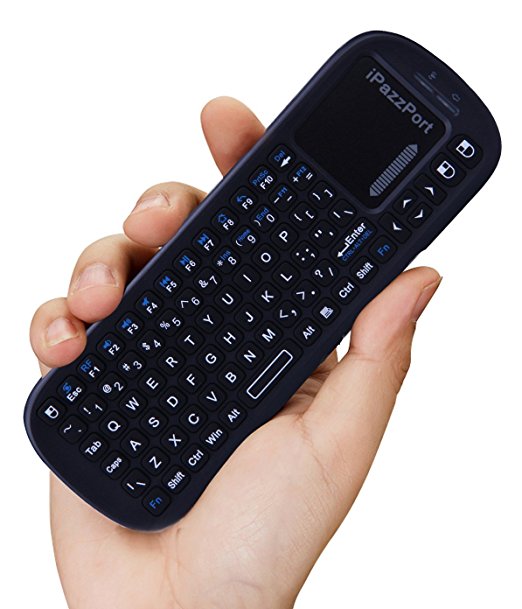


 Could only find one reference using
 The Wiert Corner - irregular stream of stuff