Archive for the ‘Hardware’ Category
Posted by jpluimers on 2017/10/30
Mikrotik and SFP versus SFTP+ is always confusing especially as the text on their equipment and their documentation doesn’t show well which situations work.
Equipment text is further on, this is their text searchable documentation:
As usually, a long search in the forums reveals the background information:
[WayBack] SFP in SFP+ slot – MikroTik RouterOS: 10Gb SFP+ sockets are usually backward compatible with SFP, but this is not guaranteed.
There are two tricks involved to get an SFP connection between these devices working:
Read the rest of this entry »
Posted in Internet, MikroTik, Power User, routers | Leave a Comment »
Posted by jpluimers on 2017/10/27
Maybe for my LoT (LAN of Things): having multiple (even many) local LANs some each with their section of LoT equipment nicely separated and partially being able to talk to some of the other LANs or part of the outside world.
Some links that might help me getting this set up:
Read the rest of this entry »
Posted in Development, Hardware, MikroTik, Network-and-equipment, Power User, RouterOS, routers, Scripting, Software Development, WinBox | Leave a Comment »
Posted by jpluimers on 2017/10/27

Accessibiity -> Zoom -> enable checkbox” class=”size-medium” /> Preferences -> Accessibiity -> Zoom -> enable checkbox
I didn’t know this was built-in since Mountain Lion and up, but it is, is startable from the keyboard and it’s tremendously convenient when presenting: [WayBack]: OS X Mountain Lion: Zoom content on the screen.
TL;DR:
- System Prefrecences
- Accesibility
- Zoom
- Checkbox
–jeroen
Posted in Apple, iMac, Keyboards and Keyboard Shortcuts, Mac, Mac OS X / OS X / MacOS, MacBook, MacBook Retina, MacBook-Air, MacBook-Pro, MacMini, macOS 10.12 Sierra, OS X 10.10 Yosemite, OS X 10.11 El Capitan, OS X 10.8 Mountain Lion, OS X 10.9 Mavericks, Power User | Leave a Comment »
Posted by jpluimers on 2017/10/26
Just over a year after this got posted, I wonder what the current state of affairs is. Did it get a lot worse or just a little (as when writing this in November 2016 my guess is that it won’t get any better soon):
To repeat +Thomas Mueller ‘s words:
Internet of default passwords …
Sounds bad until you realize that it’s even worse. There are millions of devices out there that can be or have already been compromised and can get their owners into deep shit, without their owners even doing anything wrong. And keeping your virus scanner up to date won’t help at all (it doesn’t really protect your PC either, but that’s a different story).
Just watch the first 10 minutes of the video, but be warned, it might ruin your day.
Via +Joe C. Hecht:
I found this to be a superior product – If you are into security, this episode was worth a listen. I hear they are into talking about home servers too. I like that.
A new TechSNAP is OUT: http://bit.ly/tsnap288
The Internet of Things is the Internet of Terrible, we’ll round up the week’s stories & submit the TechSNAP solution to you the audience. Plus the security cost of Android fragmentation, great questions & a packed round up!
Source:
Read the rest of this entry »
Posted in IoT Internet of Things, Network-and-equipment, Opinions, Power User | Leave a Comment »
Posted by jpluimers on 2017/10/25
Similar to IP ranges for private networks that are safe for testing
- 10.0.0.0/8 (255.0.0.0)
- 172.16.0.0/12 (255.240.0.0)
- 192.168.0.0/16 (255.255.0.0)
- fd00::/8
there are also locally administered MAC address ranges safe for testing
- x2:xx:xx:xx:xx:xx
- x6:xx:xx:xx:xx:xx
- xA:xx:xx:xx:xx:xx
- xE:xx:xx:xx:xx:xx
Thanks to [WayBack] Sam and [WayBack] Peter for answering.
–jeroen
References:
Posted in Ethernet, Internet, Network-and-equipment, Power User | Leave a Comment »
Posted by jpluimers on 2017/10/24
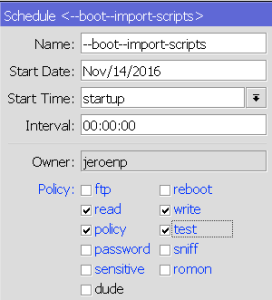
Start Time special value `startup`
There is a special startup value for “Start Time” you can enter which makes it runs once 3 seconds after reboot.
If by then your router isn’t fully “up” yet (i.e. waiting for PPPoE or DHCP network settings), then inside the script you can perform a delay global command as shown in the code fragment from the below forum post.
Don’t you love how people still tend to both repeat themselves and abbreviate stuff even though they have code completion at their disposal?:
{:delay 10};

/log print file=([/system identity get name] . "Log-" . [:pick [/system clock get date] 7 11] . [:pick [/system clock get date] 0 3] . [:pick [/system clock get date] 4 6]); \

/tool e-mail send to="xxx@xxx.com" subject=([/system identity get name] . " Log " . \

[/system clock get date]) file=([/system identity get name] . "Log-" . [:pick [/system clock get date] 7 11] . \

[:pick [/system clock get date] 0 3] . [:pick [/system clock get date] 4 6] . ".txt"); :delay 10; \

/file rem [/file find name=([/system identity get name] . "Log-" . [:pick [/system clock get date] 7 11] . \

[:pick [/system clock get date] 0 3] . [:pick [/system clock get date] 4 6] . ".txt")]; \

:log info ("System Log emailed at " . [/sys cl get time] . " " . [/sys cl get date])
Read the rest of this entry »
Posted in Development, Internet, MikroTik, Power User, RouterOS, routers, Scripting, Software Development | Leave a Comment »
Posted by jpluimers on 2017/10/19

minimum schedule and script policies: read/write/policy/test
A year later, Mikrotik still needs to update their documentation, so from my question at [WayBack] [Mikrotik follow-up needed] Router OS 6.37.1 – scheduled script cannot execute script – MikroTik RouterOS.
TL;DR:
- use the same policies for scripts and schedules
- use these policies as a minimum for scripts and schedules:
Forum post:
I found out two things:
- the
testFunctionScript needs at least these policies to call a function: read, write, policy, test
- a
schedule needs at least the same permissions as a script in order to run the script at all
This is how the various permissions affect the testFunctionScript script:
- no policies only allow
:log info "testFunctionScript"; .
read allows the above and :local testFunctionJobs [/system script job print as-value detail]; which then is be logged with :log info "testFunctionJobs=$testFunctionJobs";- only
write seems equivalent to no policies as it will only allow :log info "testFunctionScript";
read and write is equivalent to read- a lone
policy or test policy (talk about confusion!) do not add functionality, so any combinations of just policy or testwith read and/or write get the same functionality as above
policy and test without any other seem equivalent to no policies as they result in only :log info "testFunctionScript"; to execute- the combined policies
read, write, policy, test allow full script functionality including the function call and using the function call result
The above findings show that more logging is needed: the scheduler should log when (and why!) it does not have enough permissions to run a script. Right now you’re in the dark on when (and why!) a script isn’t ran by the scheduler.
The above findings show that these parts of the documentation need updating:
– http://wiki.mikrotik.com/wiki/Manual:Sc … repository (update with info about the above policy combinations)
– http://wiki.mikrotik.com/wiki/Manual:Ro … Properties (update with info about the above policy combinations)
– http://wiki.mikrotik.com/wiki/Manual:System/Scheduler (does not document anything about policies at all)
The various scripts (apply your mix of policies that you need)
## logon as user jeroenp

/system script environment remove [ /system script environment find where name="testFunction" ];
:global testFunction do={
  :local result [/system resource get uptime];
  :return $result;
}

/system script environment print detail where name=testFunction
# 0 name="testFunction" value=";(eval /system scheduler  (eval /localname=$result;value=(eval (eval /system resource getvalue-name=uptime))) (eval /returnvalue=$result))"

:log info "direct execution of testFunction"

{
:global testFunction;
:local testFunctionType [:typeof testFunction];
:local testFunctionResult [$testFunction];
:log info "testFunctionScript";
:log info "testFunctionType=$testFunctionType";
:log info "testFunctionResult=$testFunctionResult";
:log info "testFunction=$testFunction";
}

/log print where buffer=memory && (message~"testFunction" || topics~"info")

/system script remove [ /system script find where name="testFunctionScript" ];
/system script add name=testFunctionScript owner=jeroenp policy=ftp,reboot,read,write,policy,test,password,sniff,sensitive,romon source=":global testFunction;\r\
    \n:log info \"testFunctionScript\";\r\
    \n:local testFunctionType [:typeof testFunction];\r\
    \n:local testFunctionResult [\$testFunction];\r\
    \n:log info \"testFunctionType=\$testFunctionType\";\r\
    \n:log info \"testFunctionResult=\$testFunctionResult\";\r\
    \n:log info \"testFunction=\$testFunction\";\r\
    \n"

:log info "execution of testFunction via testFunctionScript"

/system script run testFunctionScript

/log print where buffer=memory && (message~"testFunction" || topics~"info")

/system scheduler remove [ /system scheduler find where name="testFunctionScriptSchedule" ];
/system scheduler add interval=10s name=testFunctionScriptSchedule on-event=testFunctionScript policy=ftp,reboot,read,write,policy,test,password,sniff,sensitive start-date=sep/22/2015 start-time=12:02:37

:log info "execution of testFunction via testFunctionScriptSchedule calling testFunctionScript"
:delay 20s
/system scheduler disable testFunctionScriptSchedule

/log print where buffer=memory && (message~"testFunction" || topics~"info")

/system scheduler print detail where name="testFunctionScriptSchedule"
–jeroen
Posted in Development, Internet, MikroTik, Power User, RouterOS, routers, Scripting, Software Development | Leave a Comment »
Posted by jpluimers on 2017/10/09
After reading [WayBack] Script job killer – MikroTik RouterOS I put lines like these into a few of my frequently running scripts:
/system script environment get systemScriptJobCountTypeIsCommand
:global systemScriptJobCountTypeIsCommand

:local scriptsOfTypeCommandCount [$systemScriptJobCountTypeIsCommand];

:if ($scriptsOfTypeCommandCount > 4) do={
  $outputError value=("$scriptName; too many runnings commands ($scriptsOfTypeCommandCount); bailing out early");
  :return -1;
}
They in turn use this underlying function:
:local scriptName "Function.systemScriptJobCountTypeIsCommand.rsc"
/system script environment remove [ find where name="systemScriptJobCountTypeIsCommand" ];

:global systemScriptJobCountTypeIsCommand do={
  :local result [:len [/system script job find where type=command]];
#  :put "result=$result"
  :return $result;
}

## Example:
## /import scripts/Function.systemScriptJobCountTypeIsCommand.rsc
## :put [$systemScriptJobCountTypeIsCommand];
–jeroen
Posted in Internet, MikroTik, Power User, routers | Leave a Comment »
Posted by jpluimers on 2017/09/29
I’ve some Fritz!Box devices on various locations that each provide VoIP access and either ISDN or PSTN lines.
Wouldn’t it be cool to be able to join them together into a virtual PBX?
I’m not sure how it’s possible and what you need for it, so here are some links that should make my future research on this easier:
–jeroen
Posted in Fritz!, Gigaset, Internet, ISDN, LifeHacker, Power User, PSTN, Telephony, VoIP | Leave a Comment »





 The Wiert Corner - irregular stream of stuff