The Wiert Corner – irregular stream of stuff

Jeroen W. Pluimers on .NET, C#, Delphi, databases, and personal interests

  • My badges

  • Twitter Updates

  • My Flickr Stream

  • Pages

  • All categories

  • Enter your email address to subscribe to this blog and receive notifications of new posts by email.

    Join 1,861 other subscribers

Archive for the ‘Internet’ Category

No more https://www.whatsapp.com/cidr.txt

Posted by jpluimers on 2018/12/11

Not sure when this happened but the CIDR list is no more [WayBackhttps://www.whatsapp.com/cidr.txt:

Dear partners,
Please note that we have migrated the latest IP pools of WhatsApp to Facebook Mobile Partner Portal. Feel free to browse to the Settings page of the portal and download the latest WhatsApp IP pool: https://fb.me/mpp_support 
Further IP pool updates are also done through the portal and are no longer distributed via email or through WhatsApp web site.
If you have not yet registered on the Mobile Partner Portal or have difficulties accessing it - please request access through the following form and we'll be happy to assist: https://fb.me/mpp_access
For any technical requests please contact us through the Support section of the portal: https://fb.me/mpp_support 
WhatsApp team

In the past it was the place to get the CIDR so you could either block or allow WhatsApp traffic: [earlier WayBack]

It is still widely cited as way to regulate WhatsApp traffic, for instance at these places:

Time to find an automated way to get the replacement list. Maybe the below helps (via [WayBackBlock facebook messenger and whatsApp on Dlink router – Super User)

whois -h whois.radb.net '!gAS32934'

–jeroen

Posted in Android Devices, Development, Internet, Network-and-equipment, Power User, routers, SocialMedia, Software Development, Ubiquiti, WhatsApp, WhatsApp for Android, WiFi | Leave a Comment »

Windows Server 2008 and Server 2008 R2 – OpenDNS

Posted by jpluimers on 2018/12/10

I did this a long time ago, but forgot to blog about it back then: [Archive.isWindows Server 2008 and Server 2008 R2 – OpenDNS.

Summary:

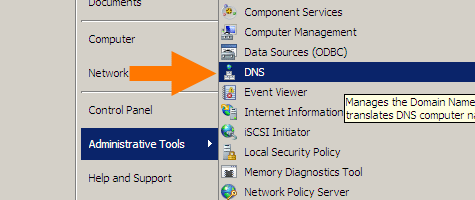
Start with the DNS manager:

%SystemRoot%\system32\dnsmgmt.msc /s

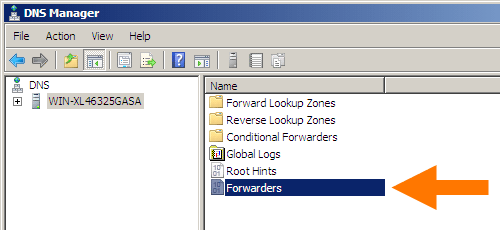
Then open your machine, and double-click Forwarders:

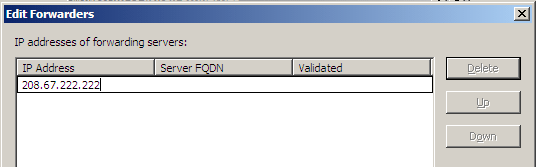
In the dialog, click the Edit button and add DNS servers (for instance Google DNS 8.8.8.8 and 8.8.4.4).

In my case it became this:

Google DNS servers added

Google DNS servers added

Click Done buttons until all dialogs are closed.


–jeroen

Read the rest of this entry »

Posted in DNS, Internet, Power User, Windows, Windows Server 2008, Windows Server 2008 R2 | Leave a Comment »

Uptime Robot on Twitter: “Sorry all that the API and status pages fluctuated since the last 18 hours. The issue is completely fixed and it is all back to normal now.”

Posted by jpluimers on 2018/12/04

[WayBackUptime Robot on Twitter: “Sorry all that the API and status pages fluctuated since the last 18 hours. The issue is completely fixed and it is all back to normal now.”

[WayBackJeroen Pluimerson Twitter: “Some are still broken, especially the ones with IDs 778601760 778601763 778601765 778601777 778601814 779973649 779677530 779677532 All of them reachable through various ISPs, but UpTimeRobot marks them down since about 11 hours”

See:

Failing:

Edit 20181205

Found out what happened: the IP got blocked on some spam lists. This is odd:

Even though the SMTP server behind it has relay blocked apart from the 2 domains it is primary MX for, somebody found a trick around it, I think by sending mail to the primary domains that

  1. are not caught yet by the installed backlist filters
  2. later bounce when forwarded to their forward address because their blacklist filters are by now more up-to-date,
  3. then the bounce email being flagged as SPAM.

MXTOOLBOX

The trick caused the IP to appear on 3 blacklists according to MXTOOLBOX:

Blacklist Reason TTL ResponseTime
 LISTED CBL 80.100.143.119 was listed  Detail 806 0 Ignore
 LISTED Hostkarma Black 80.100.143.119 was listed  Detail 805 0 Ignore
 LISTED Spamhaus ZEN 80.100.143.119 was listed  Detail 300 281 Ignore

Checking these revealed all to be around CBL:

CBL:

This IP address was detected and listed 6 times in the past 28 days, and 0 times in the past 24 hours. The most recent detection was at Tue Dec 4 02:25:00 2018 UTC +/- 5 minutes

Hostkarma Black:

Your reverse DNS is correct! – snip.xs4all.nl
The IP address for the reverse lookup name matches the original IP – RDNS Information

This is a list from our log files showing the activity from IP address 80.100.143.119. Our system stores information for 4 days.


/ip-log/karma.log.06:black 80.100.143.119 auth-bad ID=79648-15207 X=mxbackup H=snip.xs4all.nl [80.100.143.119]:40353 HELO=[[127.0.0.1]] SN=[M.ASMMSS.06446644586518723606@terrain.gov.harvard.edu] AUTH=[antonio] T=[irena.getheridge2018@outlook.fr] S=[Re: RcPT[(ALERT) | 0644664458]]

Spamhaus ZEN:

80.100.143.119 is not listed in the SBL

80.100.143.119 is not listed in the PBL

80.100.143.119 is listed in the XBL, because it appears in:

dnsbl.spfbl.net

Further research also found an entry in dnsbl.spfbl.net:

Check result of IP 80.100.143.119

This is the rDNS found:

This IP was flagged due to misconfiguration of the e-mail service or the suspicion that there is no MTA at it.


For the delist key can be sent, select the e-mail address responsible for this IP:

  • add a PayPal user’s email for 6.00 BRL.
  • add a PayPal user’s email for 1.50 USD.
  • <abuse@xs4all.nl> qualified.
  • <postmaster@snip.xs4all.nl> qualified.
  • <postmaster@xs4all.nl> qualified.

The rDNS must be registered under your own domain. We do not accept rDNS with third-party domains.

A chicken-and-egg situation here: since snip.xs4all.nl is blocked because of the blacklist entry, I cannot request a validation email for the blacklist entry.

But then there was MultiRBL showing that most DNS black lists are aggregators of others.

jeroen

Read the rest of this entry »

Posted in *nix, DNS, Internet, Monitoring, Power User, Uptimerobot | Leave a Comment »

Getting rid of trailing line-endings in the draw.io web interface

Posted by jpluimers on 2018/12/03

One of the things that bugged me for a long time is that every now and then for some shapes, when editing their text, the draw.io web interface puts in trailing line feeds after the text, messing up layout.

The easiest way to work around it is by searching inside the diagram XML for
"
, then replacing that with a ".

(the above code got screwed by WordPress.com saving it, so the search is in this small gist below)

This behaviour is intermittent on the drawio MacOS desktop app.

https://gist.github.com/jpluimers/58c3d3fcceb9beaf5bfca94e1bf72af8

–jeroen


Posted in Cloud Apps, Development, draw.io, Encoding, Internet, Power User, Software Development, Unicode | Leave a Comment »

How to configure pfSense as multi wan (DUAL WAN) load balance failover router – nixCraft

Posted by jpluimers on 2018/12/03

This will come in useful one day:

Notes for monitoring at [WayBackMulti-WAN – PFSenseDocs: Gateway Groups

  • monitoring packet loss on ADSL is cumbersome depending on the ADSL distance
  • member down is the easiest to monitor, but on fiber can fail to detect packet loss (the connection seems online, but in fact doesn’t provide traffic)

–jeroen

Posted in Internet, pfSense, Power User, routers | Leave a Comment »

Not all Fritz!Box devices can be upgraded to the most recent firmware

Posted by jpluimers on 2018/11/30

I forgot to document this earlier.

Many Fritz!Box devices cannot be upgraded to recent firmwares. The behaviour differs on hardware revisions of the same model. I’ve seen it happen on Fritz!Box 7360 devices, but others are could be affected too.

You can get the firmware revision using the trick here: FRITZ!Box call http://fritz.box/cgi-bin/system_status.

If your hardware revision is affected, do not expose it to the outside world.

You could still turn it into a local switch though: [WayBackConvert FRITZ!Box 7360 to Managed Switch (or even Access Point) having it’s own IP address: Setting up the FRITZ!Box as an IP client.

I did this before even discovering about the hardware revision limits as I wanted to keep the full phone history when migrating from ADSL to fiber (which came with a brand new Fritz!Box 7490) and could use the extra LAN ports.

Fritz!Box 7360 hardware revision v1: limited to firmware 06.3x

Read the rest of this entry »

Posted in Fritz!, Fritz!Box, Internet, Power User | Leave a Comment »

Parsing simple html in Python

Posted by jpluimers on 2018/11/29

Was working to get fritzcap to emit a list of interfaces so I could specify which one to capture.

For that I needed to parse the output of http://fritz.box/capture.lua which consists of HTML fragments like below.

What I needed was for each consecutive entries of [WayBack] th and first [WayBackbutton tags:

  • content of the th tag
  • content of the value attribute of the button tag having a type="submit" attribute and name=start attribute

So before starting to work on it, I created [WayBackIn order to fix #5, print a list of available interfaces to potentially capture from · Issue #6 · jpluimers/fritzcap

The goal was to get a series of key/value pairs:

4-138 = AP2 (2.4 + 5 GHz, ath1) - Interface 1
4-137 = AP2 (2.4 + 5 GHz, ath1) - Interface 0
4-132 = AP (2.4 GHz, ath0) - Interface 1
4-131 = AP (2.4 GHz, ath0) - Interface 0
4-129 = HW (2.4 GHz, wifi0) - Interface 0
4-128 = WLAN Management Traffic - Interface 0a

So I built a class descending from [WayBackHTMLParser — Simple HTML and XHTML parser that ships with the [WayBackPython standard libraries.

If in the future I need more complex HTML parsing, then these links will help me choosing more feature rich parsers:

Back to the HTMLParser descendant in interfaces_dumper.py which can basically be condensed down to the code below.

  • handle_data is called for both start tags and end tags. The th value in data is only present in the start tag (at the time of end tag the data is empty), so you need to keep track of both last_start_tag and last_end_tag.
  • handle_endtag maintains last_end_tag to help handle_data.
  • handle_starttag maintains last_start_tag to help handle_data and also handles the button behaviour.
    • The buttonis only relevant if it has type="submit" and name="start" and a value attribute in that order.
    • Output is in data which is an array of key/value pairs.

Read the rest of this entry »

Posted in Development, Fritz!, Fritz!Box, fritzcap, Internet, Power User, Python, Scripting, Software Development | Leave a Comment »

Fritz!Box LUA links on my research list

Posted by jpluimers on 2018/11/27

I’m not sure around which firmware versions Fritz!Box started to implement LUA links, but they are now on my research list.

Below a reference and where I found them.

A few notes first:

  • There are many duplicates, which in due time I need to de-duplicate.
  • The .lua links seem to override the old cgi-bin links (that are partially reverse engineered at [WayBackCategory:Befehle in /usr/www/cgi-bin – Fritz!Box).
  • Usually, .lua links require a SID. In the web-ui, a Fritz!Box very much tries to hide that SID from URLs in the browser address bar (especially for firmware versions 06.50 and up) so the easiest to get them is this:
    1. Login to your Fritz!Box
    2. Manually copy any of the URLs in the left side
    3. Take the SID from there.
  • More recent firmware versions hide the .lua links too, but you can see them when monitoring your network traffic in the developer mode of your web browser

Logging in programmatically needs a challenge response mechanism. It used to be at [Wayback] http://www.avm.de/de/Extern/Technical_Note_Session_ID.pdf but now has moved to [Wayback/Archive.ishttps://avm.de/fileadmin/user_upload/Global/Service/Schnittstellen/AVM_Technical_Note_-_Session_ID.pdf

Here is the list:

Read the rest of this entry »

Posted in Development, Fritz!, Fritz!Box, Hardware Development, Hardware Interfacing, Internet, Power User | Leave a Comment »

FRITZ!Box call http://fritz.box/cgi-bin/system_status

Posted by jpluimers on 2018/11/22

While researching what the cgi-bin of Fritz!Box devices expose, I found this post on http://fritz.box/cgi-bin/system_status:

[WayBack] FRITZ!Box „Service Code“ auslesen und dekodieren – Antary

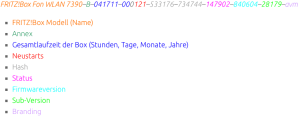
FRITZ!Box Fon WLAN 7390–B–041711–000121–533176–734744–147902–840604–28179–avm

  • FRITZ!Box Modell (Name)
  • Annex
  • Gesamtlaufzeit der Box (Stunden, Tage, Monate, Jahre)
  • Neustarts
  • Hash
  • Status
  • Firmwareversion
  • Sub-Version
  • Branding

The site has the entries colour coded, but WordPress doesn’t allow for that.

I found out that on a Fritz!Box 7490 you do not need to logon, but on a Fritz!Box 7360 you have to.

The site has a few other interesting Fritz!Box posts as well:

–jeroen

Read the rest of this entry »

Posted in Fritz!, Fritz!Box, Internet, Power User | Leave a Comment »

dig: getting the list of root servers

Posted by jpluimers on 2018/11/15

For many dig queries, it helps to get the current list of root DNS servers.

Though the list is pretty static, occasionally it changes. While writing there were 13 of them and the most recent history report was in “RSSAC023: History of the Root Server System” at [WayBackwww.icann.org/en/system/files/files/rssac-023-04nov16-en.pdf.

So below are the steps to get an accurate list based on

First find out what the root servers are:

$  dig +noall +answer . ns | sort
.           106156  IN  NS  a.root-servers.net.
.           106156  IN  NS  b.root-servers.net.
.           106156  IN  NS  c.root-servers.net.
.           106156  IN  NS  d.root-servers.net.
.           106156  IN  NS  e.root-servers.net.
.           106156  IN  NS  f.root-servers.net.
.           106156  IN  NS  g.root-servers.net.
.           106156  IN  NS  h.root-servers.net.
.           106156  IN  NS  i.root-servers.net.
.           106156  IN  NS  j.root-servers.net.
.           106156  IN  NS  k.root-servers.net.
.           106156  IN  NS  l.root-servers.net.
.           106156  IN  NS  m.root-servers.net.

You should shorten this to $ dig +noall +answer . ns but that will not give you the TTL (how long the information will be cached before your DNS server refreshes it).

Now query at least 3 of these to get the actual list of root servers (I list only one statement, the rest is similar):

$ dig +noall +answer . ns @j.root-servers.net. | sort
.           518400  IN  NS  a.root-servers.net.
.           518400  IN  NS  b.root-servers.net.
.           518400  IN  NS  c.root-servers.net.
.           518400  IN  NS  d.root-servers.net.
.           518400  IN  NS  e.root-servers.net.
.           518400  IN  NS  f.root-servers.net.
.           518400  IN  NS  g.root-servers.net.
.           518400  IN  NS  h.root-servers.net.
.           518400  IN  NS  i.root-servers.net.
.           518400  IN  NS  j.root-servers.net.
.           518400  IN  NS  k.root-servers.net.
.           518400  IN  NS  l.root-servers.net.
.           518400  IN  NS  m.root-servers.net.

Compare the lists. If they are equal, then you’re done.

If not, then the internet is in trouble (:

When you want the A and AAAA records with IP addresses in addition to the NS records with names, then add +additional to your query:

dig +noall +answer +additional @j.root-servers.net. | sort
.           518400  IN  NS  a.root-servers.net.
.           518400  IN  NS  b.root-servers.net.
.           518400  IN  NS  c.root-servers.net.
.           518400  IN  NS  d.root-servers.net.
.           518400  IN  NS  e.root-servers.net.
.           518400  IN  NS  f.root-servers.net.
.           518400  IN  NS  g.root-servers.net.
.           518400  IN  NS  h.root-servers.net.
.           518400  IN  NS  i.root-servers.net.
.           518400  IN  NS  j.root-servers.net.
.           518400  IN  NS  k.root-servers.net.
.           518400  IN  NS  l.root-servers.net.
.           518400  IN  NS  m.root-servers.net.
a.root-servers.net. 518400  IN  A   198.41.0.4
a.root-servers.net. 518400  IN  AAAA    2001:503:ba3e::2:30
b.root-servers.net. 518400  IN  A   192.228.79.201
b.root-servers.net. 518400  IN  AAAA    2001:500:200::b
c.root-servers.net. 518400  IN  A   192.33.4.12
d.root-servers.net. 518400  IN  A   199.7.91.13
e.root-servers.net. 518400  IN  A   192.203.230.10
f.root-servers.net. 518400  IN  A   192.5.5.241
g.root-servers.net. 518400  IN  A   192.112.36.4
h.root-servers.net. 518400  IN  A   198.97.190.53
i.root-servers.net. 518400  IN  A   192.36.148.17
j.root-servers.net. 518400  IN  A   192.58.128.30
k.root-servers.net. 518400  IN  A   193.0.14.129
l.root-servers.net. 518400  IN  A   199.7.83.42
m.root-servers.net. 518400  IN  A   202.12.27.33

–jeroen

Posted in DNS, Internet, Power User | 1 Comment »