The Wiert Corner – irregular stream of stuff

Jeroen W. Pluimers on .NET, C#, Delphi, databases, and personal interests

  • My badges

  • Twitter Updates

  • My Flickr Stream

  • Pages

  • All categories

  • Enter your email address to subscribe to this blog and receive notifications of new posts by email.

    Join 1,839 other subscribers

Archive for the ‘Internet’ Category

[NL] @xs4all – inkomende telefoontjes blokkeren: Fritz!Box of VOIP-selfcare

Posted by jpluimers on 2016/01/18

xs4all biedt twee mogelijkheden om inkomende telefoontjes te blokkeren: via de Fritz!Box of via VOIP-selfcare.

Als je in het VOIP-selfcare een nummer toevoegt onder “Inkomende oproepen blokkeren”, dan krijgt de beller een “bandje” dat het een ongewenst gesprek is. Dat wilde ik niet: net als bij inlog fouten wil je zo weinig mogelijk informatie geven over een oorzaak.

Als je oproepen van een specifiek telefoonnummer via de Fritz!Box blokkeert, dan krijgt de beller meteen xs4all voicemail. Ook niet wat ik wilde, maar het zette me wel op het juiste spoor.

De voicemail komt doordat de Fritz!Box dan een meteen een in-gesprek (line busy) genereert en zo het telefoongesprek afwimpelt. Omdat voicemail bij xs4all standaard aan staat, gaat het gesprek dan meteen naar voicemail.

In dit geval wilde ik toch van de xs4all voicemail af, dus heb ik dat gedaan door in de VOIP-self care alle vinkjes bij “Gesprekken doorschakelen” uit te zetten, zie het plaatje onderaan.

Een “Gesprekken doorschakelen” zonder vinkjes heft alle doorschakelingen op, waardoor de beller precies het antwoord krijgt dat de Fritz!Box voorschotelt.

Read the rest of this entry »

Posted in Fritz!, Fritz!Box, Internet, Power User | Leave a Comment »

In remembrance of Felipe Rodriquez

Posted by jpluimers on 2015/12/10

Felipe makes a few appearances in this great _Unauthorized Access_ documentary by Annaliza Savage 1994.

Memorable moments:

  1. Intro about the initial small size of Hack-Tick.
  2. The start of the Hack-Tick ISP in The Netherlands, which originally started with UUCP and later grew into one of the most important general ISPs with a very keen focus in privacy: xs4all.
  3. Hacking at the End of the Universe congress.

Most of the “in memories” were in Dutch, but one of the few English ones says it all: [Wayback] D U T C H F E L L O W S — In memory of Felipe Rodriquez.

Karin Spaink (friend of Felipe, also suffering from MS) wrote [Wayback] Felipe Rodriguez has died.

A few of the Dutch articles that impressed me very much (some obituaries, some on the internet history in The Netherlands):

–jeroen

The full video:

Slightly longer but with a worse audio quality:


Posted in About, History, Internet, Personal | 1 Comment »

Fiber to Fiber speed beats Cable to Fiber speed by a factor 2 (all three internet connections are in the same house)

Posted by jpluimers on 2015/10/05

I’ve two fiber connections, one cable connection and one ADSL connection at home.

This is a traceroute from one fiber connection to the other over the outside network:

traceroute to snip.xs4all.nl (80.100.143.119), 64 hops max, 52 byte packets
 1  tomatortn66u (172.23.71.1)  0.951 ms  0.708 ms  0.638 ms
 2  fiber24315337241.heldenvannu.net (37.153.243.241)  1.135 ms  0.988 ms  0.974 ms
 3  rt121bb121-212-183.routit.net (212.121.121.183)  1.973 ms  1.976 ms  1.919 ms
 4  0-7-0-4-core2-a-tc1.routit.net (84.246.25.133)  2.711 ms  2.498 ms  2.517 ms
 5  0-7-0-4-core2-a-tc1.routit.net (84.246.25.133)  2.725 ms  2.674 ms  2.535 ms
 6  0-7-0-7-core4-a-tc2.routit.net (37.0.80.7)  3.048 ms  2.883 ms  2.712 ms
 7  1-2-inet1-tc2.routit.net (84.246.25.46)  2.767 ms  2.633 ms  2.514 ms
 8  ams-ix.tc2.xs4all.net (80.249.208.166)  2.676 ms  4.177 ms  2.775 ms
 9  0.ae5.xr3.3d12.xs4all.net (194.109.5.13)  2.987 ms  3.114 ms  11.387 ms
10  xe-8-1-0.dr11.xs4all.net (194.109.7.14)  6.188 ms
    xe-7-0-1.dr11.d12.xs4all.net (194.109.7.58)  3.320 ms
    xe-8-0-1.dr11.d12.xs4all.net (194.109.7.38)  3.206 ms
11  snip.xs4all.nl (80.100.143.119)  4.079 ms !X  3.960 ms !X  3.946 ms !X

This is the same but from my third connection (that will go away sooner than later): Cable.

traceroute to snip.xs4all.nl (80.100.143.119), 64 hops max, 52 byte packets
 1  www.asusnetwork.net (192.168.171.1)  1.016 ms  0.983 ms  0.938 ms
 2  * * *
 3  212.142.62.69 (212.142.62.69)  11.427 ms  8.361 ms  8.459 ms
 4  84.116.244.97 (84.116.244.97)  8.080 ms  10.405 ms  7.340 ms
 5  nl-ams09b-ri1-xe-10-2-0.aorta.net (84.116.130.22)  7.625 ms
    nl-ams09b-ri1-xe-8-0-0.aorta.net (84.116.130.2)  10.392 ms
    84.116.136.81 (84.116.136.81)  9.534 ms
 6  0.xe-1-2-0.xr1.tc2.xs4all.net (194.109.7.209)  8.315 ms  9.505 ms  9.684 ms
 7  0.ae5.xr3.3d12.xs4all.net (194.109.5.13)  9.508 ms
    0.ae4.xr4.1d12.xs4all.net (194.109.5.9)  9.565 ms
    0.ae5.xr3.3d12.xs4all.net (194.109.5.13)  9.459 ms
 8  xe-7-0-1.dr11.d12.xs4all.net (194.109.7.58)  8.547 ms  13.159 ms  9.893 ms
 9  snip.xs4all.nl (80.100.143.119)  9.710 ms !X  10.079 ms !X  8.121 ms !X

Finally there is ADSL (which will go even sooner):

snap:~ # traceroute snip.xs4all.nl
traceroute to snip.xs4all.nl (80.100.143.119), 30 hops max, 40 byte packets using UDP
 1  192.168.71.1 (192.168.71.1)  1.052 ms   0.554 ms   0.520 ms
 2  lo0.dr13.d12.xs4all.net (194.109.5.212)  17.767 ms   17.368 ms   17.123 ms
 3  1423.ae3.xr4.1d12.xs4all.net (194.109.7.137)  16.901 ms 1418.ae3.xr4.1d12.xs4all.net (194.109.7.17)  16.628 ms 1323.ae3.xr3.3d12.xs4all.net (194.109.7.141)  16.354 ms
 4  xe-8-1-0.dr11.xs4all.net (194.109.7.14)  15.961 ms xe7-0-0.dr11.d12.xs4all.net (194.109.7.170)  15.762 ms xe-8-1-0.dr11.xs4all.net (194.109.7.14)  15.283 ms
 5  snip.xs4all.nl (80.100.143.119)(N!)  15.914 ms (N!)  16.171 ms (N!)  15.710 ms

Cable is about twice as slow than Fiber.

ADSL is about three times as slow than Fiber.

–jeroen

Posted in fiber, Fritz!, Fritz!Box, Internet, Power User, routers, TomatoUSB | Leave a Comment »

http://169.254.1.1 trick for Opening UI of the FRITZ!WLAN Repeater 1750E – via: AVM International

Posted by jpluimers on 2015/08/24

Because http://fritz.box points to my Fritz!BOX router, it cannot be used to get to my Fritz!WLAN Repeater. I just learned about the http://169.254.1.1 trick does.

Which saves me from remembering the repeater IP-address or name.

–jeroen

via: Opening the FRITZ!Box user interface | FRITZ!WLAN Repeater 1750E | AVM International.

Posted in Fritz!, Fritz!Box, Fritz!WLAN, Internet, Power User, routers | Leave a Comment »

Setting your DNS servers manually – via – Tweakers

Posted by jpluimers on 2015/08/21

Interesting Dutch thread about a major ISP having DNS issues because of DDos attacks. Many messages to set your DNS servers manually on various operating systems, and a list of good DNS server alternatives. Recommended reading:

Ziggo kampt weer met storing – update – IT Pro – Nieuws – Tweakers.

–jeroen

Posted in Internet, Power User, routers | Leave a Comment »

Oh wow. Apparently all S3 buckets are also BitTorrent trackers.

Posted by jpluimers on 2015/05/16

Interesting:

There is no extra charge for use of BitTorrent with Amazon S3. Data transfer via the BitTorrent protocol is metered at the same rate as client/server delivery. To be precise, whenever a downloading BitTorrent client requests a “piece” of an object from the…

Note

You can get torrent only for objects that are less than 5 GB in size.

via Using BitTorrent with Amazon S3 – Amazon Simple Storage Service.

–jeroen

via Oh wow. Apparently all S3 buckets are also BitTorrent trackers..

Posted in Amazon S3, Cloud Apps, Cloud Development, Development, Internet, Power User | Leave a Comment »

P2V of an existing XP machine to Hyper-V to have an emergency fallback when retiring old XP physical machines

Posted by jpluimers on 2015/04/27

Edit 20210727:

  • A lot of the links below have died due to link rot (sometimes even the domains have gone), but most of the WayBack machine links marked [Wayback] still work.
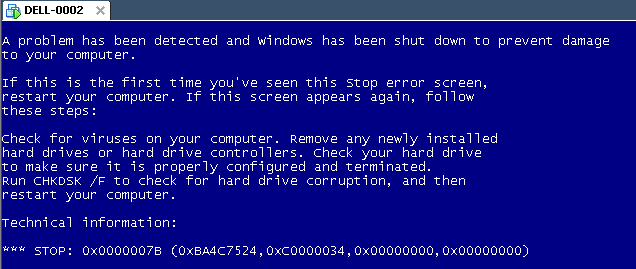
  • The same stop [Wayback] stop 0x0000007B can happen when converting a physical machine to VMware (I will schedule a separate post about this):

    Windows XP Virtual Machine failing with stop 0x0000007B

    Windows XP Virtual Machine failing with stop 0x0000007B

Steps:

  1. Put the SATA disk of the XP machine in a different one.
  2. Disk2Vhd on the new machine to create a VHDX of the XP hard disk.
  3. Install Hyper-V on the target Windows 8.1 machine (you need at least Pro for that).
  4. Setup the base VM directory.
  5. Setup a virtual network switch (decide if you want it to be internal, external or private, then bind it to a network adapter if needed).
  6. Add a new VM.
  7. Assign a new directory to it.
  8. Assign memory to it.
  9. Assign the virtual network switch to it.
  10. Save it.
  11. Edit the settings, then bind the DVD drive on the IDE controller 1 to C:\Windows\System32\vmguest.iso.
  12. Connect to the VM.
  13. Start it.
  14. If you get a stop 0x0000007B (usually because of SATA/AHCI/IDE or other MassStorage controller driver issues), then read [Wayback] Jon’s Project Blog » disk2vhd using [WaybackUBCD for Windows to solve the issue as there is no BIOS screen in Hyper-V that allows you to switch from AHCI to SATA and back.
  15. Note: you cannot perform UBCD4Win when you access the Hyper-V host through Microsoft Remote Desktop (the mouse will not work at all, and most keyboard shortcuts will not work either; [WaybackVirtual Machine Connection Key Combinations with Hyper-V – Ben Armstrong – Site Home – MSDN Blogs does not apply).
  16. Boot.
  17. Register Windows (you might need to do extra work to go from OEM to Retail here).
  18. Remove hidden devices that are not used any more and their drivers.
  19. Setup a backup schedule.

Some links that helped me get at these steps:

–jeroen

Posted in BIOS, Boot, Hyper-V, Internet, link rot, Power User, Virtualization, Windows, Windows 8, Windows 8.1, Windows XP, WWW - the World Wide Web of information | Leave a Comment »

How To Get 36 TB Free Cloud Storage From Qihoo 360 Yunpan (Cloud Drive)?

Posted by jpluimers on 2015/04/03

Interesting:

To remove the language barrier, we have written a detailed step-by-step procedure to get the 36 TB free cloud storage from Qihoo 360 Cloud Drive.

For all those MSDN and TechNet ISOs that aren’t available on-line any more (:

–jeroen

via: How To Get 36 TB Free Cloud Storage From Qihoo 360 Yunpan (Cloud Drive)?.

Posted in Cloud Apps, Internet, Power User | Leave a Comment »

Some more notes on ASUS RT-N66U, firmwares, temperatures and versions

Posted by jpluimers on 2014/08/20

In the the irregular series of ASUS RT-N66U and TomatoUSB posts:

Execute this script from the Tomato USB interface, or a ssh/telnet shell:

cat /dev/mtd0ro | grep bl_version
nvram get os_version
nvram get clkfreq
wl -i eth1 phy_tempsense | awk '{print $1/2+20;}'
wl -i eth2 phy_tempsense | awk '{print $1/2+20;}'
  • Line 1 gets the CFE bootloader version
    (1.0.2 and lower boot with 32K of NVRAM, 1.0.3 and up with 64K of RAM; some Firmwares work around the 32k limitation)
  • Line 2 gets the Firmware model and version
  • Line 3 gets the CPU speed
  • Line 4 and 5 get the temperature for eth1 (2.4 Ghz) and eth2 (5 Ghz) in Celsius
    It is based on the RMerlinDev (firmware developer) information on temperatures: These are for each radio. Take the returned value, divide by 2, then add 20. Results are in Celcius.
    Next to that knowledge, it uses a few tricks on awk calculation, and first parameter in awk (the second parameter would be the hex value of the temperature code in parenthesis) which is easier than shell calculations.

Based on those, I found a few very useful scripts:

–jeroen

Posted in ASUS RT-N66U, Awk, bash, Development, Internet, Network-and-equipment, Power User, Scripting, Software Development, TomatoUSB | Leave a Comment »

Microsoft OneDrive for Business modifies files as it syncs | Myce.com

Posted by jpluimers on 2014/04/22

Wow: Microsoft OneDrive for Business modifies files as it syncs | Myce.com.

For now Microsoft Cloud Storage is not the place for my data to be.

(Note: OneDrive used to be called SkyDrive)

The only cloud storage that worked for me without too much trouble is Copy.com. My referral there: https://copy.com?r=3NGul6.

–jeroen

Posted in Cloud Apps, Internet, Power User | Leave a Comment »