The Wiert Corner – irregular stream of stuff

Jeroen W. Pluimers on .NET, C#, Delphi, databases, and personal interests

  • My badges

  • Twitter Updates

  • My Flickr Stream

  • Pages

  • All categories

  • Enter your email address to subscribe to this blog and receive notifications of new posts by email.

    Join 1,860 other subscribers

Archive for the ‘ISO 8601’ Category

WordPress.com gets it consistently wrong, Twitter has it right: posting time stamps

Posted by jpluimers on 2022/11/15

UTC and time zones are both hard, especially with respect to scheduling.

The easiest would be to schedule things and store the time zone offsets together with the timestamp, just as ISO 8601 has UTC-relative time zone designators, or alternatively store the region in addition to the timestamp (which can be more user friendly).

When a scheduling system uses local time for schedules, you can expect these will adhere to your local time when the schedule becomes in effect.

So I schedule my posts for 06:00, 12:00 and 18:00 local time during weekdays.

Look what happens:

  1. [Archive.is] Jeroen Wiert Pluimers on Twitter: “Pro-tip for @wordpressdotcom : fix the scheduler so when you schedule in your local time zone, there is no shift during daylight saving time changes. I schedule all my posts to appear at 06:00 12:00 and 18:00 in my local time. 1/… “
  2. [Archive.is] Jeroen Wiert Pluimers on Twitter: “That works fine during winter time, which is ~5 out of 12 months, for example https://t.co/banrMebk2A 2/… “
  3. [Archive.is] Jeroen Wiert Pluimers on Twitter: “However 7 out of 12 months, they get posted at 07:00 13:00 and 19:00 local time, for example  3/3… “

Via [Archive.is] Colin Nederkoorn on Twitter: “Pro tip: Don’t schedule recurring meetings in UTC if you live in a place with daylight savings.… “ (which I do not agree with, see my post UTC and ISO 8601, or GTFO).

–jeroen

Posted in Development, ISO 8601, Power User, Software Development, UTC, Web Development | Leave a Comment »

UTC and ISO 8601, or GTFO

Posted by jpluimers on 2022/11/08

Always schedule your meetings in UTC, and use ISO-8601 date and time notation. Because time zone conversions are hard, especially with so many daylight saving time conventions.

I want not just a “UTC or GTFO” shirt, but a “UTC and ISO-8601, or GTFO” shirt.

It means I do not agree with [Archive.is] Colin Nederkoorn on Twitter: “Pro tip: Don’t schedule recurring meetings in UTC if you live in a place with daylight savings.… “ with multi-time zone teams: having it in UTC will balance out the DST changes over the teams.

Some more relevant Tweets that triggered me writing this post:

Read the rest of this entry »

Posted in Algorithms, Development, ISO 8601, Power User, Software Development, UTC | Leave a Comment »

Timestamp Generator / Converter – Timestampgenerator.com

Posted by jpluimers on 2018/11/16

I wish Google Search would return this when asking for “current time in ISO 8601”: [WayBackTimestamp Generator / Converter – Timestampgenerator.com

Type Value
Timestamp 1497872708
Server time 2017-06-19T11:52:55+00:00
ISO 8601 2017-06-19T11:45:08+00:00
RFC 2822 Mon, 19 Jun 2017 11:45:08 +0000
Day of the Week Monday
+1 Hour 1497876308
+1 Day 1497959108
+1 Week 1498477508
+1 Month 1500464708
+1 Year 1529408708

–jeroen

Posted in ISO 8601, LifeHacker, Power User | Leave a Comment »

In C#, given a DateTime object, how do I get a ISO8601 date in string format? – Stack Overflow

Posted by jpluimers on 2014/04/22

The first bulleted link below has been living in my drafts like forever (i.e. somewhere since mid June 2009), so time to write a bit about ISO 8601 and .NET.

First a few links about converting a DateTime into ISO 8601 string format:

Some solutions use the “K” as a time zone specifier. At first, I couldn’t find any documentation for it, not even Google Search for Google Search for “ssK” DateTime ToString returns anything useful.

Later on, I found The “K” Custom Format Specifier in Custom Date and Time Format Strings.

So my preferred solutions for me are these:

  • System.DateTime.Now.ToString("yyyy-MM-ddTHH:mm:ssK");
  • System.DateTime.Now.ToUniversalTime().ToString("yyyy-MM-ddTHH:mm:ssK");

I avoid these:

  • System.DateTime.Now.ToString("o");
    because it gets you too many digits in the second fracion.
  • System.DateTime.Now.ToUniversalTime().ToString("s") + "Z";
    because it is less clear what it does (might be resolved with a comment).

–jeroen

–jeroen

Posted in .NET, .NET 2.0, .NET 3.0, .NET 3.5, .NET 4.0, .NET 4.5, C#, C# 2.0, C# 3.0, C# 4.0, C# 5.0, Development, ISO 8601, Software Development | 1 Comment »

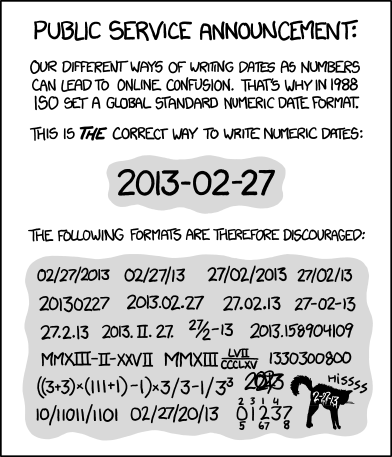
Please write dates and times so that everyone understands them, not just you. xkcd: ISO 8601

Posted by jpluimers on 2013/02/28

ISO 8601 was published on 06 05 88 and most recently amended on 12 01 04

ISO 8601 was published on 06 05 88 and most recently amended on 12 01 04

Boy, am I glad with the xkcd: ISO 8601 post and image on the right.

One reason:

Please write dates and times so that everyone understands them, not just you.

The alt-text of the comic is hilarious (ISO 8601 was published on 06 05 88 and most recently amended on 12 01 04) showing the confusion of using 2 digit years not knowing which field means which (I thin XKCD author Randall Munroe and Mathematics of the ISO calendar got some of the dates, see PDF search dates below).

I found out in the mid 1980s that people I was communicating with internationally (back then the internet was forming and you already had BITNET Relay chat and email) were using different date formats than I did.

Ever since that, I’ve used the YYYY-MM-DD format of writing dates, encouraging others to use as well and as soon as I found out that was a standard, started to evangelize ISO 8601 (there is an ISO 8601 category on my blog), which – at the time of writing this – had had revisions in 1998 (on 1998-06-15), 2000 (on 2000-12-15) and 2004 (on 2004-12-01).

A lot later I found out that back in 1971, this date format was a recommendation, and in 1976 already a standard. Not nearly as old as Esperanto though (:

Speaking about languages:

At the end of last century, after Delphi 5 added year 2000 support (which made the 16-bit Delphi 1 disappear from the box as the effort to prove the product including all libraries was year 2000 proof), Delphi went cross platform.

The Delphi team working on both Kylix 1 and Delphi 6, the also added a DateUtils unit which provides a lot of cuntionality, including support for weak numbers. The first test version always assumed week 1 was the one with januari first in it. As ISO 8601 also indicates how the first week of a year should be determined, a couple of people (Jeroen W. Pluimers, Glenn Crouch, Rune Moberg and  Ray Lischner) provided code that fixed this and a few other things in the unit. We even got mentioned by Cary Jensen!

That code is now also part of the RemObjects ShineOn library. That DateUtils unit is now on GitHub.
A Delphi XE version of the code (and a Delphi 2007 one) are now at NickDemoCode (Thanks Nick Hodges!).

Delphi is not the only environment having ISO 8601 support. XML has, .NET has, etc: it is now wide spread.
So follow your tools, and start using it yourself as well (:

Too bad the ISO 8601 standard text is not available publicly:

I remember the Y2K preparation era where the ISO-8601 standard was freely available at http://www.iso.ch/markete/8601.pdf, soon after the Year 2000, the PDF got locked behind a payment engine.
ISO suffers from heavy link rot too, for instance the ISO 3166 country codes used to be at http://www.iso.org/iso/prods-services/iso3166ma, but are now at http://www.iso.org/iso/home/standards/country_codes.htm. What about HTTP 303 or 302 redirect here guys?

Luckily people keep cached copies:

  1. “ISO 8601” “First edition” “1988-06-15” filetype:pdf
  2. “ISO 8601” “Second edition” “2000-12-15” filetype:pdf
  3. “ISO 8601” “Third edition” “2004-12-01” filetype:pdf

–jeroen

via: xkcd: ISO 8601.

Posted in .NET, Delphi, Delphi 2005, Delphi 2006, Delphi 2007, Delphi 2009, Delphi 2010, Delphi 6, Delphi 7, Delphi 8, Delphi x64, Delphi XE, Delphi XE2, Delphi XE3, Development, ISO 8601, Power User, Prism, Software Development | Tagged: , , , , , , , , , , , , , | 10 Comments »

.NET/PowerShell: Get-Host, quick way to get CurrentCulture and CurrentUICulture

Posted by jpluimers on 2013/01/28

A quick and easy way of getting the CurrentCulture and CurrentUICulture is to use the get-host cmdlet from PowerShell.

This is what PowerShell 2.0 shows on my system:

C:\Users\jeroenp>powershell get-host

Name             : ConsoleHost
Version          : 2.0
InstanceId       : 1ce173fb-70a7-403b-a2bd-3800fe740f7c
UI               : System.Management.Automation.Internal.Host.InternalHostUserInterface
CurrentCulture   : en-IE
CurrentUICulture : en-US
PrivateData      : Microsoft.PowerShell.ConsoleHost+ConsoleColorProxy
IsRunspacePushed : False
Runspace         : System.Management.Automation.Runspaces.LocalRunspace

The SeaTools from Seagate can’t cope with that because they don’t manage the Resource Fallback Process properly.

My machine is on en-IE, as it is English, and USA as location.

The main advantage for me is to use the that it is a good mix between English and Dutch settings:

  • English language (so you get proper error messages that you can find back using Google)
  • USA as location (to force more search engines to use .com domains)
  • EUR money settings (most software in Western Europe expects EUR, but displays USD when using en-US)
  • decimal dot (far easier import/export with non-Dutch stuff)
  • DD/MM/YYYY date format (I tried ISO 8601 YYYYMMDD, but that breaks too much software)
  • 24 hour clock format (just as it should be)
  • comma list separator (too much software is not configurable to use a certain separator for CSV, especially Excel depends on the system settings for list separator and decimal)
  • metric system (just as it should be)

–jeroen

via: Get-Host.

Posted in .NET, CSV, Development, Excel, ISO 8601, Office, Power User, PowerShell, Scripting, Software Development | Leave a Comment »

INFORMATION_SCHEMA views in various databases

Posted by jpluimers on 2012/08/21

Few people know about the INFORMATION_SCHEMA views that have been there since SQL-92.

Two funny things about that standard:

A few reasons I can imagine not many people know about the INFORMATION_SCHEMA:

  • Not all relational database servers implement them, and of the ones that do implement them, not all versions implement all views.
    That’s what this article is about; currently it lists only SQL Server 2000 and 2008 R2 (tried both) and PostgreSQL (verified docs), but I will update it as soon as I have run the script on other versions of SQL server and database vendors.
  • It is hard to find the official ISO standards in a public way, and ISO itself sometimes puts things online, and at other times wants money for it

    I remember the Y2K preparation era where the ISO-8601 standard was freely available at http://www.iso.ch/markete/8601.pdf, soon after the Year 2000, the PDF got locked behind a payment engine.
    ISO suffers from heavy link rot too, for instance the ISO 3166 country codes used to be at http://www.iso.org/iso/prods-services/iso3166ma, but are now at http://www.iso.org/iso/home/standards/country_codes.htm. What about HTTP 303 or 302 redirect here guys?

Since SQL-92, the INFORMATION_SCHEMA (and its twin DEFINITION_SCHEMA) have been extended. The last extension in 2008. Together they allow SQL databases to be self-describing (I think no vendor has attained that) and the structures queryable in a standard way

In fact that is the main purpose: these views in INFORMATION_SCHEMA are a very convenient standard way to query – in a vendor agnostic way – about tables, views, columns, etc. Read the rest of this entry »

Posted in Database Development, Development, Firebird, InterBase, ISO 8601, MySQL, OracleDB, PostgreSQL, Power User, SQL, SQL Server, SQL Server 2000, SQL Server 2005, SQL Server 2008, SQL Server 2008 R2, SQL Server 2012, SQL Server 7, Sybase | Leave a Comment »

ISO-8601: What’s the Current Week Number?

Posted by jpluimers on 2012/08/16

Quick way to get the current ISO-8601 based week number: What’s the Current Week Number?.

–jeroen

Posted in Internet, ISO 8601, Power User | 5 Comments »

ISO 8601 Date, Time and DateTime in Delphi (was: Simple example to show DateTime.Now in ISO 8601 format on ideone.com | Online C# Compiler & Debugging Tool)

Posted by jpluimers on 2011/08/18

In the past I wrote about a Simple example to show DateTime.Now in ISO 8601 format on ideone.com | Online C# Compiler & Debugging Tool , using ISO 8601 in batch-files, and how ISO 8601 is used in Google Calendar URLs.

Time to write something about ISO 8601 Date, Time and DateTime and Delphi.

First of all the DateUtils unit contains a bunch of routines (for instance DecodeDateWeek) that understand ISO 8601 week numbers, where:

  • Weeks start at Monday
  • The first week of a year contains (these are equivalent):
    • The first thursday in that year
    • Has at least 4 days in that year
    • Contains the 4th of January

Otherwise the week containing January 1st is week 52 or 53 of the previous year

ISO 8601 also specifies how to format Dates, Times,  DateTimes and durations according to some basic principles.

XML uses ISO 8601 to format Date, Time and DateTime and some other formats as text too.

So it is no wonder that since Delphi 6, it contains a XSBuiltIns unit covering (among other things) ISO 8601 formatting.

Given the many Delphi ISO 8601 relates questions on StackOverflow of which I answered two, and my need for ISO 8601 DateTime conversion for exporting Excel XML, here is are some samples to get started in the unit below (and in this codeplex changeset).

The unit covers Date, Time and DateTime.
You can write similar code for Duration.

Oops, I covered it already in ISO 8601: Delphi way to convert XML date and time to TDateTime and back (via: Stack Overflow)

Read the rest of this entry »

Posted in Conference Topics, Conferences, Delphi, Development, Event, ISO 8601, Power User, Software Development | 4 Comments »

Simple example to show DateTime.Now in ISO 8601 format on ideone.com | Online C# Compiler & Debugging Tool

Posted by jpluimers on 2011/05/17

I’m a fan of ISO 8601, as it is a universal way of expressing dates and times (no more MDY confusion ).

I wrote about using ISO 8601 in batch-files and with Google Calendar before.

Now it is time to give you a simple C# example.

When you realize that XML uses ISO 8601 for their date and time formats, the .NET conversion is very easy:

using System;
using System.Xml;

public class Test
{
    public static void Main()
    {
        string Iso8601DateTime =
            XmlConvert.ToString(DateTime.Now, XmlDateTimeSerializationMode.Local);
        Console.WriteLine(Iso8601DateTime);
    }
}

I wrote about ideone.com before: it is an excellent place to run sample C# code (and other languages).

When running this on ideone.com, you can see their local server time in ISO 8601 format.
Cute :-)

BTW: There are more ways to run your C# code online.

–jeroen

via: Simple example to show DateTime.Now in ISO 8601 format on Ideone.com | Online C# Compiler & Debugging Tool.

Posted in .NET, C#, Development, ISO 8601, Power User, Software Development | 1 Comment »