The Wiert Corner – irregular stream of stuff

Jeroen W. Pluimers on .NET, C#, Delphi, databases, and personal interests

  • My badges

  • Twitter Updates

  • Pages

  • All categories

  • Enter your email address to subscribe to this blog and receive notifications of new posts by email.

    Join 1,839 other subscribers

Archive for the ‘Network-and-equipment’ Category

Reminder to self: get less dependent on the various clouds

Posted by jpluimers on 2021/06/04

For my link archive: [WayBack] Grote Google-storing trof Gmail, YouTube en diensten van derden – IT Pro – Nieuws – Tweakers.

It has some interesting tips for IoT video doorbell products that are less depending on single-choice clouds:

Er bestaan er minimaal eentje; smart deurbel met camera en evt speaker, eigen intern netwerk, compatible met SIP (en video), zelf verantwoordelijk voor opnamen, etc. Enige nadeel is dan wel de prijs, het is een Duits kwaliteitsproduct, dus reken rond de 350 euro voor het absolute basismodel. Doorbird heet het; oa te koop bij Robbshop en CoolBlue of direct bij de fabiraknt’s website.


Je moet je huis flink geautomatiseerd hebben wil je echt nut van die api willen hebben.

als je alles zelf in de hand wil hebben doe je dat ook. Je zorgt er zelf voor dat je webinterface via een externe URL bereikbaar is en dan is het enkel je eigen hardware en internetverbindingen die als SPOF dienen en je kan dan ook makkelijker van solution-provider wisselen zonder vast te zitten.


wellicht is dit een oplossing voor jou?

https://www.instructables…oorbell-for-Less-Than-40/


–jeroen

Posted in Cloud Apps, Internet, IoT Internet of Things, Network-and-equipment, Power User | Leave a Comment »

Fritz!Box repeater and other devices: “Radar detection enabled. At the moment no wireless LAN connection (5 GHz) is possible; please wait.”

Posted by jpluimers on 2021/05/31

If any of your Fritz!Box devices under “Wireless” -> “Radio Channel” -> “5-GHz band”  the indicates “Radar detection enabled. At the moment no wireless LAN connection (5 GHz) is possible; please wait.” – Google Search:

  1. Click on the “Refresh Auto Channel” button
  2. Wait until it has chosen a new 5Ghz channel
  3. Verify you can connect over 5Ghz
  4. If you still cannot connect, retry steps 1…3 once.

I had this only happen on 1750E repeaters so far, but others seem to have had it on other Fritz!Box devices as well.

In the Netherlands, potentially affected channels seem to be 52 through 140.

Related:

–jeroen

Posted in Fritz!, Fritz!Box, Fritz!WLAN, Internet, Power User | Leave a Comment »

Unifi Cloud Key: “We have detected that your SD card is missing. Please insert it and reboot your Cloud Key or disable automatic backup.”

Posted by jpluimers on 2021/04/23

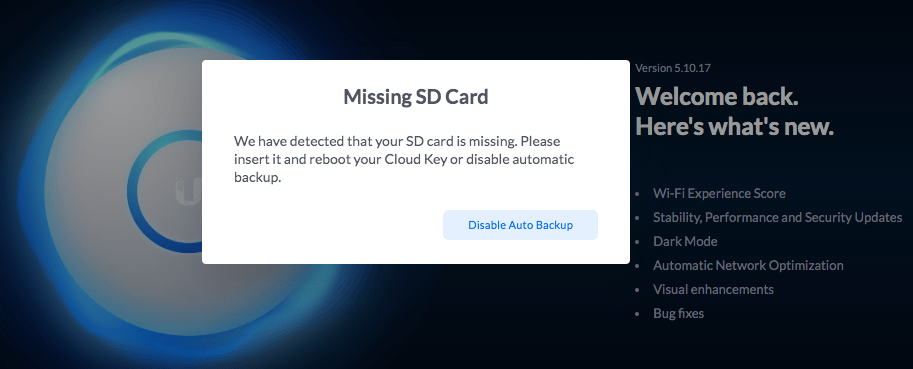
Got this a while ago with 5.10.17:

“Missing SD card”

“We have detected that your SD card is missing. Please insert it and reboot your Cloud Key or disable automatic backup.”

This might be a hardware issue with [Archive.is] Ubiquiti UniFi Cloud Key, UC-CK: AmazonSmile: Computer & Zubehör

Reading the 1-star reviews, SD-card problems seem paramount: [Archive.is] Amazon.de:Kundenrezensionen: Ubiquiti UniFi Cloud Key, UC-CK.

For me, most of the times this solved the problem:

  1. Power down the Cloud Key
  2. Remove the SD card
  3. Insert the SD card
  4. Power up the Cloud Key

Read the rest of this entry »

Posted in Cloud Key, Hardware, Network-and-equipment, Power User, Unifi-Ubiquiti | Leave a Comment »

Stop FortiClient from auto-starting (as it uses a truckload of Windows resources, often including 2 gigabyte of memory for their logger)

Posted by jpluimers on 2021/04/16

I see lot’s of negative reactions on FortiClient, as it is very closed source, many intermittent issues, and is a product that tries to be a jack of all trades (over a couple of versions, in addition of being a proprietary VPN client, they started doing vulnerability scanning, interfering with anti-virus products, they blocked saving of passwords and allowing password managers to paste them, and I could go on).

Sometimes you have to use it in order to access a FortiGate based VPN server, so the best is to defer starting it until as late as possible.

Here are some links to get that configured correctly:

–jeroen

Posted in FortiGate/FortiClient, Network-and-equipment, Power User, VPN | Leave a Comment »

How to remember password in FortiClient VPN? – Stack Overflow

Posted by jpluimers on 2021/04/12

In [WayBack] How to remember password in FortiClient VPN? – Stack Overflow, the consensus seems to be “it varies, and usually is unreliable”.

Time to write a tool that snifs the Windows GUI and auto-enters the credentials.

That would be much like the Linux expect solution: [WayBack] Continuous run Forticlient VPN using expect. Automatically restart VPN if get disconnected or session closed. · GitHub

Via: [WayBack] Forticlient 5.6 – Save Credentials | Fortinet Technical Discussion Forums

–jeroen

Posted in FortiGate/FortiClient, Network-and-equipment, Power User, VPN | Leave a Comment »

Need to do some reading on local domains on the internal network

Posted by jpluimers on 2021/04/09

A long time I wondered why I saw ESXi systems on my local network have two entries in their /etc/hosts file:

[root@ESXi-X10SRH-CF:~] cat /etc/hosts
# Do not remove the following line, or various programs
# that require network functionality will fail.
127.0.0.1   localhost.localdomain localhost
::1     localhost.localdomain localhost
192.168.71.91   ESXi-X10SRH-CF ESXi-X10SRH-CF

Then I bumped into someone who had a different setup:

[root@ESXi-X10SRH-CF:~] cat /etc/hosts
# Do not remove the following line, or various programs
# that require network functionality will fail.
127.0.0.1   localhost.localdomain localhost
::1     localhost.localdomain localhost
192.168.0.23    esxi.dynamic.ziggo.nl esxi

So now I knew that the first entry can have a domain resolving it (it still makes be wonder why ziggo is using a top-level domain to resolve local stuff; but searching for  dynamic.ziggo.nl did not get me further on that).

So I installed a quick ESXi machine on that local network, and got the same.

When back home the machine still thought it was esxi.dynamic.ziggo.nl, though clearly I was outside a Ziggo network

I wanted to get rid of it, but that was hard.

Since I forgot to take screenshots beforehand, I can only provide the ones without a search domain bellow.

Reminder to self: visit someone within the Ziggo network, then retry.

Normally you can edit things like these in the default TCP/IP stack. There are two places to change this:

Neither of these allowed me to change it to a situation like this, but luckily the console did.

In the below files, I had to remove the bold parts, then restart the management network (I did keep a text dump, lucky me):

[root@esxi:/etc] grep -inr ziggo .
./vmware/esx.conf:116:/adv/Misc/HostName = "esxi.dynamic.ziggo.nl"
./resolv.conf:2:search dynamic.ziggo.nl 
./hosts:5:192.168.71.194    esxi.dynamic.ziggo.nl esxi
[root@esxi:/etc] cat /etc/resolv.conf 
nameserver 192.168.71.3
search dynamic.ziggo.nl 
[root@esxi:/etc] cat /etc/hosts
# Do not remove the following line, or various programs
# that require network functionality will fail.
127.0.0.1   localhost.localdomain localhost
::1     localhost.localdomain localhost
192.168.71.194  esxi.dynamic.ziggo.nl esxi

Future steps

  1. Read more on local domains, search domains and related topics
  2. Configure a local domain on my local network, so DHCP hands it out, and DHCP handed out host names are put in the local DNS
  3. Test if all services on all machines still work properly

Reading list

Read the rest of this entry »

Posted in DNS, ESXi6.5, ESXi6.7, Hardware, Internet, Mainboards, Network-and-equipment, Power User, SuperMicro, Virtualization, VMware, VMware ESXi, X10SRH-CF, X9SRi-3F | Leave a Comment »

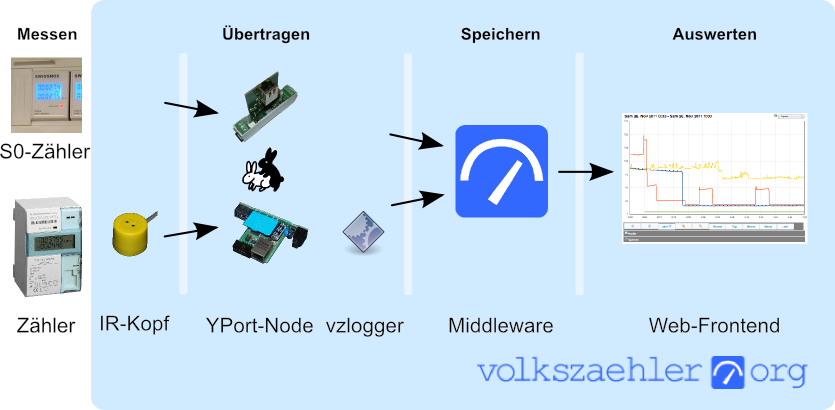
Build your own Infrared reader head for electriciti smart meters for around USD 6: haus-automatisierung.com [4K] – YouTube

Posted by jpluimers on 2021/03/24

In German, but very interesting IR-Lesekopf für SmartMeter selber bauen | haus-automatisierung.com [4K] – YouTube:

I could not find the promised follow-up video at haus-automatisierung.com – YouTube, but the manual steps and the site below have enough information for me.

Too bad the site is way to big to fully archive in the WayBack machine. I only saved the top pages:

Related: [WayBack] MQTT-Grundlagen-Kurs – haus-automatisierung.com

–jeroen

Read the rest of this entry »

Posted in Development, Hardware Development, Hardware Interfacing, IoT Internet of Things, Raspberry Pi, Software Development | Leave a Comment »

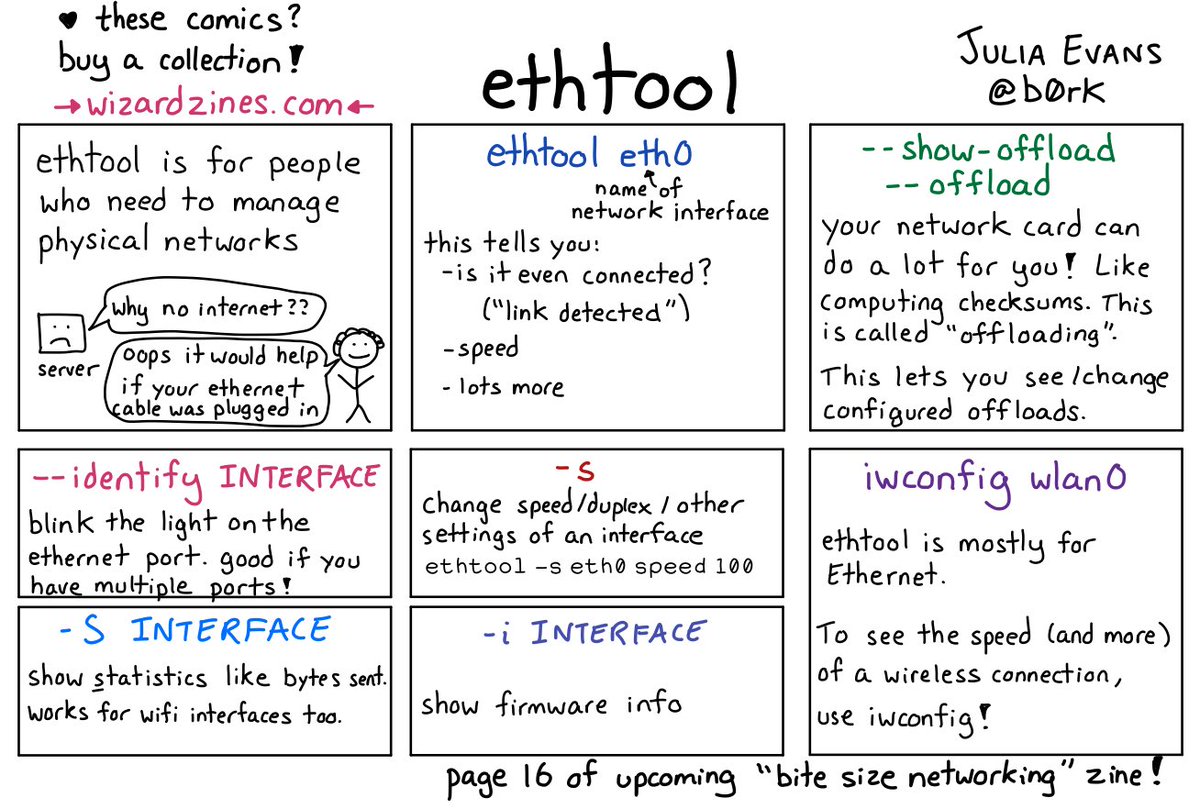
🔎Julia Evans🔍 on Twitter: “ethtool… “

Posted by jpluimers on 2021/02/08

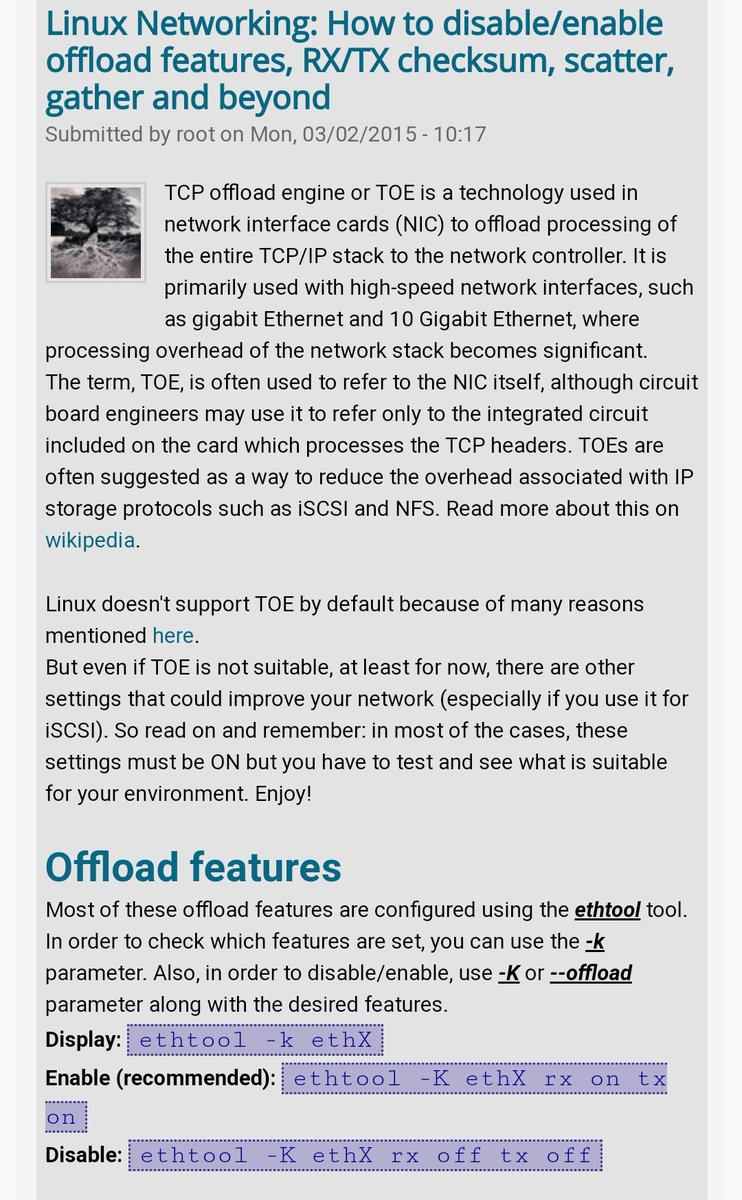
[WayBack] 🔎Julia Evans🔍 on Twitter: “ethtool… “

With a lot of responses, including:

–jeroen

Posted in *nix, *nix-tools, Network-and-equipment, Power User | Leave a Comment »

Forced routing of selective emails to ISP SMTP via Mikrotik Routing | Syed Jahanzaib Personal Blog to Share Knowledge !

Posted by jpluimers on 2021/01/14

For my link archive: [WayBack] Forced routing of selective emails to ISP SMTP via Mikrotik Routing | Syed Jahanzaib Personal Blog to Share Knowledge !

–jeroen

Posted in Development, MikroTik, Power User, RouterOS, routers, Scripting, Software Development | Leave a Comment »

Fiber cables: speed and connectors

Posted by jpluimers on 2021/01/07

Similar to the CAT# designation for speed categories, fiber cables have an OM# designation. [WayBack] OM1 fiber, OM2 fiber, OM3 fiber and OM4 fiber overview explain this well, and has this quote and image tables:

There are four kinds of multimode fibers: OM1 fiber, OM2 fiber, OM3 fiber and OM4 fiber. The letters “OM” stand for optical multi-mode.

Both OM1 and OM2 work with LED based equipment that can send hundreds of modes of light down the cable, while OM3 and OM4 are optimized for laser (eg. VCSEL) based equipment.

I have combined the tables in html as:

OM1 OM2 OM3 OM4
Maximum distance for 100 Mbit/s 2000m 2000m 2000m 2000m 100BASE -FX
Maximum distance for 1 Gbit/s 275m 550m 550m 1000m 1000BASE-SX
Maximum distance for 10 Gbit/s 33m 82m 300m 550m 10GBASE-SR
Maximum distance for 40 Gbit/s not specified not specified 100m 150m 40GBASE-SR4
Maximum distance for 100 Gbit/s not specified not specified 100m 150m 100GBASE-SR10 / 100GBASE-SR4
Diameter 62.5/125µm 50/125µm 50/125µm 50/125µm
Jacket coulors (often also cable colours) Orange Orange Aqua Aqua
Optical source LED LED VCSEL VCSEL
Bandwidth 200MHz*km 500MHz*km 2000MHz*km 4700MHz*km


Unlike CAT cabling, fiber cables can have various connectors, of which SC and LC are the most common as explained in [WayBack] SC vs LC—What’s the difference? which has this quote and image table:

  • Size: LC is half the size of SC. Actually, one SC-adapter is exactly the same size as a duplex LC-adapter. Therefore LC is more and more common in central offices where packing density (number of connections per area) is an important cost factor
  • Handling: SC is a true “push-pull-connector” and LC is a “latched connector”, although there are very innovative, real “push-pull-LCs” available which have the same handling capabilities like SC.
  • The History of Connector: The LC is the “younger” connector of the two, SC is wider spread around the world but LC is catching up. Both connectors have the same insertion loss and return loss capabilities. Generally, it depends where in the network you want to use the connector, no matter SC or LC, even the other different kinds of connector.

In html:

Name Mating
cycles
Ferrule
size
Typical
insertion loss
(dB)
IEC
specification
Cost Ease
of
use
Application
features
SC 1000 Ø 2.5mm
ceramic
0.25-0.5 61754-4 $$ ••••• Mainstream, reliable, fast deployment, field fit
LC 500 Ø 1.25mm
ceramic
0.25-0.5 61754-20 $$ ••••◦ High density, cost effective, field fit

Related:

–jeroen

Posted in Ethernet, Network-and-equipment, Power User | Leave a Comment »