The Wiert Corner – irregular stream of stuff

Jeroen W. Pluimers on .NET, C#, Delphi, databases, and personal interests

  • My badges

  • Twitter Updates

  • My Flickr Stream

  • Pages

  • All categories

  • Enter your email address to subscribe to this blog and receive notifications of new posts by email.

    Join 1,860 other subscribers

Archive for the ‘Linux’ Category

Linux: mounting of a FAT16/FAT32 USB flash drive

Posted by jpluimers on 2013/09/09

A while ago, I had to transfer a couple of files from a Linux machine where I did have console access, but no proper network access.

This was the sequence to get it connected and copy a directory to the USB flash drive:

  1. Stick the USB flash drive in a USB port (duh <g>) on the Linux system
  2. Run the fdisk  command to see on which device it got loaded:
    # fdisk -l
    It will give you something like this:
    Disk /dev/sdd: 8019 MB, 8019509248 bytes
    20 heads, 16 sectors/track, 48947 cylinders
    Units = cylinders of 320 * 512 = 163840 bytes
    Device Boot Start End Blocks Id System
    /dev/sdd1 * 1 48948 7831512 b Win95 FAT32
  3. Create a /mnt/USB directory to mount the device to using the mkdir command:
    # mkdir /mnt/USB
  4. Use the modprobe command to make sure the vfat file system support is loaded:
    # modprobe vfat
  5. Use the mount command to mount the device from the first step (/dev/sdd1) to the directory you created (/mnt/USB)
    # mount /dev/sdd1 /mnt/USB
  6. Use the rsync command to recursively (-p) copy a directory maintaining timestamps (-t) and showing progress (-v)
    # rsync -rtv /home/user/directory/ /mnt/USB/directory/
  7. Use the umount command to unmount the directory (and therefore the device)
    # umount /mnt/USB

–jeroen

via: Simple mounting of FAT32 USB Flash Drive.

Posted in *nix, Linux, Power User, SuSE Linux | Leave a Comment »

openSUSE 12.x: disabling smbd CUPS warnings when you have Samba but not printing installed

Posted by jpluimers on 2013/09/06

As Dave mentioned a couple of years ago in an article smbd_unable_to_connect_to_cups_server, even if you have printing disabled in Samba, you can get errors in /var/log/messages like these±

   May  5 09:45:02 www smbd[<pid>]: [2008/05/05 09:45:02, 0] printing/print_cups.c:cups_connect(69)
    May  5 09:45:02 www smbd[<pid>]: Unable to connect to CUPS server localhost:631 - Connection refused

This happens even if you disable the printers and print$ shares from within YaST2.

He proposed a 5-line change in the /etc/samba/smb.conf, but testing this on openSUSE 12.x, shows the actual diff is a lot smaller: just change the entry for printcap name, then add an entry for disable spoolss.

This is the diff of /etc/samba/smb.conf.printing versus /etc/samba/smb.conf: Read the rest of this entry »

Posted in *nix, Linux, openSuSE, Power User, SuSE Linux | Leave a Comment »

Resolving base-conflicts installing samba on OpenSUSE 12.x

Posted by jpluimers on 2013/09/02

When installing samba on a “minimal” server openSUSE 12.x can give you a funny error that the install process conflicts with a “patterns-openSUSE-minimal_base-conflicts” package as for instance described in OpenSUSE 12.2 Samba Standalone Server With tdbsam Backend | HowtoForge – Linux Howtos and Tutorials.

The first time I got that message, I was confused, and it took me a while to find out about the meaning of the base-conflicts package, as it was hard to get a Google search query with really meaningful result.

At last I found a Gitorious entry describing the minimal_base-conflicts package:

create a separate minimal_base-conflicts pattern

this allows to keep the minimal_base pattern upon installing a conflicting package. A better solution would be weak-conflicts but we don’t have that atm

From there I found the security request openFATE – #312150: weak conflicts/softlocks/no-recommends for patterns:

Installation of a pattern also draws in packages that are not in the pattern but only recommended by those listed in the pattern. For the “minimal” pattern this behavior is not desirable though as one really wants a minimal installation without the optional stuff.

So basically, the minimal_base-conflicts package allows the minimal_base package to reference package without pulling in a truckload of package (that would basically violate the idea of a “minimal_base” install).

If you want to install one of the truckload (samba is one of them), then you need to uninstall the minimal_base-conflicts package.

–jeroen

via: OpenSUSE 12.2 Samba Standalone Server With tdbsam Backend | HowtoForge – Linux Howtos and Tutorials.

Posted in *nix, Linux, openSuSE, Power User, SuSE Linux | Leave a Comment »

Some notes on how VMware Workstation/Player “Easy Installs” SUSE Linux

Posted by jpluimers on 2013/08/30

When VMware Workstation/Player does an Easy Install of SUSE Linux (and most other Linuxes), it does this:

  • mount a CD drive with the autoinst.iso image
  • mount a floppy drive with the autoinst.flp image

For Linux, both of them contain autoinst.xml files to automate the boot process.

It has a few drawbacks including a hardcoded boot partition size and unmount problems, so if you don’t want those, follow the guidelines at How to Stop Easy Install in VMware Workstation.

–jeroen

Posted in *nix, Linux, openSuSE, Power User, SuSE Linux, Virtualization, VMware, VMware Workstation | Leave a Comment »

User Manual for Avira AntiVir Server | Unix and Avira AntiVir Professional | Unix

Posted by jpluimers on 2013/08/26

PDF User Manual for Avira AntiVir Server  | Unix and  Avira AntiVir Professional  | Unix.

It is not completely up to date (as most installations are now RPM based), but gives great background information.

If you are using SUSE Linux, then note that as of openSUSE 11.3, there is a glitch when you use the SUSE security repository (see Bug 633771 – antivir cannot be installed because of missing libdazuko.so).

Basically there are two solutions to this:

  1. Ignore the dependency issue;
  2. Use the Avira repository.

The former seems to be a viable solution as per PDF User Manual, the installation proceeds as follows:

linking /usr/lib/AntiVir/guard/libdazuko.so to /usr/lib/AntiVir/guard/
libdazuko3compat2.so...

And indeed it does: these are the steps to follow, first for adding the security repository, then to install the package (click on images to view larger versions): Read the rest of this entry »

Posted in *nix, Linux, openSuSE, Power User, SuSE Linux | Leave a Comment »

Installing SuSE 11.2 or higher: before the first reboot the CLI version of YaST looks horrible. Reboot or second CLI fixes it.

Posted by jpluimers on 2013/08/19

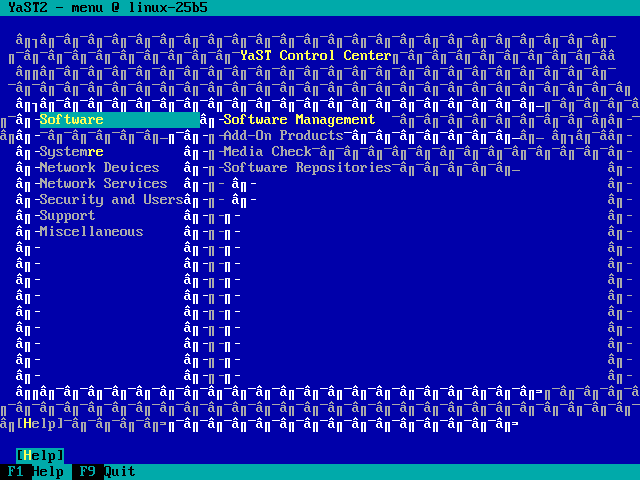
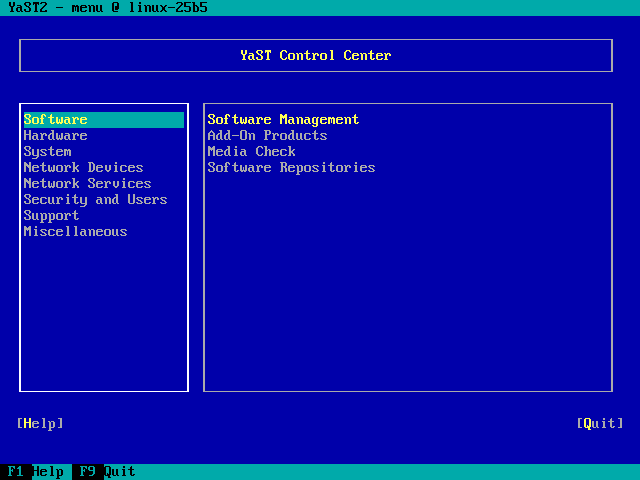
Since SuSE 11.2, when installing then the CLI version of YaST looks horrible on the first (Ctrl-Alt-F1) console before you do your first reboot.

Workarounds:

  1. Try one of the other consoles,
  2. Reboot once.

It still fails at SuSE 12.x.

Before/After (click on the images to enlarge):

YaST before reboot

YaST before reboot

YaST after reboot

YaST after reboot

–jeroen

Posted in *nix, Linux, openSuSE, Power User, SuSE Linux | Leave a Comment »

Getting a fresh root hint file on SUSE 12.x

Posted by jpluimers on 2013/07/31

Wrote a small script that goes into my monthly crontab.

It gets ftp://ftp.internic.net/domain/named.cache into /var/lib/named/named.cache.new, and logs when you need to copy it over into /var/lib/named/root.hint

Read the rest of this entry »

Posted in *nix, Development, Linux, Power User, Scripting, Sh Shell, Software Development, SuSE Linux, wget | Leave a Comment »

a few notes on sendmail and re-trying deferred messages

Posted by jpluimers on 2013/07/05

My sendmail setup is a 2-staged one.
Every once in a while one of the stages stops, and mostly they recover.
Sometimes the second stage doesn’t, which causes a lot of messages in the queue get the deferred status.

Re-trying those deferred messages was a bit of a trial and error case, as my search efforts resulted in a lot of messages telling me what should work, but not what actually works.

First of all, mailq shows you what is stuck in the queue.

snap:~ # mailq
                /var/spool/mqueue (2 requests)
-----Q-ID----- --Size-- -----Q-Time----- ------------Sender/Recipient-----------
q9FLFBkD002197    11967 Mon Oct 15 23:15 MAILER-DAEMON
                 (Deferred: Connection timed out with smtp.anbid.com.br.)
                                         <debutvtr1@anbid.com.br>
q7S6oxgS023145     5067 Tue Aug 28 08:50 MAILER-DAEMON
      8BITMIME   (Deferred: Connection timed out with mail.admail.com.ar.)
                                         <trustiest76@admail.com.ar>
                Total requests: 2

You can add some parameters for it to show other queues.

So I have a little mq script that shows all queues:

#!/bin/bash
echo "Outgoing mailq";
sudo mailq;
echo " ";
echo "Submit mailq";
sudo mailq -Ac;
echo " ";
echo "Incoming mailq";
sudo mailq -C/etc/sendmail-rx.cf;

These are the commands I tried to flush the outgoing mailq:

sendmail -v -q
sendmail -v -q -OTimeout.hoststatus=0m
sendmail -v -qR@

Only the last one worked correctly.

–jeroen

Posted in *nix, Linux, Power User | Leave a Comment »

If you by accident press Ctrl-Z on the Linux console, use fg to un-suspend that task

Posted by jpluimers on 2013/07/01

The Linux console has different shortcut keys than many people are used to, so Ctrl-Z is not “undo”, but “suspend”. It sends and returns you to the command prompt.

The easiest way to undo that is to type fg, which brings back the suspended process into the foreground.

A nice post with a bit more background information is Bg, Fg, &, Ctrl-Z – 5 Examples to Manage Unix Background Jobs.

–jeroen

via: What is effect of CTRL + Z on a unix\Linux application – Super User.

Posted in *nix, Linux, Power User | Leave a Comment »

mutt notes

Posted by jpluimers on 2013/06/28

When the webmail doesn’t do what I want, I fall back on mutt on the Linux command line prompt.

It is an immensely strong and stable text based mail client, but – beyond the basics – has a steep learning curve.

In fact it is so stable, that the CVS repository rarely gets commits

So below a few notes that I used to clean up truckloads of mail.

  1. Read Real Programmers: Jump Start: Mutt — by hackers, for hackers. It is a very short introduction with the most powerful.
  2. Read My first mutt : Searching mail (the best article on My first mutt), and My first mutt : mutt overview. They why limit is far more useful than search, and the basic UI concept of mutt.
  3. The mutt documentation has a text based man page.
  4. But there is both a html manual and text manual
    (the devel doc branch has both html manual and text manual too).
  5. A lot of actions in mutt depends on patterns which are based on regular expressions.

For me the most powerful combination of steps is this:

  1. Limit the message view to a search pattern of messages you are looking for
  2. Tag the (groups of) messages you want to operate on
  3. Use the semicolon tag-prefix command to operate only on the tagged messages [Wayback/Archive] Mutt: apply command to all tagged messages – Super User
    Once you have tagged the desired messages, you can use the tag-prefix operator, which is the ; (semicolon) key by default. When the tag-prefix operator is used, the next operation will be applied to all tagged messages if that operation can be used in that manner.

A few more details are below. Read the rest of this entry »

Posted in *nix, Cygwin, Linux, Power User | 1 Comment »