Archive for the ‘Linux’ Category
Posted by jpluimers on 2013/07/05
My sendmail setup is a 2-staged one.
Every once in a while one of the stages stops, and mostly they recover.
Sometimes the second stage doesn’t, which causes a lot of messages in the queue get the deferred status.
Re-trying those deferred messages was a bit of a trial and error case, as my search efforts resulted in a lot of messages telling me what should work, but not what actually works.
First of all, mailq shows you what is stuck in the queue.
snap:~ # mailq
                /var/spool/mqueue (2 requests)
-----Q-ID----- --Size-- -----Q-Time----- ------------Sender/Recipient-----------
q9FLFBkD002197    11967 Mon Oct 15 23:15 MAILER-DAEMON
                 (Deferred: Connection timed out with smtp.anbid.com.br.)
                                         <debutvtr1@anbid.com.br>
q7S6oxgS023145     5067 Tue Aug 28 08:50 MAILER-DAEMON
      8BITMIME   (Deferred: Connection timed out with mail.admail.com.ar.)
                                         <trustiest76@admail.com.ar>
                Total requests: 2
You can add some parameters for it to show other queues.
So I have a little mq script that shows all queues:
#!/bin/bash

echo "Outgoing mailq";

sudo mailq;

echo " ";

echo "Submit mailq";

sudo mailq -Ac;

echo " ";

echo "Incoming mailq";

sudo mailq -C/etc/sendmail-rx.cf;
These are the commands I tried to flush the outgoing mailq:
sendmail -v -q

sendmail -v -q -OTimeout.hoststatus=0m

sendmail -v -qR@
Only the last one worked correctly.
–jeroen
Posted in *nix, Linux, Power User | Leave a Comment »
Posted by jpluimers on 2013/07/01
The Linux console has different shortcut keys than many people are used to, so Ctrl-Z is not “undo”, but “suspend”. It sends and returns you to the command prompt.
The easiest way to undo that is to type fg, which brings back the suspended process into the foreground.
A nice post with a bit more background information is Bg, Fg, &, Ctrl-Z – 5 Examples to Manage Unix Background Jobs.
–jeroen
via: What is effect of CTRL + Z on a unix\Linux application – Super User.
Posted in *nix, Linux, Power User | Leave a Comment »
Posted by jpluimers on 2013/06/28
When the webmail doesn’t do what I want, I fall back on mutt on the Linux command line prompt.
It is an immensely strong and stable text based mail client, but – beyond the basics – has a steep learning curve.
In fact it is so stable, that the CVS repository rarely gets commits
So below a few notes that I used to clean up truckloads of mail.
- Read Real Programmers: Jump Start: Mutt — by hackers, for hackers. It is a very short introduction with the most powerful.
- Read My first mutt : Searching mail (the best article on My first mutt), and My first mutt : mutt overview. They why limit is far more useful than search, and the basic UI concept of mutt.
- The mutt documentation has a text based man page.
- But there is both a html manual and text manual
(the devel doc branch has both html manual and text manual too).
- A lot of actions in mutt depends on patterns which are based on regular expressions.
For me the most powerful combination of steps is this:
- Limit the message view to a search pattern of messages you are looking for
- Tag the (groups of) messages you want to operate on
- Use the semicolon tag-prefix command to operate only on the tagged messages [Wayback/Archive] Mutt: apply command to all tagged messages – Super User
Once you have tagged the desired messages, you can use the tag-prefix operator, which is the ; (semicolon) key by default. When the tag-prefix operator is used, the next operation will be applied to all tagged messages if that operation can be used in that manner.
A few more details are below. Read the rest of this entry »
Posted in *nix, Cygwin, Linux, Power User | 1 Comment »
Posted by jpluimers on 2013/06/13
Time to try out the 3 months old release and see how much got fixed in the mean time.
–jeroen
via: all mine!: openSUSE 12.3 is out!.
Posted in *nix, Linux, openSuSE, Power User, SuSE Linux | Leave a Comment »
Posted by jpluimers on 2013/06/11
Today my router had an IP-address change, but didn’t update the DynDNS.org information in my My Host Services | My Dyn Account. Which meant I could not “phone home”, as I didn’t know the new IP-address**.
Lesson re-learned:
During initial router configuration, watch the router logs, as you might have accidentally updated the DynDNS.org by hand, not by your router
Had this in the ASUS Wireless Router RT-N66U – General Log:
Jun 11 08:01:53 notify_rc : restart_ddns
Jun 11 08:01:53 ddns: clear ddns cache file for server setting change
Jun 11 08:01:53 ddns update: connected to members.dyndns.org (204.13.248.111) on port 80.
Jun 11 08:01:53 ddns update: server output: HTTP/1.1 200 OK^M Date: Tue, 11 Jun 2013 06:01:53 GMT^M Server: Apache^M X-UpdateCode: X^M Content-Length: 7^M Connection: close^M ^M notfqdn
Jun 11 08:01:53 ddns update: malformed hostname: myhostname
The problem: hostname should not only be the name of the host, but the FQDN of the host. Read the rest of this entry »
Posted in ASUS RT-N66U, Network-and-equipment, openSuSE, Power User, SuSE Linux | Tagged: computer, ddns, ip address change, software, technology | 2 Comments »
Posted by jpluimers on 2013/05/13
Edit:
After writing this, DSA got deprecated then later removed. See [WayBack] Secure Secure Shell.
When working with SSH private/public keys (often because of ssh-keygen), and using DSA for auhtentication, these are the relevant files:
- $HOME/.ssh/id_dsa:
(on the local system)
The $HOME/.ssh/id_dsa file contains the protocol version 2 DSA authentication identity of the user.
- $HOME/.ssh/id_dsa.pub:
(on the local system)
The $HOME/.ssh/id_dsa.pub file contains the DSA public key for authentication when you are using the SSH protocol version 2. A user should copy its contents in the $HOME/.ssh/authorized_keys file of the remote system where a user wants to log in using DSA authentication.
- $HOME/.ssh/authorized_keys:
(on the remote system)
The $HOME/.ssh/authorized_keys file contains authorized DSA public keys (each line is the contents of a $HOME/.ssh/id_dsa.pub file) of users on systems that are auhorized to login on the remote system.
Important:
Be sure to transfer the contents of the local $HOME/.ssh/id_dsa.pub file to the remote system in a secure way.
–jeroen
via ssh-keygen – Wikipedia, the free encyclopedia.
Posted in *nix, Apple, Cygwin, Endian, Linux, Mac, Mac OS X / OS X / MacOS, Mac OS X 10.4 Tiger, Mac OS X 10.5 Leopard, Mac OS X 10.6 Snow Leopard, Mac OS X 10.7 Lion, OS X 10.8 Mountain Lion, Power User | Leave a Comment »
Posted by jpluimers on 2012/12/30
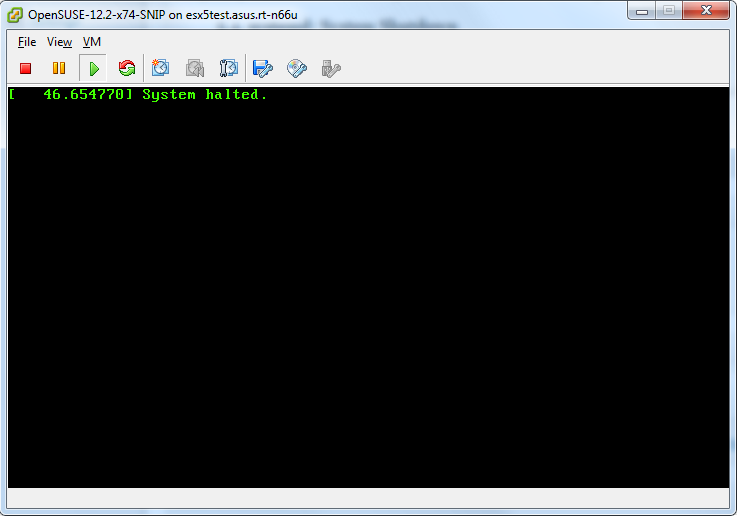
 Just noticed that in openSUSE 12.x, A plain halt will not shutdown the system properly.
On my system, it would leave the screen as shown on the right:
Only halt -p works, none of the other hints in the shutdown does not power off thread work, nor the acpi=off or acpi=oldboot settings.
The odd thing: a plain reboot still works properly.
If someone knows a better workaround: please let me know in the comments.
I hope they will fix this in a future openSUSE version; at least for 12.1 they have a “CHECKIT” marker in the documentation, but it has disappeared as of the 2.3 docs, but still fails:
5.4. systemd: System Shutdown
CHECKIT for 12.3. Is this entry still required?
To halt and poweroff the system when using systemd, issue halt -p or shutdown -h now on the command-line or use the shutdown button provided by your desktop environment.
Note: A plain halt will not shutdown the system properly.
Luckily, my openSUSE is a VM, which I can reboot from the ESXi host.
On a physical system, you will end up without any option to resurrect the system.
Later
After installing antivir, a plain halt works sort of: it says it is halted, but ESXi still thinks it is not:

After installing antivir, a plain halt appears to work, but it doesn’t.

ESXi is sure the system didn’t actually power down.
–jeroen
Posted in *nix, Linux, openSuSE, Power User, SuSE Linux | Tagged: acpi, computer, desktop environment, documentation, odd, openSUSE, reboot, shutdown button, software, SUSE, system shutdown, technology, thread work, vm | 4 Comments »
Posted by jpluimers on 2012/09/29
If I read Inappropriate Use of Adobe Code Signing Certificate my conclusion is that anything signed by the Adobe Code Signing Certificate since 2012-07-10 potentially can be malware.
As a precaution, I will manually revoke the certificate on all my systems (that’ll take a while!). If anyone knows how to automate that process, please post a comment showing how to.
Hitching on a trusted certificate of a big software company comes close to the ultimate hack: trojaning signed malware in the distribution of an OS vendor.
–jeroen
via: Inappropriate Use of Adobe Code Signing Certificate « Adobe Secure Software Engineering Team (ASSET) Blog.
Posted in *nix, Adobe, Android Devices, Apple, HTC, HTC Sensation, iOS, iPad, iPhone, iPod, iPod touch, Linux, Mac, Mac OS X / OS X / MacOS, Mac OS X 10.4 Tiger, Mac OS X 10.5 Leopard, Mac OS X 10.6 Snow Leopard, Mac OS X 10.7 Lion, Opinions, OS X 10.8 Mountain Lion, Power User, Windows, Windows 7, Windows 8, Windows Server 2000, Windows Server 2003, Windows Server 2003 R2, Windows Server 2008, Windows Server 2008 R2, Windows Vista, Windows XP | Tagged: adobe software, conclusion, engineering team, precaution, secure software, software, software company, software engineering, technology, ultimate hack | Leave a Comment »
Posted by jpluimers on 2012/08/27
Posted in *nix, Apple, Chrome, Google, Linux, Mac, Mac OS X / OS X / MacOS, Mac OS X 10.4 Tiger, Mac OS X 10.5 Leopard, Mac OS X 10.6 Snow Leopard, Mac OS X 10.7 Lion, MacBook, MacBook-Air, MacBook-Pro, Power User | 3 Comments »



 The Wiert Corner - irregular stream of stuff