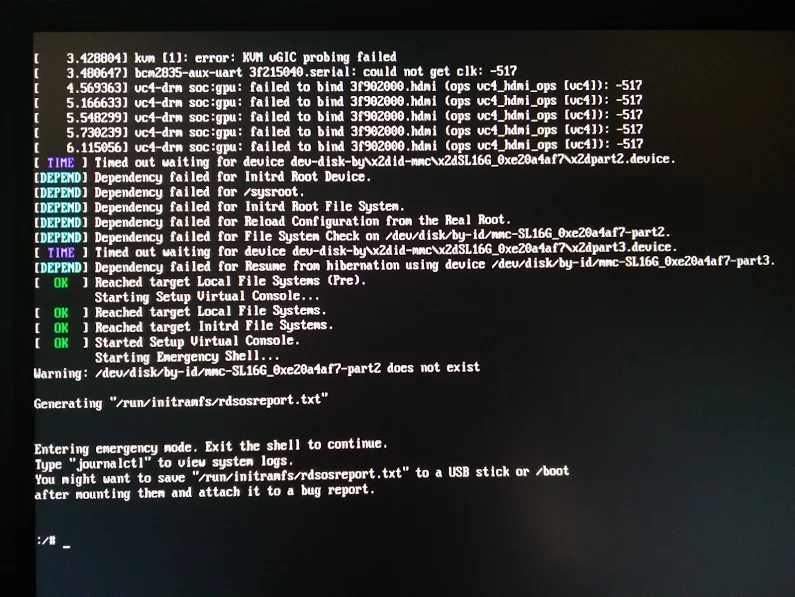
[10:40am] <wiert> TL;DR: Tumbleweed on Rpi3; enable WiFi according to site and forum instructions; zypper dist-upgrade; boot failure.
[10:41am] <wiert> without enabling WiFi everything is fine.
[10:41am] <wiert> spare RPi3s get in next week, so I’ll configure this one for my brother without WiFi for now.
[10:43am] <fvogt> Hm, that guide can’t actually work that way (unless something changed significantly)
[10:43am] <wiert> it worked in the sense that it got WiFi working. it failed in the sense that you cannot upgrade any more (:
[10:43am] <fvogt> The omit_drivers line removed the driver for the sd card controller, so it’s no surprise that it doesn’t boot anymore. It needs a different device tree
[10:44am] <fvogt> I guess you upgraded the kernel + DT? You must not do that
[10:44am] <wiert> funny as after the mkinitrd, a reboot went fine.
[10:44am] <wiert> it’s only that after a zypper dup it fails.
[10:44am] <mnowak__> DimStar, I wan’t $$ only on Windows, I should not have to re-define $prompt_sign. I guess I need to move the second $prompt_sign to the if-clause below
[10:45am] <fvogt> wiert: Ah, so it ships with a WiFi enabled DT + Kernel with the TW image
[10:45am] <fvogt> If you zypper dup then, it’ll switch to the DT + Kernel from plain TW, breaking everything
[10:48am] <fvogt> You can recover from that by downloading the right .dtb file and putting it on the sd card manually
[10:48am] <fvogt> Alternatively, the u-boot embedded one should still work, so you can delete the DT on the SD and it should boot again (with some missing peripherals though)
[10:51am] <wiert> I’ve already put a fresh disk image on it and I’m in the midst of configuring it for my brother (he’s mentally retarded and I’m putting it behind his TV so he can view his agenda electronically to see if that gives him more stability in organising his life; I need to be at his place in 2 hours)
[11:27am] <wiert> @fvogt: I will add this part of the IRC chat to that blog post and try to get your suggestions done when the spare RPI3s get in.
I could not find many potential anti-virus and -malware tools for OpenSuSE Tumbleweed despite they would be useful not only for non-Linux clients like Windows and Mac OS X.
Old (somehow it was blocked in the post queue), but sometimes still relevant for more modern services as, well sysv versus systemd war still are not over yet…
Interesting: systemctl gives flaky results for many services.
I had this strange break down of Apache 2 after updating to the most recent openSuSE Tumbleweed in the /var/log/apache2/error_log:
[Wed Jun 28 10:04:19.955991 2017] [ssl:info] [pid 27786] AH01887: Init: Initializing (virtual) servers for SSL
[Wed Jun 28 10:04:19.962449 2017] [ssl:info] [pid 27786] AH01876: mod_ssl/2.4.26 compiled against Server: Apache/2.4.26, Library: OpenSSL/1.0.2k
AH00558: httpd-prefork: Could not reliably determine the server's fully qualified domain name, using 127.0.0.1. Set the 'ServerName' directive globally to suppress this message
[Wed Jun 28 10:04:20.029863 2017] [core:crit] [pid 27786] (22)Invalid argument: AH00069: make_sock: for address [::]:443, apr_socket_opt_set: (IPV6_V6ONLY)
(98)Address already in use: AH00072: make_sock: could not bind to address [::]:443
(98)Address already in use: AH00072: make_sock: could not bind to address 0.0.0.0:443
[Wed Jun 28 10:04:20.029935 2017] [mpm_prefork:alert] [pid 27786] no listening sockets available, shutting down
This didn’t give any results for processes having port 443 open:
You know the drill: site that limits incoming traffic and has painful VPN. Luckily this time outgoing ssh traffic on port 22 was allowed (because they do SFTP which is SSH File Transfer).
That didn’t work: a remote machine could not RDP to port 3389, but a local telnet localhost 3389 would. The reason is that by default sshd binds a remote port to the local address only and not the wildcard addres.
So you have to open up the remote config a bit: at least /etc/sshd_config and most likely also your firewall.
I was not too happy that this just happened after updating one of the DNS secondaries:
May 24 21:29:48 laurel systemd[1]: Starting LSB: Domain Name System (DNS) server, named...
-- Subject: Unit named.service has begun start-up
-- Defined-By: systemd
-- Support: http://lists.freedesktop.org/mailman/listinfo/systemd-devel
--
-- Unit named.service has begun starting up.
May 24 21:29:49 laurel named[3173]: Starting name server BIND cp: cannot stat '/lib/engines': No such file or directory
May 24 21:29:51 laurel named[3235]: starting BIND 9.10.4-P5  -t /var/lib/named -u named
May 24 21:29:51 laurel named[3235]: running on Linux armv6l 4.3.3-6-raspberrypi #1 Wed Dec 16 08:03:35 UTC 2015 (db72752)
May 24 21:29:51 laurel named[3235]: built with '--prefix=/usr' '--bindir=/usr/bin' '--sbindir=/usr/sbin' '--sysconfdir=/etc' '--localstatedir=/var' '--libdir=/usr/lib' '--enable-exportlib' '--with-export-libdir=/usr/lib' '--with-export-includedir=/usr/i
May 24 21:29:51 laurel named[3235]: ----------------------------------------------------
May 24 21:29:51 laurel named[3235]: BIND 9 is maintained by Internet Systems Consortium,
May 24 21:29:51 laurel named[3235]: Inc. (ISC), a non-profit 501(c)(3) public-benefit
May 24 21:29:51 laurel named[3235]: corporation.  Support and training for BIND 9 are
May 24 21:29:51 laurel named[3235]: available at https://www.isc.org/support
May 24 21:29:51 laurel named[3235]: ----------------------------------------------------
May 24 21:29:51 laurel named[3235]: adjusted limit on open files from 4096 to 1048576
May 24 21:29:51 laurel named[3235]: found 1 CPU, using 1 worker thread
May 24 21:29:51 laurel named[3235]: using 1 UDP listener per interface
May 24 21:29:51 laurel named[3235]: using up to 4096 sockets
May 24 21:29:51 laurel named[3235]: ENGINE_by_id failed (crypto failure)
May 24 21:29:51 laurel named[3235]: error:25070067:DSO support routines:DSO_load:could not load the shared library:dso_lib.c:233:
May 24 21:29:51 laurel named[3235]: error:260B6084:engine routines:DYNAMIC_LOAD:dso not found:eng_dyn.c:467:
May 24 21:29:51 laurel named[3235]: error:2606A074:engine routines:ENGINE_by_id:no such engine:eng_list.c:390:id=gost
May 24 21:29:51 laurel named[3235]: initializing DST: crypto failure
May 24 21:29:51 laurel named[3235]: exiting (due to fatal error)
May 24 21:29:51 laurel named[3173]: ..failed
May 24 21:29:51 laurel systemd[1]: named.service: Control process exited, code=exited status=1
May 24 21:29:51 laurel systemd[1]: Failed to start LSB: Domain Name System (DNS) server, named.
-- Subject: Unit named.service has failed
-- Defined-By: systemd
-- Support: http://lists.freedesktop.org/mailman/listinfo/systemd-devel
--
-- Unit named.service has failed.
--
-- The result is failed.
May 24 21:29:51 laurel systemd[1]: named.service: Unit entered failed state.
May 24 21:29:51 laurel systemd[1]: named.service: Failed with result 'exit-code'.
However, that fix never made it to Raspberry Pi B (the original Rasberry Pi 1B) because that is armv6l and the bind build for that has failed early April 2017.
The same holds for more recent OpenSuSE systems, but ESXi would never tell what was going on.
Recently I installed an OpenSuSE Tumbleweed system under VMware Fusion (running on Mac OS X) which indicated “The CPU has been disabled by the guest operating system.”
Log indicates a “Shutdown” which in fact is a CPU not powered down.
That also explains that halt without a powerdown can be useful: it for instance gives the end-user the opportunity to click the reset button instead of the power button after a halt.
diaspore:/etc # aha --version

Ansi Html Adapter Version 0.4.9.0

diaspore:/etc # aha --version | grep aha

diaspore:/etc # aha --version | aha
Ansi Html Adapter Version 0.4.9.0
And the aha --help output on Mac OS X:
Ansi Html Adapter Version 0.4.8.0
aha takes SGR-colored Input and prints W3C conform HTML-Code
use: aha <options> [-f file]
aha (--help|-h|-?)
aha reads the Input from a file or stdin and writes HTML-Code to stdout
options: --black, -b: Black Background and White "standard color"
--pink, -p: Pink Background
--stylesheet, -s: Use a stylesheet instead of inline styles
--iso X, -i X: Uses ISO 8859-X instead of utf-8. X must be 1..16
--title X, -t X: Gives the html output the title "X" instead of
"stdin" or the filename
--line-fix, -l: Uses a fix for inputs using control sequences to
change the cursor position like htop. It's a hot fix,
it may not work with any program like htop. Example:
echo q | htop | aha -l > htop.htm
--word-wrap, -w: Wrap long lines in the html file. This works with
CSS3 supporting browsers as well as many older ones.
--no-header, -n: Don't include header into generated HTML,
useful for inclusion in full HTML files.
Example: aha --help | aha --black > aha-help.htm
Writes this help text to the file aha-help.htm
Copyleft Alexander Matthes aka Ziz 2015
zizsdl@googlemail.comhttp://ziz.delphigl.com/tool_aha.php
This application is subject to the MPL or LGPL.
–jeroen
This file contains hidden or bidirectional Unicode text that may be interpreted or compiled differently than what appears below. To review, open the file in an editor that reveals hidden Unicode characters. Learn more about bidirectional Unicode characters
Reason? Want to show the output of this as the last boot sequence line:
hostname ip route
echo
ip address | grep -w 'UP\|flags\|inet\|inet6'
echo more detailed info through "ip address" and "ip route"
cat /etc/resolv.conf | grep nameserver


A start job is running for dev-disk-by\…


 The Wiert Corner - irregular stream of stuff