The Wiert Corner – irregular stream of stuff

Jeroen W. Pluimers on .NET, C#, Delphi, databases, and personal interests

  • My badges

  • Twitter Updates

  • My Flickr Stream

  • Pages

  • All categories

  • Enter your email address to subscribe to this blog and receive notifications of new posts by email.

    Join 1,861 other subscribers

Archive for the ‘*nix-tools’ Category

Postfix TLS Support

Posted by jpluimers on 2021/02/25

For my link archive:

–jeroen

Posted in *nix, *nix-tools, Communications Development, Development, Internet protocol suite, postfix, Power User, SMTP | Leave a Comment »

showthedocs

Posted by jpluimers on 2021/02/18

[WayBack] showthedocs

is a documentation browser that finds the relevant docs for your code. It works by parsing the code and connecting parts of it to their explanation in the docs

, and supports these languages:

  • SQL
    • postgresql
    • mysql
  • Configuration
    • nginx
    • gitconfig

You can enter any language text, then click the language, followed by clicking the “SHOW ME THE DOCS!” button, for which an example is further below.

The site has an open architecture, allowing to plug in more languages and documentation:


gitconfig example

So for instance the below ./git/config file leads to this result [WayBack] where you can click on all the coloured areas for easy navigation through the documentation:

Read the rest of this entry »

Posted in *nix, *nix-tools, Database Development, Development, DVCS - Distributed Version Control, git, MySQL, nginx, PostgreSQL, Power User, Software Development | Leave a Comment »

explainshell.com: parse and explain just about any shell command

Posted by jpluimers on 2021/02/17

I bumped into the tremendously site [WayBack] explainshell.com – match command-line arguments to their help text only after documenting the relevant cURL options of yesterdays post on checking your CertBot domain expiration dates.

The site allows put in a shell command-line to see the help text that, including matches for each argument.

It works so well because it parses both the shell command-line and the man pages, then constructs a web-page linking the relevant man page content to the shell command-line in the correct shell command-line order.

The explainshell has a counterpart showthedocs (both are open source) for explaining other languages (on the one hand more extended as it goes much deeper into parsing for instance SQL, on the other hand more limited as it only supports a few languages). More on showthedocs later.

The links

The parsing results

The first bit below is just the text output, and the second bit the screenshot, of a relatively simple command like [WayBack] explainshell.com – curl -fsSL example.org:

curl(1) -fsSL example.org
transfer a URL
-f, --fail
       (HTTP)  Fail  silently  (no  output at all) on server errors. This is mostly done to better enable
       scripts etc to better deal with failed attempts. In normal cases  when  a  HTTP  server  fails  to
       deliver  a  document,  it  returns an HTML document stating so (which often also describes why and
       more). This flag will prevent curl from outputting that and return error 22.

       This method is not fail-safe and there are occasions where non-successful response codes will slip
       through, especially when authentication is involved (response codes 401 and 407).
-s, --silent
       Silent or quiet mode. Don't show progress meter or error messages.  Makes Curl mute.
-S, --show-error
       When used with -s it makes curl show an error message if it fails.
-L, --location
       (HTTP/HTTPS) If the server reports that the requested page  has  moved  to  a  different  location
       (indicated  with  a Location: header and a 3XX response code), this option will make curl redo the
       request on the new place. If used together with -i, --include or  -I,  --head,  headers  from  all
       requested pages will be shown. When authentication is used, curl only sends its credentials to the
       initial host. If a redirect takes curl to a different host, it won't  be  able  to  intercept  the
       user+password.  See  also  --location-trusted  on  how to change this. You can limit the amount of
       redirects to follow by using the --max-redirs option.

       When curl follows a redirect and the request is not a plain GET (for example POST or PUT), it will
       do  the  following  request  with a GET if the HTTP response was 301, 302, or 303. If the response
       code was any other 3xx code, curl will re-send the following request  using  the  same  unmodified
       method.
source manpages: curl

The screenshot is even more impressive:

Read the rest of this entry »

Posted in *nix, *nix-tools, bash, bash, Development, Power User, Scripting, Software Development | Leave a Comment »

🔎Julia Evans🔍 on Twitter: “ngrep: grep your network!… “

Posted by jpluimers on 2021/02/16

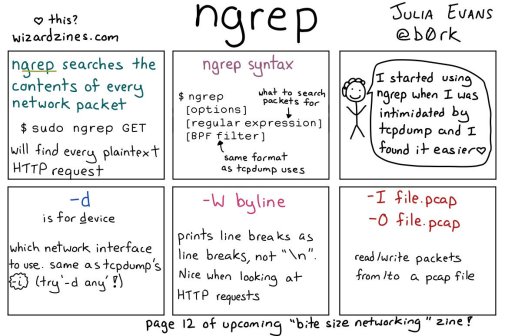
[WayBack] 🔎Julia Evans🔍 on Twitter: “ngrep: grep your network!… “

So this taught me a new tool and other new things:

Read the rest of this entry »

Posted in *nix, *nix-tools, Communications Development, Development, Internet protocol suite, Power User, Software Development, Wireshark | Leave a Comment »

🔎Julia Evans🔍 on Twitter: “ethtool… “

Posted by jpluimers on 2021/02/08

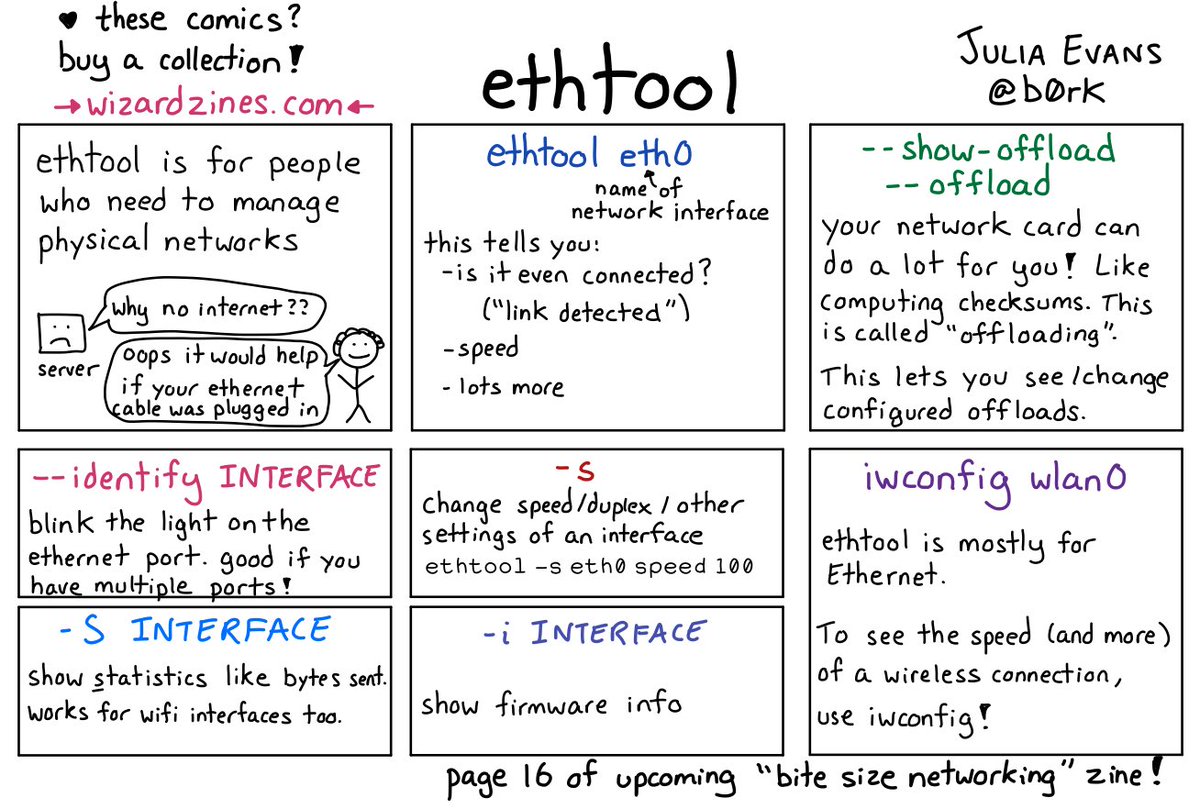
[WayBack] 🔎Julia Evans🔍 on Twitter: “ethtool… “

With a lot of responses, including:

–jeroen

Posted in *nix, *nix-tools, Network-and-equipment, Power User | Leave a Comment »

bash – How to get the primary IP address of the local machine on Linux and OS X? – Stack Overflow

Posted by jpluimers on 2021/02/05

[WayBack] bash – How to get the primary IP address of the local machine on Linux and OS X? – Stack Overflow (thanks [WayBackCollin Anderson!):

I tried on OS X 10.13.6 (macOS High Sierra) and these two work fine:

ip route get 1 | awk '{print $NF;exit}'

and

ip route get 8.8.8.8 | head -1 | cut -d' ' -f8

The first one needs the $ back-slash escaped as bash alias; the second does not need that.

Related:

–jeroen

Posted in *nix, *nix-tools, Apple, bash, Mac OS X / OS X / MacOS, macOS 10.13 High Sierra, Power User | Leave a Comment »

Thread by @b0rk: “nmap i haven’t used nmap much except to scan my home network for fun so if i missed something really important i’d love to know! […]”

Posted by jpluimers on 2021/02/05

[WayBack] Thread by @b0rk: “nmap i haven’t used nmap much except to scan my home network for fun so if i missed something really important i’d love to know! […]”


i haven’t used nmap much except to scan my home network for fun so if i missed something really important i’d love to know!

also i need to find space in there somewhere for “if you don’t run nmap as root it can’t send icmp (ping) packets, it’s better to run nmap as root”

also be careful when nmapping in a network you don’t administer! it’s a popular hacking tool so using nmap is often discouraged / banned. i made all of the examples in this comic “nmap scanme.nmap.org” and “nmap your home network” for a reason :)

There are are quite a few interesting comments on the thread:

And it taught me about scanme.nmap.org: [WayBack] Go ahead and ScanMe!

Hello, and welcome to Scanme.Nmap.Org, a service provided by the Nmap Security Scanner Project and Insecure.Org.

We set up this machine to help folks learn about Nmap and also to test and make sure that their Nmap installation (or Internet connection) is working properly. You are authorized to scan this machine with Nmap or other port scanners. Try not to hammer on the server too hard. A few scans in a day is fine, but dont scan 100 times a day or use this site to test your ssh brute-force password cracking tool.

Thanks
Fyodor

–jeroen

Read the rest of this entry »

Posted in *nix, *nix-tools, nmap, Power User | Leave a Comment »

Thread by @b0rk: “this poster is like a SUPER EXTRA COMPRESSED version of the “Bite Size Networking” zine […]”

Posted by jpluimers on 2021/02/01

[WayBack] Thread by @b0rk: “this poster is like a SUPER EXTRA COMPRESSED version of the “Bite Size Networking” zine I’m working on: the goal of that zine is to teach yo […]”

Related:

Read the rest of this entry »

Posted in *nix, *nix-tools, Power User | Leave a Comment »

56 Linux Networking commands and scripts

Posted by jpluimers on 2021/01/25

Back in 2019, there were 56 commands and scripts covered. I wonder how many there are now.

An ongoing list of Linux Networking Commands and Scripts. These commands and scripts can be used to configure or troubleshoot your Linux network.

Source: [WayBack55 Linux Networking commands and scripts

List back then (which goes beyond just built-in commands: many commands from optional packages are here as well):

  1. arpwatch – Ethernet Activity Monitor.
  2. bmon – bandwidth monitor and rate estimator.
  3. bwm-ng – live network bandwidth monitor.
  4. curl – transferring data with URLs. (or try httpie)
  5. darkstat – captures network traffic, usage statistics.
  6. dhclient – Dynamic Host Configuration Protocol Client
  7. dig – query DNS servers for information.
  8. dstat – replacement for vmstat, iostat, mpstat, netstat and ifstat.
  9. ethtool – utility for controlling network drivers and hardware.
  10. gated – gateway routing daemon.
  11. host – DNS lookup utility.
  12. hping – TCP/IP packet assembler/analyzer.
  13. ibmonitor – shows bandwidth and total data transferred.
  14. ifstat –  report network interfaces bandwidth.
  15. iftop – display bandwidth usage.
  16. ip (PDF file) – a command with more features that ifconfig (net-tools).
  17. iperf3 – network bandwidth measurement tool. (above screenshot Stacklinux VPS)
  18. iproute2 – collection of utilities for controlling TCP/IP.
  19. iptables – take control of network traffic.
  20. IPTraf – An IP Network Monitor.
  21. iputils – set of small useful utilities for Linux networking.
  22. jwhois (whois) – client for the whois service.
  23. “lsof -i” – reveal information about your network sockets.
  24. mtr – network diagnostic tool.
  25. net-tools – utilities include: arp, hostname, ifconfig, netstat, rarp, route, plipconfig, slattach, mii-tool, iptunnel and ipmaddr.
  26. ncat – improved re-implementation of the venerable netcat.
  27. netcat – networking utility for reading/writing network connections.
  28. nethogs – a small ‘net top’ tool.
  29. Netperf – Network bandwidth Testing.
  30. netsniff-ng – Swiss army knife for daily Linux network plumbing.
  31. netstat – Print network connections, routing tables, statistics, etc.
  32. netwatch – monitoring Network Connections.
  33. ngrep – grep applied to the network layer.
  34. nload – display network usage.
  35. nmap – network discovery and security auditing.
  36. nslookup – query Internet name servers interactively.
  37. ping – send icmp echo_request to network hosts.
  38. route – show / manipulate the IP routing table.
  39. slurm – network load monitor.
  40. snort – Network Intrusion Detection and Prevention System.
  41. smokeping –  keeps track of your network latency.
  42. socat – establishes two bidirectional byte streams and transfers data between them.
  43. speedometer – Measure and display the rate of data across a network.
  44. speedtest-cli – test internet bandwidth using speedtest.net
  45. ss – utility to investigate sockets.
  46. ssh –  secure system administration and file transfers over insecure networks.
  47. tcpdump – command-line packet analyzer.
  48. tcptrack – Displays information about tcp connections on a network interface.
  49. telnet – user interface to the TELNET protocol.
  50. tracepath – very similar function to traceroute.
  51. traceroute – print the route packets trace to network host.
  52. vnStat – network traffic monitor.
  53. wget –  retrieving files using HTTP, HTTPS, FTP and FTPS.
  54. Wireless Tools for Linux – includes iwconfig, iwlist, iwspy, iwpriv and ifrename.
  55. Wireshark – network protocol analyzer.

Via:

–jeroen

Posted in *nix, *nix-tools, cURL, dig, Internet, nmap, Power User, SpeedTest, ssh/sshd, tcpdump, Wireshark | Leave a Comment »

🔎Julia Evans🔍 on Twitter: “ssh tips… “

Posted by jpluimers on 2021/01/08

Great work by [WayBack]  🔎Julia Evans🔍 on Twitter: “ssh tips… “

[WayBackssh tips JPG

Via:

Some more tips:

Read the rest of this entry »

Posted in *nix, *nix-tools, Communications Development, Development, Internet protocol suite, Power User, SSH, ssh/sshd | Leave a Comment »