


For my research list: [WayBack] flyover-reverse-engineering/README.md at master · retroplasma/flyover-reverse-engineering · GitHub
–jeroen
Posted by jpluimers on 2021/03/30
For my research list: [WayBack] flyover-reverse-engineering/README.md at master · retroplasma/flyover-reverse-engineering · GitHub
–jeroen

Posted in Apple, Development, Go (golang), Mac OS X / OS X / MacOS, Power User, Software Development | Leave a Comment »
Posted by jpluimers on 2021/03/29
Google translate is so useful.
The thread below is [WayBack] Thread by @shanselman: “Anytime I’m traveling I use Google Translate to check translations in real time on signage. You have to see it to belis real and LIVE while you move your camera. @ Paris Sorry, your browser doesn’t support embedded videos Folk […]”
But first one via [WayBack] Hadi Hariri on Twitter: “This is pretty damn cool.… “
[WayBack] Leon Fayer on Twitter: “Another point for Google docs… “
Live translate (Via Danny Thorpe and Mark Miller):
Posted in Google, GoogleTranslate, Power User | Leave a Comment »
Posted by jpluimers on 2021/03/29
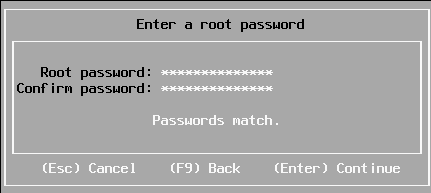
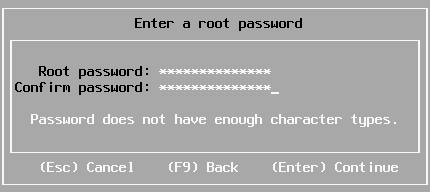
Sometimes you have a long enough password, that matches with the confirmation, but pressing “Enter” to continue gives “Password does not have enough character types”:
From [WayBack] Disable ESXi Password Complexity – Perfect Cloud:
A part of my job as a VMware Certified Instructor is to update our lab systems whenever new vSphere versions come out. After upgrading from 5.5 to 6.0 I decided we should change passwords, h…
This is the workflow:
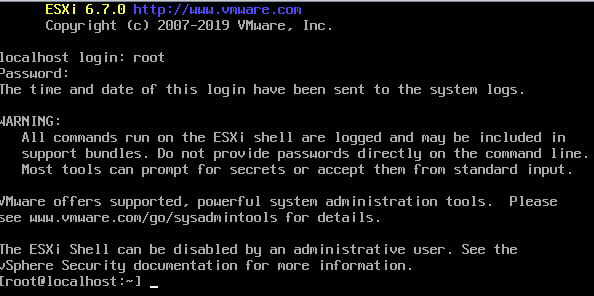
/etc/pam.d/passwd.vi to edit /etc/pam.d/passwd, and:
# in front of the lines starting with password requisiteuse_authtok bit of the line starting with password sufficient# in front of the line starting with password requiredvi while saving (press Esc, then enter :wq on the prompt)/etc/pam.d/passwd.Via: esxi 6 force short password – Google Search
I tried this:
/etc/pam.d/passwd editing steps aboveThe password requirements stayed.
(more screenshots at [WayBack] ESXi 6.7 installation Guide – Let We-i Go)
The default required password complexity changed between 6.5 and 6.7.
In addition to needing to be at least seven characters, the password must include at least three of the four character classes:
Upper case – exception: the first character being upper case does not count towards the class requirement
Lower case
Numbers – exception: the last character being a number does not count towards the class requirement
Symbols
Also, no dictionary words (whether spelt forwards or backwards).
For ESXi hosts, you have to use a password with predefined requirements. You can change the required length and character class requirement or allow pass phrases using the
Security.PasswordQualityControladvanced option.
Example: Editing
/etc/pam.d/passwdpassword requisite /lib/security/$ISA/pam_passwdqc.so retry=N min=N0,N1,N2,N3,N4values
password requisite /lib/security/$ISA/pam_passwdqc.so retry=3 min=12,9,8,7,6With this setting in effect, the password requirements are:
- retry=3: A user is allowed 3 attempts to enter a sufficient password.
- N0=12: Passwords containing characters from one character class must be at least 12 characters long.
- N1=9: Passwords containing characters from two character classes must be at least nine characters long.
- N2=8: Passphrases must contain words that are each at least eight characters long.
- N3=7: Passwords containing characters from three character classes must be at least seven characters long.
- N4=6: Passwords containing characters from all four character classes must be at least six characters long.
Passwortklassen sind schlicht
Grossbuchstaben
Kleinbuchstaben
Zahlen
Sonderzeichen
wobei das erste Zeichen nicht zählt. Also gilt
dumpfbacke     : 1 Passwortklasse
Dumpfbacke      : 1 Passwortklasse
DumpfBacke      : 2 Passwortklassen
DumpfBacke1     : 3 Passwortklassen
DumpfBacke1%            : 4 Passwortklassen
Indem man alle Werte auf 0 setzt, also
password requisite /lib/security/$ISA/pam_passwdqc.so retry=3 min=0,0,0,0,0schaltet man alle Anforderungen aus.
Alternativ geht das auch mitpassword requisite /lib/security/$ISA/pam_passwdqc.so retry=3 min=8,8,8,7,6 enforce=none
On my ESXI 6.5 system where the italic bit is removed, besides the two lines being commented out:
/etc/pam.d/passwd:#%PAM-1.0 # Change only through host advanced option "Security.PasswordQualityControl". password requisite /lib/security/$ISA/pam_passwdqc.so retry=3 min=disabled,disabled,disabled,7,7 password sufficient /lib/security/$ISA/pam_unix.so use_authtok nullok shadow sha512 password required /lib/security/$ISA/pam_deny.so
/etc/pam.d/passwd:#%PAM-1.0 # Change only through host advanced option "Security.PasswordQualityControl". #password requisite /lib/security/$ISA/pam_passwdqc.so retry=3 min=disabled,disabled,disabled,7,7 password sufficient /lib/security/$ISA/pam_unix.so nullok shadow sha512 #password required /lib/security/$ISA/pam_deny.so
On my ESXI 6.7 system (which adds the bold lines below):
/etc/pam.d/passwd:#%PAM-1.0 # Change only through host advanced option "Security.PasswordQualityControl". password requisite /lib/security/$ISA/pam_passwdqc.so retry=3 min=disabled,disabled,disabled,7,7 # Change only through host advanced option "Security.PasswordHistory" password requisite /lib/security/$ISA/pam_pwhistory.so use_authtok enforce_for_root retry=2 remember=0 password sufficient /lib/security/$ISA/pam_unix.so use_authtok nullok shadow sha512 password required /lib/security/$ISA/pam_deny.so
/etc/pam.d/passwd:#%PAM-1.0 # Change only through host advanced option "Security.PasswordQualityControl". #password requisite /lib/security/$ISA/pam_passwdqc.so retry=3 min=disabled,disabled,disabled,7,7 # Change only through host advanced option "Security.PasswordHistory" #password requisite /lib/security/$ISA/pam_pwhistory.so use_authtok enforce_for_root retry=2 remember=0 password sufficient /lib/security/$ISA/pam_unix.so nullok shadow sha512 #password required /lib/security/$ISA/pam_deny.so
–jeroen

Posted in *nix, ESXi6, ESXi6.5, ESXi6.7, Power User, Virtualization, VMware, VMware ESXi | Leave a Comment »
Posted by jpluimers on 2021/03/28
Notes:
Phone tel:+318001533
You get confirmation by SMS and e-mail and you need to bring the following things to the vaccination site:
More information: GGD Vaccination Medical Information Line (088 767 40 80).
Related:

Posted in About, LifeHacker, Personal, Power User | Leave a Comment »
Posted by jpluimers on 2021/03/26
For my link archive: [WayBack] Encode/Decode Quoted Printable – Webatic.
It did a splendid job at decoding email files in MIME format Quoted-printable.
–jeroen
Posted in *nix, *nix-tools, Communications Development, Development, eMail, Encoding, Internet, Internet protocol suite, Power User, sendmail, SMTP, SocialMedia, Software Development | Leave a Comment »
Posted by jpluimers on 2021/03/26
I needed Forticlient on a machine one day, so this is how to install the most recent Forticlient 6 using chocolatey:
choco install --yes forticlient --source https://www.myget.org/F/public-choco/api/v2
This ensures you can automatically update from Chocolatey instead of manually from the Forticlient GUI.
The update command is slightly different as a choco update will complain it cannot find the source for forticlient; you need this in stead:
choco update forticlient --source https://www.myget.org/F/public-choco/api/v2
Based on [WayBack] public-choco – forticlient 6.0.4.0182 | MyGet.
–jeroen
Posted in Chocolatey, Power User, Windows | Leave a Comment »
Posted by jpluimers on 2021/03/26
Learned about this in the fall of G+: [WayBack] GitHub – webrecorder/webrecorder-user-guide: webrecorder user guide and glossary
Back then, fully automated tools were easier.
So it is on my list of things to try one day for smaller projects.
From the glossary:
Quick Start
- Enter a URL in the box in the center of the screen labeled ‘URL to capture’.
- Press the ‘start’ button (look down and to the right of the box where you entered the URL).
- Interact with the web page that loads so Webrecorder can capture the content displayed on this page. To collect audio or video from a page be sure to press ‘play’ so the file will load into the browser.
- Continue to visit and browse the pages you would like to capture. Each page you view will be included in your capture session. Note: you will be capturing the contents of each page you visit but will not automatically obtain pages that are linked to on the pages you collect (hyperlinks).
- To end your capture session hover over the ‘Capture’ button in the upper left corner of the screen so it changes to read ‘Stop’ then click that button.
- Your capture will then be browsable. Note: the capture will not ‘replay’ like a linear recording but instead be an interactive copy of the pages you have collected.
- If you are a logged-in user, this session will be saved to your account automatically. If you are not logged in an account, you can sign up for an account or log in to your existing account to save the collection after you create it. If you do not log in you can still download your collection for a limited time (approximately 90 minutes from when you stop your recording session).
–jeroen
Posted in Internet, InternetArchive, Power User | Leave a Comment »
Posted by jpluimers on 2021/03/24
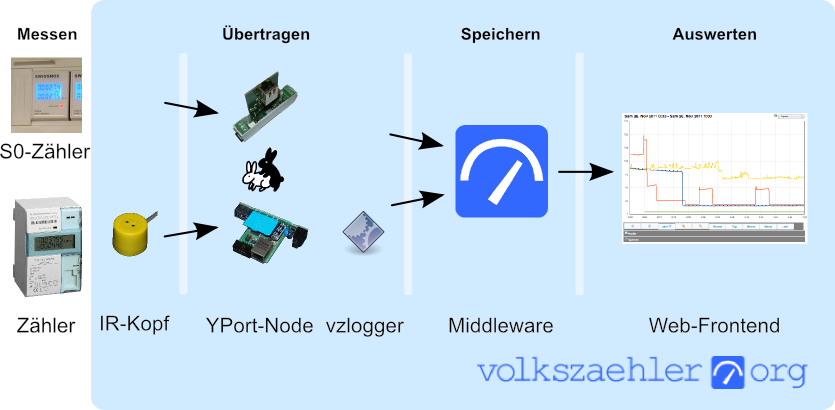
In German, but very interesting IR-Lesekopf für SmartMeter selber bauen | haus-automatisierung.com [4K] – YouTube:
- Manual steps (Genaue Anleitung) [WayBack] hardware:controllers:ir-schreib-lesekopf-ttl-ausgang [wiki.volkszaehler.org]
- Case (Gehäuse) [WayBack] IR Lesekopf für SmartMeter by klein0r – Thingiverse
- Ringmagnet – [Archive.is] Neodym Ringmagnet 27 x 5 mm mit 16 mm Bohrung, Grade N42, vernickelt, Supermagnet: AmazonSmile: Baumarkt
I could not find the promised follow-up video at haus-automatisierung.com – YouTube, but the manual steps and the site below have enough information for me.
Too bad the site is way to big to fully archive in the WayBack machine. I only saved the top pages:
Related: [WayBack] MQTT-Grundlagen-Kurs – haus-automatisierung.com
–jeroen

Posted in Development, Hardware Development, Hardware Interfacing, IoT Internet of Things, Raspberry Pi, Software Development | Leave a Comment »
Posted by jpluimers on 2021/03/23
 Security issues for older models (mainly GATE01 and WV-1716 systems; which used a lot of Climax components):
A more recent security review:
This thesis is about the design of an IoT privacy label and the methodologies to collect the necessary information to populate the privacy label for an IoT product and its entire ecosystem. The privacy risks of IoT ecosystems are determined by testing all components in the ecosystem for vulnerabilities. These vulnerabilities can be found by security scans, penetration tests and audits, and quantified by using the Common Vulnerability Scoring System (CSS). The level of the privacy risk can be determined and expressed by combining the sensitivity of the personal information being processed and the vulnerabilities in the IoT ecosystem. A conceptual six-layer IoT service model has been developed to better understand the architecture of the IoT product and to structurally test all components. Three case studies were performed in this research to assess and improve the methodologies and design of the privacy label.
Key words: IoT ecosystem, privacy risk matrix, privacy label, IoT security testing
Physical security is important too; ensure the system is in an enclosed closet, powered by a UPS and your communication lines are secured as well: [WayBack] Manipulationen an Alarmanlagen verhindern – Smarthomewiki
Dutch links on the hardware connections and protocols used:
More recent information:
API usage:
More subdomains (in 2019) via:
| alarmsysteem.woonveilig.nl |
| mijn.woonveilig.nl |
| srv01.woonveilig.nl |
| http://www.woonveilig.nl |
| dev03.egardia.com |
| stream01.dev03.egardia.com |
| cam05.dev03.egardia.com |
| app01.egardia.com |
| app02.egardia.com |
| cpe01.egardia.com |
| cpe02.egardia.com |
| ftp01.egardia.com |
| ftp02.egardia.com |
| galera01.egardia.com |
| galera02.egardia.com |
| galera03.egardia.com |
| lb01.egardia.com |
| lb02.egardia.com |
| mailout.egardia.com |
| my.egardia.com |
| nfs01.egardia.com |
| nuance01.egardia.com |
| sip01.egardia.com |
| sql01.egardia.com |
| sql02.egardia.com |
| rt.egardia.com |
| srv01.egardia.com |
| http://www.egardia.com |
| stream01.egardia.com |
| stream02.egardia.com |
–jeroen

Posted in Communications Development, Development, Power User, Security, Software Development | Leave a Comment »
Posted by jpluimers on 2021/03/22
Cool: [Archive.is/WayBack] em-dosbox – Windows 3.11 on the Web.
Via [WayBack] JRWR – Forrest F. on Twitter: “I love this thing, http://vrcade.io/win311 Boots into Windows 3.11 with a internet connection (over a fake modem!)”
–jeroen

Posted in History, Windows, Windows 3.11 | 2 Comments »
 The Wiert Corner - irregular stream of stuff