


Save yourself the data fee, 1:50
- 2/3 rubbing alchohol
- 1/3 water
- in a spray bottle
–jeroen
Posted by jpluimers on 2021/01/29
Save yourself the data fee, 1:50
- 2/3 rubbing alchohol
- 1/3 water
- in a spray bottle
–jeroen

Posted in LifeHacker, Power User | Leave a Comment »
Posted by jpluimers on 2021/01/29

Different keying for each colour in the SB50 series. Note that black and grey are keyed the same making them interchangeable.
I bumped into [WayBack] Anderson Powerpole – Wikipedia through Cheap VS Expensive Solar Panels | 12v Touring | Project Cyan – YouTube.
APC uses some of these connectors (I have seen the yellow, blue and grey ones) in many of their systems: [Archive.is] apc battery connectors – Google Search
Images from wikipedia.
Quotes from the article:
Powerpole connectors are physically and electrically hermaphroditic, thus avoiding the need to worry about which end is the plug and which the socket, or which end has the correct polarity.
…
The Anderson Powerpole connector is more expensive than the older de facto standards of the two-wire trailer plug and the Molex connector, but provides a more reliable electrical connection (both mechanically and electrically), and is easier to adapt to a wider range of wire gauges.[19] Another advantage over the older trailer or Molex connectors is the Powerpole’s superior ratings to withstand 100,000 no-load insertions and 250 hot-plugs at full load. The specific hermaphroditic nature of the powerpoles is a significant advantage since batteries can be both a power source or a power sink, a power supply can be connected to a radio and/or a battery, and multiple batteries, radios, and/or redundant power sources can be connected in parallel using the same power distribution panels.
…
For use in amateur radio, the community has adopted a standard color code, polarity, and specific physical arrangement for assembling pairs of Powerpole connectors. One red and one black powerpole housing can be physically arranged in 4 topologically different mechanical orientations (red left, red right, red top, red bottom – when viewed from contact side with tongue up), 2 of which are mechanically incompatible (connectors won’t mate with ARES) and 1 is electrically incompatible (will mate but reverse polarity) with the ARES standard; there are also additional unusual configurations in which one housing is rotated 90 degrees. The standard is red positive and black negative. When viewed from the contact side, a mnemonic for remembering the arrangement is: “Red [on] Right — Tongue [on] Top” (note the first letter alliteration).
Anderson Powerpole 15/30/45 ampere housings and contacts (front view)
Cutaway view of housing (side view)
–jeroen

Posted in LifeHacker, Power User | Leave a Comment »
Posted by jpluimers on 2021/01/28
Interesting read: [WayBack] Deciphering the Messages of Apple’s T2 Coprocessor | Duo Security.
Via:
–jeroen
Posted in Development, Security, Software Development | Leave a Comment »
Posted by jpluimers on 2021/01/27
I am really glad this keynote got recorded. Still very relevant, it is as much about software development as it is about society.
Go watch it, as it gives you reason to think about your role in the software development process, and in the information fire hose at large.
Back in the days, David Intersimone was right when he created the regular blog post “Sip from the Firehose” (for early materials, see [WayBack] GetPublished – Author Information: Firehose).
The talk main thread is about current and ever growing overload of information which basically makes it disinformation, combined with the abundance of “AI” recording devices around you that basically make you the product.
Basically we reached all the tick marks of these books:
The session is not just about “how bad is the situation” (it is very), but also provides directions on how to get out of it for both people in the development process, as well as consumers, producers and sharers of information.
via:
–jeroen
Posted in .NET, Development, Opinions, Power User, Security, Software Development | Leave a Comment »
Posted by jpluimers on 2021/01/25
[Archive.is] PassProtect – Chrome Web Store:
Stop using bad passwords. PassProtect alerts you about breached credentials. Powered by “Have I Been Pwned?”.
Interesting plugin. Will try this soon.
Via:
–jeroen
Posted in Authentication, Chrome, Firefox, LifeHacker, Power User, Security, Web Browsers | Leave a Comment »
Posted by jpluimers on 2021/01/25
Some notes and links, as eventually I want to react on Windows events raised for successful Remote Desktop connections.
Log-files:
Microsoft-Windows-TerminalServices-LocalSessionManager/Admin%SystemRoot%\System32\Winevt\Logs\Microsoft-Windows-TerminalServices-LocalSessionManager%4Admin.evtxMicrosoft-Windows-TerminalServices-LocalSessionManager/Operational%SystemRoot%\System32\Winevt\Logs\Microsoft-Windows-TerminalServices-LocalSessionManager%4Operational.evtxEventID 25:
<Event xmlns="http://schemas.microsoft.com/win/2004/08/events/event">
<System>
<Provider Name="Microsoft-Windows-TerminalServices-LocalSessionManager" Guid="{5D896912-022D-40AA-A3A8-4FA5515C76D7}" />
<EventID>25</EventID>
<Version>0</Version>
<Level>4</Level>
<Task>0</Task>
<Opcode>0</Opcode>
<Keywords>0x1000000000000000</Keywords>
<TimeCreated SystemTime="2019-02-06T13:48:02.978377900Z" />
<EventRecordID>5358</EventRecordID>
<Correlation ActivityID="{F4203346-1BFB-421E-8668-C7503D590000}" />
<Execution ProcessID="308" ThreadID="12552" />
<Channel>Microsoft-Windows-TerminalServices-LocalSessionManager/Operational</Channel>
<Computer>MACHINE-NAME.subdomain.domain</Computer>
<Security UserID="S-1-5-18" />
</System>
<UserData>
<EventXML xmlns="Event_NS">
<User>DOMAIN\jeroen</User>
<SessionID>2</SessionID>
<Address>192.168.1.42</Address>
</EventXML>
</UserData>
</Event>
Links on the events:
A cohesive and comprehensive walk-through of the most common and empirically useful RDP-related Windows Event Log Sources and ID’s, grouped by stage of occurrence (Connection, Authentication, Logon, Disconnect/Reconnect, Logoff).
…
Event ID: 25
Provider Name: Microsoft-Windows-TerminalServices-LocalSessionManager
Description: “Remote Desktop Services: Session reconnection succeeded:”
Notes: The user has reconnected to an RDP session, when the “Source Network Address” contains a remote IP address. A “Source Network Address” of “LOCAL” simply indicates a local session reconnection and does NOTindicate a remote RDP session reconnection. Note the “Source Network Address” for the source of the RDP connection. This is typically paired with an Event ID 40. Take note of the SessionID as a means of tracking/associating additional Event Log activity with this user’s RDP session.TL;DR: The user has reconnected to an existing RDP session, so long as the “Source Network Address” is NOT “LOCAL”.
Links on triggers and scripts running because of events:
There is no convenient way to disable automatic updates on Windows 10, This guide presents 8 working methods to disable automatic updates with ease.
–jeroen
Posted in Power User, Windows, Windows 10 | Leave a Comment »
Posted by jpluimers on 2021/01/25
Back in 2019, there were 56 commands and scripts covered. I wonder how many there are now.
An ongoing list of Linux Networking Commands and Scripts. These commands and scripts can be used to configure or troubleshoot your Linux network.
Source: [WayBack] 55 Linux Networking commands and scripts
List back then (which goes beyond just built-in commands: many commands from optional packages are here as well):
- arpwatch – Ethernet Activity Monitor.
- bmon – bandwidth monitor and rate estimator.
- bwm-ng – live network bandwidth monitor.
- curl – transferring data with URLs. (or try httpie)
- darkstat – captures network traffic, usage statistics.
- dhclient – Dynamic Host Configuration Protocol Client
- dig – query DNS servers for information.
- dstat – replacement for vmstat, iostat, mpstat, netstat and ifstat.
- ethtool – utility for controlling network drivers and hardware.
- gated – gateway routing daemon.
- host – DNS lookup utility.
- hping – TCP/IP packet assembler/analyzer.
- ibmonitor – shows bandwidth and total data transferred.
- ifstat – report network interfaces bandwidth.
- iftop – display bandwidth usage.
- ip (PDF file) – a command with more features that ifconfig (net-tools).
- iperf3 – network bandwidth measurement tool. (above screenshot Stacklinux VPS)
- iproute2 – collection of utilities for controlling TCP/IP.
- iptables – take control of network traffic.
- IPTraf – An IP Network Monitor.
- iputils – set of small useful utilities for Linux networking.
- jwhois (whois) – client for the whois service.
- “lsof -i” – reveal information about your network sockets.
- mtr – network diagnostic tool.
- net-tools – utilities include: arp, hostname, ifconfig, netstat, rarp, route, plipconfig, slattach, mii-tool, iptunnel and ipmaddr.
- ncat – improved re-implementation of the venerable netcat.
- netcat – networking utility for reading/writing network connections.
- nethogs – a small ‘net top’ tool.
- Netperf – Network bandwidth Testing.
- netsniff-ng – Swiss army knife for daily Linux network plumbing.
- netstat – Print network connections, routing tables, statistics, etc.
- netwatch – monitoring Network Connections.
- ngrep – grep applied to the network layer.
- nload – display network usage.
- nmap – network discovery and security auditing.
- nslookup – query Internet name servers interactively.
- ping – send icmp echo_request to network hosts.
- route – show / manipulate the IP routing table.
- slurm – network load monitor.
- snort – Network Intrusion Detection and Prevention System.
- smokeping – keeps track of your network latency.
- socat – establishes two bidirectional byte streams and transfers data between them.
- speedometer – Measure and display the rate of data across a network.
- speedtest-cli – test internet bandwidth using speedtest.net
- ss – utility to investigate sockets.
- ssh – secure system administration and file transfers over insecure networks.
- tcpdump – command-line packet analyzer.
- tcptrack – Displays information about tcp connections on a network interface.
- telnet – user interface to the TELNET protocol.
- tracepath – very similar function to traceroute.
- traceroute – print the route packets trace to network host.
- vnStat – network traffic monitor.
- wget – retrieving files using HTTP, HTTPS, FTP and FTPS.
- Wireless Tools for Linux – includes iwconfig, iwlist, iwspy, iwpriv and ifrename.
- Wireshark – network protocol analyzer.
Via:
–jeroen
Posted in *nix, *nix-tools, cURL, dig, Internet, nmap, Power User, SpeedTest, ssh/sshd, tcpdump, Wireshark | Leave a Comment »
Posted by jpluimers on 2021/01/24
Valid reasons:
English (Dutch)
- I need to work and I have an employer’s declaration with me. (Ik moet werken en heb de Werkgeversverklaring Avondklok
bij me).- I need urgent medical assistance or my pet needs urgent veterinary assistance. (Ik heb dringend medische hulp nodig of
een dier heeft dringend medische hulp nodig).
- Explanation (Toelichting):
- Someone needs my urgent assistance. (Iemand anders heeft dringend mijn hulp nodig).
- Explanation (Toelichting):
- I am travelling to a destination outside the Netherlands and I have travel documents and other documents
proving this is the reason I need to be outdoors between 21:00 and 04:30. (Ik reis naar het buitenland en kan met (reis)
documenten aantonen dat ik daarom tussen 21.00 – 04.30 uur buiten ben.)- I am going to or returning from a funeral and I can prove this. (Ik ben onderweg van of naar een uitvaart en kan dit aantonen).
- I am travelling in connection with a summons issued by a court or public prosecutor, or in connection with a court
hearing in objection, judicial review or appeal proceedings, and I can prove this. (Ik ben onderweg in verband met een
oproep van een rechter, officier van justitie of bezwaar- of beroepschriftencommissie en kan dit aantonen).- I am travelling to or from a live programme and have an invitation from the broadcaster to prove this. (Ik ben
onderweg van of naar een live-programma en kan dit aantonen met een uitnodiging van de omroep die dit programma uitzendt.)- I am going to or returning from an exam that I must sit and I can prove this (applies to students in secondary
vocational education (MBO) and higher education (HBO and university)). (Ik ben onderweg van of naar een examen of
tentamen dat ik moet afleggen voor mijn opleiding op het mbo, hbo of wo en kan dit aantonen.)Dutch
- Ik moet werken en heb de Werkgeversverklaring Avondklok bij me.
- Ik heb dringend medische hulp nodig of een dier heeft dringend medische hulp nodig. Toelichting:
- Iemand anders heeft dringend mijn hulp nodig. Toelichting:
- Ik reis naar het buitenland en kan met (reis)documenten aantonen dat ik daarom tussen 21.00 en 04.30 uur buiten ben.
- Ik ben onderweg van of naar een uitvaart en kan dit aantonen.
- Ik ben onderweg in verband met een oproep van een rechter, officier van justitie of bezwaar- of beroepschriftencommissie en kan dit aantonen.
- Ik ben onderweg van of naar een live-programma en kan dit aantonen met een uitnodiging van de omroep die dit programma uitzendt.
- Ik ben onderweg van of naar een examen of tentamen dat ik moet afleggen voor mijn opleiding op het mbo, hbo of wo en kan dit aantonen.
For my link archive:
In heel Nederland geldt vanaf zaterdag 23 januari een avondklok. Dat betekent dat iedereen tussen 21.00 uur ’s avonds en 04.30 uur ’s ochtends binnen blijft.
[Wayback] Avondklok | Coronavirus COVID-19 | Rijksoverheid.nl
Koninklijk Besluit op voordracht van minister-president Rutte om een avondklok in te voeren als onderdeel van de maatregelen ter bestrijding van het coronavirus (COVID-19).
[Wayback] Koninklijk Besluit invoering avondklok | Besluit | Rijksoverheid.nl
Wie tijdens de avondklok voor het werk buiten is, heeft een Werkgeversverklaring avondklok nodig. De werkgever geeft deze verklaring aan werknemers.
[Wayback] Voor werk buiten tijdens de avondklok (werkgeversverklaring) | Coronavirus COVID-19 | Rijksoverheid.nl
Als u tijdens de avondklok buiten moet zijn, heeft u hiervoor een ingevuld formulier nodig. Dit moet u bij u hebben en kunnen laten zien aan de politie. Lees hier hoe u het formulier kunt downloaden, invullen en printen.
[Wayback] Instructie voor formulieren avondklok: downloaden en meenemen | Publicatie | Rijksoverheid.nl
Als het noodzakelijk is dat u tijdens de avondklok naar buiten gaat, dan moet u het formulier ‘Eigen verklaring avondklok’ bij zich hebben.
[Wayback] Formulier ‘Eigen verklaring avondklok’ | Formulier | Rijksoverheid.nl
Als u tijdens de avondklok voor het werk buiten moet zijn, dan heeft u het formulier ‘Eigen verklaring avondklok’ en een ‘Werkgeversverklaring avondklok’ nodig. De werkgever geeft deze verklaring aan werknemers.
[Wayback] Formulier ‘Werkgeversverklaring avondklok’ | Formulier | Rijksoverheid.nl
Als het noodzakelijk is dat u naar buiten gaat tijdens de avondklok, dan moet u het formulier ‘Eigen verklaring avondklok’ bij zich hebben. Als het nodig is dat u voor werk naar buiten gaat moet u ook een ‘Werkgeversverklaring avondklok’ kunnen laten zien.
[Wayback] Formulieren avondklok | Coronavirus COVID-19 | Rijksoverheid.nl
Als het noodzakelijk is dat u tijdens de avondklok naar buiten gaat, dan moet u het formulier ‘Eigen verklaring avondklok’ bij zich hebben.
[Wayback] Formulier Eigen verklaring avondklok (Fries) | Formulier | Rijksoverheid.nl
Als het noodzakelijk is dat u tijdens de avondklok naar buiten gaat, dan moet u het formulier ‘Eigen verklaring avondklok’ bij zich hebben.
[Wayback] Formulier Eigen verklaring avondklok (Engels) | Formulier | Rijksoverheid.nl
Als u tijdens de avondklok voor het werk buiten moet zijn, dan heeft u het formulier ‘Eigen verklaring avondklok’ en een ‘Werkgeversverklaring avondklok’ nodig. De werkgever geeft deze verklaring aan werknemers.
[Wayback] Formulier Werkgeversverklaring avondklok (Engels) | Formulier | Rijksoverheid.nl
–jeroen
Posted in About, LifeHacker, Personal, Power User | Leave a Comment »
Posted by jpluimers on 2021/01/24
U kunt uw afval de avond voor de ophaaldag vanaf 18.00 uur buiten zetten. Op de ophaaldag kunt u uw afval voor 7.00 uur buiten zetten.
Source: [Wayback] Ruimere tijden grofvuil wegens avondklok – Gemeente Amsterdam
–jeroen
Posted in About, LifeHacker, Power User | Leave a Comment »
Posted by jpluimers on 2021/01/22
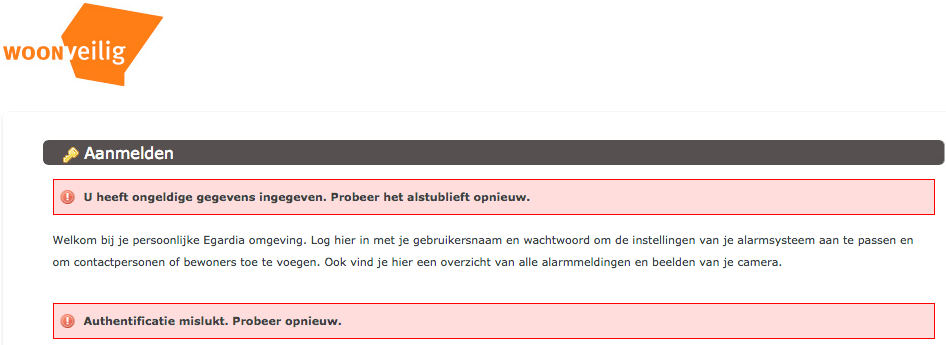
Ik had al eerder over woonveilig geschreven (Ik ben wat verward over de @WoonVeilig site. https://t.co/ui8agTkgM9 heeft het bijvoorbeeld over GATE-03 en GATE-02, maar…), nu iets meer over de installatie handleidingen van GATE-03:
Het is weer vakantietijd: een periode waarin we niet al te veel thuis zijn. Voor veel mensen is dat geen probleem, die gooien de deur achter zich dicht en zijn weg, voor anderen een heikel punt:
…
Hieronder de verkorte versie van de handleiding, zodat je een idee hebt van wat je te wachten staat.
…
- Start je computer of tablet op en ga naar www.woonveilig.nl/aanmelden. Daar vul je alle vragen in die je gesteld worden.
De aanmeldprocedure brengt je naar [Archive.is] alarmsysteem.woonveilig.nl/nl_NL_woonveilig/registratie, die voor registratie nog verwijst naar:
Een paar tips tijdens de registratie en gebruik:
Contact loopt dan via [WayBack] Contact | WoonVeilig
www.woonveilig.nl/klantenservice/gebruikersvragen staat bij “Ik wil geen App installeren. Is er ook een mobiele website?” dat je ook naar mobile.woonveilig.nl kunt, maar die doet het niet. Hoe zit dat?”
curl http://mobile.woonveilig.nl
<!DOCTYPE HTML PUBLIC "-//IETF//DTD HTML 2.0//EN">
<html><head>
<title>301 Moved Permanently</title>
</head><body>
<h1>Moved Permanently</h1>
<p>The document has moved <a href="https://www.woonveilig.nl/alarm/dashboard">here</a>.</p>
</body></html>
curl https://www.woonveilig.nl/alarm/dashboard–jeroen

Posted in LifeHacker, Power User, Security | Leave a Comment »



 The Wiert Corner - irregular stream of stuff