The Wiert Corner – irregular stream of stuff

Jeroen W. Pluimers on .NET, C#, Delphi, databases, and personal interests

  • My badges

  • Twitter Updates

  • Pages

  • All categories

  • Enter your email address to subscribe to this blog and receive notifications of new posts by email.

    Join 1,854 other subscribers

Archive for the ‘Power User’ Category

Archiving Google Product Forums URLs

Posted by jpluimers on 2020/11/13

Archiving Google Product Forum URLs is a pain in the butt for a couple of reasons:

So the trick for saving is:

  1. Get from the /forum/#!topic/ based URL to the /d/topic/ based one
  2. Put it after the archive.is/?run=1&url=, then save

--jeroen


Posted in Conference Topics, Conferences, Event, Internet, InternetArchive, Power User, WayBack machine | Leave a Comment »

Using both Google Fi and Google Voice means you need to use two Google accounts on the same phone

Posted by jpluimers on 2020/11/13

A while ago at [WayBack] The only bad thing about getting Google Fi is giving up Google Voice — Mike Elgan wrote

You can use Google Voice or you can use Google Fi, but you can’t use both. I just bought a Google Pixel 3 in order to move off AT&T and onto Google Fi fulltime. (We used to use Google Fi using my wife’s account, but only as a WiFi hotspot while traveling abroad.) It’s kind of a bummer, b

But the first comment has a solution that works, if you use two Google accounts that is:

I have Fi and use Google Voice on the same phone. I have to sign in to Voice with a separate Google account so there are some compromises but it works for how I use it.

–jeroen

Posted in Google, GoogleVoice, LifeHacker, Power User | Leave a Comment »

Chrome not asking to save or saving passwords? – Google Product Forums

Posted by jpluimers on 2020/11/13

From [Archive.is] Chrome not asking to save or saving passwords? – Google Product Forums

Hemanth M said:

After a lot of playing around, I’ve arrived at an elegant solution. Here are the steps:Steps to make Google Chrome offer to save (prompt) password for a particular site (for e.g abcd.com) and Auto-login the site with the credentials thus saved.

  1. Go to the given URL ‘abcd.com
  2. Right-click Page Info and disable ‘JavaScript’
  3. Reload the page.
  4. Enter the credentials (uid,pwd)
  5. A prompt appears to save password.
  6. Click on Save password.
  7. Auto-Login Extension bubble appears on this page.

At this point it is important because the extension ‘Auto-Login’ (like many other extensions) require JavaScript to be enabled.

  1. Re-enable the JavaScript for this page and reload the page.
  2. Now Click on the ‘Auto-Login’ bubble for remembering automatically logging into the site hereafter!

In my case, this was for ESXi credentials. Do not go the cheap way or revealing them inside javascript like these guys:

–jeroen

Posted in Chrome, Chrome, Google, Power User, Web Browsers | Leave a Comment »

Me starting to understand the real life meanings of Shim

Posted by jpluimers on 2020/11/12

The combination of being partially word blind and having learned English initially from my urge to understand computing books during my (Dutch) secondary education in the mid 1980s, I often have a gap between understanding “daily life” or “real life” English words, especially when they also have a meaning in the computing world.

So it took me a while to get the non-computing meaning of shim.

In computing, shim is used as word for tiny shell that separates two layers, which means my original association was with “sphere”.

Had I associated with an adapter or something that puts space between to layers, it would have been much easier to understand the “real life” meaning of a spacer shim.

Similarly, I had trouble understanding washer (which I associated with washing, and is right: it often means washing machine, but can also mean dish washer, which is an odd word for me as it washes much more than dishes). It took me much longer to get there is an additional meaning for a mechanical construction washer, which is a thin disc (so not a tube-like ring) often used as spacers, so in a sense similar to a shim.

In Dutch, I have the same problem with “wasmachine” (English washing machine) and “afwasmachine” (Dish washer).

To add to the confusion, hardware washers in Dutch are called rings.

–jeroen

All of the above links are from Wikipedia.

Posted in About, LifeHacker, Personal, Power User | Leave a Comment »

How to quickly add hours/minutes/second to date and time in Excel?

Posted by jpluimers on 2020/11/11

Excel date times are almost identical to OLE/COM automation date times (that used in many Windows applications).

Which means that dates are 1 unit apart, and:

  • Weeks = 7
  • Days = 1
  • Hours = 1/24
  • Minutes = 1/(24*60) or 1/1440
  • Seconds = 1/(24*60*60) or 1/86400

That way you can easily add one hour to a date/time value by adding 1/24.

Source: How to quickly add hours/minutes/second to date and time in Excel?

Related:

–jeroen

Posted in Development, Excel, LifeHacker, Office, Power User, Software Development | Leave a Comment »

JSON to tabular format via JSONformatter.org and JSON2table.com

Posted by jpluimers on 2020/11/10

Two interesting sites to ease transforming JSON fragments in log-messages to a table system, for instance Excel.

  1. Paste the bits in [WayBack] Best JSON Pretty Print Online then fix any syntax errors.
  2. Copy from there to [WayBack] json2table.com and press the triangle button (run)
  3. Copy either the tabular or tree result to your favourite program.
  4. Format any numbers for readability. I really like the Custom format ##0.00E+00 that just shows the exponents in multiples of 3 (so kilo, mega, giga, etc)[WayBack] formatting – How can I format bytes a cell in Excel as KB, MB, GB etc? – Stack Overflow

This way I copied the example code into adjecent Excel areas, so I could compare the values and calculate memory increase of a Delphi application.

jeroen

Read the rest of this entry »

Posted in Development, JavaScript/ECMAScript, JSON, LifeHacker, Power User, Scripting, Software Development | Leave a Comment »

Radio Garden

Posted by jpluimers on 2020/11/10

Explore live radio by rotating the globe.

[Archive.is] Radio Garden

Via: [WayBack] Radio Garden is just too cool Check out radio across the planet with this interactive station finding globe! – Kevin Powick – Google+

–jeroen

Read the rest of this entry »

Posted in LifeHacker, Power User | Leave a Comment »

Bootable virus scanners supporting ntfs

Posted by jpluimers on 2020/11/09

I was looking for a bootable virus scanner supporting NTFS. Kaspersky was the first one I found, and it worked well.

Back then, these were the output locations:

The HTTP link can be convenient for locations that do not support TLS (cough, VMware ESXi wget, cough), which are OK if you calculate the sha256 hash from the TLS link first.

Likely there is a 2020 version by now.

I got the links via:

I might try BitDefender later.

–jeroen

Posted in LifeHacker, Power User, Security | Leave a Comment »

“net view” “System error 1231 has occurred.” “Windows 10”

Posted by jpluimers on 2020/11/09

On my research list: none of my Windows 10 PC’s in WORKGROUP can see that other machines exist, but they can connect to each other.

C:\>net view
System error 1231 has occurred.c

C:\>net view
System error 6118 has occurred.

On Windows 8.1 and 7 (I know: both beyond end-of-support) can see both Windows 8.1/7 machines and Windows 10 machines:

C:\>net view
Server Name          Remark
-------------------------------------------------------------------------------
\\...
The command completed successfully.

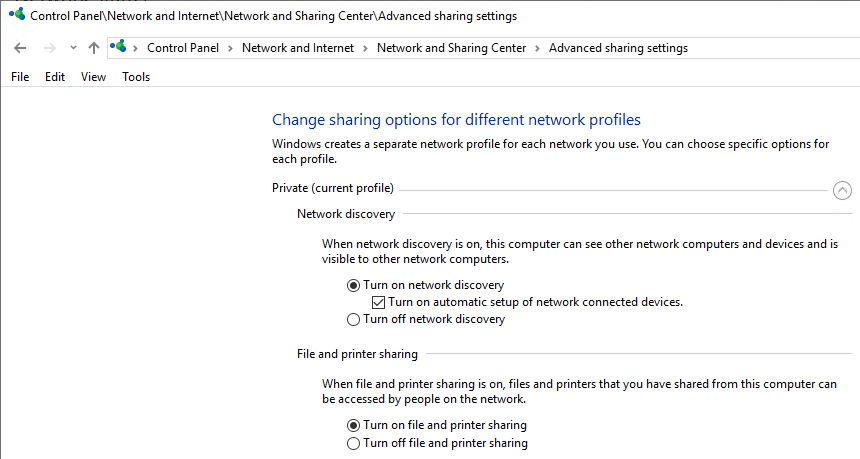
It is unclear on which Windows 10 release this started failing. I think it is around 1803 (April 2018 Update) or 1709 (Fall Creators Update). It fails despite all settings indicating sharing and discovery are enabled:

Things tried that failed:

Start service WebClient

Tried from an administrative command prompt, then waited a minute:

C:\net start WebClient
The WebClient service is starting.
The WebClient service was started successfully.

Failed.

Via: [WayBack] System error 1231 has occurred – Microsoft Community

Ensure system names are uppercase

The system names were already in uppercase.

Via: [WayBack] Win10 10586 – FOUND FIX for system error 1231 bug ( network shares – Microsoft Community

TODO

Note: do not re-enable SMBv1 as it is inherently insecure!

–jeroen

Posted in Power User, Windows, Windows 10 | Leave a Comment »

PoE to ethernet + micro USB converters

Posted by jpluimers on 2020/11/06

The first is 100mbit, some do not get it to work with Raspberry Pi 3B+, but others do get it to work, even at 1Gbit:

The second is 1Gbit, about 40% more expensive, but just works:

Via: [WayBack] Thread by @Nick_Craver: “Shout out to @mstum for reminding me 1Gb PoE USB splitters are completely viable for Raspberry Pis – now running a fi PoE switches and using just 1 outlet on the UPS: … Less wiring and if the network’s […]”

–jeroen

Posted in Development, Hardware Development, Power User, Raspberry Pi | Leave a Comment »