The Wiert Corner – irregular stream of stuff

Jeroen W. Pluimers on .NET, C#, Delphi, databases, and personal interests

  • My badges

  • Twitter Updates

  • Pages

  • All categories

  • Enter your email address to subscribe to this blog and receive notifications of new posts by email.

    Join 1,854 other subscribers

Archive for the ‘Power User’ Category

Time to look back at the Spectre vulnerabilities.

Posted by jpluimers on 2020/07/07

About 2 years ago, over the course of almost a year, many Spectre vulnerabilities were found.

In November 2018, this lead many people disabling Hyper Threading: [WayBack] STIBP by default.. Revert?

This is a reminder to self to look back at Spectre to get a better historic feel for it.

Via: [WayBack] Work is being done on the Linux Kernel mailing list about further exploits of the Spectre Family of Exploits. The mitigations are bad – basically, you c… – Kristian Köhntopp – Google+

–jeroen

Posted in Development, Power User, Security, Software Development | Leave a Comment »

MacOS/OS X/Mac OS X: Keeping an eye on your used disk space

Posted by jpluimers on 2020/07/06

Two tools I like:

GrandPersctive is good at showing a visual overeview. OmniDiskSweeper is better at gradually drilling down.

Easy installation:

brew install caskroom/cask/omnidisksweeper

$ brew install caskroom/cask/grandperspective

–jeroen

Posted in Apple, Mac OS X / OS X / MacOS, Power User | Leave a Comment »

RB450G and “..could not get answer from dns server” – MikroTik

Posted by jpluimers on 2020/07/06

[WayBack] RB450G and “..could not get answer from dns server” – MikroTik: I do not see a default route. It would be the route with “dst-address=0.0.0.0/0.

–jeroen

Posted in Internet, MikroTik, Power User, routers | Leave a Comment »

lifeliners volgen – P2000 monitor (support forums)

Posted by jpluimers on 2020/07/06

[WayBack] lifeliners volgen – P2000 monitor (support forums):

–jeroen

Posted in LifeHacker, Power User | Leave a Comment »

MacOS/OS X/ Mac OS X tip: AppCleaner

Posted by jpluimers on 2020/07/03

[WayBack] AppCleaner helped me get rid of a the gazillion number of versions that GoToMeeting had silently installed and their dependencies.

Gigabytes recovered.

Installing is easy: $ brew install caskroom/cask/appcleaner

AppCleaner is a small application which allows you to thoroughly uninstall unwanted apps.

Installing an application distributes many files throughout your System using space of your Hard Drive unnecessarily.
AppCleaner finds all these small files and safely deletes them.

Simply drop an application onto the AppCleaner window. It will find for the related files and you can delete them by clicking the delete button.

–jeroen

Posted in Apple, Mac OS X / OS X / MacOS, Power User | Leave a Comment »

Cipher: a command-line tool to decrypt/encrypt files and directories (een recursively) on Windows

Posted by jpluimers on 2020/07/03

A while ago, I had to mass encrypt a lot of directories and files on Windows for some directories in an existing directory structure.

This helped me to find out which ones were already done (it lists all encrypted files on all drives; the /n ensures the files or encryption keys are not altered):

cipher.exe /u /n /h

This encrypted recursively in one directory B:\Directory:

cipher /D /S:B:\Directory /A

It also has options to wipe data (/W), export keys into transferrable files (/X) and many more.

If you like the Windows Explorer more then to encrypt/decrypt (it is a tedious process): [WayBack] How do I encrypt/decrypt a file? | IT Pro.

Via:

–jeroen

Posted in Encryption, NTFS, Power User, Security, Windows | Leave a Comment »

Tools I use for audio/video downloading, media conversion and audio editing

Posted by jpluimers on 2020/07/03

A friend asked me what tools I use for downloading media, converting it to various formats (including audio extraction) and audio editing.

It is a surprisingly short list:

Most of it runs out of the box on Mac OS X/MacOS/OS X, as I’ve moved there form Windows for most of my day to day access to systems (there is a great set of Microsoft Remote Desktop in the app store: [Archive.isMicrosoft Remote Desktop 8.0 on the Mac App Store and [Archive.isMicrosoft Remote Desktop 10 on the Mac App Store; I like the first one better).

Audacity shortcuts

Read the rest of this entry »

Posted in Apple, Audacity, Audio, ffmpeg, iMac, Mac, Mac OS X / OS X / MacOS, MacBook, MacBook Retina, MacBook-Air, MacBook-Pro, MacMini, Media, Power User, Remote Desktop Protocol/MSTSC/Terminal Services, SocialMedia, Windows, YouTube, youtube-dl | Leave a Comment »

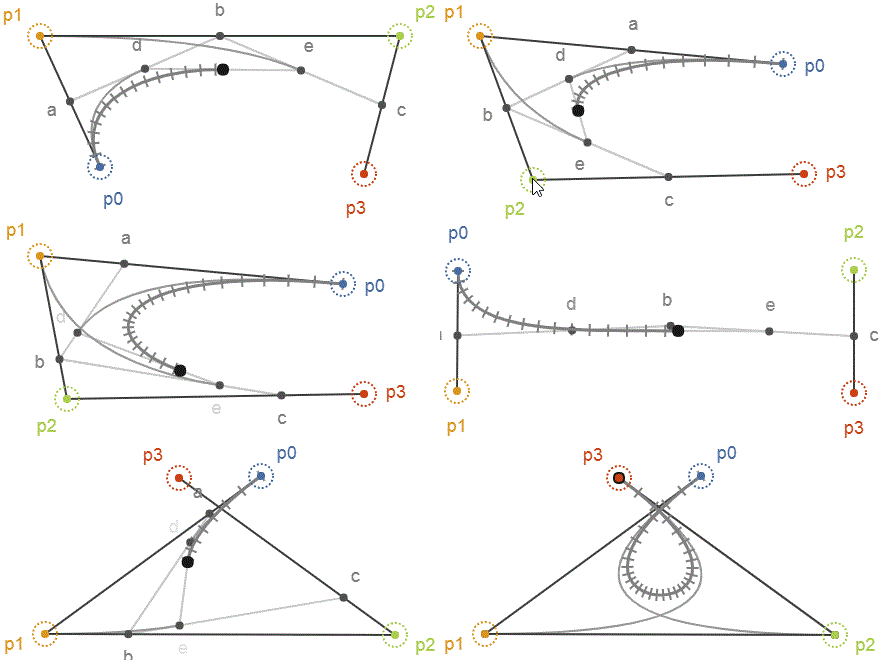
The ever so lovely Bézier curve – Freya Holmér – Medium

Posted by jpluimers on 2020/07/01

[WayBackThe ever so lovely Bézier curve – Freya Holmér – Medium:

Bézier curves are, to me, one of the best examples of mathematical beauty

Based on:

Via: [WayBack] Bezier curves, how do they even work – Kristian Köhntopp – Google+

–jeroen

Read the rest of this entry »

Posted in Development, Power User, science, Software Development | Leave a Comment »

binaryfiles – How to convert PDF binary parts into ASCII/ANSI so I can look at it in a text editor? – Stack Overflow

Posted by jpluimers on 2020/06/30

The first hit of pdf binary to text – Google Search was [WayBack] binaryfiles – How to convert PDF binary parts into ASCII/ANSI so I can look at it in a text editor? – Stack Overflow has many options including:

Since I have qpdf installed on most systems:

Another useful tool to transform a PDF into an internal format that enables text editor access is qpdf. It is a “command-line program that does structural, content-preserving transformations on PDF files”.

Example usage:

 qpdf                                  \
   --qdf                               \
   --object-streams=disable            \
     input-with-compressed-objects.pdf \
     output-with-expanded-objects.pdf
  1. The output of the QDF-mode enforced by the --qdf switch organizes and re-orders the objects neatly. It adds comments to track the original object IDs and page content streams. All object dictionaries are written into a “normalized” standard format for easier parsing.
  2. The --object-streams=disable causes the extraction of (otherwise not recognizable) individual objects that are compressed into another object’s stream data.

The recompress is easy as per [WayBackQPDF Manual:

qpdf /tmp/uncompressed.pdf /tmp/compressed.pdf

The answer is by [WayBack] User Kurt Pfeifle – Stack Overflow who has many other interesting PDF related answers at:

Stackoverflow.com:

Superuser.com:

Serverfault.com:

–jeroen

Posted in Development, EPS/PostScript, PDF, Power User | Leave a Comment »

Just as “curl | sudo sh is not advised”, do not impose running http based scripts in your customers IDE

Posted by jpluimers on 2020/06/30

For a long time, it is advised against to curl | sudo sh or equivalent:

  • [WayBackwhy using curl | sudo sh is not advised? – Stack Overflow

    Because you are giving root access to whatever script you are executing. It can do a wide variety of nasty things.

  • [WayBack] The Security Spectrum of curl | sh

    By far the most irresponsible use of curl | sh is to use it with plain, unauthenticated, insecure HTTP instead of HTTPS. This is because it’s not only possible, but also increasingly likely, that the connection over which the shell script is delivered could have its contents silently modified by anyone in network position between the vendor and the installer—especially if you’re using public Wi-Fi. (If you don’t believe this is a real risk, consider that some companies’ business models revolve around modifying JavaScript delivered over HTTP in-transit—and anyone can hijack Wi-Fi with inexpensive, easy-to-obtain devices.)

So I’m surprised that companies still run content – include JavaScript – over an insecure http transport channel in their customers IDE instances.

Many developers run their IDE as Administrator, but even as regular user this is a large security risk: the transport layer is the easiest to hack and will eventually be hacked.

One such occasion was [WayBack] Delphi 10.2.3: Tools > Options Click OK = Script Error I have another weird situation with Delphi 10.2.3. Anytime I open up the options and click OK I … – Michael Riley – Google+ .

That one actually showed the script executed, but normally you do not see it happening at all.

So my advice:

Run the web-traffic from your development machines over a web-proxy like HTTP Fiddler, then disable all http based scripts.

–jeroen

Line 73: https://gist.github.com/jpluimers/40a60ca1e07bb91fa337ecfebe314d64#file-cf-common-js-L73

Read the rest of this entry »

Posted in Development, Power User, Security, Software Development | Leave a Comment »