The Wiert Corner – irregular stream of stuff

Jeroen W. Pluimers on .NET, C#, Delphi, databases, and personal interests

  • My badges

  • Twitter Updates

  • Pages

  • All categories

  • Enter your email address to subscribe to this blog and receive notifications of new posts by email.

    Join 1,854 other subscribers

Archive for the ‘Power User’ Category

“error: invalid object 100644” “git svn”

Posted by jpluimers on 2020/07/14

A while back, while using “git svn”, on a Windows system, I got [Archive.is“error: invalid object 100644” “git svn” – Google Search after statements like this:

# git svn rebase
error: refs/remotes/git-svn does not point to a valid object!
error: invalid object 100644 ac7df132f5bd7d639fc525f1f0204a546658d0c5 for 'Source/ToDoList/GX_ToDo.pas'
fatal: git-write-tree: error building trees
write-tree: command returned error: 128

# git svn fetch
error: refs/remotes/git-svn does not point to a valid object!
error: invalid object 100644 ac7df132f5bd7d639fc525f1f0204a546658d0c5 for 'Source/ToDoList/GX_ToDo.pas'
fatal: git-write-tree: error building trees
write-tree: command returned error: 128

In my case, regular git operations (like branching, committing, pushing, etc) worked fine, but git svn would fail.

One problem was that [Archive.is“error: refs/remotes/git-svn does not point to a valid object” – Google Search only returned one un-meaningful result: [WayBack] gist:87613 · GitHub.

Luckily, I had a backup (though it was from a while ago as that VM had not been in use for quite some time) which is the first part in [WayBack] Git FAQ – Git SCM Wiki: How to fix a broken repo?.

Since I was still interested finding out how to resurrect, just in case this happens at a time the backups do not go back far enough, I tried the steps below.

The very first fixing step is to ensure you can quickly restore things, or even better: operate on a copy of the broken pieces. On Windows, robocopy /mir is my friend for this, in Linux rsync -avloz (although on some systems, -z crashes).

TL;DR from the fixing steps

Find out what problems you have, and in which order to fix them. Otherwise you will break more stuff and take longer to fix it.

In this case, two things failed: one on the git side, and one on the git svn side. Since git svn depends on git, the best approach is to fix the git problem first, then the git svn thing.

Fixing this manually try 1

Read the rest of this entry »

Posted in CertUtil, Development, DVCS - Distributed Version Control, git, Hashing, md5, Power User, Security, SHA, SHA-1, SHA-256, SHA-512, Software Development, Source Code Management, Subversion/SVN, Windows | Leave a Comment »

Building a rudimentary battery backup for your USB powered devices (IoT, Raspberry, etc)

Posted by jpluimers on 2020/07/14

Malcolm Lewis [WayBack] came with these interesting pastes for a rudimentary battery backup servicing USB powered devices:

Since both expired, here is some more elaboration with Amazon.com links:

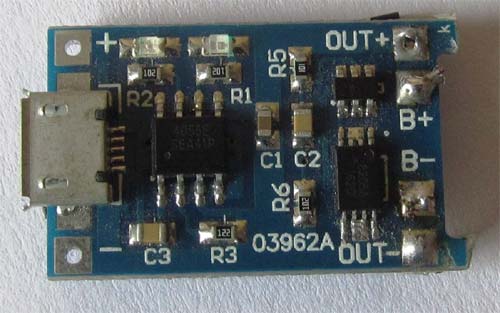
From the picture linked above (full one at the bottom of the post): a switch is missing from the parts list (:

Note that this is only the hardware parts, and no measurements of the voltage from the Raspberry Pi. So it is a battery backup, not a UPS.

For a UPS kind of functionality, you need more hardware (measure voltage to assess when to safely shut down, reset circuitry for when power comes up), and software (so the devices can shutdown).

Connections

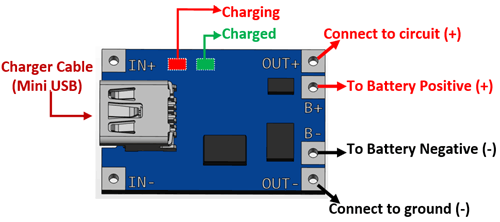
After IRC chatting with Lewis (see his [WayBack] profile), this is how they should be connected:

  1. USB charger:
    1. OUT connector type A of USB charger cable
  2. Connections to the TP4056 battery charger (a nice video on this is at Charging a Lithium 18650 Cell using the TP4056)
    1. IN mini/micro USB from connector type B of USB charger cable
    2. BAT pins B+ and B- to the + and – of the 18650 battery holder
    3. OUT pins +/- to your LM2577 IN pins+/-
  3. 18650 battery holder
    1. IN pins +/- to the TP4056 BAT pins +/-
    2. One or two 18650 batteries
    3. Note
    4. Most of the wired “parallel” 18650 dual battery holders on non-USA Amazon sites are in fact serial (you see that in the comments, or by watching the wiring carefully), so better buy an unwired one!
  4. Connections to the adjustable LM2577 step-up converter having a max current of 3A
    (get one *with* voltage meter, as voltage meteres themselves are about half the price of the LM2577!)

    1. IN pins from the TP4056 OUT pins
    2. Adjust to slightly above 5V before connecting anything else!
    3. OUT pins +/- to the red/black pins of a connector A stripped micro USB cable
  5. USB powered device (like Raspberry Pi)
    1. Micro USB connector: connector B of the USB cable coming out of LM2577

If you want to measure both voltage and current, then a combined piece like Voltmeter Amperemeter Dual Digital Volt Amp Meter Messgerät 100V 10A is very convenient. Most of these do not come with schematics, so here is one:

Specs

Parts from Amazon.de

Media

There is a 6A module; though I’m not sure it is based on LM2577

Bad battery box example

–jeroen

Read the rest of this entry »

Posted in 18650, Batteries, Development, Hardware Development, Li-Ion, Power User | Leave a Comment »

Marrying U-Boot, uEFI and grub2 – Alexander Graf – openSUSE…

Posted by jpluimers on 2020/07/13

A very insightful talk: “Marrying U-Boot, uEFI and grub2 – Alexander Graf – openSUSE…”

Booting is hard. Booting in the ARM world is even harder. State of the art are a dozen different boot loaders that may or may not deserve that name. Each gets configured differently and each has its own pros and cons.

As a distribution this is a nightmare. Configuring each and every one of them complicates code that really should be very simple.

To solve the problem, we can just add another layer of abstraction (grub2) on top of another layer of abstraction (uEFI) on top of another layer of abstraction (u-boot). Follow me on a journey on how all those layers can make life easier for the distribution and how much fun uEFI really is.

After this talk, you will know how ARM systems boot, what uEFI really means, how uEFI binaries interact with firmware and how we are going to move to uEFI based boot on openSUSE for ARM.

Usually known as agraf on-line, [WayBack] Alexander Graf – Open IoT & ELC 2017 is an impressive guy:

Alexander Graf

SUSE
KVM Wizard
Nürnberg Area, Germany
Alexander started working for SUSE about 9 years ago. Since then he worked on fancy things like SUSE Studio, QEMU, KVM and openSUSE on ARM. Whenever something really useful comes to his mind, he tends to implement it. Among others he did Mac OS X virtualization using KVM, nested SVM, KVM on PowerPC and a lot of work in QEMU for openSUSE on ARM. He is the upstream maintainer of KVM for PowerPC, QEMU for PowerPC and QEMU for S390x.

Slides: [WayBack] Marrying U-Boot, UEFI and grub.pdf

There are 2 videos on YouTube (view them below):

A few things I learned

Boot sequence:

  1. Raspberry Pi has a tiny boot ROM
  2. It loads the firmware in the GPU (for Raspberry this is a Raspberry Foundation provided binary)
  3. The firmware loads U-Boot
  4. U-Boot loads grub2
  5. grub2 can have many modules (like file system drivers) and loads the kernel

Alexander pushed the U-Boot stuff up stream, but the FreeBSD team was the first to actually boot a full OS from it.

Relations:

  • uEFI/EFI is a set of specs that define the API
  • U-Boot is the firmware implementing uEFI, so your machine behaves as a PC making booting a lot more standardised, starting at handing off to a regular grub2 boot process
  • U-Boot loads grub2

U-boot:

–jeroen

References:

Images

Read the rest of this entry »

Posted in *nix, *nix-tools, openSuSE, Power User, SuSE Linux, Tumbleweed | Leave a Comment »

ThinkPad USB Keyboard With TrackPoint – Overview

Posted by jpluimers on 2020/07/13

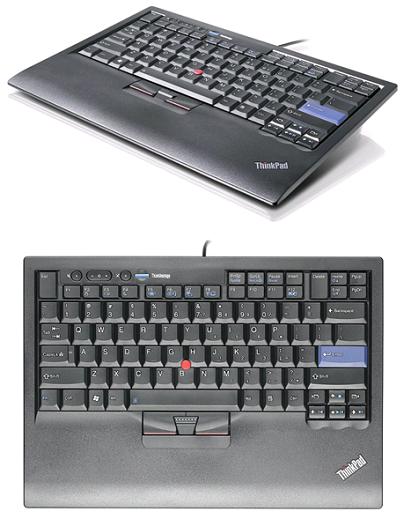
I wish this keyboard was still on the market [WayBackThinkPad USB Keyboard With TrackPoint – Overview.

Known as 55Y9053, 55Y9003 and 57Y4641 (and a few others like  the English/EUR 55Y9042 if you count the various localised layouts at [WayBack] ThinkPad USB Keyboard with TrackPoint – Service parts), it was one of the best keyboards made apart from the big delete key (that was better in the predecessor, but that one lacked windows keys: [WayBack] Lenovo ThinkPad USB Keyboard Review | NotebookReview).

It is about the same as the Thinkpad25, which added a touchpad: [WayBack] The 25th-anniversary ThinkPad: Every laptop should add some retro appeal | Ars Technica Review: A seven-row keyboard? Matte screen? TrackPoint? The all-business black body? Swoon

--jeroen

Posted in History, Power User, ThinkPad, UltraNav keyboards | Leave a Comment »

Remapping a mac keyboard for windows user In my quest to make this macbook air into a usable machine: Karabiner-Elements

Posted by jpluimers on 2020/07/10

I am still a bit ambivalent on remapping keys on a keyboard, mainly because of two reasons:

  • Without remapping, tools used for virtualisation, remote access and shells already get it wrong every now and then. Finding causes is already tough, so adding more degrees of freedom complicates this more.
  • Switching systems or assisting people without the tools can be cumbersome. I vividly remember the really hard times when I had switched from Windows Explorer to Windows Commander (now Total Commander) and could not use it on a sequence of contracting jobs.

Just in case I am going to use it:

–jeroen

Via:


Posted in Keyboards and Keyboard Shortcuts, Power User | Leave a Comment »

“View Image” button in Google Image Search

Posted by jpluimers on 2020/07/10

Hopefully by now the extensions below still work, as Google removed the “View Image” button in Google Image Search a few years back.

When not: these might help finding an updated method (:

Via:

–jeroen

Posted in Google, GoogleImageSearch, GoogleSearch, Power User | Leave a Comment »

On my tools list: Rapid Environment Editor – freeware Windows environment variables editor

Posted by jpluimers on 2020/07/10

On my tools list: [WayBack] About – Rapid Environment Editor Rapid Environment Editor – freeware Windows environment variables editor

Thanks to Thomas Mueller via [WayBack] I have installed RAD Studio 10.1 Berlin running under Win 10 and I have tried to install GExperts. It doesn’t install into the IDE. I run the ExpertMana… – Bill Olson – Google+.

–jeroen

Posted in Power User, Windows | Leave a Comment »

openSUSE:Standards Rpm Metadata – openSUSE: Repository layout

Posted by jpluimers on 2020/07/09

For my link archive: [WayBack] openSUSE:Standards Rpm Metadata – openSUSE: Repository layout.

It is not fully up to date any more on primary.xml.gz, so here are my notes for the aarch64 version of Tumbleweed:

  1. Inspect http://download.opensuse.org/ports/aarch64/tumbleweed/repo/oss/repodata/repomd.xml [WayBack] for the name of *-primary.xml.gz (in this case http://download.opensuse.org/ports/aarch64/tumbleweed/repo/oss/repodata/d701c298b21d0b995c9560f9cfcc84685cb916deacc4f4c4a613a9b9d8f5aa57-primary.xml.gz [WayBack]
  2. Download that .gz file and uncompress it
  3. Inspect the *-primary.xml from it, look inside the metatadata root element for a package having a name element with value openSUSE-release: that package element now has a version element having a ver attribute containing the version text.

–jeroen

Posted in *nix, *nix-tools, Linux, openSuSE, Power User, SuSE Linux, Tumbleweed | Leave a Comment »

linux – How do I use sudo to redirect output to a location I don’t have permission to write to? – Stack Overflow

Posted by jpluimers on 2020/07/09

Various ways are explained at [WayBack] linux – How do I use sudo to redirect output to a location I don’t have permission to write to? – Stack Overflow.

Some are for simple commands and can be a one liner (for instance using tee, or executing a secondary shell).

Others are more suited for longer command sequences.

–jeroen

Posted in *nix, *nix-tools, bash, bash, Development, Power User, Scripting, Software Development | Leave a Comment »

Virtual Machine Serial Console access | Blog | Microsoft Azure

Posted by jpluimers on 2020/07/08

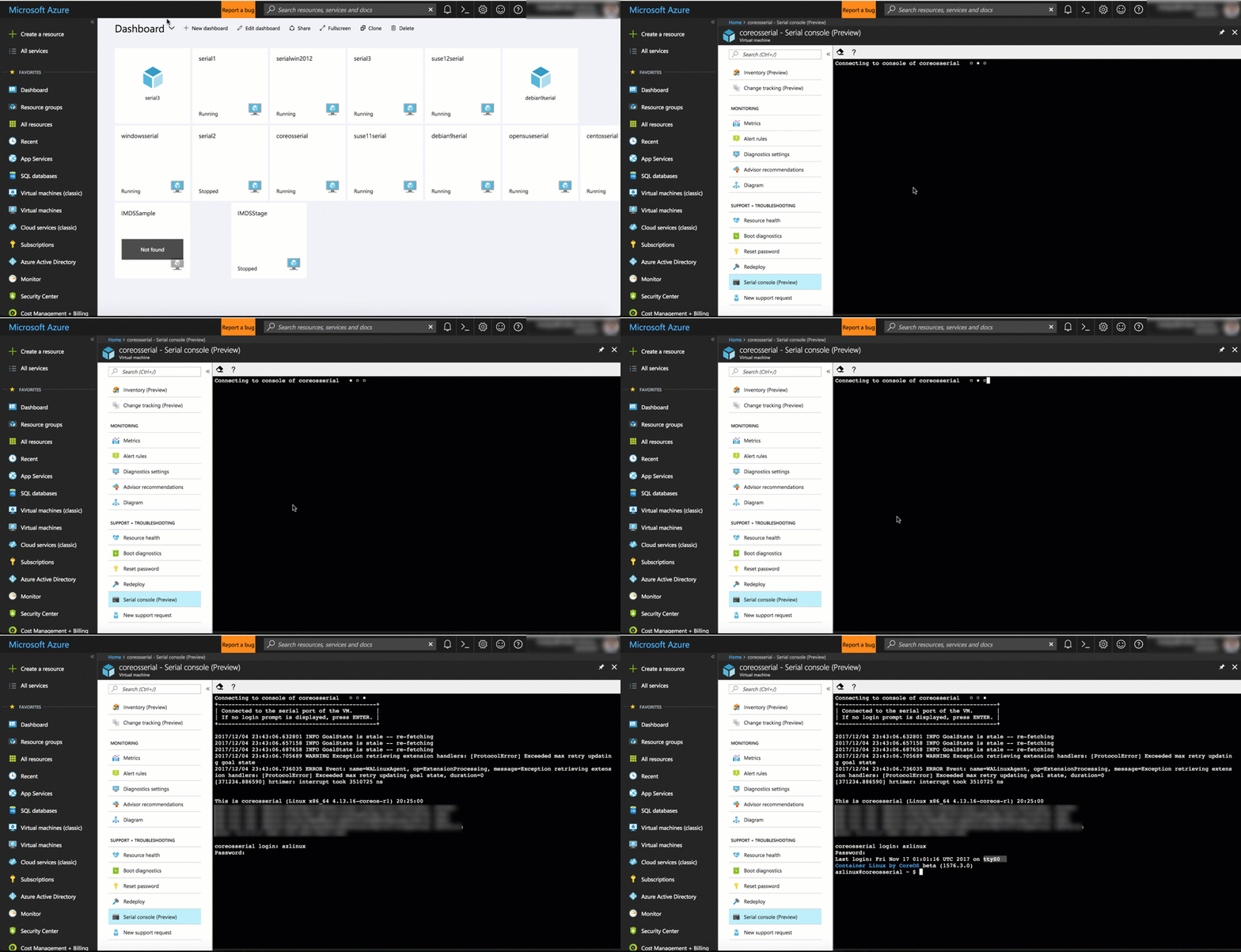
Reminder to self: out of band access (some older Windows images need extra work; it works out of the box for Linux and more recent Windows images) [WayBackVirtual Machine Serial Console access | Blog | Microsoft Azure.

Related: [WayBack] Azure virtual machine serial console | Microsoft Docs Bi-Directional serial console for Azure virtual machines (aka.ms/serialconsolehelp).

Via: [WayBack] Microsoft Serial Console: how to fix a ‘broken’ cloud – Open Source Insider

–jeroen


Posted in Azure Cloud, Cloud, Cloud Development, Development, Infrastructure, Power User, Software Development, Windows Azure | Leave a Comment »