The Wiert Corner – irregular stream of stuff

Jeroen W. Pluimers on .NET, C#, Delphi, databases, and personal interests

  • My badges

  • Twitter Updates

  • Pages

  • All categories

  • Enter your email address to subscribe to this blog and receive notifications of new posts by email.

    Join 1,854 other subscribers

Archive for the ‘Power User’ Category

Cool hacking stuff…

Posted by jpluimers on 2020/05/06

Boy, it is indeed a game of walls and ladders:

–jeroen

Posted in CommandLine, Development, Power User, PowerShell, PowerShell, Scripting, Software Development, Windows | Leave a Comment »

Certified Stealing Sh*t That Works Practitioners

Posted by jpluimers on 2020/05/05

A large part of my work is not how to search blindly, but how to actually find things, assess what parts of them are useful, then use the bits that are.

A big reason for writing this blog in the first place, is find back the stuff that worked so next time the search is easier.

So, share the CSSTWP information from [WayBack] Certified Stealing Sh*t That Works Practitioners if you like:

Certified Stealing Sh*t That Works Practitioners

CSSTWPs have come to value:
Trying new things over sticking with what we know
Trusting experience over third-party certification
Learning from peers over training courses
Choosing effective practices over MethodologyBrand™ allegiance
If you agree then… Tweet #CSSTWP
What are other people saying? Tweets by csstwp
If you agree then… Tweet #CSSTWP

Via [WayBack] I’m a proud Certified Stealing Sh*t That Works Practitioner. Are you? #CSSTWP – Marjan Venema – Google+ (who is an excellent coach).

–jeroen


Posted in Agile, Development, LifeHacker, Power User, Software Development | Leave a Comment »

SSH through HTTPS

Posted by jpluimers on 2020/05/04

Often, hotspots only allow http/https traffic. Other traffic – like SSH – is blocked. Nowadays, fewer hotspots block that, but too many still do.

So it can be worth a while to route your SSH server through HTTPS (I don’t like Web-based SSH that much as terminal emulation in browsers isn’t that well yet, but that seems to change rapidly, more on that in the “Further reading” section below).

After some background reading at apache – Tunnel over HTTPS – Stack Overflow, here are a few links that help you do it:

Server side: DAG: Tunneling SSH over HTTP(S).

You need:

  • An internet connected Apache server (eg. with IP address 10.1.2.3)
  • A FQDN that points to this IP address (eg. ssh.yourdomain.com)
  • A virtual host configuration in Apache for this domain (eg. /etc/httpd/conf.d/ssh.yourdomain.com.conf)
  • A configuration to adapt ssh to use the HTTP tunnel

Read more at DAG: Tunneling SSH over HTTP(S) and SSH over SSL, a quick and minimal config..

Client side: Using SSH over the HTTPS port · GitHub Help.

Steps:

  1. Test of it works at all
  2. Edit your local ~/.ssh/config file to redirect SSH to HTTPS

Read more at Using SSH over the HTTPS port · GitHub Help.

Using Putty and an HTTP proxy to ssh anywhere through firewalls | Me in IT.

the Digital me: SSH Tunneling Proxy using Putty on Windows and Linux (Unblock YouTube / Orkut / Facebook).

Tunneling SSH through HTTP proxies using HTTP Connect – ArchWiki.

HTTP Tunneling – ArchWiki.

Running SSHD on port 443.

Not all proxy configurations and hotspots support this. But it might be worth a look: SSH Over Proxy.

Further reading: Web-based SSH.

SSH plugins for browsers:

Web based SSH:

–jeroen

Posted in Communications Development, Development, Encryption, HTTP, https, HTTPS/TLS security, Internet protocol suite, Power User, Security, SSH, TCP | Leave a Comment »

OpenSSH keygen guidelines

Posted by jpluimers on 2020/05/01

Verify [WayBack] OpenSSH: Key generation before generating keys.

At the time of grabbing it was this (for the mozilla tag; use another tag if you prefer):

# RSA keys are favored over ECDSA keys when backward compatibility ''is required'',
# thus, newly generated keys are always either ED25519 or RSA (NOT ECDSA or DSA).
$ ssh-keygen -t rsa -b 4096 -f ~/.ssh/id_rsa_mozilla_$(date +%Y-%m-%d) -C "Mozilla key for xyz"

# ED25519 keys are favored over RSA keys when backward compatibility ''is not required''.
# This is only compatible with OpenSSH 6.5+ and fixed-size (256 bytes).
$ ssh-keygen -t ed25519 -f ~/.ssh/id_ed25519_mozilla_$(date +%Y-%m-%d) -C "Mozilla key for xyz"

This was not changed based on [WayBack] Key generation: pass-a and -o argument? · Issue #68 · mozilla/wikimo_content · GitHub: a discussion on the KDF rounds (-a parameter) and storage format (-o parameter).

This is slightly less strong than in [WayBack] Upgrade Your SSH Key to Ed25519 | Programming Journal, but seems to be OK when writing this in 2018.

For comparison, a similar discussion is at [WayBack] public key – How many KDF rounds for an SSH key? – Cryptography Stack Exchange.

In practice, I am not for one ssh ID per host, but I use different tags depending on where the ssh ID applies. More discussion on this is at [WayBack] privacy – Best Practice: ”separate ssh-key per host and user“ vs. ”one ssh-key for all hosts“ – Information Security Stack Exchange

Based on the above, I also learned about this password generator: [WayBack] GitHub – gdestuynder/pwgen

–jeroen

Posted in *nix, *nix-tools, Encryption, Hashing, Power User, Security, ssh/sshd | Leave a Comment »

LED bulbs in IKEA track lighting systems lie SANSA or LINA – SM2YER Goran’s Homepage

Posted by jpluimers on 2020/05/01

It is easy to replace the halogen bulbs in IKEA track lighting systems like IKEA SANSA or IKEA LINA by LED bulbs (Sansa uses 5.3mm spaced MR16 fitting compatible with both GX5.3 and GU5.3 bulbs, I think LINA uses the same): [WayBack] SM2YER Goran’s Homepage.

There are many other fittings; [WayBack] LED fitting welke moet ik kiezen? | Lampfittingen overzicht has a good list, mentioning these:

  • E14
  • E27
  • GU10
  • MR11 (which has slightly thicker pins than G4 and GU4)
  • G4 and GU4
    (with varying pin thickness)
  • G5.3, GX5.3, GU5.3
    (with varying pin thickness)
  • G6.35, GX6.535, GY6.35, GZ6.35
    (with varying pin thickness)
  • MR16
  • G9
  • GU10
  • AR111

The problem is the power supplies. They do not like the low wattage, or even burn with low wattage. Two solutions:

  • Use at least one 10W bulb, or
  • Use a 12V power supply from a laptop or other device that delivers far less power.

Fitting references:

--jeroen

Posted in Development, Hardware Development, IKEA hacks, LifeHacker, Power User | Leave a Comment »

Finding back license keys on Windows

Posted by jpluimers on 2020/05/01

Every now and then, I tend to misplace software license keys so they are only on the system I’ve installed it on.

Too bad, virus scanners (including the built in Windows one) tend to get more picky on which of the below tools get automatically deleted, so I’ve listed quite a few of them, including some posts with more links:

Note some of the PowerShell scripts fail on some of the installations I tried. Not sure why yet.

–jeroen

Posted in Power User, Windows | Leave a Comment »

How to pin either a Shortcut or a Batch file to the new Windows 7, 8 and 10 Taskbar and start menu? – Super User

Posted by jpluimers on 2020/04/29

This nailed it: way easier than all the alternatives involving VB scripts, registry keys and Group Policy Editors.

  1. Create a shortcut to your batch file.
  2. Get into shortcut property and change target to something like: cmd.exe /C "path-to-your-batch".
  3. Simply drag your new shortcut to the taskbar

Source: [WayBackHow to pin either a Shortcut or a Batch file to the new Windows 7, 8 and 10 Taskbar and start menu? – Super User

The trick is step 2. After that you can modify back your shortcut to just the batch file.

–jeroen

Posted in Batch-Files, Development, Power User, Scripting, Software Development, Windows, Windows 7 | Leave a Comment »

Side by Side user scoped .NET Core installations on Linux with dotnet-install.sh – Scott Hanselman

Posted by jpluimers on 2020/04/28

For my link archive: [WayBack] Side by Side user scoped .NET Core installations on Linux with dotnet-install.sh – Scott Hanselman

Via [WayBack] DotNetKicks on Twitteru: „Side by Side user scoped .NET Core installations on Linux with  by @shanselman  #aspnet via @DotNetKicks“

–jeroen

Posted in .NET, .NET Core, .NET Core, .NET Standard, Development, Linux, Power User, Software Development | Leave a Comment »

KiTTY auto-reconnect ssh tunnel so you can RDP from remote machine into local one

Posted by jpluimers on 2020/04/27

I needed this equivalent in KiTTY while also keeping the connection alive:

ssh -o "ExitOnForwardFailure yes" -R :3389:127.0.0.1:3389 

Here, (via [WayBack] SSH options, Port Forwarding over SSH, Keepalives – zwilnik), -R Specifies that the given port on the remote (server) host is to be forwarded to the given host and port on the local side. This works by allocating a socket to listen to port on the remote side, and whenever a connection is made to this port, the connection is forwarded over the secure channel, and a connection is made to host port hostport from the local machine.

This is unlike most port forwarding examples which shows you how to forward a local port to a remote one (for instance [WayBack] Portforwarding with SSH (Putty)).


I wanted this on Windows, but auto connect, and not depend on OpenSSH. So I used the portable edition of [WayBack] Download KiTTY., which is a PuTTY derivative with more features.

With OpenSSH it is easier, but requires either Windows 10 (having it pre-installed) or an OpenSSH installation. How simple? This simple: [WayBack] openssh – How do I keep SSH connection alive on Windows 10? – Stack Overflow

The portable version of KiTTYensures all configuration is in configuration files (not the registry like the regular edition: [WayBack] KiTTY Session Configuration Location – Chase’s Notes)

I bumped into KiTTY because in another situation, I needed to execute a remote command and found [WayBack] ssh – How to run a remote command in PuTTY after login & keep the shell running? – Super User

Later I found other references as it can also auto-logon:

Kitty has a URL based update checker; for instance [WayBackwww.9bis.net/kitty/check_update.php?version=0.70.0.6 checks if a newer version than 0.70.0.6 is available. If you do not trust it, you can run that URL over TLS as well.

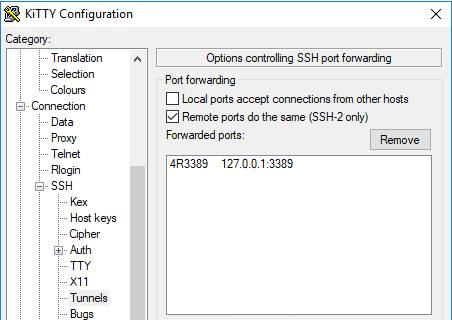
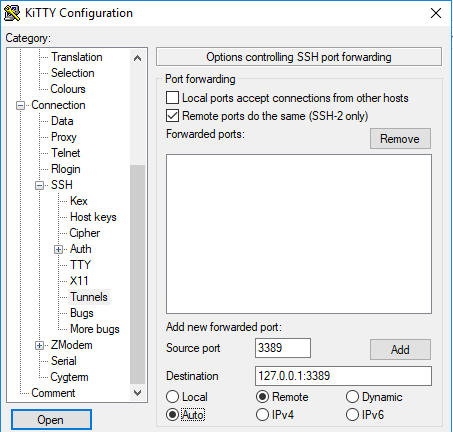
These screenshots seem to do just get the above configuration:

  1. Under “SSH”, in “Tunnels”
    • tick “Remote ports do the same (SSH-2 only)”
    • fill in a source port (that’s the remote port and will become the :3389: bit above)
    • fill in destination 127.0.0.1:3389 (that’s the local RDP port on your Windows machine)
    • tick “Remote”
    • tick “Auto”
    • click “Add” to get to the second screenshot
  2. Under connection:
    • Ensure “Seconds between keepalives” is larger than zero (I took 1)
    • Tick “Disable Nagle’s algorithm”
    • Tick “Enable TCP keepalives”
    • Tick “Attempt to reconnect on system wakup”
    • Tick “Attempt to reconnect on connection failure”
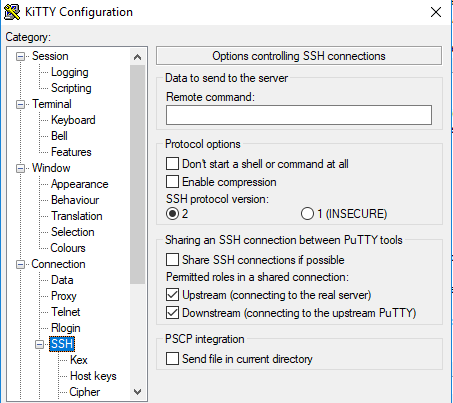
  3. On the “SSH” tab:
    • Do not enter a “Remote command” (seems unneeded on my system)
So for now, I can do without things like:

–jeroen

Posted in *nix, *nix-tools, Power User, ssh/sshd, Windows | Leave a Comment »

OSK: How to turn off auto start On-Screen Keyboard on Windows 7 64 bit? – Super User

Posted by jpluimers on 2020/04/27

Steps based on [WayBackHow to turn off auto start on-screen-keyboard on Windows 7 64 bit? – Super User.

  1. Turn down the volume of your PC
  2. Run “Control Panel”
  3. Choose “Ease of Access”, then “Ease of Access Center”
  4. Click “Use the computer without a mouse or keyboard”
    • If you forgot the sound settings, and they are at max: the narrative voice will probably deafen you
  5. Uncheck the “use on-screen keyboard” box
  6. Press “Apply” or “OK
  7. Close the “Control Panel”

I got in this situation when I selected the “On-Screen Keyboard” (often abbreviated to OSK; it is serviced by OSK.exe) on the logon screen in the “Ease of Access Center”. After that it would launch after each logon, even after I disabled it on the logon screen.

Back then I needed it because the VM ran on a Mac under Virtual Box which by default not only takes the left Command key, but also messes with some of the other left modifier keys.

The password for a new user I had to logon with needed the modifier keys, so it appears that the logon screen settings during the very first logon get copied to the user profile.

Turning them off on the logon screen does not copy them to the profile again:

Read the rest of this entry »

Posted in Power User, Windows, Windows 7 | Leave a Comment »