Archive for the ‘Power User’ Category
Posted by jpluimers on 2019/06/24
Learned a new thing today: you can change the line styles in PlantUML to these:
This in addition to the colour I already knew about. The order of these does not matter:
@startuml

' Make a dashed line, alternative syntax for ..>
(*) -[dashed]-> "Write outline"

' Make line bold and use color name
"Write outline" -[bold,#green]-> "Find example"

' Only change the color with hexadecimal RGB code
"Find example" -[#ff00ff]-> "Write blog"

' Order of line style and color can be reversed
"Write blog" -[#6666ff,dashed]-> "Publish"

' Use dotted line style
"Publish" -[dotted]-> (*)

@enduml
Source: [WayBack] PlantUML Pleasantness: Change Line Style And Color – Messages from mrhaki
–jeroen
Posted in Color (software development), Development, Diagram, PlantUML, Power User, Software Development, UML | Leave a Comment »
Posted by jpluimers on 2019/06/21
An interesting set of apps behind the various control panel links from [WayBack] Stop user access to control panel. Even though from 2013, many still work.
I edited most because:
- some had the form
control /name - Microsoft.AutoPlay but the – should have been between the name and the command.
- none had the commands in
code format so it was hard to see what you have to run
Add Hardware – Wizard hdwwiz.cpl
Administrative Tools – control admintools
Advanced System Properties ?
Advanced tab System – PropertiesAdvanced.exe
Computer Name – tab sysdm.cpl or SystemPropertiesComputerName.exe
Prevention tab – SystemPropertiesDataExecutionPrevention.exe
Hardware tab – SystemPropertiesHardware.exe
System Protection tab – SystemPropertiesProtection.exe
Remote tab – SystemPropertiesRemote.exe
AutoPlay – control /name Microsoft.AutoPlay
Backup and Restore Center – control /name Microsoft.BackupAndRestoreCenter
Backup Status and Configuration – sdclt.exe
BitLocker Drive Encryption – control /name Microsoft.BitLockerDriveEncryption
Bluetooth Devices – bthprops.cpl
Date And Time – timedate.cpl or control date/time
Display Settings – desk.cpl
Default Programs – control /name Microsoft.DefaultPrograms
Device Manager – devmgmt.msc
Disk Manager – diskmgmt.msc
Ease of Access Center – access.cpl or Utilman.exe
Game Controllers – joy.cpl
Indexing Options – control /name Microsoft.IndexingOptions
Internet Options – inetcpl.cpl
Keyboard Properties – control keyboard
Mouse Properties – main.cpl or control mouse
Network and Sharing Center – control /name Microsoft.NetworkandSharingCenter
Network Connections – ncpa.cpl or control netconnections
Offline Files – control /name Microsoft.OfflineFiles
Parental Controls – control /name Microsoft.ParentalControls
Pen and Input – Devices TabletPC.cpl
People Near Me – collab.cpl or p2phost.exe
Phone and Modem Options – telephon.cpl or control telephony
Power Options – powercfg.cpl
Printers – control printers
Problem Reports and Solutions – wercon.exe
Programs and Features – appwiz.cpl
Regional and Language Options – intl.cpl or control international
Scanners and Cameras – sticpl.cpl
Secure Online Key Backup – control /name Microsoft.SecureKeyBackup
Security Center – wscui.cpl
Sound – mmsys.cpl
Speech Recognition Options – control /name Microsoft.SpeechRecognitionOptions
Sync Center – mobsync.exe
System – control /name Microsoft.System
Tablet PC Settings – control /name Microsoft.TabletPCSettings
Task Scheduler – control schedtasks
Text to Speech – sapi.cpl or control speech
User Accounts – nusrmgr.cpl or Netplwiz.exe or control userpasswords
User Accounts (advanced) – control userpasswords2
Volume Mixer – SndVol.exe
Welcome Center – control.exe /name Microsoft.WelcomeCenter
Windows Defender – MsAsCui.exe
Windows Firewall – Firewall.cpl or FirewallControlPanel.exe
Windows Firewall Settings – FirewallSettings.exe
Windows Sidebar Properties – control.exe /name Microsoft.WindowsSidebarProperties
Windows SideShow – control.exe /name Microsoft.WindowsSideshow
Windows Update – control.exe /name Microsoft.WindowsUpdate
–jeroen
Posted in Power User, Windows | Leave a Comment »
Posted by jpluimers on 2019/06/21
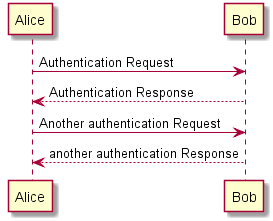
I like PlantUML a lot as it is an easy way to create even simple diagrams using plain text, for instance a simple Sequence Diagram like below.
Sometimes, you want to add comments because the way you build the diagram needs explanation that is not needed in the diagram itself. You can:
[Archive.is] Is it possible to comment out lines of diagram syntax? – PlantUML Q&A:
You can use quote like in the following example
@startuml

' This is a comment on a single line

Bob->Alice : hello

/' You quote by using slash-and-quote

to split your comments on several

lines '/

@enduml
[Archive.is] Sequence Diagram syntax and features
–jeroen
Posted in Development, Diagram, PlantUML, Power User, Software Development, UML | Leave a Comment »
Posted by jpluimers on 2019/06/21
[WayBack] Stugge kabel probleem – Netwerken – GoT: talkpoeder is het geheim om stugge kabels door een bochtig stelsel PVC pijpen te trekken.
–jeroen
Posted in LifeHacker, Power User | Leave a Comment »
Posted by jpluimers on 2019/06/20
The TCP SACK vulnerabilities as found by Netflix: [WayBack] security-bulletins/2019-001.md at master · Netflix/security-bulletins · GitHub.
Easy, but slow workaround from [WayBack] linux – How to disable TCP SACK for CentOS? – Super User:
Temporary (until boot):
echo "0" > /proc/sys/net/ipv4/tcp_sack
Permanent (even after boot):
echo "net.ipv4.tcp_sack = 0" >> /etc/sysctl.conf
sysctl -p
Coverage:
–jeroen
Posted in *nix, *nix-tools, Communications Development, Development, Internet protocol suite, Power User, Security, TCP | Leave a Comment »
Posted by jpluimers on 2019/06/17
It looks like many Dell machines suffer from this: devmgmt.msc indicating an unknown device with identification ACPI\DELLABC6.
The odd thing is that the tool known for 10+ years as Dell Detect, but got renamed into SupportAssist does not detect that Windows needs drivers for it.
So a bunch of posts:
They lead to these download:
- [WayBack] Dell WLAN Radio Switch Driver | Dell US with [WayBack] Dell-WLAN-Radio-Switch-Driver_JK9WM_WIN_1.0.0.9_A05.EXE
- [WayBack] Dell Airplane Mode Switch Driver | Dell US with [WayBack] FOLDER03137561M/1/Network_Driver_PX8MM_WN64_1.0.0_A00.EXE
The first of these works on a Dell Precision 7710 perfectly fine.
The odd thing: without the driver, pressing Fn+PrtScr (turn off/on WiFi radios) just works (for details on that key combination, see [WayBack] How to Turn the Wireless Devices on a Dell Notebook On and Off | Dell US or[WayBack] Dell Precision 7710 Mobile Workstation Keyboard Guide | Dell US)
–jeroen
Posted in Hardware, Power User | Leave a Comment »
Posted by jpluimers on 2019/06/17
 I live in a street that has a non-ASCII character in it: Pyreneeën.
I’ve reverted back to entering the street name as plain ASCII for a simple reason:
Too often the ë gets mangled into encoding gibberish, similar to the é example in [WayBack] When Good Characters Go Bad: A Guide to Diagnosing Character Display Problems as these characters are very near both in UTF-8 and in the [WayBack] Unicode Characters in the Latin-1 Supplement Block:
I’ve seen these encodings, where only the top encoding is correct; the degeneration gets worse moving downwards, a classic Mojibake:
| # |
encoded |
UTF-8 (hex.) |
| 0 |
ë |
0xC3 0xAB |
| 1 |
ë |
0xC3 0x83 0xC2 0xAB |
| 2 |
ë |
0xC3 0x83 0xC2 0x83 0xC3 0x82 0xC2 0xAB |
| 3 |
ÃÂë |
0xC3 0x83 0xC2 0x83 0xC3 0x82 0xC2 0x83 0xC3 0x83 0xC2 0x82 0xC3 0x82 0xC2 0xAB |
| 4 |
ÃÂÃÂÃÂë |
0xC3 0x83 0xC2 0x83 0xC3 0x82 0xC2 0x83 0xC3 0x83 0xC2 0x82 0xC3 0x82 0xC2 0x83 0xC3 0x83 0xC2 0x83 0xC3 0x82 0xC2 0x82 0xC3 0x83 0xC2 0x82 0xC3 0x82 0xC2 0xAB |
| 5 |
ë |
0x26 0x65 0x75 0x6d 0x6c 0x3b |
The last one seldomly happens, the first one relatively often, just like [Archive.is] fd.nl did a while on their finanancial pages.
These mistakes become sort of understandable (but not forgivable) when you look at the below table-fragment (the full table is at[WayBack] Unicode/UTF-8-character table – starting from code position 0080).
Read the rest of this entry »
Posted in Development, Encoding, Mojibake, Power User, Software Development, Unicode, Web Browsers | Leave a Comment »
Posted by jpluimers on 2019/06/14
Every now and then, I learn a “new” feature that has existed for a very long time.
This time it is about the Copy as Path feature from Windows Explorer context menu:
- hold the
shift key, then right click any file or directory
- select
Copy as Path
This was introduced in Windows Vista ([WayBack] How to Get Windows Vista and 7’s “Copy as Path” Option in Windows XP Context Menu? – AskVG).
By default the Copy as Path is not in the context menu: you have to press the shift key. In the past, I used tools like ClipName from the PC TimeWatch people – Freeware « The Wiert Corner – irregular stream of stuff.
Seems I do not use that any more for just copying one filename, only for copying multiple.
Related:
–jeroen
Posted in Power User, Windows, Windows Explorer / Windows Shell | Leave a Comment »
Posted by jpluimers on 2019/06/14
CitiZen nmap output: beagleboard with these open ports:
- 22 – ssh
- 80 – http
- 81 – unknown
- 1883 – mqtt
- 35505 – http
–jeroen
Posted in *nix, *nix-tools, nmap, Power User | Leave a Comment »



 The Wiert Corner - irregular stream of stuff