The Wiert Corner – irregular stream of stuff

Jeroen W. Pluimers on .NET, C#, Delphi, databases, and personal interests

  • My badges

  • Twitter Updates

  • Pages

  • All categories

  • Enter your email address to subscribe to this blog and receive notifications of new posts by email.

    Join 1,854 other subscribers

Archive for the ‘Power User’ Category

Introduction to Snapshots/Rollback with Snapper | ActiveDoc

Posted by jpluimers on 2019/07/01

The snapper documentation itself is big and hard to grasp at once, so start here for a few examples on how to get going, or how to assess your current configuration:

For a very good snapper introduction seems to be gone, but was present in the OpenSuSE documentation archive circa version 13.2 at [WayBackChapter 4. Snapshots/Rollback with Snapper | ActiveDoc which I’ve quoted below.

Between that version and LEAP, the retention got moved from “timeline” based to “number” based. More on that in these links:

Man pages:

Introduction

4.1.1 snapshots and Disk Space #

When a snapshot is created, both the snapshot and the original point to the same blocks in the file system. So, initially a snapshot does not occupy additional disk space. If data in the original file system is modified, changed data blocks are copied while the old data blocks are kept for the snapshot. Therefore, a snapshot occupies the same amount of space as the data modified. So, over time, the amount of space a snapshot allocates, constantly grows. As a consequence, deleting files from a Btrfs file system containing snapshots may not free disk space!

Note: Snapshot Location

Snapshots always reside on the same partition or subvolume that has been snapshotted. It is not possible to store snapshots on a different partition or subvolume.

As a result, partitions containing snapshots need to be larger than “normal” partitions. The exact amount strongly depends on the number of snapshots you keep and the amount of data modifications. As a rule of thumb you should consider using twice the size than you normally would.

Tip: Freeing space / Disk Usage

In order to free space on a Btrfs partition containing snapshots you need to delete unneeded snapshots rather than files. Older snapshots occupy more space than recent ones.

Since the df does not show the correct disk usage on Btrfs file systems, you need to use the command btrfs filesystem df MOUNT_POINT. Displaying the amount of disk space a snapshot allocates is currently not supported by the Btrfs tools.

–jeroen

Posted in *nix, Linux, openSuSE, Power User, SuSE Linux, Tumbleweed | Leave a Comment »

SequoiaView Homepage

Posted by jpluimers on 2019/07/01

I thought I had scheduled a blog post about the great tool on [WayBackSequoiaView Homepage, but didn’t. In the mean time, Paolo Buffa posted an overview with a really nice historic perspective:

Is amazing from how many years I’m using this program, and how many operating systems it managed to go thru almost unscathed, without modification.

Paolo Buffa

Source: [Archive.is] SequoiaView: a piece of history. – Data Center IT – Spiceworks

I still use it, despite it being quite old: 2002 era, written in Delphi 5. It’s beautiful in part because of its anciency, but also because it is so simple and intuitive that I still use it regularly.

The age also shows in the web page (which when writing it was still on-line): The SequiaView home page link above is actually a classic frame inside [WayBackThe SequoiaView Homepage. Back then, it was already starting to be considered obsolete to write HTML using frameset [WayBackFraming (World Wide Web) – Wikipedia.

The SequoiaView [WayBack] Download Page even points to non-existing ftp-download URLs via counter CGI scripts:

None of them have been archived by the WayBack machine: https://web.archive.org/web//ftp://ftp.win.tue.nl/pub/home/sequoia//

To verify alternative downloads, just check these hashes:

hash command filename hash output
$ md5 Sequoia1.3Install.zip MD5 (Sequoia1.3Install.zip) = 28d356f2bafe258805794257c284a075
$ md5 Sequoia1_3XPInstall.exe MD5 (Sequoia1_3XPInstall.exe) = 142586a5cc7a0139bde8c13e5cc4d301
$ shasum Sequoia1.3Install.zip 762ab30177a7f6a0d4f173fd2442ba7b61df4c2e Sequoia1.3Install.zip
$ shasum Sequoia1_3XPInstall.exe c1db10a0f7d36adbc14b5a7a3f08fc35db1bee8b Sequoia1_3XPInstall.exe

I’ve a copy in my archive that I just use in a portable way: just copy over SequoiaView directory with these files in it:

  • Archives.col
  • DEFAULT.COL
  • Images.col
  • License.txt
  • Movies.col
  • ReleaseNotes.txt
  • Sequoia.cnt
  • Sequoia.exe
  • SEQUOIA.HLP
  • Sound.col

You can download this from gist.github.com/jpluimers/b0df9c2dba49010454ca6df406bc5f3d (ef94f1875377f4054e3a434f8942e1749f0af74a.zip).

A few things that could be fixed (if ever hopefully MagnaView open sources it: [WayBack] @jpluimers More @magnaview did you ever consider to open source the Delphi code for http://www.win.tue.nl/sequoiaview/ or give someone NDA access to fix some bugs?):

  • Access violation when re-scanning a drive
  • Option to show multiple links to the same physical file
  • Indication of more rights  needed to index a file or directory
  • Better explorer integration (via context menu)

Read the rest of this entry »

Posted in Delphi, Delphi 5, Development, Power User, Software Development, Windows | Leave a Comment »

Grandparents on my mothers side

Posted by jpluimers on 2019/06/29

This is so long ago, at an age so young, I barely had a recollection:

Of the names below, a few passed away too: Sander died when he was very young, Mats 20 years ago, and Frits 15 years ago.

Read the rest of this entry »

Posted in History, Power User | Leave a Comment »

Windows Security From The Ground Up — Decent Security

Posted by jpluimers on 2019/06/28

Because so few people actually make more than 10% of these simple steps: [WayBack] Windows Security From The Ground Up — Decent Security (How to secure a Windows computer).

It starts with BIOS update, configuration, TPM, then secure boot into a bitlocker encrypted drive with a Windows installation that has UAC set to high, and a safe web browsing environment.

via

–jeroen

Posted in Power User, Windows | Leave a Comment »

ServiceDependencyViewer

Posted by jpluimers on 2019/06/28

Since CodePlex is sunsetting, some archived locations of ServiceDependencyViewer.zip:

It helps you investigate dependencies of Windows Services.

–jeroen


Posted in Power User, Windows | Leave a Comment »

Excel: printing top row on every page, and including grid

Posted by jpluimers on 2019/06/28

I hardly print with Excel, so I always forget these two:

–jeroen

Posted in Excel, Office, Office 2011 for Mac, Office 2013, Power User | Leave a Comment »

Solid State vs. Electromechanical Relays | Arrow.com

Posted by jpluimers on 2019/06/27

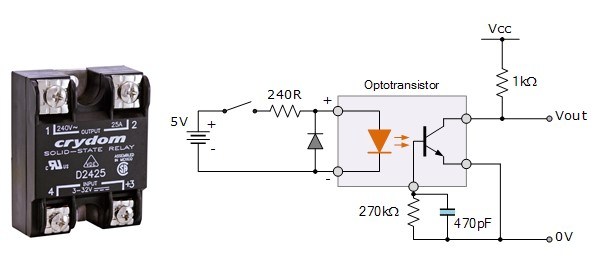
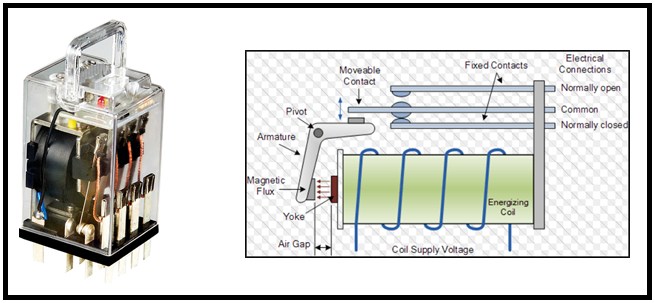
For my reading list: [WayBack] Solid State vs. Electromechanical Relays | Arrow.com

When you need a power switching solution, you are faced with two competing technologies – electromechanical relays and solid state relays. So which is the right choice for your design?

Keywords: SSR versus EMR, SPDT

via:

–jeroen

Posted in Development, Hardware, Hardware Development, Power User | Leave a Comment »

Supreme / Pearl Drums – Animal | Soundslice

Posted by jpluimers on 2019/06/27

[WayBack] Supreme / Pearl Drums – Animal | Soundslice. Found based on a low-quality video in a private FB channel.

This one is much better (:

–jeroen

Posted in Fun, LifeHacker, Music | Leave a Comment »

Enable remote desktop on Windows – SystemPropertiesRemote.exe

Posted by jpluimers on 2019/06/24

The easiest way to enable remote desktop access on Windows is by running SystemPropertiesRemote.exe.

There are alternatives using the command prompt that edit registry settings and network firewall in the links below, but they are all more cumbersome.

Links mostly via enable remote desktop on windows – Google Search

I need to check out:

  • which of the above are really old
  • how to find out if WinRM is enabled
  • see if this can be done over WinRM
  • see if this can be done with PSShell
  • see if PowerShell is a good successor to the now deprecated netsh
    • you want to enable the remote desktop group in a language and windows version neutral way, not just port 3389

Some registry entries:

[HKEY_LOCAL_MACHINE\SYSTEM\ControlSet001\Services\SharedAccess\Parameters\FirewallPolicy\FirewallRules]

[HKEY_LOCAL_MACHINE\SYSTEM\CurrentControlSet\Services\SharedAccess\Parameters\FirewallPolicy\FirewallRules]

"RemoteDesktop-UserMode-In-TCP"="v2.28|Action=Allow|Active=TRUE|Dir=In|Protocol=6|LPort=3389|App=%SystemRoot%\\system32\\svchost.exe|Svc=termservice|Name=@FirewallAPI.dll,-28775|Desc=@FirewallAPI.dll,-28756|EmbedCtxt=@FirewallAPI.dll,-28752|"
"RemoteDesktop-UserMode-In-UDP"="v2.28|Action=Allow|Active=TRUE|Dir=In|Protocol=17|LPort=3389|App=%SystemRoot%\\system32\\svchost.exe|Svc=termservice|Name=@FirewallAPI.dll,-28776|Desc=@FirewallAPI.dll,-28777|EmbedCtxt=@FirewallAPI.dll,-28752|"
"RemoteDesktop-Shadow-In-TCP"="v2.28|Action=Allow|Active=TRUE|Dir=In|Protocol=6|App=%SystemRoot%\\system32\\RdpSa.exe|Name=@FirewallAPI.dll,-28778|Desc=@FirewallAPI.dll,-28779|EmbedCtxt=@FirewallAPI.dll,-28752|Edge=TRUE|Defer=App|"
"RemoteAssistance-In-TCP-EdgeScope"="v2.28|Action=Allow|Active=TRUE|Dir=In|Protocol=6|Profile=Public|App=%SystemRoot%\\system32\\msra.exe|Name=@FirewallAPI.dll,-33003|Desc=@FirewallAPI.dll,-33006|EmbedCtxt=@FirewallAPI.dll,-33002|Edge=TRUE|Defer=App|"
"RemoteAssistance-Out-TCP"="v2.28|Action=Allow|Active=TRUE|Dir=Out|Protocol=6|Profile=Public|App=%SystemRoot%\\system32\\msra.exe|Name=@FirewallAPI.dll,-33007|Desc=@FirewallAPI.dll,-33010|EmbedCtxt=@FirewallAPI.dll,-33002|"
"RemoteAssistance-PnrpSvc-UDP-In-EdgeScope"="v2.28|Action=Allow|Active=TRUE|Dir=In|Protocol=17|Profile=Public|LPort=3540|App=%systemroot%\\system32\\svchost.exe|Svc=pnrpsvc|Name=@FirewallAPI.dll,-33039|Desc=@FirewallAPI.dll,-33040|EmbedCtxt=@FirewallAPI.dll,-33002|Edge=TRUE|Defer=App|"
"RemoteAssistance-PnrpSvc-UDP-OUT"="v2.28|Action=Allow|Active=TRUE|Dir=Out|Protocol=17|Profile=Public|App=%systemroot%\\system32\\svchost.exe|Svc=pnrpsvc|Name=@FirewallAPI.dll,-33037|Desc=@FirewallAPI.dll,-33038|EmbedCtxt=@FirewallAPI.dll,-33002|"

–jeroen

Posted in Power User, Windows | Leave a Comment »

How to take a nap

Posted by jpluimers on 2019/06/24

When the Coen brothers were asked about their creative process, Joel Coen said, “We do a lot of napping.” Maurice Sendak: “I love napping. Working and reading…”

Source on the how and why: [WayBack] How to take a nap

Via: [WayBack] Want to increase your creativity and productivity? Take a nap! Here’s how… – Marjan Venema – Google+

–jeroen

Posted in LifeHacker, Power User | Leave a Comment »