The Wiert Corner – irregular stream of stuff

Jeroen W. Pluimers on .NET, C#, Delphi, databases, and personal interests

  • My badges

  • Twitter Updates

  • Pages

  • All categories

  • Enter your email address to subscribe to this blog and receive notifications of new posts by email.

    Join 1,854 other subscribers

Archive for the ‘Power User’ Category

Flickr Free is limited to 1000 foto’s and will start deleting old photos in half a year…

Posted by jpluimers on 2019/05/04

A reminder to myself: about half a year ago, [WayBack] Flickr announces changes From http://flickr.com/lookingahead we note the following: Free accounts will soon be limited to 1,000 photos or videos. Flick… – Jeff Diver – Google+

Free members with more than 1,000 photos or videos uploaded to Flickr will no longer be able to upload new content after Tuesday, January 8, 2019 unless they upgrade to Pro. After February 5, 2019, free accounts that contain over 1,000 photos or videos will have content deleted — starting from oldest to newest date uploaded — to meet the new limit. Members may always choose to download content over the limit at any time prior to these dates.

I had been a Flickr Pro subscriber for a long time, but the social interactions where mweh, and I had far less storage than the free tier anyway, so I let the Pro expire.

With about 33k photos, I seem to have no other options than to:

  • download everything, and find a new place, including all meta-information
  • go pro

Time to make a decision in a month or so…

–jeroen

Posted in Flickr, Power User, SocialMedia | Leave a Comment »

Do not blur, but do randomly add noise or move pixels – Censoring image in GIMP – Graphic Design Stack Exchange

Posted by jpluimers on 2019/05/03

Blurring is like a hash function: it cannot be undone, but with enough plain text to blur examples, you can reconstruct the plain text: [WayBack] Why blurring sensitive information is a bad idea | dheera.net | Dheera Venkatraman’s web site

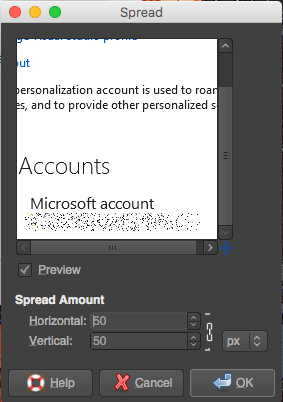
As an alternative, randomly add noise or move pixels. I used  [WayBack] Censoring image in GIMP – Graphic Design Stack Exchange. For the example on the right, I used “Filters → Noise → Spread” from the Stack Exchange answer.

With enough randomness, it is much harder to construct plain/hash combinations.

–jeroen

Posted in Image Editing, LifeHacker, Power User, Security, The Gimp | Leave a Comment »

Cleaning SILVER WITHOUT losing the Ag!

Posted by jpluimers on 2019/05/03

Interesting trick explained at [WayBackCleaning SILVER WITHOUT losing the Ag! which works very quickly as you can see in the below video.

What happens is that you transform Silver-Sulfide plus Aluminium into Silver plus Aluminium-Sulfide.

After that, the [WayBackAluminium-Sulfide reacts with water and transforms into Aluminium-Hydroxide and Hydrogen-Sulfide. The latter smells like rotten eggs, so better do this in a well ventilated area.

–jeroen

Posted in LifeHacker, Power User | Leave a Comment »

My LSI adapters and ESXi 6.5

Posted by jpluimers on 2019/05/03

So I won’t forget:

Direct download links in September 2017:

[WayBack] How to upgrade LSI MegaRaid SAS controller firmware using FreeDOS – Teksupport.in

Notes:

LSI provider install (SIM-S, SIMS, CIM, WEBM):

  1. Download the latest version (at the time of writing VMW-ESX-5.5.0-lsiprovider-500.04.V0.66-0002-5751577.zip)
  2. Unzip into /tmp
  3. esxcli software vib install -f -v /tmp/vmware-esx-provider-lsiprovider.vib
  4. wait for the VIB install to complete
  5. suspend or shutdown all VMs
  6. reboot the ESXi machine
  7. esxcli system wbem set --enable true
  8. Browse to https://192.168.71.91/ui/#/host/monitor/hardware/storage to see if SIM-S is working

MegaRAID Storage Manager (MSM) operation notes

A few tricky things to get right:

  • waiting: MSM is unbelievably slow (starting on SSD takes 10 seconds; discovery 30; connecting to host 60 – without any indication something is happening; fetching host data another 60;
  • old MSM versions are unstable (especially 14.x and lower), so keep current
  • ensure the hosts file on both the ESXi and Windows side match (otherwise it won’t discover anything, or discover as 0.0.0.0)
  • enable promiscuous mode on your vSwitch
  • if all else fails, disable any firewalls then enable bit by bit to see where it went wrong

Great installation steps:

MegaCLI installs

  1. Download the latest version that has VMware support (at the time of writing 8-07-07_MegaCLI.zip)
  2. Unzip into /tmp
  3. esxcli software vib install -f -v /tmp/VmwareMN/vmware-esx-MegaCli-8.07.07.vib
  4. wait for the VIB install to complete

Now you can the command /opt/lsi/MegaCLI/MegaCli (yes the casing of these two is different!) but you must to it in that directory, or ensure the LD_LIBARY_PATH contains /opt/lsi/MegaCLI.

StorCLI installs

Based on [WayBackStorCLI unter VMware vSphere installieren – Thomas-Krenn-Wiki

  1. Download the latest version that has VMware support (at the time of writing 1.23.02_StorCLI.zip)
  2. Recursively uncompress the ZIP file into /tmp**
  3. esxcli software vib install -f -v /tmp/storcli_All_OS/Vmware-OP/vmware-esx-storcli-1.23.02.vib
  4. wait for the VIB install to complete

Now you can the command /opt/lsi/storcli/storcli but you must to it in that directory, or ensure the LD_LIBARY_PATH contains /opt/lsi/storcli.

Example:

execute-storcli.sh /cALL show all | grep 'Controller = \|Model = \|Serial Number = \|Firmware'a

The vib file in "Vmware-NDS/" folder works with native driver.
The vib file in "Vmware-MN/" folder works with VMKlinux driver.

So I did a bit more searching based on the files in the VMware directories and came up with this list:

  • storcli_All_OS/Vmware/storcli.zip
    • Looks like it targets ESXi 3.x and older
  • storcli_All_OS/Vmware-MN/vmware-esx-storcli-1.23.02.vib wit  storcli_All_OS/Vmware-MN/VMWARE_MN_Readme.txt
    • Targets the vmklinux drivers that are being phased out with ESXi 5.5 and up
  • storcli_All_OS/Vmware-OP/vmware-esx-storcli-1.23.02.vib with storcli_All_OS/Vmware-OP/VMWARE_MN_NDS_Readme.txt
    • Targets the New Driver architecture introduced with ESXi 5.5 and used more and more since then

Background reading:

** unzip doesn’t work:

# unzip -d /tmp/ 1.23.02_StorCLI.zip
Archive: 1.23.02_StorCLI.zip
inflating: 1.23.02_StorCLI.txt
unzip: short read

But a combination of 7za and unzip does work:

# 7za x -o/tmp/ 1.23.02_StorCLI.zip
7-Zip (a) [32] 16.02 : Copyright (c) 1999-2016 Igor Pavlov : 2016-05-21
p7zip Version 16.02 (locale=en_US.UTF-8,Utf16=on,HugeFiles=on,32 bits,20 CPUs Intel(R) Xeon(R) CPU E5-2630L v4 @ 1.80GHz (406F1),ASM,AES-NI)

Scanning the drive for archives:
1 file, 48778476 bytes (47 MiB)

Extracting archive: 1.23.02_StorCLI.zip
--
Path = 1.23.02_StorCLI.zip
Type = zip
Physical Size = 48778476

Everything is Ok

Files: 2
Size: 48928561
Compressed: 48778476

# unzip -d /tmp/ /tmp/storcli_All_OS.zip 
Archive:  /tmp/storcli_All_OS.zip
   creating: storcli_All_OS/
   creating: storcli_All_OS/EFI/
  inflating: storcli_All_OS/EFI/license.txt
   creating: storcli_All_OS/EFI/UDK/
  inflating: storcli_All_OS/EFI/UDK/license.txt
  inflating: storcli_All_OS/EFI/UDK/storcli.efi
   creating: storcli_All_OS/FreeBSD/
  inflating: storcli_All_OS/FreeBSD/FreeBSD_readme.txt
  inflating: storcli_All_OS/FreeBSD/license.txt
  inflating: storcli_All_OS/FreeBSD/storcli.tar
  inflating: storcli_All_OS/FreeBSD/storcli64.tar
   creating: storcli_All_OS/Linux/
  inflating: storcli_All_OS/Linux/license.txt
  inflating: storcli_All_OS/Linux/LINUX_Readme.txt
  inflating: storcli_All_OS/Linux/storcli-1.23.02-1.noarch.rpm
   creating: storcli_All_OS/Linux-OEL-Sparc/
  inflating: storcli_All_OS/Linux-OEL-Sparc/license_OELSparc.txt
  inflating: storcli_All_OS/Linux-OEL-Sparc/storcli64-1.23.02-1.sparc64.rpm
   creating: storcli_All_OS/Linux-ppc/
   creating: storcli_All_OS/Linux-ppc/Big Endian/
  inflating: storcli_All_OS/Linux-ppc/Big Endian/license.txt
  inflating: storcli_All_OS/Linux-ppc/Big Endian/storcli.tar
   creating: storcli_All_OS/Linux-ppc/Little Endian/
  inflating: storcli_All_OS/Linux-ppc/Little Endian/license.txt
  inflating: storcli_All_OS/Linux-ppc/Little Endian/Readme.txt
  inflating: storcli_All_OS/Linux-ppc/Little Endian/storcli64_1.23.02_ppc64el.deb
   creating: storcli_All_OS/Solaris/
  inflating: storcli_All_OS/Solaris/license.txt
  inflating: storcli_All_OS/Solaris/SOLARIS_Readme.txt
  inflating: storcli_All_OS/Solaris/storcli.pkg
   creating: storcli_All_OS/Solaris Sparc/
  inflating: storcli_All_OS/Solaris Sparc/license.txt
  inflating: storcli_All_OS/Solaris Sparc/storcli.pkg
   creating: storcli_All_OS/Ubuntu/
  inflating: storcli_All_OS/Ubuntu/read_me.txt
  inflating: storcli_All_OS/Ubuntu/storcli_1.23.02_all.deb
   creating: storcli_All_OS/Vmware/
  inflating: storcli_All_OS/Vmware/license.txt
   creating: storcli_All_OS/Vmware/Linux/
  inflating: storcli_All_OS/Vmware/Linux/storcliKL-1.23.02-1.noarch.rpm
  inflating: storcli_All_OS/Vmware/Rel_read_me.txt.txt
  inflating: storcli_All_OS/Vmware/storcli.zip
   creating: storcli_All_OS/Vmware/Windows/
  inflating: storcli_All_OS/Vmware/Windows/StorCLIKL.zip
   creating: storcli_All_OS/Vmware-MN/
  inflating: storcli_All_OS/Vmware-MN/license.txt
  inflating: storcli_All_OS/Vmware-MN/vmware-esx-storcli-1.23.02.vib
  inflating: storcli_All_OS/Vmware-MN/VMWARE_MN_Readme.txt
   creating: storcli_All_OS/Vmware-OP/
  inflating: storcli_All_OS/Vmware-OP/license.txt
  inflating: storcli_All_OS/Vmware-OP/vmware-esx-storcli-1.23.02.vib
  inflating: storcli_All_OS/Vmware-OP/VMWARE_MN_NDS_Readme.txt
   creating: storcli_All_OS/Windows/
  inflating: storcli_All_OS/Windows/license.txt
  inflating: storcli_All_OS/Windows/storcli.exe
  inflating: storcli_All_OS/Windows/storcli64.exe
  inflating: storcli_All_OS/Windows/WIN_ReadMe.txt

9260-8i firmware update

  1. Download the latest firmware (at the time of writing 12.15.0-0239_MR_2108_SAS_FW_2.130.403-4660.zip) into /tmp
  2. unzip -d /tmp/ /tmp/12.15.0-0239_MR_2108_SAS_FW_2.130.403-4660.zip
  3. Find out the controller number
  4. Where 0 is the controller number, execute/opt/lsi/storcli/storcli /c0 download file=/tmp/mr2108fw.rom
  5. Wait for the firmware update to complete
  6. Suspend or shutdown all VMs
  7. Reboot

–jeroen

Posted in ESXi6.5, Power User, Virtualization, VMware, VMware ESXi | 2 Comments »

Show SCSI / HBA modules in ESXi 6.5 with file and version information

Posted by jpluimers on 2019/05/02

A small script I made: Show SCSI / HBA modules in ESXi 6.5 with file and version information:

MODULES=`esxcfg-scsidevs --hbas | awk 'FNR > 0 {print $2}'`
for MODULE in $MODULES ; do
    # echo "Probing $MODULE"
    vmkload_mod --showinfo $MODULE | grep 'file: \|Version'
done

The script is based on ideas from [WayBackDetermining Network/Storage firmware and driver version in ESXi 4.x and later (1027206) | VMware KB

It works in at least ESXi 6.5 where it shows this on one of my systems:

 input file: /usr/lib/vmware/vmkmod/lsi_msgpt3
 Version: 12.00.02.00-11vmw.650.0.0.4564106
 input file: /usr/lib/vmware/vmkmod/vmw_ahci
 Version: 1.0.0-39vmw.650.1.26.5969303
 input file: /usr/lib/vmware/vmkmod/vmw_ahci
 Version: 1.0.0-39vmw.650.1.26.5969303
 input file: /usr/lib/vmware/vmkmod/vmw_ahci
 Version: 1.0.0-39vmw.650.1.26.5969303
 input file: /usr/lib/vmware/vmkmod/lsi_mr3
 Version: 6.910.18.00-1vmw.650.0.0.4564106
 input file: /usr/lib/vmware/vmkmod/megaraid_sas
 Version: Version 6.603.55.00.2vmw, Build: 4564106, Interface: 9.2 Built on: Oct 26 2016
 input file: /usr/lib/vmware/vmkmod/vmkusb
 Version: 0.1-1vmw.650.1.26.5969303

–jeroen

Read the rest of this entry »

Posted in bash, Development, ESXi6.5, Power User, Scripting, Software Development, Virtualization, VMware, VMware ESXi | Leave a Comment »

bash – aliasing cd to pushd – is it a good idea? – Unix & Linux Stack Exchange

Posted by jpluimers on 2019/04/30

On my research list: [WayBackbash – aliasing cd to pushd – is it a good idea? – Unix & Linux Stack Exchange

It has a nice discussion on complements to pushd/popd/cd/dirs including a very nice set of navd scripts that eases the navigation of the directory stack.

I found it because the ESXi busybox does not have pushd and popd and a cd won’t work from inside a shell script: [WayBacklinux – Why doesn’t “cd” work in a bash shell script? – Stack Overflow

It also made me find out that the ESXi busybox does support cd - to go to the previous directory. More info on that cd syntax is at [WayBack] bash – Difference between “cd -” and “cd ~-” – Unix & Linux Stack Exchange

–jeroen

Posted in *nix, bash, Development, ESXi5, ESXi5.1, ESXi5.5, ESXi6, ESXi6.5, Power User, Scripting, Software Development, Virtualization, VMware, VMware ESXi | Leave a Comment »

osx lion – osx change printer ip address without adding new printer – Super User

Posted by jpluimers on 2019/04/29

From [WayBack] osx lion – osx change printer ip address without adding new printer – Super User:

Q

Is there a way to change a printer’s IP address in OSX (Lion) without having to add a new printer? I did find Printer IP Remedy, but was curious if there was an ‘official’ method.

A

You can do this in the CUPS web interface with the following steps:

  1. Open Terminal.app and run cupsctl WebInterface=yes. This enables the CUPS web interface
  2. Open http://127.0.0.1:631/printers in your web browser
  3. Click on the printer you want to change. From the “Administration” drop down, select “Modify Printer”.
  4. Log in with your local admin account
  5. Select the new printer IP either from “Discovered Network Printers” or add it manually with “Other Network Printers”. Make sure that you keep the same connection protocol as it says in “Current Connection” (for me, this was LPD).

Once you’re done with this, Mac OS X will directly print to the new IP address. There is no need to reboot or so. If you want to disable the CUPS web interface again, run cupsctl WebInterface=no.

The CUPS solution works splendid in MacOS as well, so there was no need for [Archive.is] Printer IP Remedy 1.3 free download for Mac | MacUpdate.

Without the CUPS web interface enabled, the web-interface at http://127.0.0.1:631/printers looks like this:

Web Interface is Disabled

The web interface is currently disabled. Run “cupsctl WebInterface=yes” to enable it.

After enabling it like the CUPS web interface wit cupsctl WebInterface=yes, you can see I have the same printer configured multiple times with different communication protocols and output languages:

Printers

Search in Printers:

Showing 6 of 6 printers.

Queue Name Description Location Make and Model Status
OKI_MC342_36855D OKI-MC342-PSO-36855D Office MC342-AirPrint Idle
OKI_MC342_36855D_PCL OKI-MC342-36855D PCL 1060NP-Office Generic PCL Laser Printer Idle
OKI_MC342_IPP OKI-MC342-IPP Office Generic PostScript Printer Idle
OKI_MC342_LPR OKI-MC342-LPR Office Generic PostScript Printer Idle

The first two printers were mapped by DNS, but the last two were mapped by IP address.

Changing the IP address was simple:

  1. Click on each link
  2. Select “Modify printer”
  3. Authenticate (only needed for the first printer change)
  4. For IPP: note the current address (like ipp://192.168.71.52/), then
    1. Choose “Internet Printing Protocol (ipp) “
    2. Click “Continue”
    3. Enter the correct ipp://…./ address (help is at http://127.0.0.1:631/help/network.html or http://127.0.0.1:631/help/network.html?PRINTABLE=YES)
    4. Click “Continue”
    5. Check the modifications (optionally change Description/Location)
    6. Click “Continue”
    7. Keep the driver
    8. Click “Modify printer”
  5. For LPD, note the current address (like lpd://192.168.71.52/), then follow the IPP steps, but choose “LPD/LPR Host or Printer” and enter a valid lpd address.

This is also the place where you can change “Default options”, like paper size (which – for all but the first – somehow defaulted to US Letter 11 inch, while it is actually filled with A4 paper).

At the end, disable the web interface: cupsctl WebInterface=no.

Related:

–jeroen

Read the rest of this entry »

Posted in *nix, *nix-tools, Apple, iMac, Mac, MacBook, MacBook Retina, MacBook-Air, MacBook-Pro, MacMini, macOS 10.12 Sierra, macOS 10.13 High Sierra, Power User | Leave a Comment »

LSI 9260-8i: all disks are “Unconfigured bad”

Posted by jpluimers on 2019/04/29

This is the second time in about 6 years that somehow after an ESXi reboot all of the drives on an LSI 9260-8i controller got into the state “Unconfigured bad”.

The trick to solve this is to:

  1. go into the WebBIOS of the LSI card
  2. mark all drives as “Unconfigured good”
  3. rescan for devices
  4. import the existing configuration
  5. reboot

More in depth steps with images:

–jeroen

Posted in LSI/3ware, Power User, RAID | Leave a Comment »

lamw/ghettoVCB: ghettoVCB

Posted by jpluimers on 2019/04/29

I found out that I had some very old draft notes below, but since then the source has moved to github: lamw/ghettoVCB: ghettoVCB.

Since I find VIB easier to use than the Offline Bundle (for differences see [WayBackVIB vs. Offline Bundle and [WayBack] VMware Front Experience: ESXi Community Packaging Tools) these are the VIB steps to get it installed:

  1. Download https://github.com/lamw/ghettoVCB/raw/master/vghetto-ghettoVCB.vib
  2. Put it in the /tmp directory on your ESXi box (using for instance FileZilla, WinSCP, SCP or other tools)
  3. Install it using esxcli software vib install -v /tmp/vghetto-ghettoVCB.vib -f

Then use it to make backups or restores as described at:

Note that contrary to the documentation, the config file has moved to /etc/ghettovcb/ghettoVCB.conf.

Because of Keeping your root visorfs clean: point the path to your own binaries stored on a vmfs volume I’m using a copy of that stored in my local-bin directory (which is backed-up by rsync to another disk) and a small ghettoVcb.sh bootstrap script referencing that config-file, so the backup command for one command now is this:

ghettoVcb.sh -m diaspore.opensuse-Tumbleweed-x64

or this for all VMs (about 2 hours from NVME SSD to HDD; will probably make this a 2 stage thing):

ghettoVcb.sh -a

VMs are backed-up under the directory specified in VM_BACKUP_VOLUME(below that’s ./) in a schema like this:

./diaspore.opensuse-Tumbleweed-x64
./diaspore.opensuse-Tumbleweed-x64/diaspore.opensuse-Tumbleweed-x64-2017-09-24_16-07-08
./diaspore.opensuse-Tumbleweed-x64/diaspore.opensuse-Tumbleweed-x64-2017-09-24_16-07-08/diaspore.opensuse-Tumbleweed-x64.vmx
./diaspore.opensuse-Tumbleweed-x64/diaspore.opensuse-Tumbleweed-x64-2017-09-24_16-07-08/diaspore.opensuse-Tumbleweed-x64-flat.vmdk
./diaspore.opensuse-Tumbleweed-x64/diaspore.opensuse-Tumbleweed-x64-2017-09-24_16-07-08/diaspore.opensuse-Tumbleweed-x64.vmdk
./diaspore.opensuse-Tumbleweed-x64/diaspore.opensuse-Tumbleweed-x64-2017-09-24_16-07-08/STATUS.ok

In the future, I might move to an NFS based back-up based on these links:

–jeroen

Very old notes:


–jeroen

Posted in ESXi4, ESXi5, ESXi5.1, ESXi5.5, ESXi6, ESXi6.5, Power User, Virtualization, VMware, VMware ESXi | Leave a Comment »

BBC Radio 2 – Ken Bruce, Mark Knopfler performs live, Mark Knopfler performs live in the Radio 2 Piano Room

Posted by jpluimers on 2019/04/29

Missed this during the hectic last years, but bumped into it by accident: [WayBack] BBC Radio 2 – Ken Bruce, Mark Knopfler performs live, Mark Knopfler performs live in the Radio 2 Piano Room.

Tracks performed: Romeo & Juliet, Good On You Son and The Boxer

as part of [WayBack] BBC Radio 2 – Ken Bruce, Mark Knopfler performs live

Mark Knopfler, the singer-songwriter, guitarist, producer and the lead singer of Dire Straits performs live in the Radio 2 Piano Room. Mark is about to release his 9th solo studio album ‘Down The Road Wherever’ which features 14 new songs written by Mark. The album has been inspired by a wide range of subjects, including his early days in Deptford with Dire Straits, a stray football fan lost in a strange town, the compulsion of a musician hitching home through the snow, and a man out of time in his local greasy spoon. In addition to producing his own records Mark has also produced albums for Bob Dylan and Randy Newman. The multi Grammy award winning artist has also composed film scores, been inducted into the Rock and Roll Hall of Fame and is considered one of the greatest guitarists of all time.

I also missed the “new” 2018 studio album Down the Road Wherever – Wikipedia:

Via [WayBack] Mark Knopfler Performs ‘Romeo & Juliet’ For BBC:

Guitarist Mark Knopfler led a stripped-down rendition of Dire Straits classic “Romeo And Juliet” for the BBC. Video of the stirring performance is now available.

–jeroen

Read the rest of this entry »

Posted in About, LifeHacker, Music, Personal, Power User | Leave a Comment »