


The trick is to use the choice command; see [WayBack] if statement – How to ask for batch file user input with a timeout – Stack Overflow
–jeroen
Posted by jpluimers on 2019/05/14
The trick is to use the choice command; see [WayBack] if statement – How to ask for batch file user input with a timeout – Stack Overflow
–jeroen

Posted in Batch-Files, Development, Microsoft Surface on Windows 7, Power User, Scripting, Software Development, Windows, Windows 10, Windows 7, Windows 8, Windows 8.1, Windows 9, Windows Server 2000, Windows Server 2003, Windows Server 2003 R2, Windows Server 2008, Windows Server 2008 R2, Windows Server 2012, Windows Server 2012 R2, Windows Server 2016, Windows Vista, Windows XP | Leave a Comment »
Posted by jpluimers on 2019/05/13
[WayBack] Where is the Chrome settings file? – Super User, on various platforms as a folder named Default under:
In Windows:
%LocalAppData%\Google\Chrome\User Data\
In OS X:~/Library/Application Support/Google/Chrome/
In Linux:~/.config/google-chrome/
The easiest way to find out the actual location is by browsing to chrome://version/ as per [WayBack] google chrome – Disabling “Sign In ” tab on startup – Super User. There the entry Profile Path will show the actual profile location.
Inside that path is a JSON file called preferences which you can edit if Chrome is closed (since Chrome will overwrite it regularly when active).
A few entries I saw are interesting:
    "session": {
      "restore_on_startup": 1
    },
    "exit_type": "Crashed",
    "exited_cleanly": true,
    "exit_type": "Normal",
    "exited_cleanly": true,
A trick to restore the session after you quite Chrome is to replace "exited_cleanly":true with "exited_cleanly":false in the Preferences file.
–jeroen
Posted in Chrome, Google, Power User | Leave a Comment »
Posted by jpluimers on 2019/05/13
Dozens of variations with links to youtube videos by Alex Krasny on how to tie them: [WayBack] Fashion – AGREEorDIE: How to tie a necktie not
–jeroen
Posted in LifeHacker, Power User | Leave a Comment »
Posted by jpluimers on 2019/05/13
Based on [WayBack] command line – How to access a usb flash drive from the terminal? – Ask Ubuntu
Figure out the device:
lsblksudo blkidsudo fdisk -lMount the device (assuming it is /dev/sdb1):
sudo mount /dev/sdb1 /media/usbpmount /dev/sdb1udisksctl mount -b /dev/sdb1Unmounting and eject is in [WayBack] Linux (Ubuntu): safely remove USB flash disk via command line – Stack Overflow
–jeroen
Posted in *nix, *nix-tools, Linux, Power User | Leave a Comment »
Posted by jpluimers on 2019/05/10
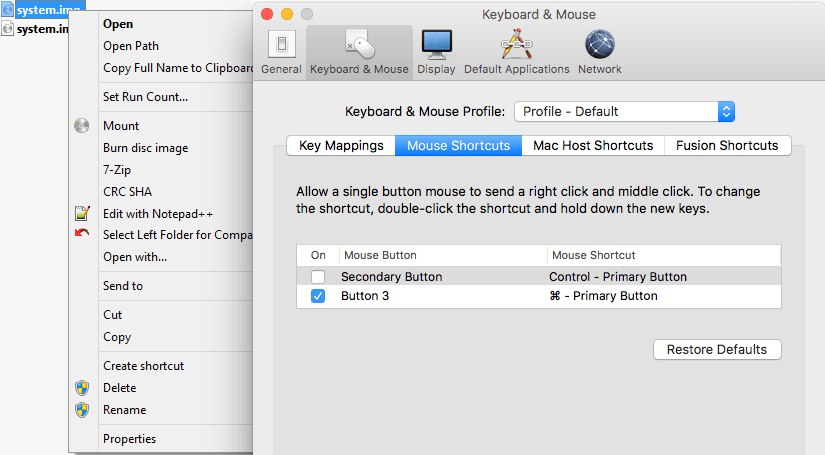
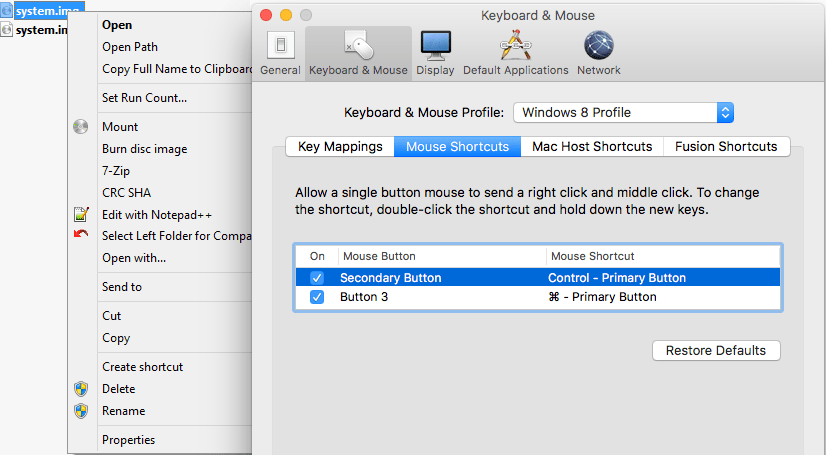
A while ago, I was surprised that in a Windows VM running under VMware Fusion, the Ctrl-Click performed a right click, despite me having changed the configuration:
I was wrong, as I had forgotten I assigned the “Windows 8 Profile” tot hat VM (as it was running Windows 8.1), which had the Secondary Button still mapped to the Control+Primary Button:
Related:
Unlike OS X, most other operating systems require the use of multibutton mice. Most Mac users know you can ctrl-click to simulate a right click, and you can do that in Fusion as well. But what if you actually want to ctrl-click in the guest – say, to select multiple items in Explorer? In Fusion’s […]
–jeroen

Posted in Fusion, Power User, Virtualization, VMware, Windows | Leave a Comment »
Posted by jpluimers on 2019/05/10
Basically the boot delay during startup is so short that usually you cannot even choose the boot device.
Solution: edit the .vmx configuration file for the Virtual Machine, then change this value:
bios.bootDelay = "15000"
Source:
–jeroen
Posted in Fusion, Power User, Virtualization, VMware | Leave a Comment »
Posted by jpluimers on 2019/05/09
For my own ference:
disk space under VMFS-3 is organized according to four resource types. They are : blocks, sub-blocks, pointer blocks, and file descriptors. Resources are grouped into clusters, which form cluster groups. Every resource type is administered by one or a number of system files. Lets have a look at what those abbreviated file names stand for:
- fbb.sf = file block bitmap.sf
- fdc.sf = file descriptor cluster.sf
- pbc.sf = pointer block cluster.sf
- sbc.sf = sub-block cluster.sf
- vh.sf = volume header.sfs
- dd.sf = scsi device description.sf
The VMFS-5 uses one more system file:
- pb2.sf = pointer block 2.sf
Source: [Archive.is] VMFS metadata files
Posted in ESXi4, ESXi5, ESXi5.1, ESXi5.5, ESXi6, ESXi6.5, Power User, Virtualization, VMware, VMware ESXi | Leave a Comment »
Posted by jpluimers on 2019/05/07
Two posts with interesting commands to help digging through your hba/disk/datastore configurations from the console:
One day I will write a script that – per datastore – lists all the devices related to it including their HBA and LUN.
For that, I will likely need these references:
For now this works:
Device Name column has the NAA_ID you need below):esxcli storage vmfs extent listHBA, Channel, Target and LUN:esxcli storage core path list --device NAA_IDesxcli storage core adapter listModel and Revision):esxcli storage core device list --device NAA_IDThe example below (with most important output bolded) shows a drive connected to a SAS3008 based controller which storcli cannot access (nor MegaCli), but MegaRAID Storage Manager (MSM) can.
MSM allowed me to find the serial number of the drive by the Target Transport Details value 4433221106000000 as being on Slot number 6 (which seems to indicate Target numbers are 1-based whereas LUN is 0-based).
# esxcli storage vmfs extent list
Volume Name                     VMFS UUID                            Extent Number  Device Name                                                                 Partition
------------------------------  -----------------------------------  -------------  --------------------------------------------------------------------------  ---------
...
ST6000VX0001-1SH                59a33f7b-66df7c00-11b0-0cc47aaa9742              0  naa.5000c50087762d1b                                                                1
# esxcli storage core path list -d naa.5000c50087762d1b
sas.500304801ce1d700-sas.4433221106000000-naa.5000c50087762d1b
   UID: sas.500304801ce1d700-sas.4433221106000000-naa.5000c50087762d1b
   Runtime Name: vmhba0:C0:T7:L0
   Device: naa.5000c50087762d1b
   Device Display Name: Local ATA Disk (naa.5000c50087762d1b)
   Adapter: vmhba0
   Channel: 0
   Target: 7
   LUN: 0
   Plugin: NMP
   State: active
   Transport: sas
   Adapter Identifier: sas.500304801ce1d700
   Target Identifier: sas.4433221106000000
   Adapter Transport Details: 500304801ce1d700
   Target Transport Details: 4433221106000000
   Maximum IO Size: 4194304
# esxcli storage core adapter list
HBA Name  Driver        Link State  UID                   Capabilities  Description
--------  ------------  ----------  --------------------  ------------  ----------------------------------------------------------------------
vmhba0    lsi_msgpt3    link-n/a    sas.500304801ce1d700                (0000:01:00.0) Avago (LSI Logic) Fusion-MPT 12GSAS SAS3008 PCI-Express
...
vmhba32   vmkusb        link-n/a    usb.vmhba32                         () USB
# esxcli storage core device list --device naa.5000c50087762d1b
naa.5000c50087762d1b
   Display Name: Local ATA Disk (naa.5000c50087762d1b)
   Has Settable Display Name: true
   Size: 5723166
   Device Type: Direct-Access
   Multipath Plugin: NMP
   Devfs Path: /vmfs/devices/disks/naa.5000c50087762d1b
   Vendor: ATA
   Model: ST6000VX0001-1SH
   Revision: VN02
   SCSI Level: 6
   Is Pseudo: false
   Status: on
   Is RDM Capable: true
   Is Local: true
   Is Removable: false
   Is SSD: false
   Is VVOL PE: false
   Is Offline: false
   Is Perennially Reserved: false
   Queue Full Sample Size: 0
   Queue Full Threshold: 0
   Thin Provisioning Status: unknown
   Attached Filters:
   VAAI Status: unsupported
   Other UIDs: vml.02000000005000c50087762d1b535436303030
   Is Shared Clusterwide: false
   Is Local SAS Device: true
   Is SAS: true
   Is USB: false
   Is Boot USB Device: false
   Is Boot Device: false
   Device Max Queue Depth: 32
   No of outstanding IOs with competing worlds: 32
   Drive Type: physical
   RAID Level: NA
   Number of Physical Drives: 1
   Protection Enabled: false
   PI Activated: false
   PI Type: 0
   PI Protection Mask: NO PROTECTION
   Supported Guard Types: NO GUARD SUPPORT
   DIX Enabled: false
   DIX Guard Type: NO GUARD SUPPORT
   Emulated DIX/DIF Enabled: false
–jeroen
Posted in ESXi5, ESXi5.1, ESXi5.5, ESXi6, ESXi6.5, Power User, Virtualization, VMware, VMware ESXi | Leave a Comment »
Posted by jpluimers on 2019/05/06
On my research list:
Borg
Deduplicating archiver
with compression and encryptionBorgBackup (short: Borg) gives you:
- Space efficient storage of backups.
- Secure, authenticated encryption.
- Compression: LZ4, zlib, LZMA.
- Mountable backups with FUSE.
- Easy installation on multiple platforms: Linux, macOS, BSD, …
- Free software (BSD license).
- Backed by a large and active open source community.
Source: [WayBack] BorgBackup – Deduplicating archiver with compression and authenticated encryption
Repositories:
–jeroen
Posted in *nix, *nix-tools, Development, Power User, Software Development | Leave a Comment »
Posted by jpluimers on 2019/05/06
This is an interesting question at [WayBack] How can I lower the ESXI acceptance level when a forced install has been done? – Server Fault.
The default level on ESXi 6.5 is this:
# esxcli software acceptance get

PartnerSupported
Since I had ghettoVCB installed with the -f option, installing any PartnerSupported VIB would result in this error:
 [DependencyError]
 VIB virtuallyGhetto_bootbank_ghettoVCB_1.0.0-0.0.0 violates extensibility rule checks: ['(line 24: col 0) Element vib failed to validate content']
 VIB virtuallyGhetto_bootbank_ghettoVCB_1.0.0-0.0.0's acceptance level is community, which is not compliant with the ImageProfile acceptance level partner
 To change the host acceptance level, use the 'esxcli software acceptance set' command.
 Please refer to the log file for more details.
This fails:
# esxcli software acceptance set --level=CommunitySupported

[AcceptanceConfigError]

Unable to set acceptance level of community due to installed VIBs virtuallyGhetto_bootbank_ghettoVCB_1.0.0-0.0.0 having a lower acceptance level.

Please refer to the log file for more details.
The workaround is to uninstall virtuallyGhetto_bootbank_ghettoVCB_1.0.0-0.0.0, then install thePartnerSupportedVIB, then re-install ghettoVCB with the --force option or with lowered acceptance level:
esxcli software vib remove -n ghettoVCB/tmpcd /tmp && unzip /vmfs/volumes/Samsung512NVME/base/VIB/vghetto-ghettoVCB-offline-bundle.zipesxcli software vib install -v /tmp/vib20/ghettoVCB/virtuallyGhetto_bootbank_ghettoVCB_1.0.0-0.0.0.vib -f/tmp thenesxcli software vib install -v /tmp/vghetto-ghettoVCB.vib -a–jeroen
Posted in ESXi6.5, Power User, Virtualization, VMware, VMware ESXi | Leave a Comment »
 The Wiert Corner - irregular stream of stuff