The Wiert Corner – irregular stream of stuff

Jeroen W. Pluimers on .NET, C#, Delphi, databases, and personal interests

  • My badges

  • Twitter Updates

  • Pages

  • All categories

  • Enter your email address to subscribe to this blog and receive notifications of new posts by email.

    Join 1,854 other subscribers

Archive for the ‘Power User’ Category

Research list: machine sometimes not visible on LAN

Posted by jpluimers on 2019/04/08

When one of the machine isn’t active for a while it seems to disappear. Even when it’s active some of the machines have intermittent errors pinging it as like every 10-30 seconds one of these ping results appear:

92 bytes from tl-er5120 (192.168.71.1): Redirect Host(New addr: 192.168.71.193)
Vr HL TOS  Len   ID Flg  off TTL Pro  cks      Src      Dst
 4  5  00 0054 05de   0 0000  40  01 644d 192.168.71.108  192.168.71.193

Sometimes even a simple

Request timeout for icmp_seq 6900

So I need to dig into  ICMP “Redirect Host” .

It might be a simple ARP thing like mac mini – Why the different results for ping? Or why is the Time Capsule getting involved? – Ask Different [WayBack] but like usual stuff I bump into is of a more complex kind so I’ve archived at least these:

–jeroen

Posted in Internet, MikroTik, Power User, routers | Leave a Comment »

Ich brauch gerade mal Nachhilfe in uBlock Syntax. Wo kann man Beispiele lese…

Posted by jpluimers on 2019/04/08

For my link archive:

On uBlock, uMatrix, Personal Blocklist, Google Chrome Site Settings and others.

–jeroen

Posted in Chrome, Google, Power User | Leave a Comment »

How to activate ADB & Helium on OnePlus 2 on Mac – OnePlus Forums

Posted by jpluimers on 2019/04/05

The quoted link wasn’t in the end what I used to get my config from a OnePlus 2 to a OnePlus 5

How to activate ADB & Helium on OnePlus 2 on Mac – OnePlus Forums « The Wiert Corner – irregular stream of stuff.

This is what I had to do instead:

  1. On the OnePlus 2:
    1. Enable developer mode (see Android 4.2+: enable USB debug mode (Nexus 4, Nexus 7, etc) orA few OnePlus One CyanogenMod tips)
    2. Enable USB debugging
    3. Install the Helium Android App from play.google.com/store/apps/details?id=com.koushikdutta.backup
    4. Run Helium
    5. Wait for activation
  2. On my Mac:
    1. Install the Mac version of Helium from http://download.clockworkmod.com/carbon/carbon-mac.zip
    2. Run the Mac version of Helium from
    3. Connect the USB cable to the OnePlus 2
    4. Wait for the Mac version of Helium to have “enabled” Helium on the One Plus 2
    5. Quit the Mac version of Helium
    6. Install the Chrome version of Helium from https://chrome.google.com/webstore/detail/helium-backup/gpglbgbpeobllokpmeagpoagjbfknanl?authuser=1
    7. Run the Chrome version of Helium
    8. Wait for the Chrome version of Helium to complete the activation of Helium on the Ons Plus 2
  3. On the One Plus 2:
    1. Select the applications to backup
    2. Back up

Relevant links:

–jeroen

Posted in Android Devices, Helium, OnePlus Five, OnePlus Two, Power User | Leave a Comment »

Product Graveyard: Commemorating the most memorable dead products

Posted by jpluimers on 2019/04/05

Some of those past products you’d loved are now at [Archive.isProduct Graveyard: Commemorating the most memorable dead products

It lists alternatives too at the bottom of each obituary, which might help you find a replacement for tools you had a crush on.

From their featured products list, I miss these the most:

Starting in august 2017, I’m curious to see how long the site itself lasts…

–jeroen

via: [WayBack] Product GraveyardWhat an interesting site. Obituary notices for products that at one time may have been famous and widely used. You can even find a… – Lars Fosdal – Google+


Posted in History, Power User | Leave a Comment »

Google Local Guides Nederland after G+

Posted by jpluimers on 2019/04/02

For my information archive as G+ died:

From the (unarchived, but disappeared) Is er al iemand een slack kanaal gestart waar we als localguides heen kunnen?

Read the rest of this entry »

Posted in Google, GoogleMaps, Local Guides, Power User | Leave a Comment »

CV installaties optimaliseren en inregelen

Posted by jpluimers on 2019/04/01

Een aantal interessante linkjes:

–jeroen

Posted in LifeHacker, Power User | Leave a Comment »

debugging – Find what javascript changes the DOM? – Stack Overflow

Posted by jpluimers on 2019/04/01

I know I’m going to need this one day: [WayBackdebugging – Find what javascript changes the DOM? – Stack Overflow

Via: [WayBack] Javascript “Why”: Wenn ich eine fertig geladene Webseite sehe und wissen möchte, warum “dieses Element da” (Bild, Script, div) geladen worden ist, wie… – Kristian Köhntopp – Google+

–jeroen

Posted in Chrome, Development, JavaScript/ECMAScript, Power User, Scripting, Software Development, Web Browsers, Web Development | Leave a Comment »

Sending SMS from your PC using a web browser through your Android Phone

Posted by jpluimers on 2019/03/29

I have been a long-time PushBullet user, but I bumped into an alternative if you just want to send SMS from a PC using a web browser through your Android Phone.
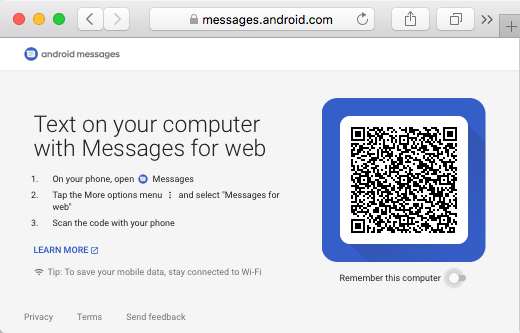
You will miss out all the other neat PushBullet features (like clipboard support), but it does work:

There is even a Mac warpper for it:

–jeroen

Posted in Android Devices, Power User | Leave a Comment »

ESXi 6.5: mount a datastore that does not automount; esxcfg-volume to the rescue

Posted by jpluimers on 2019/03/29

I had a 1.5 TB SATA disk with VMFS5 created on ESXi 5.1 that would not want to mount on ESXi 6.5 automatically, not even after a rescan, or fresh boot, so I did this:

[root@ESXi-X10SRH-CF:~] esxcfg-volume --help
esxcfg-volume
-l|--list                                List all volumes which have been
                                         detected as snapshots/replicas.
-m|--mount              Mount a snapshot/replica volume, if 
                                         its original copy is not online.
-u|--umount             Umount a snapshot/replica volume.
-r|--resignature        Resignature a snapshot/replica volume.
-M|--persistent-mount   Mount a snapshot/replica volume
                                         persistently, if its original copy is
                                         not online.
-U|--upgrade            Upgrade a VMFS3 volume to VMFS5.
-h|--help                                Show this message.
[root@ESXi-X10SRH-CF:~] esxcfg-volume --list
Scanning for VMFS-3/VMFS-5 host activity (512 bytes/HB, 2048 HBs).
VMFS UUID/label: 59a5306c-a8793061-4a23-001f29022aed/ST1500LM0032D9YH148-backup
Can mount: Yes
Can resignature: Yes
Extent name: naa.5000c5002dba6642:1 range: 0 - 1430527 (MB)

Scanning for VMFS-3/VMFS-5 host activity (512 bytes/HB, 2048 HBs).
VMFS UUID/label: 532cd010-6e8c01d1-45be-001f29022aed/Raid6SATA
Can mount: Yes
Can resignature: Yes
Extent name: naa.600605b00aa054a0ff000021022683ae:1 range: 0 - 1830143 (MB)

[root@ESXi-X10SRH-CF:~] esxcfg-volume -m 532cd010-6e8c01d1-45be-001f29022aed/Raid6SATA
No matching volume 532cd010-6e8c01d1-45be-001f29022aed/Raid6SATA found!
[root@ESXi-X10SRH-CF:~] esxcfg-volume --mount 532cd010-6e8c01d1-45be-001f29022aed
Mounting volume 532cd010-6e8c01d1-45be-001f29022aed

Based on: [WayBackMount VMFS Datastore – via GUI or via CLI [Guide] – ESX Virtualization

–jeroen

Posted in ESXi5.1, ESXi6.5, Power User, Virtualization, VMware, VMware ESXi | Leave a Comment »

ssh from Mac OS X to ESXi: “WARNING: terminal is not fully functional”

Posted by jpluimers on 2019/03/29

When connecting from my Mac to my ESXi rig, some commands (especially less) show this output:

WARNING: terminal is not fully functional

So I created this alias to connect from my Mac to the internal address of my ESXi rig:

alias ssh-esxi-X10SRH-CF-internal='TERM=xterm ssh -p 22 root@192.168.71.91'

The trick is the bold part: TERM=xterm (which you can also replace by export TERM=xterm; if you want future ssh sessions to use the same [wayback] TERM setting).

The reason is that the Mac defines the TERM variable as containing xterm-256 which is defined on the Mac itself, but ESXi has a hard time coping with it.

Some Mac OS and Xcode combinations had a problem with xterm-256 not being present ([WayBackmacos – Terminal strangeness after installing Xcode on Lion – Super User), but this isn’t the case on my system:

$ ls -alh `find /usr/share/terminfo | grep 'xterm-256color'`
-rw-r--r-- 1 root wheel 3.2K Jul 30 2016 /usr/share/terminfo/78/xterm-256color

On the Mac you really want to use xterm-256color as it looks way better than xterm-color or xterm: [WayBacklinux – What is the difference between xterm-color & xterm-256color? – Stack Overflow (thanks [WayBack] Chris Page!)

It seems I already did something similar on ESXi itself to get esxtop working: ESXi: when esxtop shows garbage. That was on the ESXi side and works as well for this problem too.

However, it is a bit harder to have a script run during ESXi boot time that sets this, so it is easier to fix this on the Mac side.

It works for all OS X and ESXi versions I’ve tested so far.

–jeroen

Posted in *nix, Apple, ESXi5.1, ESXi5.5, ESXi6, ESXi6.5, iMac, Mac, Mac OS X / OS X / MacOS, Mac OS X 10.4 Tiger, Mac OS X 10.5 Leopard, Mac OS X 10.6 Snow Leopard, Mac OS X 10.7 Lion, MacBook, MacBook Retina, MacBook-Air, MacBook-Pro, MacMini, macOS 10.12 Sierra, OS X 10.10 Yosemite, OS X 10.11 El Capitan, OS X 10.8 Mountain Lion, OS X 10.9 Mavericks, Power User, Virtualization, VMware, VMware ESXi | Leave a Comment »