The Wiert Corner – irregular stream of stuff

Jeroen W. Pluimers on .NET, C#, Delphi, databases, and personal interests

  • My badges

  • Twitter Updates

  • Pages

  • All categories

  • Enter your email address to subscribe to this blog and receive notifications of new posts by email.

    Join 1,854 other subscribers

Archive for the ‘Power User’ Category

Postfix and blacklists

Posted by jpluimers on 2019/04/19

Still learning postfix configuration, below are some links on how to enable various blacklists that use the RBL DNS (aka [WayBack] DNSBL) way of operations.

They are centered around using the of the [WayBack] Postfix Documentation entry reject_rbl_client listings:

Basically reject_rbl_client is part of smtpd_client_restrictions.

TODO:

I need to dig further into some other blacklist options than reject_rbl_clientreject_rhsbl_client, reject_rhsbl_reverse_client, reject_rhsbl_sender or reject_rhsbl_recipient restriction.

Then I need to go through these links:

Some blacklist checking links:

–jeroen

Posted in *nix, *nix-tools, postfix, Power User | Leave a Comment »

When +Google Nederland maps only fills one or part of the map tiles…

Posted by jpluimers on 2019/04/18

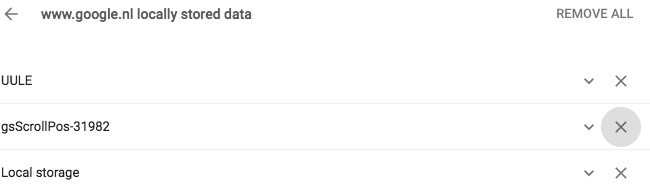
I still have to do this every few weeks on all my desktop machines: [WayBack] When +Google Nederland maps only fills none or part of the map tiles… – Jeroen Wiert Pluimers – Google+

When +Google Nederland maps only fills none or part of the map tiles at https://maps.google.nl, but https://maps.google.com works fine, then remove any gsScrollPos cookies from www.google.nl.

I need to do this every couple of days to keep maps.google.nl working.

Later I also found it can happen for YouTube, then did more digging for gsScrollPos and found a better workaround: [WayBackAwesome Cookie Manager where you can just delete the gsScrollPos cookies from all sites in one go.

Even later I found out that this can be one of the causes for the WayBack machine giving an error 400 when archiving. A more common reason however is that many archived web-pages try to create cookies in the web.archive.com subdomain resulting in the same problem.

The cause seems to be the Great Suspender plugin which should be fixed by now, but might not automatically update to the latest version. See:

Pending a new Great Suspender release, below is a quick way to manually remove them if you are into SQL scripting for sqlite. It basically comes down to executing the below statement when Chrome is closed:

delete from cookies where name like 'gsScrollPos-%'

Edit 20231230: Awesome Cookie Manager source repository at [Wayback/Archive] Phatsuo/awesome-cookie-manager: Awesome Cookie Manager.

--jeroen

Posted in Chrome, Google, GoogleMaps, Internet, InternetArchive, Power User, WayBack machine | Leave a Comment »

mail-filters/Makefile at master · fumiyas/mail-filters

Posted by jpluimers on 2019/04/15

Cool tool if you use Postfix: mail-filters/Makefile at master · fumiyas/mail-filters.

You set it up like this:

cd /etc/postfix
wget https://raw.githubusercontent.com/fumiyas/mail-filters/master/postfix/Makefile

Then each time you change your postfix configuration:

cd /etc/postfix
make

In that directory, it will (re)generate a Makefile.postmapbased on the lines with hash in main.cf, then make each .db file from the source hash file.

After that you have to manually restart postfix, which depends on your Linux flavour.

Similar solutions:

–jeroen

Posted in *nix, *nix-tools, Development, Makefile, postfix, Power User, Scripting, Software Development | Leave a Comment »

AlessandroZ/LaZagne: Credentials recovery project

Posted by jpluimers on 2019/04/15

Just when I thought I made a note of a password I hardly ever use, I didn’t, luckily this open source tools understands how to recover many kinds of passwords: AlessandroZ/LaZagne: Credentials recovery project.

–jeroen

Posted in *nix, *nix-tools, Chrome, Development, DVCS - Distributed Version Control, Firefox, git, Internet Explorer, Office, Opera, Outlook, Power User, Python, Scripting, Skype, Software Development, Source Code Management, Web Browsers, WiFi, Windows | Leave a Comment »

Default OpenSuSE Postfix main.cf forgets to configure SASL for cyrus…

Posted by jpluimers on 2019/04/15

If you see the below in your Postfix log when trying to test your config, then the SASL configuration is empty. Oddly that seems the default on OpenSuSE for a while now, despite it providing cyrus SASL out of the box.

Sep 15 14:30:07 katrien postfix/smtpd[12719]: fatal: bad string length 0 < 1: smtpd_sasl_path =
Sep 15 14:30:08 katrien postfix/master[12400]: warning: process /usr/lib/postfix/smtpd pid 12719 exit status 1
Sep 15 14:30:08 katrien postfix/master[12400]: warning: /usr/lib/postfix/smtpd: bad command startup -- throttling

Prior OpenSuSE versions had this in /etc/postfix/main.cf:

# SASL stuff
############################################################
smtp_sasl_auth_enable = no
smtp_sasl_security_options =
smtp_sasl_password_maps =
smtpd_sasl_auth_enable = no
#smtpd_sasl_path = private/auth
#smtpd_sasl_type = dovecot

Newer OpenSuSE versions have this:

# SASL stuff
############################################################
smtp_sasl_auth_enable = no
smtp_sasl_security_options =
smtp_sasl_password_maps =
smtpd_sasl_auth_enable = no
# cyrus : smtpd_sasl_type = cyrus, smtpd_sasl_path = smtpd
# dovecot : smtpd_sasl_type = dovecot, smtpd_sasl_path = private/auth
smtpd_sasl_path =
smtpd_sasl_type = 

Despite the newer having these installed:

# rpm -qa | grep cyrus
cyrus-sasl-crammd5-2.1.26-14.2.aarch64
cyrus-sasl-2.1.26-14.2.aarch64
cyrus-sasl-plain-2.1.26-14.2.aarch64
cyrus-sasl-digestmd5-2.1.26-14.2.aarch64
cyrus-sasl-gssapi-2.1.26-14.2.aarch64

Solution:

smtpd_sasl_path = smtpd
smtpd_sasl_type = cyrus

Since the values for both lines are default, you could even comment them out; see the documentation:

–jeroen

Via: [WayBackpostfix IRC logs [July 26 – 2007]

Posted in *nix, *nix-tools, Linux, openSuSE, postfix, Power User, SuSE Linux, Tumbleweed | Leave a Comment »

When your triple/quad-play providers refuse to give your VoIP SIP credentials, but allows access to your modem: use Wireshark on the WAN side

Posted by jpluimers on 2019/04/12

Every now and then I hear about providers that refuse to hand over the VoIP SIP credentials.

If you do have access to your modem, you can Wireshark the WAN side, then reset the modem and capture traffic until it has obtained the VoIP information:

[WayBack] Telfort SIP (getest met Glasvezel) | Het leven van Teus & Simone:

Veel mensen op het forum van Telfort vragen zich af of ze de SIP gegevens kunnen krijgen voor telefonie zodat men de ExperiaBox niet hoeven te gebruiken. Gezien dat de Telfort Support deze gegevens…

Via:

–jeroen

Posted in *nix, *nix-tools, Internet, Power User, Wireshark | Leave a Comment »

crontab.guru – the cron schedule expression editor

Posted by jpluimers on 2019/04/12

Confused by crontab expressions? Me too, so I was happy to find: At minute 3 past every 12th hourcrontab.guru – the cron schedule expression editor.

It has a [WayBack] truckload of common crontab expressions, but more importantly allows you to live edit one, then explains in human terms what it means and when the schedule runs next.

If you like a step by step cron configurator, then you can try [WayBackCron Job Generator by GenerateIt.net but need to note it cannot interpret a cron expression.

–jeroen

Posted in *nix, *nix-tools, cron, Linux, Power User | Leave a Comment »

Delphi Code Monkey: Cool Advanced Troubleshooting Technique – WinDbg

Posted by jpluimers on 2019/04/11

This so much reminds me of a struggle in the Toshiba Tecra 750CDT era: [WayBackDelphi Code Monkey: Cool Advanced Troubleshooting Technique – WinDbg.

First about Warren’s issue:

His laptop froze only in Windows 10, but not Windows 7, after doing some debugging work. Display is on, but non-responsive. He ruled out a lot of things, thought it was a video issue, looked for pointers how to research it ending to force memory dumps by keyboard then running WinDbg to further pinpoint the cause.

He solved the issue by removing the Lenovo supplied Intel graphics driver and forcing the Intel HD Graphics 520 OEM drivers onto the system and posted a few interesting links:

Then some history:

Back in the 750CDT days, the problem was the combination of Toshiba using OEM S3 Virge/MX video drivers, Windows GDI and TImageList with a lot of images in them (basically: the component palette).

Result: interrupt freeze of the laptop, so not even mouse or keyword would work.

Solutions:

  • use Windows NT, not Windows 95
  • disable all S3 hardware acceleration
  • use the Toshiba 780 series video drivers

From then on, I’ve never developed on Windows 9x based systems any more, but Windows NT based systems (even though it was much harder to get drivers for all hardware components), this despite the fact that with Windows NT 4, Microsoft video drivers from ring 3 to ring 0 (they were at ring 3 until and including Windows NT 3.51 [Archive.is]). On the one hand the move to ring 0 caused more blue screens, on the other hand made it a lot harder to directly access hardware from user software running at ring 3.


–jeroen

Posted in Development, Power User, Software Development, Windows, Windows 10 | Leave a Comment »

Some links and notes as I want to learn about JavaScript in bookmarklets

Posted by jpluimers on 2019/04/11

I wrote about bookmarklets before, but more from a usage perspective, not from a programmers one.

From what I understand now is that:

  • bookmarklets are basically a special form of URI
    • you can use JavaScript in them, but must make sure you do not interfere with existing JavaScript on the page
    • javascript:(function(){ window.open('https://wiert.me/'); })();
  • the URI has limits so,
    • browsers can have length restrictions (some around 500 characters) forcing you to put the actual script on-line as externalised bookmarklet (which won’t work on body-less pages)
    • you will have to encode special characters (and URI decode them before beautifying existing JavaScript bookmarklets)

My first tries will likely be:

Read the rest of this entry »

Posted in Bookmarklet, Development, JavaScript/ECMAScript, jQuery, Power User, Scripting, Software Development, Web Browsers | Leave a Comment »

Adobe Acrobat Reader – Content Preparation Progress window

Posted by jpluimers on 2019/04/08

I hope this gets rid of the content preparation progress window:

Disable the screen reader options in Adobe Acrobat:

  1. Within Adobe Acrobat, go to “Edit > Preferences > Reading”
  2. Locate the “Screen Reader Options” section.
  3. In the ‘Page vs Document’ dropdown box choose “Only read the currently visible pages”, and uncheck “Confirm before tagging documents”.

–jeroen

Read the rest of this entry »

Posted in Adobe, Adobe Acrobat, Adobe Reader, Power User | 2 Comments »