The Wiert Corner – irregular stream of stuff

Jeroen W. Pluimers on .NET, C#, Delphi, databases, and personal interests

  • My badges

  • Twitter Updates

  • My Flickr Stream

  • Pages

  • All categories

  • Enter your email address to subscribe to this blog and receive notifications of new posts by email.

    Join 1,839 other subscribers

Archive for the ‘Power User’ Category

People have been asking about the fact I use old Xeon boxes for my development…

Posted by jpluimers on 2017/05/19

An interesting discussion on Xeon based 2nd hand systems that are way cheaper than new ones:

[WayBack] People have been asking about the fact I use old Xeon boxes for my development platforms (and indeed more). I want to cover what I use, why I use them, … – Alan Cox – Google+

I still run a couple of HP XW6600 workstations with [WayBackE5420 processors (of the [WayBackHarpertown family) to host VMs on. Works splendid.

–jeroen

Source: [People have been asking about the fact I use old Xeon boxes for my developmen…1919

Posted in Hardware, HP XW6600, LifeHacker, Power User, Virtualization | Leave a Comment »

ESXi 4.0.0.Update01-208167 Whitebox on HP xw6600: success!

Posted by jpluimers on 2017/05/19

Boy, I totally forgot to post this. It runs also ESXi 5.x; I’ve not tried more recent ESXi versions as they just run fine.

As a follow-up on [WayBackVMware Communities: ESX 3.5 Whitebox on HP xw6600 …, I have installed ESXi 4.0.0.Update01-208167 on a HP XW6600 workstation.

Good news: the generic ESXi 4 installation works, whereas the HP specific ESXi 4 fails (you get a nice purple screen of death).

[WayBackhttp://www.vm-help.com//esx40i/esx40_whitebox_HCL.php

–jeroen

Posted in ESXi4, ESXi5, ESXi5.1, ESXi5.5, Hardware, HP XW6600, Power User, Virtualization, VMware, VMware ESXi | Leave a Comment »

northfield_systems/noip2.c at master · sweetonmac/northfield_systems

Posted by jpluimers on 2017/05/15

Never noticed there were sources available for the official Linux no-ip client, but there are: northfield_systems/noip2.c at master · sweetonmac/northfield_systems

Looks similar to what these do: Dynamic DNS through NO-IP: keeping your hosts current, and your NO-IP account happy. « The Wiert Corner – irregular stream of stuff

Posted in *nix, *nix-tools, Power User | Leave a Comment »

PatchCleaner just cleaned 10-20 gigabyte per Windows 7-8.x installation

Posted by jpluimers on 2017/05/15

PatchCleaner just cleaned out 10-20 gigabyte per VM for most of my Windows 7-8.x VMs. After that, the updates still worked fine.

So it indeed does:

Safely remove all orphaned patch and installer files from your windows installer directory in one easy click

–jeroen

Download: https://sourceforge.net/projects/patchcleaner/

Posted in Power User, Windows, Windows 7, Windows 8, Windows 8.1, Windows 9 | Leave a Comment »

Magnetic Bottle Opener | Best Funny Gifs Updated Daily

Posted by jpluimers on 2017/05/12

Still one of the nicest bottle openers I’ve seen: Magnetic Bottle Opener | Best Funny Gifs Updated Daily

–jeroen

Via:Very useful fridge magnet

Posted in LifeHacker, Power User | Leave a Comment »

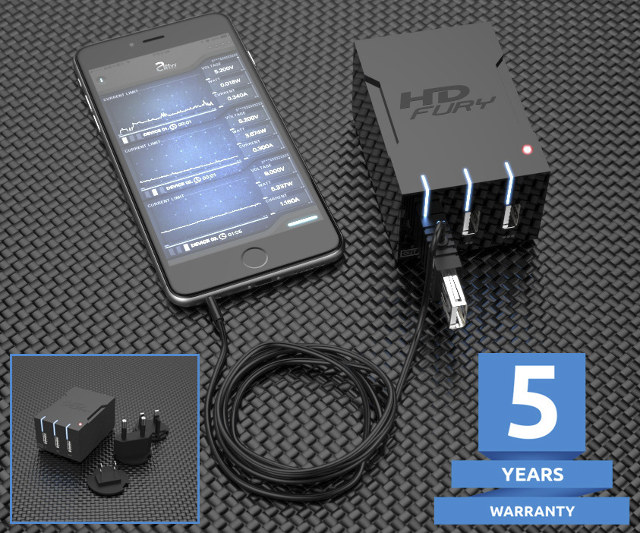
$59 HDFury Universal PSU Doctor Supports Power Monitoring via iOS or Android

Posted by jpluimers on 2017/05/11

Interesting device [WayBack]: $59 HDFury Universal PSU Doctor Supports Power Monitoring via iOS or Android which has a lot more details.

Via: [WayBack] +HDfury has launched a 3-port USB charger/power supply with power monitoring function. – Jean-Luc Aufranc – Google+

–jeroen

Posted in Android Devices, Apple, Development, Hardware Development, Hardware Interfacing, iOS, Power User, USB | Leave a Comment »

URLs and domains that OS-es use to detect Captive Portals

Posted by jpluimers on 2017/05/11

OS X

Android / Chromebook:

  • clients3.google.com

iOS 6:

  • gsp1.apple.com
  • *.akamaitechnologies.com

iOS 7:

  • www.appleiphonecell.com
  • www.airport.us
  • *.apple.com.edgekey.net
  • *.akamaiedge.net
  • *.akamaitechnologies.com

iOS 8/9:

Windows

Amazon Kindle (Fire)

OS X settings are in:

  • /Library/Preferences/SystemConfiguration/CaptiveNetworkSupport/Settings.plist

--jeroen

via:

Posted in Captive Portal, Communications Development, Development, Hardware, Internet, Internet protocol suite, Network-and-equipment, Power User, Software Development, TCP | Leave a Comment »

Building `libssh2` for Windows (Win32/Win64) is a lot harder than I hoped for

Posted by jpluimers on 2017/05/09

Building libssh2 for Windows (Win32/Win64) is a lot harder than I hoped for.

There were no instructions on their website, there was the occasional “use CMake” at #IRC and that was about it.

Of course running just CMake doesn’t work and getting it working involves a lot of non-descriptive error messages, cursing and fruitless searches for them just bumping into “me too” threads not really providing the solution.

I tried building OpenSSL but after building, no `lib` directory appears so I cannot satisfy the dependencies. Not sure what OpenSSL would bring as I could not find any documentation about it either, so I’ll leave it at that.

Might be that `make test` for OpenSSL doesn’t succeed because some vague non-explained error which is odd when doing this on an almost prestine VS 2015 Community Edition VM.

But I’ll take that up with the OpenSSL people one day.

Oh the joy of Open Source…

Below are the steps (below the –more– mark a gist with the most recent version).

The core are these:

  • you need git, Visual Studio and CMake
  • use CMake to generate project files, msbuild to build (CBuild cannot build any more)
  • After a Win64 build you have to reset the platform to create a Win32 build

These links helped a lot some in the positive, others in the negative sense:

  1. Install Visual Studio 2015 community edition from https://www.visualstudio.com/en-us/downloads/download-visual-studio-vs.aspx (as of writing:http://download.microsoft.com/download/D/2/3/D23F4D0F-BA2D-4600-8725-6CCECEA05196/vs_community_ENU.exe or http://download.microsoft.com/download/b/e/d/bedddfc4-55f4-4748-90a8-ffe38a40e89f/vs2015.3.com_enu.iso )
  2. Download CMake via https://cmake.org/download/ back then https://cmake.org/files/v3.6/cmake-3.6.2-win64-x64.msi
  3. Install and ensure to add CMake to the PATH for all users:

https://www.dropbox.com/s/ss5xke97iy4yyka/Screenshot%202016-09-13%2009.36.54.png?raw=1

  1. Run this script on a new command-line:
    git clone https://github.com/libssh2/libssh2.git
    pushd libssh2
    mkdir buildWin64
    pushd buildWin64
    :: Generate build for MSVS 2015
    cmake .. -G"Visual Studio 14 Win64" -D"BUILD_SHARED_LIBS=1"
    
    :: this fails bitching about v100 not being there:
    :: cmake --build . --config "Visual Studio 14 Win64"
    :: this just works:
    set Platform=
    call "C:\Program Files (x86)\Microsoft Visual Studio 14.0\VC\bin\amd64\vcvars64.bat"
    call msbuild libssh2.sln
    dumpbin /headers example\Debug\libssh2.dll | find "machine"
    popd
    mkdir buildWin32
    pushd buildWin32
    :: Generate build for MSVS 2015
    cmake .. -G"Visual Studio 14" -D"BUILD_SHARED_LIBS=1"
    
    set Platform=
    call "C:\Program Files (x86)\Microsoft Visual Studio 14.0\VC\bin\vcvars32.bat"
    call msbuild libssh2.sln
    dumpbin /headers example\Debug\libssh2.dll | find "machine"
    popd
    popd

Source: Building libssh2 for Windows (Win32/Win64) is a lot harder than I hoped for

–jeroen

Read the rest of this entry »

Posted in Communications Development, Development, Internet protocol suite, OpenSSL, Power User, Security, SSH, TCP | Leave a Comment »

Mikrotik – Choosing your SFP/SFP+ modules and direct access cables

Posted by jpluimers on 2017/05/09

For hooking up SFP and SFP+ ports on Mikrotik devices you basically have two options:

  • Direct Access Cable (passive and affordable for 1 and 2 meters; active and more expensive for more than 3 meters)
  • SFP/SFP+ modules with LC-LC optic fiber cable in between them (pairs of modules are more expensive than passive DAC, but the fiber is a lot cheaper)

Choosing the SFP/SFP+ modules is a bit intimidating as the MikroTik SFP module compatibility table – MikroTik Wiki has very few details.

Then I found sfp_all-150601132341.pdf (archived) which lists many of the SFP and SFP+ modules including their specifications.

Since neither the matrix nor the PDF contains links to the products, here is a small list of what I could source last year and is compatible with both the CCR1009 routeres and CRS226 switches:

–jeroen

via: Connect CCR1009 with CSR226 over a longer distance than 3 meter – MikroTik RouterOS

Posted in Internet, MikroTik, Power User, routers | Leave a Comment »

ext3 – How to tell the language encoding of a filename on Linux? – Server Fault

Posted by jpluimers on 2017/05/08

From ext3 – How to tell the language encoding of a filename on Linux? – Server Fault  [WayBack] I learned a few things:

  • filename encoding on Linux is undetermined – the file system just assumes a byte array of characters
  • FTP and SFTP suffer from this as well (SFTP is based on SSH which now prefers UTF-8 [WayBack])

A good default is UTF-8, but it’s never guaranteed.

Two tools can help to determine the encoding of a filename:

  • convmv [WayBack] converts filenames from one encoding to another
  • chardet (Python) The Universal Character Encoding Detector

–jeroen

Posted in *nix, *nix-tools, Development, Encoding, Power User, Software Development, UTF-8, UTF8 | Leave a Comment »