The Wiert Corner – irregular stream of stuff

Jeroen W. Pluimers on .NET, C#, Delphi, databases, and personal interests

  • My badges

  • Twitter Updates

  • My Flickr Stream

  • Pages

  • All categories

  • Enter your email address to subscribe to this blog and receive notifications of new posts by email.

    Join 1,839 other subscribers

Archive for the ‘Power User’ Category

Finder doesn’t work since Yosemite – Ask Different

Posted by jpluimers on 2017/02/20

Source: Finder doesn’t work since Yosemite – Ask Different [WayBack]:

This fix from Reddit worked perfectly for me!!

http://www.reddit.com/r/osx/comments/2jtikj/finder_not_responding_new_yosemite_install/ [WayBack]

You can most likely fix the issue by clearing out Finder’s saved state, caches, and/or settings.

Use Spotlight (the search icon in the far right of the menu bar) to find and open the “Terminal” application. Triple-click the following line in order to copy and paste it into Terminal’s window:

rm -fR ~/Library/Saved\ Application\ State/com.apple.finder.savedState ~/Library/Caches/com.apple.finder; killall Finder

If it still doesn’t work, try this one:

mv ~/Library/Preferences/com.apple.finder{,.backup}.plist; killall Finder

–jeroen

Read the rest of this entry »

Posted in Apple, iMac, Mac, Mac OS X / OS X / MacOS, MacBook, MacBook Retina, MacBook-Air, MacBook-Pro, MacMini, OS X 10.10 Yosemite, Power User | Leave a Comment »

Some links I’ll need for monit one day

Posted by jpluimers on 2017/02/17

Getting monit to run on opensuse isn’t a feat.

I might try again one day with these links:

–jeroen

Posted in *nix, Linux, openSuSE, Power User, SuSE Linux, Tumbleweed | Leave a Comment »

“Developer Desks” – multi monitor setups in “Trading System” disguise.

Posted by jpluimers on 2017/02/17

via: “Developer Desks” – I think this company is artificially limiting their source of income. – Kristian Köhntopp – Google+

Interesting as the company provides multi-monitor fitting systems up to 8 wide by 4 high and full solutions (including PC and monitor) of 7 wide by 2 high monitors. Even custom made solutions are possible: Sonderlösungen – Trading-PC. They provide electric height adjustment systems too:Elektrische Höhenverstellung – Trading-PC.

Their sister company provides desks and other furniture related to multi-monitor systems: Sedergo – High-End Furniture Made in Germany. They provide height adjustable desks as well: Elektrische Höhenverstellung. Both companies are owned by XECURIS GmbH & Co. KG

One day, I’ll redo the office (:

Posted in LifeHacker, Power User | Leave a Comment »

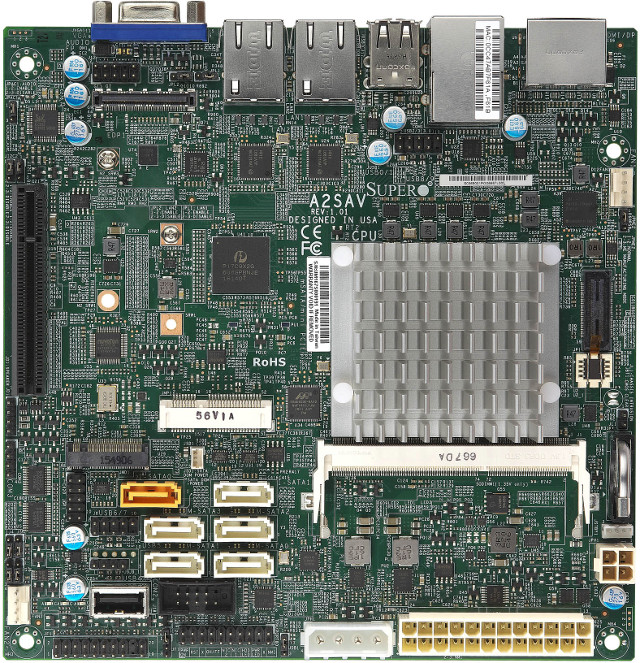
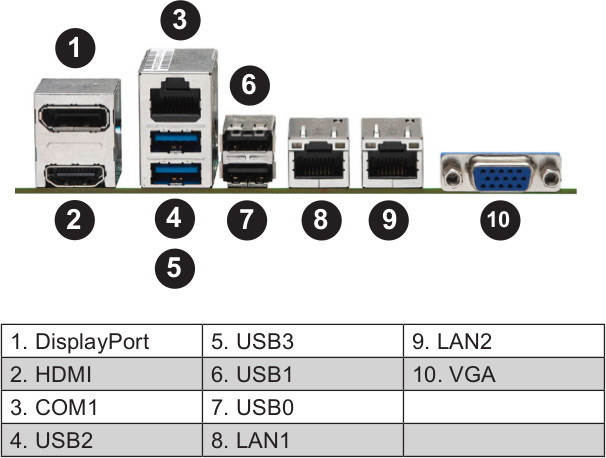
Supermicro A2SAV mini-ITX Board Powered by Intel Atom E3940 SoC Features 6 SATA Ports, Dual GbE, and Up to 9 USB Interfaces

Posted by jpluimers on 2017/02/17

Interesting board: [WayBackSupermicro A2SAV mini-ITX Board Powered by Intel Atom E3940 SoC Features 6 SATA Ports, Dual GbE, and Up to 9 USB Interfaces

All below pictures from www.cnx-software.com

Could for IoT hardware and software development.

via: [WayBack] http://www.cnx-software.com/2017/02/06/supermicro-a2sav-mini-itx-board-powered-by-intel-atom-e3940-soc-features-6-sata-ports-dual-gbe-and-up-to-9-usb-in… – Joe C. Hecht – Google+

–jeroen

Posted in Development, Hardware Development, Power User, Software Development | Leave a Comment »

Apple ][ history – Nibble magazine

Posted by jpluimers on 2017/02/16

I recently found some old magazine issues of my early programming escapades. It reminded me of the really old days where – as a school kid – I tried to buy Nibble magazine at a regular base. It was expensive (I think it was around 8 Dutch Guilders (or NLG) – close to EUR 4 – which was a lot for me, though less expensive than diskettes that were like NLG 10 each).

But it was fun as the magazine focussed at computer programs and programming transitioned my life. From Integer Basic via AppleSoft Basic (and various smaller attempts in FORTH, MuSimp, LISA Assembler and LOGO) to Turbo Pascal on CP/M.

Recently I learned that all issues (16k pages total!) have been scanned and OCR-ed and can be obtained on DVD for a modest price. Even better: all their software is available for free.

Just follow these links:

For some history:

–jeroen

Posted in //e, 6502, Apple, Apple ][, Development, History, Pascal, Power User, Software Development, Turbo Pascal | Leave a Comment »

How-To: Create a free Apple developer account for sideloading apps | 9to5Mac

Posted by jpluimers on 2017/02/16

Interesting: Starting with Xcode 7, Apple made it possible to sideload apps on the iPhone, iPad, and Apple TV using a free Apple ID. Although a paid developer account is still required to deploy apps to the App…: How-To: Create a free Apple developer account for sideloading apps | 9to5Mac

Posted in Apple TV, Development, iOS, iOS Development, iPad, iPhone, iPod touch, Mobile Development, Power User, Software Development, xCode/Mac/iPad/iPhone/iOS/cocoa | Leave a Comment »

GSM/3G/4G/LTE/… enable or disable caller ID when calling

Posted by jpluimers on 2017/02/13

When testing the setup of a Fritz!Box 7490 with fiber connection, routing anonymous/withheld ISDN calls to a new answering machine I needed to test if only Caller ID calls were getting through.

The easiest was to do this from my mobile phone.

Izzy explained how to in callerid – How can I make anonymous calls for everyone but contact list? – Android Enthusiasts Stack Exchange.

Basically all cellular networks based on GSM or derived technologies allow you to prefix any phone numbers with:

–jeroen

Posted in Cellular telephony, ISDN, LifeHacker, Power User, PSTN, Telephony | Leave a Comment »

Managing WIFI connections using the Mac OSX…

Posted by jpluimers on 2017/02/10

These links:

Made me add this to my ~/.bash_profile:

Read the rest of this entry »

Posted in Apple, Mac, Mac OS X / OS X / MacOS, Mac OS X 10.6 Snow Leopard, MacBook, MacBook Retina, MacBook-Air, MacBook-Pro, MacMini, OS X 10.10 Yosemite, OS X 10.9 Mavericks, Power User | Leave a Comment »

The 2017 web is bloated and slow, and I am guilty, too. – The Isoblog – website speed tests

Posted by jpluimers on 2017/02/10

[WayBackThe 2017 web is bloated and slow, and I am guilty, too. – The Isoblog.

My site on 2G: load time 60 seconds: [Archive.isWebPagetest Test Result – Dulles : wiert.me – 02/09/17 21:45:23

–jeroen

For Player-FM:

https://plus.google.com/+JeroenPluimers/posts/ASnejgv5M9r


Posted in Blogging, Power User, SocialMedia | Leave a Comment »

RDP Clipboard Fix – via Remko Weijnen’s Blog (Remko’s Blog)

Posted by jpluimers on 2017/02/09

RDP Clipboard Fix is the client-side fix for loosing your RDP clipboard (server side fix is killing the RDPClip process). Since his site is not archived but some of the links have 404’s, here is the full article with fixed WayBack links:

Did you ever loose Clipboard functionality (copy/paste) while working with several Terminal Server sessions? I think everyone that works a lot with Terminal Server has experienced this from time to time.

It’s caused by badly behaving applications. Dimitry Vostokov wrote a tool to fix this issue for Citrix (RepairCBDChain.exe), he explains the issue very well on his blog:

Windows has a mechanism to notify applications about clipboard changes. An application interested in such notifications has to register itself in the so called clipboard chain. Windows inserts it on top of that chain and that application is responsible to propagate changes down the chain:

rc1.JPG

If 3rd-party application forgets to forward notifications down then we have a broken clipboard chain and clipboard changes are not sent via ICA protocol:

Read more at Dimitry’s Blog: http://web.archive.org/web/20071019060125/http://citrite.org/blogs/dmitryv/2006/12/09/clipboard-issues-explained/

So how can we fix this for Terminal Server then?

MSTSC creates a hidden window with Window Class RdpClipRdrWindowClass, you can observe this with a Window Spy tool such as X-Spy

Clipboard Redirector Window

If we look at the Window Style we can see the Window is hidden (doesn’t contain WS_VISIBLE):

Window Style

So we just need to find all windows with this Windows Class and subscribe them to Clipboard Notifications.

The code is simple:

function EnumWindowsProc(hHwnd: HWND; Param:Integer): boolean; stdcall; 
var ClassName: String; 
begin 
  SetLength(ClassName, 255); 
  SetLength(ClassName, GetClassName(hHWnd, PChar(ClassName), 255));        
 
  if ClassName = 'RdpClipRdrWindowClass' then 
  begin 
    // This is uses to restore the clipboard functionality 
    SetClipboardViewer(hHWND); 
  end; 
  Result := True; 
end;

Using EnumWindows instead of FindWindow (as RepairCBDChain seems to do) has the advantage that it finds multiple windows (when you have multiple sessions) and not just the first.

You can download the compiled version below. If you like it why not leave a comment?

Screenshot RDPFixClip

RDP Clipboard Fix (12076) – RDPFixClip.zip

See here for more Terminal Server related articles:http://remkoweijnen.nl/blog/topics/terminalserver/

There’s an explanation of this issue at the Microsoft Terminal Services team blog too:
http://blogs.msdn.com/ts/archive/2006/11/16/why-does-my-shared-clipboard-not-work-part-1.aspx
http://blogs.msdn.com/ts/archive/2006/11/20/why-does-my-shared-clipboard-not-work-part-2.aspx

–jeroen

Source: RDP Clipboard Fix | Remko Weijnen’s Blog (Remko’s Blog)

Posted in Clipboard, Development, Power User, Software Development | 1 Comment »