The Wiert Corner – irregular stream of stuff

Jeroen W. Pluimers on .NET, C#, Delphi, databases, and personal interests

  • My badges

  • Twitter Updates

  • My Flickr Stream

  • Pages

  • All categories

  • Enter your email address to subscribe to this blog and receive notifications of new posts by email.

    Join 1,862 other subscribers

Archive for the ‘Virtualization’ Category

Disable ESXi Password Complexity – Perfect Cloud

Posted by jpluimers on 2021/03/29

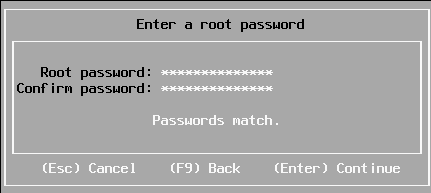
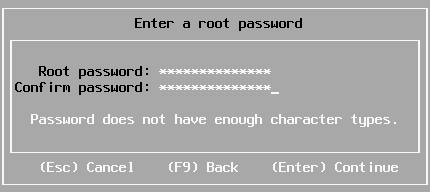
Sometimes you have a long enough password, that matches with the confirmation, but pressing “Enter” to continue gives “Password does not have enough character types”:

From [WayBack] Disable ESXi Password Complexity – Perfect Cloud:

A part of my job as a VMware Certified Instructor is to update our lab systems whenever new vSphere versions come out.   After upgrading from 5.5 to 6.0 I decided we should change passwords, h…

This is the workflow:

  1. Make a backup of /etc/pam.d/passwd.
  2. Use vi to edit /etc/pam.d/passwd, and:
    1. Put a # in front of the lines starting with password requisite
    2. Remove the use_authtok bit of the line starting with password sufficient
    3. Put a # in front of the line starting with password required
    4. Quit vi while saving (press Esc, then enter :wq on the prompt)
  3. Change the password to a less secure one
  4. Restore the original /etc/pam.d/passwd.

Via: esxi 6 force short password – Google Search

Working around this on during ESXi installation fails

I tried this:

  1. Press Alt-F1 to go from the installation screen to the console screen
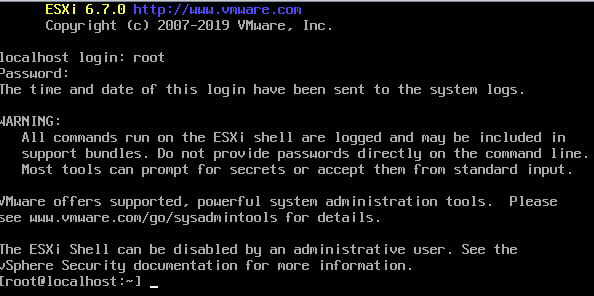
  2. Logon as root, with no password at all to get to the command-prompt:

  3. Perform the /etc/pam.d/passwd editing steps above
  4. Press Alt-F2 to go back to the install screen
  5. Enter root password

The password requirements stayed.

(more screenshots at [WayBack] ESXi 6.7 installation Guide – Let We-i Go)

Related

On my ESXI 6.5 system where the italic bit is removed, besides the two lines being commented out:

  1. original /etc/pam.d/passwd:
    #%PAM-1.0
    
    # Change only through host advanced option "Security.PasswordQualityControl".
    password   requisite    /lib/security/$ISA/pam_passwdqc.so retry=3 min=disabled,disabled,disabled,7,7
    password   sufficient   /lib/security/$ISA/pam_unix.so use_authtok nullok shadow sha512
    password   required     /lib/security/$ISA/pam_deny.so
    
  2. modified /etc/pam.d/passwd:
    #%PAM-1.0
    
    # Change only through host advanced option "Security.PasswordQualityControl".
    #password   requisite    /lib/security/$ISA/pam_passwdqc.so retry=3 min=disabled,disabled,disabled,7,7
    password   sufficient   /lib/security/$ISA/pam_unix.so nullok shadow sha512
    #password   required     /lib/security/$ISA/pam_deny.so
    

On my ESXI 6.7 system (which adds the bold lines below):

  1. original /etc/pam.d/passwd:
    #%PAM-1.0
    
    # Change only through host advanced option "Security.PasswordQualityControl".
    password   requisite    /lib/security/$ISA/pam_passwdqc.so retry=3 min=disabled,disabled,disabled,7,7
    
    # Change only through host advanced option "Security.PasswordHistory"
    password   requisite    /lib/security/$ISA/pam_pwhistory.so use_authtok enforce_for_root retry=2 remember=0
    
    password   sufficient   /lib/security/$ISA/pam_unix.so use_authtok nullok shadow sha512
    password   required     /lib/security/$ISA/pam_deny.so
    
  2. modified /etc/pam.d/passwd:
    #%PAM-1.0
    
    # Change only through host advanced option "Security.PasswordQualityControl".
    #password   requisite    /lib/security/$ISA/pam_passwdqc.so retry=3 min=disabled,disabled,disabled,7,7
    
    # Change only through host advanced option "Security.PasswordHistory"
    #password   requisite    /lib/security/$ISA/pam_pwhistory.so use_authtok enforce_for_root retry=2 remember=0
    
    password   sufficient   /lib/security/$ISA/pam_unix.so nullok shadow sha512
    #password   required     /lib/security/$ISA/pam_deny.so
    

–jeroen

Posted in *nix, ESXi6, ESXi6.5, ESXi6.7, Power User, Virtualization, VMware, VMware ESXi | Leave a Comment »

Supermicro | Products | Motherboards | Xeon® Boards | X9SRi-3F

Posted by jpluimers on 2021/03/12

I still like this board: Supermicro | Products | Motherboards | Xeon® Boards | X9SRi-3F.

It has been in a storage solution for a while, uses OK power, has not many SATA ports, but enough slots for expansion cards, and comes with two network connections and 8 slots which I fitted with a total of 256 gibibyte of memory.

Some links, as SuperMicro tends to hide them behind POST requests:

Note that IPMI over je Java Web Start.app runs into certificate signing issues, so better use Supermicro IPMIViewer for this:

IPMIView links via:

The errors when running the KVM Console from your web browser are waved away by SuperMicro, but more and more people bump into them:

–jeroen

Posted in Development, Hardware, Mainboards, Power User, Software Development, SuperMicro, Virtualization, VMware, VMware ESXi, X9SRi-3F | Leave a Comment »

Chris Foster: Windows Development in a KVM Virtual Machine

Posted by jpluimers on 2021/02/04

For my link archive: [WayBack] Chris Foster: Windows Development in a KVM Virtual Machine covering among others much (mostly based [WayBack] libvirt: The virtualization API) stuff:

Similar posts:

–jeroen

Posted in Development, KVM Kernel-based Virtual Machine, Power User, Proxmox, Software Development, Virtualization, Windows | Leave a Comment »

A choco install list

Posted by jpluimers on 2021/02/03

Sometimes I forget the choco install mnemonics for various tools, so here is a small list below.

Of course you have to start with an administrative command prompt, and have a basic Chocolatey Installation in place.

If you want to clean cruft:

choco install --yes choco-cleaner

Basic install:

choco install --yes 7zip
choco install --yes everything
choco install --yes notepadplusplus
choco install --yes beyondcompare
choco install --yes git.install --params "/GitAndUnixToolsOnPath /NoGitLfs /SChannel /NoAutoCrlf /WindowsTerminal"
choco install --yes hg
choco install --yes sourcetree
choco install --yes sysinternals

For VMs (pic one):

choco install --yes vmware-tools
choco install --yes virtio-drivers

For browsing (not sure yet about Chrome as that one has a non-admin installer as well):

choco install --yes firefox

For file transfer (though be aware that some versions of Filezilla contained adware):

choco install --yes filezilla
choco install --yes winscp

For coding:

choco install --yes vscode
choco install --yes atom

For SQL server:

choco install --yes sql-server-management-studio

For web development / power user:

choco install --yes fiddler

For SOAP and REST:

choco install --yes soapui

If you don’t like manually downloading SequoiaView at gist.github.com/jpluimers/b0df9c2dba49010454ca6df406bc5f3d (e8efd031d667de8a1808d6ea73548d77949e7864.zip):

choco install --yes windirstat

For drawing, image manipulation (paint.net last, as it needs a UI action):

choco install --yes gimp
choco install --yes imagemagick
choco install --yes paint.net

For ISO image mounting in pre Windows 10:

choco install --yes wincdemu

For hard disk management:

choco install --yes hdtune
choco install --yes seatools
choco install --yes speedfan

For Fujitsu ScanSnap scanners (not sure yet this includes PDF support):

choco install --yes scansnapmanager

–jeroen

Posted in 7zip, atom editor, Beyond Compare, Chocolatey, Compression, Database Development, Development, DVCS - Distributed Version Control, Everything by VoidTools, Fiddler, Firefox, Fujitsu ScanSnap, git, Hardware, Mercurial/Hg, Power User, Scanners, SOAP/WebServices, Software Development, Source Code Management, SQL Server, SSMS SQL Server Management Studio, SysInternals, Text Editors, Versioning, Virtualization, VMware, VMware ESXi, vscode Visual Studio Code, Web Browsers, Web Development, Windows | Leave a Comment »

OSX 10.13 with vSphere 6.7 – Virtual Odyssey

Posted by jpluimers on 2020/11/16

Interesting: I never realised that getting MacOS installed on ESXi was relatively easy!

[WayBack] OSX 10.13 with vSphere 6.7 – Virtual Odyssey:

vCenter 6.7a/ESXi 6.7a Installing OSX 10.13 seemed pretty straight forward on 6.7. Essentially, you mount the ISO as per usual, and the only thing I had to do before starting the installation was to format the disk via terminal. Once…

So no need for all this:

–jeroen


Posted in ESXi6.5, ESXi6.7, Power User, Virtualization, VMware, VMware ESXi | Leave a Comment »

Packer template for Alpine Linux on Hyper-V and Azure; GitHub – tomconte/packer-alpine-azure

Posted by jpluimers on 2020/10/05

Cool: a Packer template for Alpine Linux on Hyper-V and Azure: [WayBack] GitHub – tomconte/packer-alpine-azure

I like Alpine Linux because it is lightweight and the focus of being very secure, how popular it is in the Docker scene where it replaced Ubuntu and is now the standar package at [Archive.is/A2] library/alpine – Docker Hub and the motto [WayBack] Alpine Linux; Small. Simple. Secure. Alpine Linux is a security-oriented, lightweight Linux distribution based on musl libc and busybox.

Alpine is not yet out of of the box endorsed by Azure ([WayBack] Endorsed distributions of Linux | Microsoft Docs) so this is a very welcome tool.

From the readme:

Read the rest of this entry »

Posted in Azure Cloud, Cloud, Cloud Development, Development, Hyper-V, Infrastructure, Power User, Virtualization, Windows Azure | Leave a Comment »

Converting a virtual IDE disk to a virtual SCSI disk (1016192)

Posted by jpluimers on 2020/09/11

Just in case I have a VM with only IDE disks of which one ore more need to become SCSI disks: [WayBack] Converting a virtual IDE disk to a virtual SCSI disk (1016192)

TL;DR

  1. Add one SCSI disk
  2. Install drivers for it and get it recognised
  3. When the VM is shutdown:
    1. Modify the disk description of the IDE disk to SCSI (hack) or
    2. (often easier) remove the disk, then attach it to the SCSI controller

–jeroen

Posted in Power User, Virtualization, VMware, VMware ESXi | Leave a Comment »

ESXi: shrinking a thin provisioned disk by first exploding it with zero content

Posted by jpluimers on 2020/09/07

In addition to ESXi: shrinking a Windows disk, you can shrink any ESXi thin provisioned disk by first exploding it with zero content, then shrinking it like described by [WayBack] How to Shrink a Thin VMDK on ESXi 5.0 | Boerlowie’s Blog.

It comes down to using this command:

 vmkfstools --punchzero myVirtualMachineDisk.vmdk

You can replace --punchzero with -K if you like more cryptic arguments.

This works because thin provisioned vmdk disk files are sparse files where zero content can be non-allocated.

The trick requires all empty space to be zeroed out (which usually comes down using a tool like sdelete on Windows or shred on Linux), hence the “exploding” in the post title.

For a good explanation on thin, versus thick versus eagerlyZeroedThick, read [WayBackThin Provisioning – What’s the scoop? – VMware vSphere Blog.

A few remarks:

  • this only works within datastores, so when you transfer your file out, then the file will be the thick size
  • an OVF exported virtual machine will benefit from thin provisioned disks
  • the du command will show the actual storage size (including the savings from think provisioned disks)
  • the ls command will show then “virtual” storage size (excluding any thin provisioning gains)
  • the difference between ls and du output is the thin provisioning gain

–jeroen

Posted in Power User, Virtualization, VMware, VMware ESXi | Leave a Comment »

ESXi: shrinking a Windows disk

Posted by jpluimers on 2020/09/04

I had to shrink down a Windows disk of an ESXi based Virtual Machine from 240 Gibibyte to about 140 gigabyte.

In this case, it was Windows 7 on ESXi 6.5, but the actual versions do not really matter.

The only way to decrease ESXi .vmdk files is by fiddling with disk sector counts in the text based .vmdk files (not the binaries .vmdk files!) of a diskname.vmdk / diskname-flat.vmdk text/binary pair. This is described for instance in these two articles:

Notes:

  1. This article presumes you already shrunk your NTFS partition (for instance as described in Consolidating NTFS free space).
  2. If you only have a binary .vmdk file, then you can use vmkfstools to create a text/binary pair for you, for instance by using these commands:
    vmkfstools --clonevirtualdisk Windows7.vmdk Windows7.thick.vmdk
    vmkfstools --clonevirtualdisk Windows7.vmdk Windows7.thin.vmdk --diskformat thin
  3. You cannot workaround 2. as the --geometry functionality of vmkfstools only displays existing geometry, see

ESXi has .vmdk files that count disk sizes in sectors, but the tooling that ship with Windows to not show partition sizes in sectors, especially not the partition ending sector.

All permutations of tooling like DISKPART, PowerShell, WMIC and terms partition, ending sector, cylinder, head, etc failed me to return built-in tools.

Luckily, “powershell” “partition” “ending sector” found the documentation for [WayBack] Test Disk | File System | Data Management titled “TestDisk Documentation, Release 7.1, Christophe GRENIER” which lead to:

[WayBack] TestDisk Download – CGSecurity

Download TestDisk & PhotoRec. TestDisk is a free and open source data recovery software tool designed to recover lost partition and unerase deleted files. PhotoRec is a file carver data recovery software tool.

It is available for many platforms, including Windows x86 (fully featured) and x64 (limited features):

There was also the much more convoluted PowerForensics which is also more difficult to install:

As a check (because the calculations by hand are too cumbersome to trust on a first trey), I also downloaded the ISO image of gparted:

Let’s get started for real!

Read the rest of this entry »

Posted in Power User, Virtualization, VMware, VMware ESXi, Windows, Windows 7 | Leave a Comment »

HOW TO: Configure Shared Diagnostic Partition on VMware ESX host | vStrong.info

Posted by jpluimers on 2020/08/31

Interesting for vSphere clusters: [WayBack] HOW TO: Configure Shared Diagnostic Partition on VMware ESX host | vStrong.info

–jeroen

Posted in Power User, Virtualization, VMware, VMware ESXi | Leave a Comment »