


Time to start planning the patching process: VMware KB: VMware ESXi 5.1, Patch ESXi510-Update01: VMware ESXi 5.1 Complete Update 1.
You can also download the fresh installation ISO at Download VMware vSphere Hypervisor for Free.
–jeroen
Posted by jpluimers on 2013/04/29
Time to start planning the patching process: VMware KB: VMware ESXi 5.1, Patch ESXi510-Update01: VMware ESXi 5.1 Complete Update 1.
You can also download the fresh installation ISO at Download VMware vSphere Hypervisor for Free.
–jeroen

Posted in ESXi5.1, Power User, VMware, VMware ESXi | Leave a Comment »
Posted by jpluimers on 2013/02/11
So I won’t forget: How To Patch vSphere 5 ESXi Without Update Manager.
It describes how to:
esxcli software vib install -d /vmfs/volumes/[DATASTORE]/[PATCH_FILE].zipThanks Chris Colotti for publishing this!
–jeroen
via How To Patch vSphere 5 ESXi Without Update Manager • Chris Colotti’s Blog.
Posted in ESXi5, Power User, VMware, VMware ESXi | 3 Comments »
Posted by jpluimers on 2013/02/08
A long while ago I blogged about Creating vSphere 5 ESXi embedded USB Stick so I could boot ESXi from USB.
Since then, I changed USB sticks to be larger (and faster) ones and thought it might be possible to put a small datastore on it for a small maintenance VM.
The VMware Communities: External USB hard drive detected as… thread on the VMware Communities site shows you can do it for a USB disk, but only from the console or SSH (not from the regular maintenance tools).
The results vary, and don’t sound very stable to me, so it is definitely not recommended.
So I have refrained from going that way.
–jeroen
via: VMware Communities: External USB hard drive detected as….
Posted in ESXi5, Hardware, HP XW6600, Power User, Virtualization, VMware, VMware ESXi | Leave a Comment »
Posted by jpluimers on 2013/01/17
Last year, I missed this tiny sentence:
So in plain English, any VM that was generated on VMware ESX Server 3.5 or later can run atop ESXi 5.1 unchanged.
Which means it is a snap to move your VMs from older ESX / ESXi / vSphere versions as long as they are ESX 3.x or later.
In fact hardware version 7 has the widest compatibility amongst ESX/ESXi/vSphere/Fusion/Workstation/Player versions (see the table at the bottom).
The free version still has a 32 gigabyte physical RAM limit (people are still confused by the vRAM / Physical RAM distinction, especially since vRAM is not limited any more). Read the rest of this entry »
Posted in ESXi4, ESXi5, ESXi5.1, Excel, Fusion, Power User, VMware, VMware ESXi, VMware Workstation, Word | Tagged: computer, hardware version, hardware versions, machine hardware, physical ram, software, technology, version compatibility, virtual hardware, virtual machine, virtual machines, vm, vms | Leave a Comment »
Posted by jpluimers on 2013/01/14
So I won’t forget:
–jeroen
Posted in ESXi5, Power User, VMware, VMware ESXi, Windows | 1 Comment »
Posted by jpluimers on 2013/01/07
Experimenting with VMware ESXi5, I accidentally got a GPT formatted USB stick that no Windows XP systems could handle.
I used [Wayback/Archive] Convert GPT Disk to MBR Disk – Windows 7 Forums to convert it back to MBR.
I needed to perform these DiskPart steps on a Windows 7 machine, as
DiskPart Windows XP doesn’t recognize GPT (should have been obvious to me, but still)--jeroen
Posted in ESXi5, Power User, VMware, VMware ESXi, Windows, Windows 7, Windows XP | Leave a Comment »
Posted by jpluimers on 2012/12/10
Every once in a while I need some disk imaging software. After all these years, WinImage is still my tool of choice.
This time, I needed it to create a Creating vSphere 5 ESXi embedded USB Stick.
Usually I only need it for a day or two, and most of the times I have reinstalled my system between uses. Not this time, so I needed to enter the license, which I knew I had, but had to search for it.
Luckily, I have installed the Lookout search tool for Outlook (which – even though you cannot officially get it any more – is so much better than the integrated search).
It found back the below message, from 1997.
1997! And the license is indeed perpetual: it still works on the most current WinImage build (which now supports x64 as well as x86, a lot more disk image formats and disk types, etc).
The WinImage site references some very old tools back from the days when you had BBS, Fidonet, ARPANET, Simtel, and Compuserve (the latter both hosted on PDP-10 machines, 1970s based technologies still ruled many of the computing world).
But I digress.
Back then, the only disk image supported were floppy disks, and most tools were DOS based. Like the FDFormat tool from Christoph H. Hochstätter which allowed you to add 300 kilobyte of extra space on 3.5 inch 1.44 megabyte floppy disk.
You can still see that in the WinImage binaries: Bootsector from C.H. Hochstatter
The email:
From: Gilles Vollant [mailto:——@winimage.com]
Sent: 07 December 1997 13:02
To: ‘——@xs4all.nl’
Subject: WinImage registration notificationThank you a lot for registering WinImage 4.00 Professional
Your code of registration is:
J——s
—————Note there is now french, english, italian, portugese, spanish and german version of WinImage.
I send you a floppy with WinImage 4.00 and my freeware Extract. I hope you’ll be happy with WinImage !Don ‘t hesitate to upload it on BBS and give to your friend !
Only two question : Where did you find WinImage and do you Windows 3.1, Win
95 or WinNT version, or both ? (you can answer in french or english)For getting more information, you can connect on my web site at :
http://www.winimage.com/winimage.htm
and at http://www.winimage.com for information and downloading other tools (including related to WinImage)Regards,
Gilles Vollant
–jeroen
via:
Posted in BBS, FidoNet, History, Power User, VMware, VMware ESXi, Windows, Windows 7, Windows 8, Windows Server 2000, Windows Server 2003, Windows Server 2003 R2, Windows Server 2008, Windows Server 2008 R2, Windows Vista, Windows XP | Leave a Comment »
Posted by jpluimers on 2012/10/01
It is possible from inside a guest VM to determine the kind of VMware host it runs on by looking at the BIOS information and for instance map the version of VMware Tools to install.
Still need to find out about the 04/15/11 BIOS Release Date, but this should give me a start (vSphere matches ESX/ESXi):
VMware version BIOS Release Date Address (hex) (bytes) ESX 2.5 04/21/2004 0xE8480 97152 ESX 3.0 04/17/2006 0xE7C70 99216 ESX 3.5 01/30/2008 0xE7910 100080 ESX 4 08/15/2008 0xEA6C0 88384 ESX 4U1 09/22/2009 0xEA550 88752 ESX 4.1 10/13/2009 0xEA2E0 89376 ESX 5 01/07/2011 0xE72C0 101696 ESX 5.1 22/06/2012 0xEA0C0 89920
–jeroen
Via:
Posted in BIOS, Boot, ESXi4, ESXi5, Power User, VMware, VMware ESXi | Leave a Comment »
Posted by jpluimers on 2012/08/23
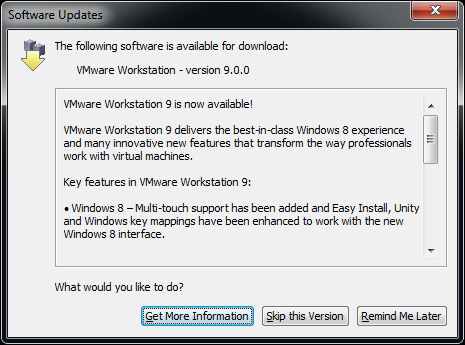 This morning, when starting VMware Workstation 8.0.4, it indicated that 9.0.0 was available.
No news on the VMware website (it still shows adverts for Workstation 8), nor on Wikipedia VMware Workstation page so is their auto-update system in an identity crisis or what?
Two links on VMware Workstation 9.0.0 Build 812388, but not sure if nsane is a good source of information. On the other hand, there is also news on the Bulgarian Kaldata about VMware Player 5.0.0 Build 812388.
Since VMware Player and Workstation share build numbers, and there has been a VMware Workstation Technology Preview 2012 for about 6 months, something could be in the midst of release in time zones where it is not yet 20120823.
VMware workstation checks https://softwareupdate.vmware.com/cds and https://ueip.vmware.com/, but I didn’t decrypt the traffic there yet.
Anyone with the latest official news on this?
Edit 20120823 0631UTC:
Two links I just found:
So yes, there was a temporary 2b || !2b crisis in the update service.
Edit 20120823 0711UTC:
Now it is 20120823 in California too, so now the VMware Workstation pages and VMware Workstation What”s new pages got updated and shows that VMware Workstation 9 is out.
This is the quote from the dialog on the right: Read the rest of this entry »

Posted in Power User, VMware, VMware Workstation | 1 Comment »
Posted by jpluimers on 2012/07/30
Installing and booting ESXi 5 from USB allows you to keep your storage exclusively for VMs and separately make backup of your boot configuration and data configuration (note you cannot put the DataStore on your USB stick).
A small stick (minimum 1 gigabyte) will suffice, and works on many systems, but at first not on my HP XW6600, despite the latest BIOS version 1.36a. You get a nice “Non-System disk or disk error” message.
Both methods I tried failed at first. I thought they failed because the BIOS on the HP has limited USB boot support. It did boot from single partition USB sticks, but seemed not to boot from multi-partition ones, no matter if they are removable or HDD (with the removable bit flipped).
The ESXi5 installer is a single partition one. The final ESXi5 installed image is a multi-partition one. That’s what got me thinking into the multi-partiton direction.
Since the problem is similar to the impossibility of booting VMware workstation VMs from USB stick, (this fails even from the BIOS), I tried Plop since Plop works for VMware Workstation. The Plop USB boot manager failed too. My final thought was to install Plop on a FAT formatted USB stick(which does boot) and continue from there to the ESXi5 one: that failed too.
Boy I was wrong: the failure was not caused by the multi-partition setup, but because of my “Google blindness”: I searched in the wrong direction with the wrong keywords, therefore not getting the right links as search results.
A VMware Communities forum threads on “No bootable device” after successful ESXI5 installation on Intel DG35EC desktop motherboard” and No boot after clean install finally got me in the right direction:
As of ESXi5, the default partition table type is GPT (GUID Partition Table), not MBR (Master Boot Record) any more (thats why an ESXi4 install will work fine).
Booting from GPT is in the EFI standards (now in its second generation UEFI or United Extensible Firmware), allowing – among others – to boot from disks bigger than 2 terrabyte. You need a BIOS that is compatible with GPT to do so, and the HP XW6600 BIOS clearly isn’t compatible with GPT.
Not all is lost, as while installing ESXi5, you have an option – though well hidden – to force it to use MBR boot. That worked, and I will blog on the steps later.
The good news: it now works on my HP XW6600 workstations (that support both VT-x and VT-d, which means I can do PCI pass through).
First things first though: creating the USB stick in the first place. Read the rest of this entry »

Posted in BIOS, Boot, ESXi4, ESXi5, Hardware, HP XW6600, Power User, UEFI, Virtualization, VMware, VMware ESXi | 4 Comments »
 The Wiert Corner - irregular stream of stuff