Archive for the ‘VMware’ Category
Posted by jpluimers on 2023/04/26
A less clickbaity title than most articles today as the below only applies to the VMware hypervisors running on MacOS and Windows.
The last Pwn2Own Zero Day Initiative revealed two major issues that allow a virtual machine to either execute code or read hypervisor memory on the VMware Workstation/Player/Fusion host:
- [Wayback/Archive] NVD – CVE-2023-20869
VMware Workstation (17.x) and VMware Fusion (13.x) contain a stack-based buffer-overflow vulnerability that exists in the functionality for sharing host Bluetooth devices with the virtual machine.
- [Wayback/Archive] NVD – CVE-2023-20870
VMware Workstation and Fusion contain an out-of-bounds read vulnerability that exists in the functionality for sharing host Bluetooth devices with the virtual machine.
Both issues have been fixed now, so be sure to deploy the fixes or, if you can’t, apply the workarounds.
Read the rest of this entry »
Posted in Fusion, Power User, Security, Virtualization, VMware, VMware Player, VMware Workstation | Leave a Comment »
Posted by jpluimers on 2023/02/04
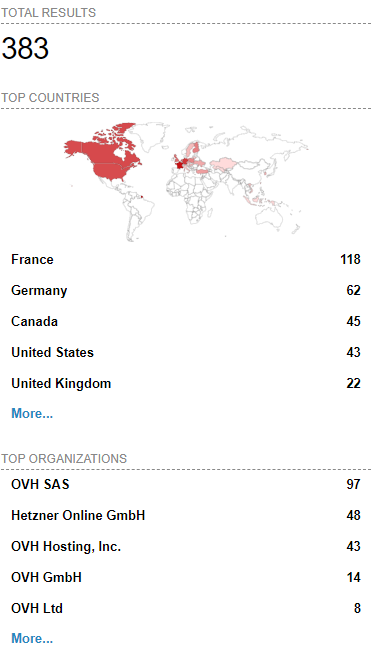 [Wayback/Archive] Massive ESXiArgs ransomware attack targets VMware ESXi servers worldwide
Admins, hosting providers, and the French Computer Emergency Response Team (CERT-FR) warn that attackers actively target VMware ESXi servers unpatched against a two-year-old remote code execution vulnerability to deploy ransomware.
Tracked as
CVE-2021-21974, the security flaw is caused by a heap overflow issue in the OpenSLP service that can be exploited by unauthenticated threat actors in low-complexity attacks.
“As current investigations, these attack campaigns appear to be exploiting the vulnerability CVE-2021-21974, for which a patch has been available since 23 February 2021,” CERT-FR said.
“The systems currently targeted would be ESXi hypervisors in version 6.x and prior to 6.7.”
To block incoming attacks, admins have to disable the vulnerable Service Location Protocol (SLP) service on ESXi hypervisors that haven’t yet been updated.
CERT-FR strongly recommends applying the patch as soon as possible but adds that systems left unpatched should also be scanned to look for signs of compromise.
CVE-2021-21974 affects the following systems:
- ESXi versions 7.x prior to ESXi70U1c-17325551
- ESXi versions 6.7.x prior to ESXi670-202102401-SG
- ESXi versions 6.5.x prior to ESXi650-202102101-SG
[Wayback/Archive] Esxi Ransomware Help and Support Topic (ESXiArgs / .args extension) – Page 2 – Ransomware Help & Tech Support (there are now 4 pages, most victims OVH, likely many more pages to follow)
[Wayback/Archive] How to Disable/Enable the SLP Service on VMware ESXi (76372)
[Wayback/Archive] html:”We hacked your company successfully” title:”How to Restore Your Files” – Shodan Search which resulted in the above image (I tweeted it at [Wayback/Archive] Jeroen Wiert Pluimers @wiert@mastodon.social on Twitter: “@vmiss33”)
Commands used in [Wayback/Archive] Jeroen Wiert Pluimers @wiert@mastodon.social on Twitter: “@vmiss33 I did forget to disable SLP on a patched system, but doing that is easy as per kb.vmware.com/s/article/76372“:
/etc/init.d/slpd status
/etc/init.d/slpd stop
esxcli system slp stats get
esxcli network firewall ruleset set -r CIMSLP -e 0
chkconfig slpd off
chkconfig --list | grep slpd
More links to follow, but I’m away from keyboard for most of the day.
–jeroen
Read the rest of this entry »
Posted in ESXi6, ESXi6.5, ESXi6.7, Power User, Ransomware, Security, Virtualization, VMware, VMware ESXi | Leave a Comment »
Posted by jpluimers on 2022/12/30
For my memory to create a 40 GiB (gibibytes, i.e. sizes in powers of 2 bytes):
# vmkfstools --createvirtualdisk 40G --diskformat eagerzeroedthick ./X9SRI-3F-W10P-EN-MEDIA-DATA.vmdk
Creating disk './X9SRI-3F-W10P-EN-MEDIA-DATA.vmdk' and zeroing it out...
Create: 100% done.
People tend to abbreviate it into what for me reads gibberish:
# vmkfstools -c 40G -d eagerzeroedthick ./X9SRI-3F-W10P-EN-MEDIA-DATA.vmdk
Creating disk './X9SRI-3F-W10P-EN-MEDIA-DATA.vmdk' and zeroing it out...
Create: 100% done.
It will create a descriptor file and flat data file, of which the last is exactly 40 gibibytes size (as 42949672960 / (1024 * 1024 * 1024) == 40):
# ls -l X9SRI-3F-W10P-EN-MEDIA-DATA*.vmdk
-rw-------    1 root     root     42949672960 Nov 16 16:54 X9SRI-3F-W10P-EN-MEDIA-DATA-flat.vmdk
-rw-------    1 root     root           471 Nov 16 16:54 X9SRI-3F-W10P-EN-MEDIA-DATA.vmdk
–jeroen
Posted in ESXi6, ESXi6.5, ESXi6.7, Power User, Virtualization, VMware, VMware ESXi | Leave a Comment »
Posted by jpluimers on 2022/05/02
A while ago I wrote about Stop 0x0000007B after converting an existing XP machine to a Virtual Machine (ESXi, Hyper-V, or other).
After this, the machine still had boot issues (a grey or black screen after boot, unless booted via Grub from a rescue CD).
The solution in retrospect was simple, but I only figured out after the fact what the solution had done.
Of course this gave me a facepalm moment, as back in the days, this was exactly the warning I gave everyone when installing Windows XP on ESXi anyway: use a SCSI buslogic based virtual disk, not an IDE or SATA virtual disk.
The reason is that Windows XP does not like the IDE/SATA disk that VMware provides. Windows Vista and up are less of a problem.
This is indeed what my practical solution did:
- VMware Converter 4.x creates a VM with an IDE/SATA disk (as it cannot talk to the more recent ESXi versions at all because of API changes)
- VMware Converter 6.x creates a VM with a buslogic SCSI base disk (and it can create it directly on your ESXi rig, though it will use a directory in the root of your data store, even if you prefer it somewhere deeper in the directory tree)
References:
–jeroen
Posted in ESXi6, ESXi6.5, ESXi6.7, Hardware, Power User, SAS/SATA, SCSI, Virtualization, VMware, VMware Converter, VMware ESXi, Windows, Windows XP | Leave a Comment »
Posted by jpluimers on 2022/04/29
Sometimes machines die without one having had the chance of doing a proper bootable file-system backup instead of a file-by-file-backup.
You can still P2V these machines (convert them from physical to virtual), but it is a lot more pain as you have to try to grab any installation keys for them and create a compatible virtual machine configuration by hand like I did in P2V of an existing XP machine to Hyper-V to have an emergency fallback when retiring old XP physical machines.
The below linked answer (with steps) uses Symantec Backup Exec System Recovery (now back in the hands of Veritas again as Backup Exec) to make part of this process towards VMware ESXi less tedious: [Wayback] virtualization – Convert a hard-drive into a VMWare machine – Server Fault (thanks [Wayback] Mark Booth and [Wayback] Dave M)
Doing this might require you to find old Windows XP media. Those are in the Internet Archive (often slower, but has the file hashes too) and The Eye (much faster from where I live in Europe); Internet Archive examples are for English, though other languages are present as well:
Got the Internet Archive tip from [Wayback/Archive.is] Where can I download an official Windows XP ISO? I have a license key if that helps? : windows, found the correct filename there, then downloaded the [Wayback] The Eye.
–jeroen
Posted in Hyper-V, Power User, Virtualization, VMware, VMware ESXi, Windows | Leave a Comment »
Posted by jpluimers on 2022/04/21
For my link archive: [Wayback] VMware ESXi: How to Kill an Unresponsive (Stuck) Virtual Machine | Windows OS Hub
Commands covered:
esxcli vm process listesxcli vm process kill --type=[soft,hard,force] --world-id=WorldNumberesxtoppskill
–jeroen
Posted in ESXi5, ESXi5.1, ESXi5.5, ESXi6, ESXi6.5, ESXi6.7, ESXi7, Power User, Virtualization, VMware, VMware ESXi | Leave a Comment »
Posted by jpluimers on 2022/04/13
Guessing the [Wayback] Run ESXi from a USB Flash Drive: A How-To-Guide by just the abstract does not show the value enough:
A USB flash drive can be used not only for installation media – you can also run ESXi from USB flash drives or SD flash cards and boot from these devices.
In fact, the article shows way more, including:
- how the partitions on USB/SD devices are built as compared to HDD devices, and how they even differ depending on USB/SD sizes
- how to backup/restore the USB/SD boot devices (so you can stock them in case of failure)
This is very important, because every now and then, these USB and SD devices fail (see for instance [Wayback] Solved: Remount boot filesystem on a running system. – VMware Technology Network VMTN), so knowing what to do then is key and helps handling errors like this one:
Lost connectivity to the device mpx.vmhba32:C0:T0:L0 backing the boot filesystem /vmfs/devices/disks/mpx.vmhba32:C0:T0:L0. As a result, host configuration changes will not be saved to persistent storage.
A every useful article for my link archive!
Related: ESXi: storing an ISO 8601 time-stamped backup tarball locally
Read the rest of this entry »
Posted in ESXi5, ESXi5.1, ESXi5.5, ESXi6, ESXi6.5, ESXi6.7, ESXi7, Power User, Virtualization, VMware, VMware ESXi | Leave a Comment »
Posted by jpluimers on 2022/04/12
Posted in *nix, *nix-tools, ash/dash, ash/dash development, Development, ESXi5, ESXi5.1, ESXi5.5, ESXi6, ESXi6.5, ESXi6.7, Power User, Scripting, Software Development, Virtualization, VMware, VMware ESXi | Leave a Comment »
Posted by jpluimers on 2022/03/29
When virtualising your final physical Windows XP machines (just in case you need to hook up old hardware that is unsupported from newer Windows versions), you need to figure out the kind of license of each physical Windows XP machine in order to stand a chance to keep it licensed.
This answer by [Wayback] Moab [Wayback] windows xp – How to know which license version has an XP installed system – Super User helped me a lot.
I tried to make it a bit easier to read:
- First obtain the “Product ID” from the Windows XP machine. It is derived from the original Windows XP installation product key and displays a few values:
xxxxx-yyy-zzzzzzz-zzzzz
xxxxx: the MCP (Microsoft Product Code) describing which product version, or in case of Windows XP: what language, edition (like “Home” and “Pro”) and often some more information)yyy: the Channel ID (especially important to set apart OEM from other channels; OEM is not allowed to be virtualised, so would need a complete new Windows XP key to be activated as Virtual Machine; Channel IDs being neither OEM nor VLK (volume license key) can often be re-activated, sometimes over the phone to explain the situation; I’ve not tried virtualising a VLK based Windows XP yet.zzzzzzz-zzzzz: semi-random values
[Wayback/Archive.is] Product IDs – Lunarsoft Wiki has quite detailed lists of not just the MCP and Channel ID values for Windows XP and Windows Server 2003, but also the disk volume labels and setup.ini label values.
Often this is easier to do from the physical machine before virtualising it, but even afterwards you can get it by running Windows in Safe Mode, then use either of these to get the Product ID:
- Run the Windows Contol Panel applet
sysdm.cpl which shows the “Product ID” us under the “Registerd to” information.
- From the console, run
reg query "hklm\software\microsoft\windows nt\currentversion" /v ProductID
- From another machine or boot CD (like Hiren’s Boot CD or Windows Ultimate Boot CD), mount the hard disk, mount the registry hive, then show the above registry key value
- Download and run NirSoft [Wayback] ProduKey (which usually will give you both the Product ID and Product Key)
- From the product key, determine if you can re-activate Windows, either by phone, or by this link:
[Archive.is] Self Service for Mobile
I got the link from [Wayback] activate windows xp – Microsoft Community via [Wayback] windows xp – How do I activate WindowsXP now that support has ended? – Super User.
Phone (in most countries) and on-line activation should still work; it worked in 2016 (see [Wayback] license – Will I still be able to activate Windows XP after support ends? – Super User) 2019 (see [Wayback] windows xp – How do I activate WindowsXP now that support has ended? – Super User) and 2020 (see [Wayback] XP activation – Windows XP Home and Professional).
- When OEM, try to obtain a legal Windows XP license key that matches the MCP, then change the key using steps in for instance:
- [Wayback] Change the Volume Licensing product key – Windows Server | Microsoft Docs. I think this is what these below links are based on:
- [Wayback] Use OEM Version to Upgrade XP | Petri
- Licensing is a pain; this interesting thread shows how much pain:
-
- [Wayback] Licensing after Virtualizing Windows XP physical machine – MS Licensing – Spiceworks
- [Wayback] Licensing after Virtualizing Windows XP physical machine – MS Licensing – Spiceworks – Page 2
- [Wayback] Licensing after Virtualizing Windows XP physical machine – MS Licensing – Spiceworks – Page 3
- [Wayback] Licensing after Virtualizing Windows XP physical machine – MS Licensing – Spiceworks – Page 4
- [Wayback] Licensing after Virtualizing Windows XP physical machine – MS Licensing – Spiceworks – Page 5
- [Wayback] Licensing Windows 10 with virtualization technologies – How-To – Windows Forum – Spiceworks
I’m not a lawyer, and Microsoft Licensing is a pain (especially for products that are out of support), but it looks like it is about three licenses:
-
- the original OEM license on the physical machine that allowed you to install the original Windows XP on that machine
- the non-OEM license for the Virtual Machine (if I read the thread correctly, it needs to be a Volume License that has Software Assurance) to activate it
- an access license so you can logon to the Virtual Machine or otherwise access it
Alternatively, if you started with a non-OEM license, and you could re-activate it on the virtual machine, it looks like you only need 3 (if you could not reactivate, you’d need 2 and 3)
Chris (Microsoft) had many interesting responses in the thread: 1, 2, 3, 4, 5, 6, 7, 8, 9, 10, 11, 12, 13, 14, 15, 16, 17
Other interesting bits in the thread: the XP activation servers are still working, but buying new keys for it can be problem and given the right licenses, reinstalling a virtual machine is virtually indistinguishable from cloning the physical machine.
Note that it is no use searching Google for Windows XP License keys: Microsoft did and invalidated them back in the Windows XP SP1, SP2 and SP3 days: Wayback: Error message when you install Windows XP Service Pack 1 (SP1) or Service Pack 2 (SP2): “The product key used to install Windows is invalid
The 2001 Windows XP Professional License is archived in the Wayback machine as Microsoft Windows XP Professional END-USER LICENSE AGREEMENT: Windows%20XP_Professional_English_9e8a2f82-c320-4301-869f-839a853868a1.pdf (via [Wayback] Convert your existing Windows XP system into a virtual machine – TechRepublic).
Note this does not cover OEM or Volume Licenses.
–jeroen
Posted in ESXi6, ESXi6.5, ESXi6.7, Power User, Virtualization, VMware, VMware ESXi, Windows, Windows XP | Leave a Comment »


 The Wiert Corner - irregular stream of stuff