Archive for the ‘VMware ESXi’ Category
Posted by jpluimers on 2026/08/18
Where in ESXi 6.x you could change /etc/rc.local in ESXi 7 and up tightened security and now use /etc/rc.local.d/local.sh [Wayback/Archive] virtualization – ESXi 7.X file permissions – how to buypass new security measures – Server Fault
Notes:
- some ESXi (for instance when booting from PXE do not have persistent storage)
- be sure to always backup an ESXi configuration after changing it
Via [Wayback/Archive] “esxi 7” run your own shell scripts – Google Search
–jeroen
Posted in ash/dash development, Development, ESXi6, ESXi6.5, ESXi6.7, ESXi7, ESXi8, Scripting, Software Development, Virtualization, VMware, VMware ESXi | Leave a Comment »
Posted by jpluimers on 2026/08/03
With both the ever increasing amount of internet data, and ever increasing number of web sites pulling the plug, archiving them into the Internet Archive is ever more important.
The thread at [Wayback/Archive] Double Your Archiving Impact: Guide to Setting Up Your 2nd ArchiveTeam Warrior in VirtualBox (Windows) : Archiveteam has great tips on running ArchiveTeam Warrior instances, even running more than one on a machine.
It covers:
- Running in VirtualBox
- Running in docker
A third option is to run on ESXi which I have covered the ESXi quite a few times on my blog already. You can find the main post at Running ArchiveTeam Warrior version 3.2 on ESXi, and all posts at wiert.me/category/ArchiveTeamWarrior.
–jeroen
Posted in ArchiveTeamWarrior, Cloud, Containers, Docker, Infrastructure, Internet, InternetArchive, Power User, VirtualBox, Virtualization, VMware, VMware ESXi, WayBack machine | Leave a Comment »
Posted by jpluimers on 2026/01/30
It’s a tricky process, but I might need this in the future:
–jeroen
Posted in Hardware, Network-and-equipment, pfSense, Power User, routers, Virtualization, VMware, VMware ESXi | Leave a Comment »
Posted by jpluimers on 2024/02/12
Quite a few people already bumped into this the last two days (will add those links later), so today’s confirmation by Broadcom – who have a similar modus operandi as companies like Computer Associates and Symantec were and Idera is now – as of the ESXi death does not come as a surprise.
Read the rest of this entry »
Posted in Internet, InternetArchive, Power User, Virtualization, VMware, VMware ESXi, WayBack machine | Leave a Comment »
Posted by jpluimers on 2024/01/18
This is where you can still register for a free ESXi 8 account (until Broadcom kills that):
Because of:
Note that slightly more than a year ago, there was a problem getting licenses because too many were registering at once: [Wayback/Archive] Solved: esxi 8 Free registration – VMware Technology Network VMTN
Read the rest of this entry »
Posted in ESXi7, ESXi8, Power User, Virtualization, VMware, VMware ESXi | Leave a Comment »
Posted by jpluimers on 2024/01/10
I bumped into [Wayback/Archive] Script to rename a virtual machine in ESXi 6: gist.github.com/Gremgoll/8bd91258d71fe895c0d416e2543ca2dc.
Then I forked it with the intent to make usage more clear, as the current usage on my ESXi rig (which has mos VMs not in the root of data stores) is like the bold italic portion here:
[root@X9SRI3F-ESXi:/vmfs/volumes/608be754-f21556ad-1082-0025907d9d5c/VM] vm-rename.sh NVMe980PRO_1TB/VM X9SRI-3F-W10P-NL-OFFICE X9SRI-3F-W10P-NL X9SRI-3F-W10P-NL-OFFICE
VOLNAME=NVMe980PRO_1TB/VM
DIRNAME=X9SRI-3F-W10P-NL-OFFICE
OLDNAME=X9SRI-3F-W10P-NL
NEWNAME=X9SRI-3F-W10P-NL-OFFICE
VM_DIRPATH=/vmfs/volumes/NVMe980PRO_1TB/VM/X9SRI-3F-W10P-NL-OFFICE
NW_DIRPATH=/vmfs/volumes/NVMe980PRO_1TB/VM/X9SRI-3F-W10P-NL-OFFICE
Failed to rename './X9SRI-3F-W10P-NL-flat.vmdk' to './X9SRI-3F-W10P-NL-OFFICE-flat.vmdk': The file specified is not a virtual disk (15)
renaming ./X9SRI-3F-W10P-NL-41260b40.vmem to ./X9SRI-3F-W10P-NL-OFFICE-41260b40.vmem
renaming ./X9SRI-3F-W10P-NL-41260b40.vmss to ./X9SRI-3F-W10P-NL-OFFICE-41260b40.vmss
renaming ./X9SRI-3F-W10P-NL-6a4b8f29.hlog to ./X9SRI-3F-W10P-NL-OFFICE-6a4b8f29.hlog
renaming ./X9SRI-3F-W10P-NL.nvram to ./X9SRI-3F-W10P-NL-OFFICE.nvram
renaming ./X9SRI-3F-W10P-NL.vmsd to ./X9SRI-3F-W10P-NL-OFFICE.vmsd
renaming ./X9SRI-3F-W10P-NL.vmx to ./X9SRI-3F-W10P-NL-OFFICE.vmx
renaming ./X9SRI-3F-W10P-NL.vmx.backup to ./X9SRI-3F-W10P-NL-OFFICE.vmx.backup
renaming ./X9SRI-3F-W10P-NL.vmxf to ./X9SRI-3F-W10P-NL-OFFICE.vmxf
renaming ./vmx-X9SRI-3F-W10P-NL-1093012288-1.vswp to ./vmx-X9SRI-3F-W10P-NL-OFFICE-1093012288-1.vswp
All Done. You now need to register X9SRI-3F-W10P-NL-OFFICE to the inventory.
There also was a renaming bug (see the italic line).
I managed to fix both that and added more documentation plus output.
Repositories and code
- Original:
- Fork with added VSAN functionality (see [Wayback/Archive] Revisions · Script to rename a virtual machine in ESXi 6):
- My fork of 2:
- My fix:
Code before modifying: [Wayback/Archive] gist.githubusercontent.com/jpluimers/fcc601dd41ac89f601a5174be92c841c/raw/e3683fbb6bdf1e73d65d2b784027c70cf42a5512/vm-rename
Code after modifying: [Wayback/Archive] raw.githubusercontent.com/jpluimers/vm-rename/master/vm-rename.sh.
Yes, that is not in a gist any more (see below why), it is now part of [Wayback/Archive] jpluimers/vm-rename: Script to rename a virtual machine in ESXi 6; fork from https://gist.github.com/jpluimers/fcc601dd41ac89f601a5174be92c841c as [Wayback/Archive] vm-rename/vm-rename.sh at master · jpluimers/vm-rename.
The reason was
Yesterday I described the workaround in Fork Gist to Repo on GitHub – Stack Overflow.
Queries
I found the original via [Wayback/Archive] script esxi rename vmx vmxf and related files – Google Search.
My start was [Wayback/Archive] script esxi duplicate vm and rename vmdk – Google Search which found:
- [Wayback/Archive] Renaming a virtual machine and its files in VMware ESXi (1029513) which has a PowerCLI script (that requires Windows to run PowerCLI on)
- [Wayback/Archive] Solved: How to clone a VM on a ESXI 6.5 server? – VMware Technology Network VMTN which pointed me to the next Google Search result :
- [Wayback/Archive] VMware esxi – Script to clone a VM without vSphere or vCenter. | GrangerX which I put in this gist:
- [Wayback/Archive] Script to create Linked Clones on ESXi | RedNectar’s Blog which is great, but way to complicate for my use case. It references a few other cool scripts though, and shows how to use Resource Pools in ESXi (which the Web-UI does not seem to support):
- [Wayback/Archive] [script] Cloning VMs using ESXi shell/admin console – Virtualizing Unraid – Unraid
- [Wayback/Archive] Script to clone a VM with free VMware ESXi – Rob Pomeroy (again: PowerCLI)
–jeroen
Posted in *nix, *nix-tools, ash/dash, ash/dash development, Development, ESXi6, ESXi6.5, ESXi6.7, Power User, PowerCLI, Scripting, Software Development, Virtualization, VMware, VMware ESXi | Leave a Comment »
Posted by jpluimers on 2024/01/02
I keep forgetting this, but ESXi likes the text .vmdk file with a binary -flat.vmdk, where Fusion/ Workstation/Player like binary .vmdk file.
Most sites that mention how to solve it love the cryptic parameters like -i (software developers: when inventing command-line parameters, please use a more descriptive letter for a command) in stead of --clonevirtualdisk), so for instance Migrate VMware Workstation / Fusion VM to ESXi | Ming’s Blog comes up with
[root...] mv Windows-10-64-Enterprise-disk1.vmdk Windows-10-64-Enterprise-disk1.vmdk.fusion
[root...] vmkfstools -i Windows-10-64-Enterprise-disk1.vmdk.fusion Windows-10-64-Enterprise-disk1.vmdk
Destination disk format: VMFS zeroedthick
Cloning disk 'Windows-10-64-Enterprise-disk1.vmdk.fusion'...
Clone: 100% done.
is more readable as
[root...] vmkfstools --clonevirtualdisk Windows-10-64-Enterprise-disk1.vmdk.fusion Windows-10-64-Enterprise-disk1.vmdk
And yes, I wrote about this before, but keep forgetting it applies :
–jeroen
Posted in ESXi6, ESXi6.5, ESXi6.7, Fusion, Power User, Virtualization, VMware, VMware ESXi, VMware Workstation | Leave a Comment »
Posted by jpluimers on 2023/12/28
This is a sort of follow-up on ESXi: listing virtual machines with their IP addresses where we ended with this:
I modified the above script to become this:
#!/bin/sh
vmids=`vim-cmd vmsvc/getallvms | sed -n -E -e "s/^([[:digit:]]+)s+((S.+S)?)s+([S+])s+(.+.vmx)s+(S+)s+(vmx-[[:digit:]]+)s*?((S.+)?)$/1/p"`
for vmid in ${vmids} ; do
    # powerState values:
    #   Powered off
    #   Powered on
    #   Suspended
    powerState=`vim-cmd vmsvc/power.getstate ${vmid} | sed '1d'`
    name=`vim-cmd vmsvc/get.config ${vmid} | sed -n -E -e '/(vim.vm.ConfigInfo) {/,/files = (vim.vm.FileInfo) {/ s/^ +name = "(.*)",.*?/1/p'`
    vmPathName=`vim-cmd vmsvc/get.config ${vmid} | sed -n -E -e '/files = (vim.vm.FileInfo) {/,/tools = (vim.vm.ToolsConfigInfo) {/ s/^ +vmPathName = "(.*)",.*?/1/p'`
    # For now, I choose to use only the IPv4 main address from ipAddress, which is in between (vim.vm.GuestInfo) { and net = (vim.vm.GuestInfo.NicInfo) [.
    ipAddress=`vim-cmd vmsvc/get.guest ${vmid} | sed -n -E -e '/(vim.vm.GuestInfo) {/,/net = (vim.vm.GuestInfo.NicInfo) [/ s/^ +ipAddress = "(.*)",.*?/1/p'`
    printf "VM with id %3s has power state %-11s and IPv4=%-15s (name = ${name}; vmPathName = ${vmPathName}).n" "${vmid}" "${powerState}" "${ipAddress}"
done
Now the script grew even larger in to vim-cmd-list-all-VMs-with-IPv4-MAC-uuid.sh:
Read the rest of this entry »
Posted in *nix, *nix-tools, ash/dash, ash/dash development, Development, ESXi6, ESXi6.5, ESXi6.7, Power User, Scripting, Software Development, Virtualization, VMware, VMware ESXi | Leave a Comment »
Posted by jpluimers on 2023/02/04
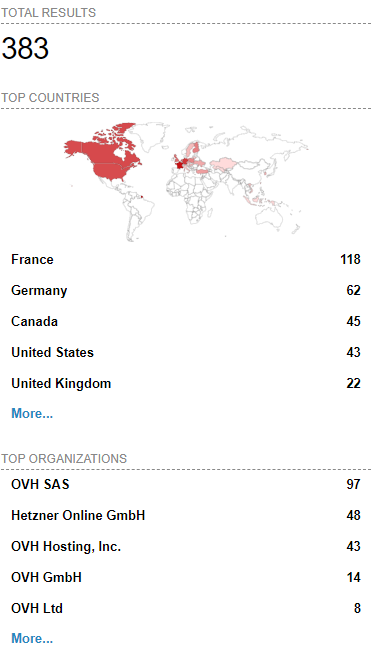 [Wayback/Archive] Massive ESXiArgs ransomware attack targets VMware ESXi servers worldwide
Admins, hosting providers, and the French Computer Emergency Response Team (CERT-FR) warn that attackers actively target VMware ESXi servers unpatched against a two-year-old remote code execution vulnerability to deploy ransomware.
Tracked as
CVE-2021-21974, the security flaw is caused by a heap overflow issue in the OpenSLP service that can be exploited by unauthenticated threat actors in low-complexity attacks.
“As current investigations, these attack campaigns appear to be exploiting the vulnerability CVE-2021-21974, for which a patch has been available since 23 February 2021,” CERT-FR said.
“The systems currently targeted would be ESXi hypervisors in version 6.x and prior to 6.7.”
To block incoming attacks, admins have to disable the vulnerable Service Location Protocol (SLP) service on ESXi hypervisors that haven’t yet been updated.
CERT-FR strongly recommends applying the patch as soon as possible but adds that systems left unpatched should also be scanned to look for signs of compromise.
CVE-2021-21974 affects the following systems:
- ESXi versions 7.x prior to ESXi70U1c-17325551
- ESXi versions 6.7.x prior to ESXi670-202102401-SG
- ESXi versions 6.5.x prior to ESXi650-202102101-SG
[Wayback/Archive] Esxi Ransomware Help and Support Topic (ESXiArgs / .args extension) – Page 2 – Ransomware Help & Tech Support (there are now 4 pages, most victims OVH, likely many more pages to follow)
[Wayback/Archive] How to Disable/Enable the SLP Service on VMware ESXi (76372)
[Wayback/Archive] html:”We hacked your company successfully” title:”How to Restore Your Files” – Shodan Search which resulted in the above image (I tweeted it at [Wayback/Archive] Jeroen Wiert Pluimers @wiert@mastodon.social on Twitter: “@vmiss33”)
Commands used in [Wayback/Archive] Jeroen Wiert Pluimers @wiert@mastodon.social on Twitter: “@vmiss33 I did forget to disable SLP on a patched system, but doing that is easy as per kb.vmware.com/s/article/76372“:
/etc/init.d/slpd status
/etc/init.d/slpd stop
esxcli system slp stats get
esxcli network firewall ruleset set -r CIMSLP -e 0
chkconfig slpd off
chkconfig --list | grep slpd
More links to follow, but I’m away from keyboard for most of the day.
–jeroen
Read the rest of this entry »
Posted in ESXi6, ESXi6.5, ESXi6.7, Power User, Ransomware, Security, Virtualization, VMware, VMware ESXi | Leave a Comment »


 The Wiert Corner - irregular stream of stuff