Archive for the ‘Windows’ Category
Posted by jpluimers on 2018/09/17
Steps to try first:
- Check
%windir%\Windowsupdate.log (on my system, it did not reveal anything special)
- In an administrator command prompt, run
sfc /scannow (which takes a few minutes to run)
- Reboot
- Run Clean Manager
%windir%\System32\cleanmgr.exe (ensure to clean up update files: it can take tens of minutes to run)
- Reboot
- Download the SP1 files (I needed 32-bit x86)
- Install SP1 manually
- If it still hangs:
- In
Appwiz.cpl try a “Repair” of the Office 2013 installation
- If it works: Reboot, otherwise:
- Uninstall Office 2013
- Disable the network adapter
- Reboot
- Check if KB3173424 is installed (check it with
Appwiz.cpl)
- if not: download on a different machine, transfer over USB, install, then reboot
- Check ifKB3172614 is installed (which has a younger Windows Update Client)
- if not: downloadon a different machine, transfer over USB, install, then reboot
- Enable the network adapter
- Let Windows scan for updates and install them
- If you get an error 80070463 or 80070663: just reboot and retry the updates.
- Reboot
- Run Clean Manager
- Install Office 2013
- Reboot
- Let Windows scan for updates and install them
- Reboot
- Run Clean Manager
- Reboot
The KB3172614 should also alleviate long during (dozens of minutes) high CPU usage of svchost.exe and TiWorker.exe when searching for Windows updates.
Read the rest of this entry »
Posted in Office, Office 2013, Power User, Windows, Windows 8.1 | Leave a Comment »
Posted by jpluimers on 2018/08/17
It seems there are a few, but only loading the binary is the sure method to know what the process will be using: [WayBack] How to check if a binary is 32 or 64 bit on Windows? – Super User and [WayBack] How do I determine if a .NET application is 32 or 64 bit? – Stack Overflow.
Details in the answers of these questions, here are a few highlights:
- The first few characters in the binary header reveal what it was originally designed for.
- A .NET executable might still have an x64 header for bootstrapping.
- The Windows SDK has a tool
dumpbin.exe with the /headers option.
- You can use
sigcheck.exe from SysInternals.
- The
file utility (e.g. from cygwin, which comes with msysgit) will distinguish between 32- and 64-bit executables.
- Use the command line
7z.exe on the PE file (Exe or DLL) in question which gives you a CPU line.
- Virustotal
File detail is a way to find out if a binary is 32 bit or 64 bit.
- Even an executable marked as 32-bit can run as 64-bit if, for example, it’s a .NET executable that can run as 32- or 64-bit. For more information see https://stackoverflow.com/questions/3782191/how-do-i-determine-if-a-net-application-is-32-or-64-bit, which has an answer that says that the
CORFLAGS utility can be used to determine how a .NET application will run.
–jeroen
Search terms: win64, win32, x64, x86_64, x86
Posted in Assembly Language, Development, Power User, Windows, x64, x86 | Leave a Comment »
Posted by jpluimers on 2018/08/17
If you are still on version 8, then note this version will be deprecated at 20180901, so it is time to upgrade to [Archive.is] Microsoft Remote Desktop 10 on the Mac App Store
[Archive.is] Microsoft Remote Desktop 8 on the Mac App Store is now at version 8.0.44, which changed one thing:
This update adds a dismissible banner to the app UI to message the fact that the client will be deprecated soon. You can start using the new version of Remote Desktop today by downloading Microsoft Remote Desktop 10 from the App Store.
It is easy to import your RDP desktops from version 8 into version 18: in the menu, select Connections, then Import from Microsoft Remote Desktop 8, then enter your credentials so the saved logon passwords can be imported from the [WayBack] KeyChain.
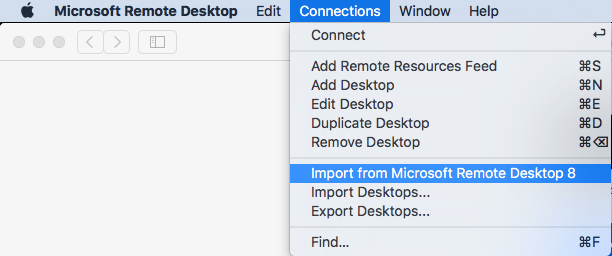
A few things to note:
- importing the Microsoft Remote Desktop 8 fails to import the Local Resource bindings
- in Microsoft Remote Desktop 10, editing Local Resource binding right after adding them will crash
Background reading:
The full version histories of both:
Read the rest of this entry »
Posted in Apple, Power User, Remote Desktop Protocol/MSTSC/Terminal Services, Windows | Leave a Comment »
Posted by jpluimers on 2018/08/13
I needed to figure out what was wrong with a Canon MF8200C UFRII LT XPS.
Luckily, this still worked for administrator access [WayBack] Default admin password for Canon Multifunction Printers:
Put in admin id 7654321 pw 7654321
–jeroen
Posted in Power User, Printer drivers, Windows | Leave a Comment »
Posted by jpluimers on 2018/08/10
- Windows PE 10 x64 based: [WayBack] Hiren’s BootCD PE Hiren’s BootCD PE (Preinstallation Environment) is an emergency boot disk based on Windows 10 PE x64. It is being developed for the new age computers, it supports UEFI booting and requires minimum 2 GB RAM.After boot, it finds and installs many common drivers like graphics, sound, wireless and ethernet card for your hardware. So that you can connect to a WIFI or Ethernet network.
- Syslinux/Grub4dos/FreeDOS based: [WayBack] Ultimate Boot CD – Overview
–jeroen
Via:
Posted in Power User, Windows | Leave a Comment »
Posted by jpluimers on 2018/08/06
Posted in Power User, Windows | 2 Comments »
Posted by jpluimers on 2018/07/30
I needed all .dproj files in all subdirectories, but only their filenames without any directory names.
With directory names, this is easy:
dir /s /b *.dproj
The answers at [WayBack] windows – How to list all files in directory/subdirectory without path name CMD? – Stack Overflow give the below kind of output.
[WayBack] forfiles embeds all filenames within quotes:
forfiles /m *.dproj /s

"Foo.dproj"
"Bar.dproj"
A more convoluted [WayBack] for loop gives them without quotes where n stands for name and x for extension including .:
for /r %a in (*.dproj) do @echo %~nxa
Foo.dproj
Bar.dproj
–jeroen
Posted in Batch-Files, CommandLine, Development, Power User, Scripting, Software Development, Windows | Leave a Comment »
Posted by jpluimers on 2018/07/27
 This worked for Windows 8.1 as well: Trying fix for Windows 8 high CPU usage of TiWorker.exe (via: bit-tech.net) « The Wiert Corner – irregular stream of stuff
DISM /online /cleanup-image /restorehealth
After more than one hour of running, it:
- freed up more than a gigabyte of disk space. Which on an SSD based VM is a lot.
- solved the huge memory footprint of TiWorker.exe on the right.
–jeroen
Posted in Power User, Windows, Windows 8, Windows 8.1 | Leave a Comment »
Posted by jpluimers on 2018/07/16
It seems netsh is something different than bash or csh as it is the command-line interface to many (all?) Windows Firewall settings.
So I need to put some time into learning it.
This gives you all the names of firewall rules, ready for text searching it (with find, grep, etc):
netsh advfirewall firewall show rule name=all
An alternative might be PowerShell as it too has a lot of Windows Firewall plumbing: [WayBack] How to manage the Windows firewall settings with PowerShell – James O’Neill’s blog
Choices, choices.
–jeroen
via: [WayBack] windows firewall – How can I use netsh to find a rule using a pattern – Server Fault
Posted in Firewall, Power User, Windows | Leave a Comment »
Posted by jpluimers on 2018/06/29
I forgot to schedule the post below. It is still relevant if you create a machine with lots of Delphi versions on it.
Read the rest of this entry »
Posted in .NET, .NET 2.0, .NET 3.0, .NET 3.5, Database Development, Delphi, Delphi 2007, Delphi XE, Delphi XE2, Delphi XE3, Delphi XE4, Delphi XE5, Development, Firebird, InterBase, Power User, Software Development, Windows, Windows 8 | 2 Comments »


 The Wiert Corner - irregular stream of stuff